
Varmilo VBS108
Varmilo VBS108 Lure Bot Mechanical Keyboard
Manual de instructiuni
Introducere
Thank you for choosing the Varmilo VBS108 Lure Bot Mechanical Keyboard. This keyboard is designed for versatility and durability, featuring triple mode connectivity (Bluetooth 5.0, 2.4GHz Wireless, and USB-C), high-quality PBT dye-sub keycaps, and Cherry MX Brown switches for a tactile typing experience. This manual provides detailed instructions for setup, operation, maintenance, and troubleshooting to ensure optimal performance and longevity of your keyboard.
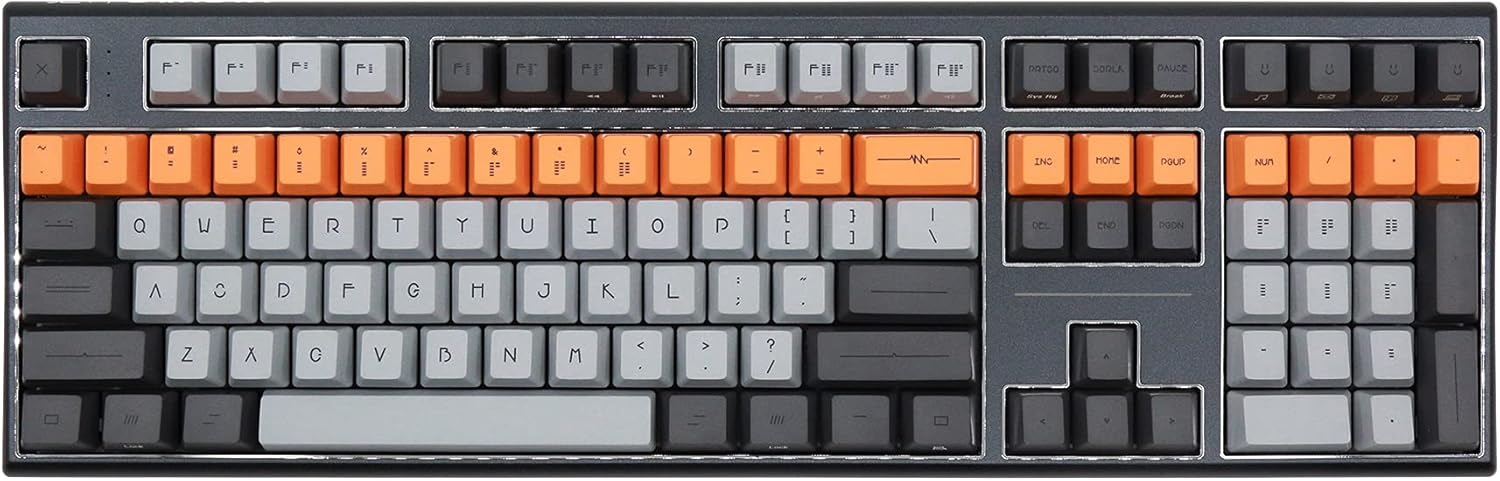
Figure 1: Varmilo VBS108 Lure Bot Mechanical Keyboard
Conținutul pachetului
Vă rugăm să vă asigurați că toate articolele sunt prezente în colet:
- Varmilo VBS108 Lure Bot Mechanical Keyboard
- Cablu USB-C la USB-A
- Dongle wireless de 2.4 GHz (de obicei, depozitat în compartimentul bateriei tastaturii sau într-un slot dedicat)
- Extractor pentru taste (poate fi inclus)
- Manual de utilizare (acest document)
Înființat
The Varmilo VBS108 offers three connectivity modes: USB-C wired, 2.4GHz wireless, and Bluetooth 5.0.
1. Conexiune USB-C cu fir
- Locate the USB-C port on the keyboard (usually on the top edge).
- Conectați un capăt al cablului USB-C furnizat la tastatură.
- Conectați celălalt capăt (USB-A) la un port USB disponibil de pe computer.
- Tastatura va fi recunoscută automat și gata de utilizare.
2. Conexiune wireless de 2.4 GHz
- Localizați dongle-ul wireless de 2.4 GHz.
- Conectați dongle-ul la un port USB disponibil de pe computer.
- Ensure the keyboard is in 2.4GHz mode (refer to the keyboard's function key combinations or a physical switch if available).
- Tastatura ar trebui să se conecteze automat.
3. Conexiune Bluetooth 5.0
- Ensure the keyboard is in Bluetooth pairing mode. This typically involves holding down a specific Fn key combination (e.g., Fn + 1, Fn + 2, or Fn + 3 for different profiles) until an indicator light flashes. Consult your keyboard's specific key legend for Bluetooth pairing.
- Pe computer sau dispozitiv, deschideți setările Bluetooth.
- Caută new devices and select "Varmilo VBS108" or a similar name from the list.
- Urmați orice instrucțiuni de pe ecran pentru a finaliza procesul de asociere.
Funcționează
The Varmilo VBS108 keyboard includes various function key combinations for enhanced control.
Function Key Combinations (Fn + Key)
- Fn + F1-F12: Multimedia controls (play/pause, volume up/down, mute, etc.). Refer to the keycap legends for specific functions.
- Fn + Win: Tasta de blocare/deblocare Windows.
- Fn + Left Alt: Switch between macOS and Windows layouts (if supported).
- Fn + Q/W/E: Comutare între Bluetooth profiles (dacă este cazul).
- Fn + R: Comutați la modul wireless de 2.4 GHz.
- Fn + T: Switch to USB-C wired mode.
- Fn + Backlight Keys: Adjust backlight brightness or effects (if applicable).
Adjustable Flip-out Feet
Tastatura dispune de 3 tastetage adjustable flip-out feet on the underside, allowing you to customize the typing angle for ergonomic comfort.

Figure 2: Adjustable Flip-out Feet
Întreţinere
Proper maintenance ensures the longevity and performance of your Varmilo keyboard.
Curățarea tastaturii
- Tastaturi: Use a keycap puller to carefully remove keycaps. Clean them with a mild soap solution and a soft cloth, then rinse thoroughly and air dry completely before reattaching.
- Caz: Wipe the keyboard case with a soft, slightly damp, lavetă fără scame. Evitați utilizarea substanțelor chimice dure sau a materialelor abrazive.
- Între chei: Use compressed air to remove dust and debris from between the key switches. A small brush can also be used for stubborn particles.

Figure 3: PBT Dye-Sub Keycaps
Depanare
If you encounter issues with your Varmilo VBS108 keyboard, try the following solutions:
- Tastatura nu răspunde (cu fir): Asigurați-vă că cablul USB-C este conectat corect atât la tastatură, cât și la computer. Încercați un alt port USB sau un alt cablu.
- Tastatura nu răspunde (Wireless/Bluetooth):
- Verificați nivelul bateriei.
- Ensure the keyboard is in the correct mode (2.4GHz or Bluetooth).
- For 2.4GHz, ensure the dongle is properly inserted and try a different USB port.
- Pentru Bluetooth, anulați asocierea și reasocieți tastatura cu dispozitivul. Asigurați-vă că Bluetooth-ul dispozitivului este activat.
- Cheile nu se înregistrează: Remove the keycap and check for any obstructions around the switch. Clean the area with compressed air.
- Conexiune intermitentă: Ensure there are no major sources of interference (e.g., other wireless devices) near the keyboard or dongle.
- Actualizarea firmware-ului: Check the official Varmilo website for any available firmware updates for your model, which can resolve known issues.
Specificații
| Caracteristică | Detaliu |
|---|---|
| Marca | Varmilo |
| Model | VBS108 Lure Bot |
| Tehnologia de conectivitate | Bluetooth 5.0, 2.4GHz Wireless, USB-C |
| Tip comutator | Cherry MX Brown |
| Material Keycap | PBT Dye-Sub |
| Numărul de chei | 104 |
| Dispozitive compatibile | PC |
| Culoare | Cherry MX Brown (keyboard color scheme) |
| Caracteristica specială | 3-Stage Adjustable Flip-out Feet |
Garanție și suport
Varmilo products are designed for quality and reliability. For information regarding warranty coverage, technical support, or service, please refer to the warranty card included with your product or visit the official Varmilo website. De asemenea, puteți contacta distribuitorul de la care ați achiziționat produsul pentru asistență.
Ask a question about this manual
Ask about setup, troubleshooting, compatibility, parts, safety, or missing instructions. Manuals+ will review the question and use this page’s manual context to help answer it.