
Introducere
This manual provides instructions for the MARVO GT-80 Wireless Gamepad. It covers setup, operation, maintenance, and troubleshooting for optimal use with compatible devices including PlayStation 4, PC, Android, and iOS.
Conținutul pachetului
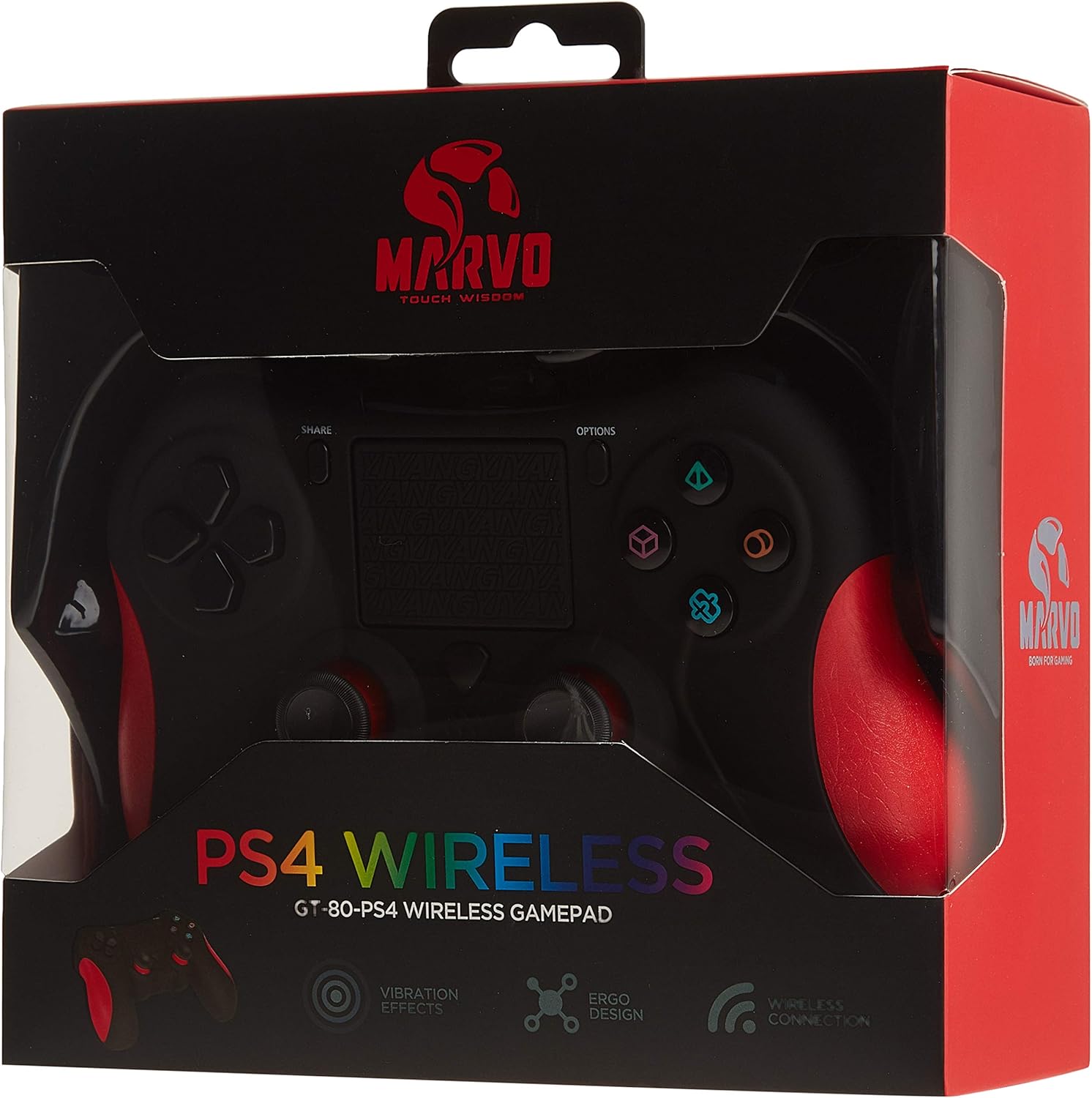
Image: The MARVO GT-80 Wireless Gamepad in its retail packaging.
- Gamepad wireless MARVO GT-80
- Cablu de încărcare USB (80 cm)
- Manual de utilizare (acest document)
Caracteristicile produsului
- Wireless connectivity via Bluetooth V4.2
- Wired connectivity via USB cable
- Built-in rechargeable battery (600 mAh capacity)
- Double vibration feedback for immersive gaming
- Integrated 6-axis sensor (3D-Sensor + G-Sensor)
- Large LED light bar
- Built-in loudspeaker function
- Suport mufă pentru căști stereo de 3.5 mm
- Controlul touchpad-ului
- 19 butoane programabile
Înființat
1. Încărcarea gamepad-ului
Before first use, fully charge the gamepad. Connect the supplied USB cable to the Micro USB port on the gamepad and the other end to a USB power source (e.g., console, PC, USB wall adapter).

Image: The MARVO GT-80 Gamepad connected to its USB charging cable.
The LED light bar will indicate charging status. A full charge typically takes approximately 2-3 hours.
2. Conectarea la PlayStation 4 (PS4)
- Porniți consola PS4.
- Connect the gamepad to the PS4 console using the USB cable.
- Press the "PS" button on the gamepad. The gamepad will pair with the console.
- După asociere, puteți deconecta cablul USB pentru redare wireless.
3. Conectarea la PC (Windows)
The gamepad supports both D-input and X-input modes for PC.
Conexiune prin cablu:
Connect the gamepad to your PC using the USB cable. The PC should automatically detect and install the necessary drivers. The gamepad will operate in D-input mode by default. Some games may require X-input mode, which can often be toggled via specific button combinations or software.
Conexiune Bluetooth:
- Asigurați-vă că PC-ul are Bluetooth activat.
- Put the gamepad into pairing mode (specific button combination, usually "SHARE" + "PS" button until LED flashes rapidly).
- Pe PC, accesați setările Bluetooth și căutați dispozitive noi.
- Select "Wireless Controller" or "GT-80" from the list of available devices to pair.
4. Connecting to Android/iOS Devices
- Ensure Bluetooth is enabled on your Android or iOS device.
- Put the gamepad into pairing mode (specific button combination, usually "SHARE" + "PS" button until LED flashes rapidly).
- On your mobile device, go to Bluetooth settings and search for new devices.
- Select "Wireless Controller" or "GT-80" from the list of available devices to pair.
Instrucțiuni de operare
Dispunerea butoanelor și funcții

Imagine: față view of the MARVO GT-80 Wireless Gamepad.

Imagine: Spate view of the MARVO GT-80 Wireless Gamepad, highlighting the M-buttons.
- Butoane de direcție (D-Pad): Used for directional input.
- Manete analogice: Two analog sticks for precise 3D movement and camera control.
- Butoane de acțiune (Triunghi, Cerc, Cruce, Pătrat): Butoane de acțiune principale.
- Butonul SHARE: Used for sharing gameplay content (PS4).
- Buton OPȚIUNI: Accesează meniurile sau opțiunile de sistem din joc.
- Buton PS: Power on/off the gamepad, access PS4 system menu.
- Butoane L1/R1: Nasturi de umăr.
- Declanșatoare L2/R2: Declanșatoare analogice.
- Touchpad: Multi-touch input surface.
- M1, M2, M3, M4 Buttons: Programmable back buttons (refer to device-specific instructions for programming).
Funcții speciale
- Double Vibration: Provides tactile feedback during gameplay.
- Senzor pe 6 axe: Includes a 3D-Sensor and G-Sensor for motion-controlled gameplay.
- Difuzor: Integrated speaker for enhanced audio effects (PS4).
- Funcția căștilor: Connect a 3.5mm stereo headset for audio output and microphone input (PS4).
Întreţinere
Curatenie
Wipe the gamepad with a soft, dry cloth. Do not use harsh chemicals or abrasive cleaners. Avoid getting moisture into openings.
Depozitare
Store the gamepad in a cool, dry place away from direct sunlight and extreme temperatures. Avoid placing heavy objects on the gamepad.
Depanare
Gamepad Does Not Power On
- Ensure the gamepad is fully charged. Connect it to a power source using the USB cable.
- Press the PS button to attempt to power it on.
Probleme de conectare
- Fără fir: Ensure Bluetooth is enabled on your device and the gamepad is in pairing mode. Try re-pairing the device.
- Cu fir: Asigurați-vă că cablul USB este conectat corect atât la gamepad, cât și la dispozitiv. Încercați un alt port USB sau cablu.
- PS4: If issues persist, try resetting the gamepad (a small reset button is usually located on the back, requiring a pin to press).
Buttons or Joysticks Unresponsive
- Asigurați-vă că gamepad-ul este conectat corect și pornit.
- Test the gamepad with another game or application to rule out software issues.
- If possible, try resetting the gamepad.
Vibrația nu funcționează
- Verificați setările din joc pentru a vă asigura că feedback-ul prin vibrații este activat.
- Asigurați-vă că gamepad-ul este complet încărcat.
Specificații

Image: Technical specifications as printed on the product packaging.
| Caracteristică | Detaliu |
|---|---|
| Model | GT-80 |
| Conectivitate | Fără fir (Bluetooth V4.2), Cu fir (cablu USB) |
| Butoane | 19 |
| Capacitatea bateriei | 600 mA |
| Difuzor | 6/8Ω-1W |
| Interfață | Suport EXT, mufă de 3.5 mm |
| Compatibilitate | PS4, PC (D-input & X-input), Android, iOS |
| Senzor de mișcare | 3D-Sensor + G-Sensor |
| Lungimea cablului micro USB | 80 cm |
| Dimensiuni | 40.49 x 9.5 x 9.5 cm |
| Greutate | 310 g |
Garanție și suport
For warranty information and technical support, please refer to the documentation provided with your purchase or contact MARVO customer service directly. Keep your proof of purchase for warranty claims.