
1. Introducere
The ProForm Carbon T7 Smart Treadmill is designed to provide an effective and engaging cardiovascular workout experience in your home. Featuring a 7-inch HD touchscreen and integration with iFIT, this treadmill offers a variety of interactive training options. This manual provides essential information for the safe assembly, operation, maintenance, and troubleshooting of your Carbon T7 treadmill.

This image shows the ProForm Carbon T7 Smart Treadmill from a front-side angle, highlighting its console with a 7-inch HD touchscreen, the running deck, and the sturdy frame.
2. Informații importante privind siguranța
Before operating the ProForm Carbon T7 Smart Treadmill, please read all instructions carefully. Keep this manual for future reference. Failure to follow these instructions could result in injury or damage to the product.
- Consultați întotdeauna un medic înainte de a începe orice program de exerciții.
- Așezați banda de alergare pe o suprafață plană, cu cel puțin 2 metri (6.5 picioare) de spațiu liber în spatele acesteia și 0.5 metri (1.6 picioare) pe fiecare parte.
- Țineți copiii și animalele de companie departe de banda de alergare în timpul funcționării.
- Nu folosiți banda de alergare dacă are cablul de alimentare sau ștecherul deteriorat sau dacă nu funcționează corect.
- Purtați îmbrăcăminte sport și pantofi sport adecvate. Evitați hainele largi care s-ar putea prinde în piesele mobile.
- Always use the safety key. Attach the clip to your clothing before starting the treadmill.
- Nu pășiți pe sau coborâți de pe banda de alergare în timp ce banda se mișcă.
- Do not attempt to adjust or repair the treadmill yourself. Contact qualified service personnel.
3. Asamblare
The ProForm Carbon T7 Treadmill requires assembly. For detailed, step-by-step 3D instructions, download the free Bilt app on your smartphone or tablet. Ensure all parts are present before beginning assembly. It is recommended to have two people for assembly due to the weight and size of the components.
- Unpack all components and place them on a clear, flat surface.
- Follow the instructions provided in the Bilt app or the included assembly guide.
- Ensure all bolts, nuts, and screws are securely tightened before use.

The ProForm Carbon T7 Smart Treadmill is shown in its upright, folded configuration, illustrating its SpaceSaver design for compact storage when not in use.
4. Funcționare
4.1 Noțiuni introductive
- Conexiune de alimentare: Conectați cablul de alimentare la o priză cu împământare.
- Cheie de siguranță: Attach the safety key clip to your clothing and insert the safety key into the console. The treadmill will not operate without the safety key in place.
- Standing on the Treadmill: Stand on the foot rails, not the running belt, before starting your workout.
- Începerea unui antrenament: Press the 'Start' button on the console. The belt will begin to move at a low speed.
4.2 Using the Console and 7" HD Touchscreen
The Carbon T7 features a 7-inch HD interactive touchscreen display that allows you to stream iFIT workouts directly. The console also includes physical buttons for quick adjustments.
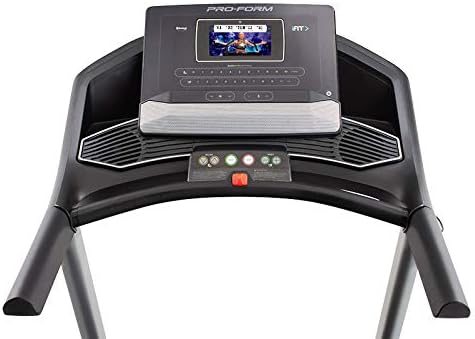
Un detaliat view of the treadmill's console, featuring the 7-inch HD touchscreen display, control buttons for speed and incline, and integrated speakers.
- Navigare cu ecran tactil: Use the touchscreen to browse iFIT workouts, adjust settings, and view workout metrics.
- QuickSpeed Controls: Use the 'Speed' buttons or quick-select buttons on the console to adjust the running belt speed from 0 to 10 MPH.
- Quick Incline Controls: Use the 'Incline' buttons or quick-select buttons to adjust the incline from 0% to 10%.
- Oprirea unui antrenament: Press the 'Stop' button to pause or end your workout. Remove the safety key to fully power off the treadmill.
4.3 iFIT Integration
Your ProForm Carbon T7 Treadmill includes a 30-Day iFIT Family Membership. iFIT provides access to live workouts, studio classes, and global workouts led by expert personal trainers. With iFIT, your trainer can auto-adjust your treadmill's speed and incline for an optimized and immersive exercise experience.
- Activating iFIT: Follow the on-screen prompts on the 7-inch HD touchscreen to activate your iFIT membership.
- Selectarea antrenamentului: Browse the iFIT library for a wide range of workouts, including running, walking, and cross-training.
- Trainer Control: During iFIT workouts, the treadmill's speed and incline may automatically adjust according to the trainer's program. You can override these adjustments manually if needed.

A woman is shown actively running on the ProForm Carbon T7 Smart Treadmill, demonstrating its use in a typical home environment. The treadmill's running deck and console are visible.
5. Întreținere
Regular maintenance ensures the longevity and optimal performance of your ProForm Carbon T7 Treadmill.
- curatenie: Regularly wipe down the treadmill surfaces with a damp pânză. Evitați utilizarea agenților de curățare abrazivi sau a solvenților.
- Curățarea benzii: Periodically clean the running belt and the area beneath it to prevent debris buildup.
- Lubrifierea curelei: The running belt is pre-lubricated. Refer to the full product manual for specific lubrication instructions and frequency, typically required after a certain number of hours of use.
- Alinierea și tensiunea curelei: Check the running belt for proper alignment and tension. Adjust as needed according to the detailed instructions in the full product manual.
- Verificarea cablului de alimentare: Verificați cablul de alimentare pentru a depista eventualele deteriorări. Dacă este deteriorat, întrerupeți utilizarea și contactați serviciul de asistență pentru clienți.
6. Depanare
If you encounter issues with your ProForm Carbon T7 Treadmill, refer to the table below for common problems and solutions.
| Problemă | Cauza posibila | Soluţie |
|---|---|---|
| Banda de alergare nu pornește. | Cablul de alimentare nu este conectat la priză; întrerupătorul s-a declanșat; cheia de siguranță nu este introdusă. | Asigurați-vă că este conectat corect cablul de alimentare. Verificați întrerupătorul de circuit al ușii. Introduceți complet cheia de siguranță în consolă. |
| Running belt does not move. | Safety key not inserted; 'Start' button not pressed; motor overload. | Insert safety key. Press 'Start'. If motor overload, reduce load and try again. |
| Cureaua alunecă sau ezită. | Tensiunea curelei este prea slabă; cureaua necesită lubrifiere. | Adjust belt tension according to the full manual. Lubricate the belt if necessary. |
| Afișajul consolei este gol sau nu răspunde. | Problemă de alimentare; eroare de software. | Ensure power is connected. Try unplugging the treadmill for 60 seconds and plugging it back in. If issue persists, contact customer support. |
7. Specificații
Key technical specifications for the ProForm Carbon T7 Smart Treadmill:
| Caracteristică | Detaliu |
|---|---|
| Numărul de model | PFTL87720 |
| Dimensiuni produs (L x l x H) | 186.69 cm x 89.41 cm x 146.05 cm (73.5" x 35.2" x 57.5") |
| Greutatea articolului | 97.98 kg (216 lbs) |
| Puterea motorului | 2.6 CHP (Continuous Horsepower) |
| Interval de viteză | 0-10 MPH (0-16 KPH) |
| Gama de înclinare | 0-10% Digital Quick Incline |
| Tread Belt Size | 51 cm x 140 cm |
| Afişa | 7" HD Interactive Touchscreen |
| Capacitate de greutate | 300 lbs (136 kg) |
| Material cadru | Oțel aliat |
| Sursa de alimentare | Electric cu fir |
| Caracteristici speciale | SpaceSaver Design, ISO Flex Deck Cushioning |
8. Garanție și asistență pentru clienți
Your ProForm Carbon T7 Smart Treadmill is backed by a comprehensive warranty to ensure your peace of mind.
- Garanția cadrului: 10 ani
- Garanția pieselor și a forței de muncă: 1 an
For warranty claims, technical assistance, or to order replacement parts, please contact ProForm customer support. Refer to the contact information provided in your product packaging or on the official ProForm website-ul.