
Introducere
The 4smarts Powerbank Enterprise 2 is a high-capacity 20000 mAh portable charger designed to provide fast and efficient power to a wide range of electronic devices. With a total output of 130 watts and multiple charging ports, it supports various fast charging standards, including Power Delivery (PD), Qualcomm Quick Charge 3.0 (QC3.0), and Samsung Adaptive Fast Charge. This manual provides essential information for the safe and optimal use of your power bank.

Image: The 4smarts Powerbank Enterprise 2, highlighting its 130W output capability.
Înființat
Încărcare inițială
Before first use, fully charge your 4smarts Powerbank Enterprise 2. For the fastest charging experience, use a 100W Power Delivery (PD) compatible wall charger and a USB-C to USB-C cable (sold separately). The power bank can be fully recharged in approximately 60 minutes with a 100W charger.
Indicatoare LED
The power bank features LED indicators to display the current charge level. Observe these lights to monitor the battery status during charging and discharging.
Instrucțiuni de operare
Încărcarea Power Bank-ului
- Connect a compatible charging cable to either the USB-C1 or USB-C2 input port on the power bank. For optimal speed, use the USB-C1 port with a 100W PD charger.
- Alternativ, puteți utiliza Micro USB input port with a compatible cable and charger.
- Indicatorii LED se vor aprinde pentru a arăta progresul încărcării. Toate LED-urile vor fi aprinse constant când bateria este complet încărcată.
Încărcarea dispozitivelor externe
The Powerbank Enterprise 2 offers multiple output ports to charge your devices:
- USB-C1 Output (PD/PPS): Up to 100W for fast charging laptops (e.g., MacBook Pro), tablets, and smartphones.
- USB-C2 Output (PD): Up to 30W for fast charging tablets and smartphones.
- Ieșire USB-A (QC3.0): Up to 18W for devices supporting Qualcomm Quick Charge 3.0 or other standard charging protocols.
Pentru a încărca un dispozitiv:
- Connect your device to the appropriate output port on the power bank using a compatible charging cable.
- Acumulatorul extern va începe automat încărcarea dispozitivului. Dacă nu, apăsați butonul de pornire o dată pentru a activa încărcarea.
- You can charge multiple devices simultaneously. The total output is up to 130W (e.g., USB-C1 at 100W + USB-C2 at 30W). For safety, if the total output exceeds 130W, the power bank will regulate the output of each port accordingly.

Image: Diagram illustrating the various input and output ports of the power bank, including their respective wattages and functions (Micro USB input, USB-C1 input/output with PD/PPS, USB-C2 input/output with PD, and USB-A output with QC3.0).
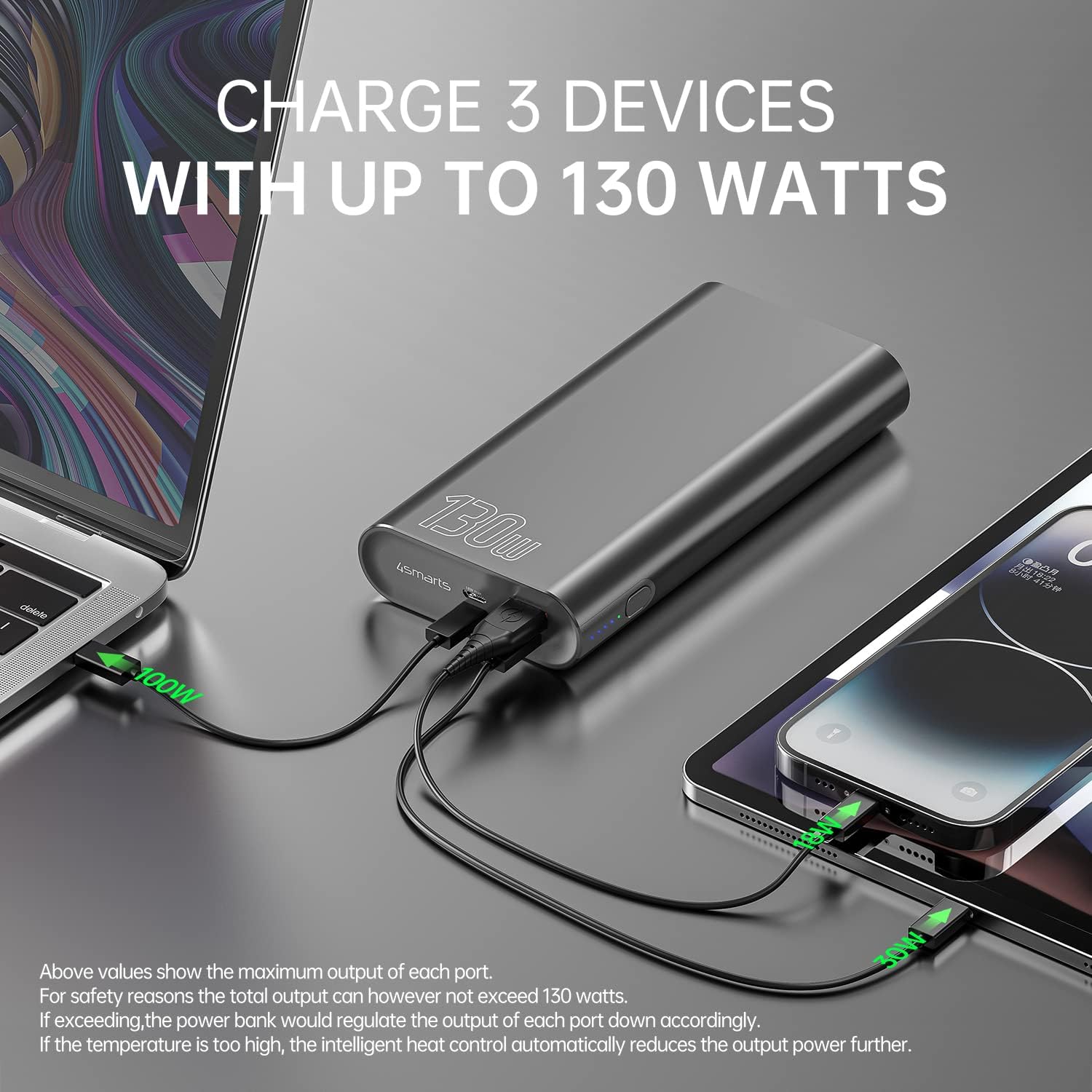
Image: The power bank connected and simultaneously charging a laptop and a tablet, demonstrating its multi-device charging capability.

Image: The power bank charging a MacBook Pro 16", illustrating 100W fast charging to reach 50% in 45 minutes.
Întreţinere
- curatenie: Folosește o lavetă moale și uscată pentru a curăța acumulatorul extern. Evită utilizarea substanțelor chimice dure sau a materialelor abrazive.
- Depozitare: Depozitați bateria externă într-un loc răcoros și uscat, ferit de lumina directă a soarelui, temperaturi extreme și umiditate.
- Îngrijirea bateriei: Pentru a prelungi durata de viață a bateriei, încărcați complet bateria externă cel puțin o dată la trei luni dacă nu o utilizați în mod regulat. Evitați descărcarea completă a bateriei pentru perioade lungi de timp.
- Manipulare: Do not drop, puncture, or disassemble the power bank. This can damage the internal components and void the warranty.
Depanare
- Bateria externă nu se încarcă: Ensure the charging cable and wall adapter are functioning correctly and are securely connected. For fastest charging, use a 100W PD charger with the USB-C1 port.
- Dispozitivul nu se încarcă de la bateria externă: Ensure the power bank has sufficient charge. Press the power button to activate output if necessary. Check that the cable connecting your device to the power bank is not damaged and is compatible.
- Încărcare lentă: Verify that your device and cable support fast charging protocols (PD, QC3.0) and are connected to the appropriate high-output port (USB-C1 for up to 100W, USB-C2 for up to 30W, USB-A for up to 18W).
- Supraîncălzire: The power bank features intelligent heat control. If the temperature is too high, it will automatically reduce output power. Ensure proper ventilation during use.
The 4smarts Powerbank Enterprise 2 is equipped with multiple safety features, including overload protection, short circuit protection, intelligent charge shutdown, and deep discharge protection, to ensure safe operation.

Image: An internal diagram of the power bank, showcasing its certified safety features such as overload protection, short circuit protection, intelligent charge shutdown, and deep discharge protection.
Specificații
| Caracteristică | Detaliu |
|---|---|
| Numele modelului | Powerbank Enterprise 2 |
| Numărul de model al articolului | 4S468747 |
| Capacitatea bateriei | 20000 mAh |
| Compoziția celulei bateriei | Lithium-ion (4 Tesla 21700 Li-ion cells) |
| Intrare micro USB | CC 5V/2A, 9V/2A, 12V/1.5A (maxim 18W) |
| USB-C1 Input/Output (PD/PPS) | DC 5V/3A, 9V/3A, 12V/3A, 15V/3A, 20V/5A (Max 100W) |
| USB-C2 Input/Output (PD) | DC 5V/3A, 9V/3A, 12V/3A, 15V/2A, 20V/1.5A (Max 30W) |
| Ieșire USB-A (QC3.0) | CC 5V/3A, 9V/2A, 12V/1.5A (maxim 18W) |
| Ieșire totală | 130W (USB-C1 100W + USB-C2 30W) |
| Power Bank Charging Time | Approx. 60 minutes (with 100W AC charger and cable, sold separately) |
| Dimensiuni (L x l x H) | 15.2 x 7.5 x 2.5 cm (5.98 x 2.95 x 0.98 țoli) |
| Greutatea articolului | 515 grame (1.13 lbs) |
| Culoare | Negru |
| Caracteristici speciale | Fast Charging, Overload Protection, Short Circuit Protection, Deep Discharge Protection |
| Utilizări recomandate | iPhone, Laptop, Smartphone, Tablet |
Informații de siguranță
- Nu expuneți bateria externă la apă, foc sau temperaturi extreme.
- Evitați să scăpați sau să supună powerbank-ului la impacturi puternice.
- Do not attempt to disassemble, repair, or modify the power bank.
- A nu se lăsa la îndemâna copiilor.
- Folosiți doar cabluri și adaptoare de încărcare originale sau compatibile certificate.
- Aruncați bateria externă în mod responsabil, conform reglementărilor locale privind deșeurile electronice.
Garanție și suport
garanție
The 4smarts Powerbank Enterprise 2 comes with a manufacturer's warranty. Please refer to the warranty card included in the product packaging or visit the official 4smarts webpentru termenii și condițiile detaliate de garanție specifice regiunii dumneavoastră.
Asistență pentru clienți
For technical assistance, troubleshooting, or any questions regarding your 4smarts Powerbank Enterprise 2, please contact 4smarts customer support. Contact information can typically be found on the official 4smarts website-ul sau în ambalajul produsului.