
Introducere
This manual provides essential information for the safe and efficient operation of your QFX SBX-213 12-inch Portable Bluetooth Speaker. Please read it thoroughly before using the product and retain it for future reference.
Instrucțiuni de siguranță
Pentru a asigura o funcționare în siguranță și a preveni deteriorarea, vă rugăm să respectați următoarele măsuri de siguranță:
- Nu expuneți unitatea la ploaie, umezeală sau temperaturi extreme.
- Nu deschideți difuzorul casing. Apelați la personal calificat pentru toate lucrările de service.
- Keep the speaker away from heat sources, direct sunlight, and open flames.
- Use only the specified power adapter and charging cable provided with the unit.
- Asigurați o ventilație adecvată în jurul difuzorului pentru a preveni supraîncălzirea.
- Evitați să așezați obiecte grele pe difuzor.
Conținutul pachetului
La despachetare, vă rugăm să verificați dacă toate articolele enumerate mai jos sunt prezente și în stare bună:
- QFX SBX-213 Portable Bluetooth Speaker
- Cablu de alimentare
- Telecomanda
- Manual de utilizare (acest document)
Produs terminatview
The QFX SBX-213 is a 12-inch portable speaker designed for versatile audio playback. It features Bluetooth connectivity for wireless streaming, an FM radio tuner, and a USB input for playing audio files de pe o unitate flash.
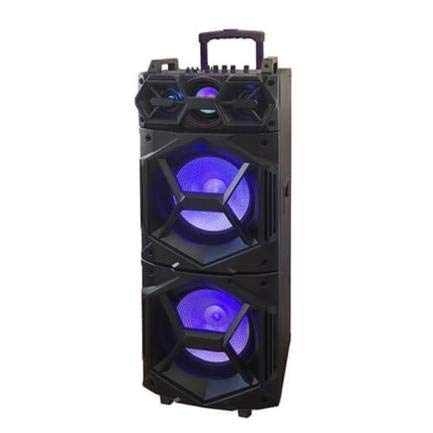
Imagine: față view of the QFX SBX-213 Portable Bluetooth Speaker, showcasing its 12-inch driver and robust design. The speaker features a black finish and a protective grille over the main driver.
The speaker's control panel and ports typically include:
- Comutator de pornire/oprire
- Mode Button (to switch between Bluetooth, FM, USB inputs)
- Volume Control Knobs or Buttons
- Play/Pause, Previous/Next Track Buttons
- Port USB pentru redare media
- Charging Port for power cable connection
- LED Indicator Lights for power, charging, and Bluetooth status
Înființat
- Încărcarea difuzorului: Before first use, connect the provided power cable to the speaker's charging port and plug it into a standard electrical outlet. Allow the speaker to fully charge. The charging indicator light will typically change color or turn off when charging is complete.
- Plasare: Place the speaker on a stable, flat surface. For optimal sound dispersion, avoid placing it in enclosed spaces or directly against walls.
Instrucțiuni de operare
1. Pornire/Oprire
To power on the speaker, locate the power switch, usually on the back or side panel, and slide it to the "ON" position. To power off, slide the switch to the "OFF" position.
2. Asociere Bluetooth
- Turn on the speaker. It will typically enter Bluetooth pairing mode automatically, indicated by a flashing LED light and an audible prompt.
- Activați Bluetooth pe dispozitivul mobil (smartphone, tabletă etc.).
- Caută available Bluetooth devices. You should see "QFX SBX-213" or a similar name in the list.
- Select the speaker to pair. Once connected, you will hear a confirmation sound, and the LED indicator will stop flashing.
- Acum poți reda sunet de pe dispozitiv prin difuzor.
3. Funcționare radio FM
- Press the "MODE" button on the speaker or remote control until "FM" mode is selected.
- Press the "Play/Pause" button to initiate an automatic scan for FM stations. The speaker will save all found stations.
- Use the "Previous/Next Track" buttons to navigate between saved FM stations.
4. Redare USB
- Introduceți o unitate flash USB care conține fișiere MP3 fileîn portul USB al difuzorului.
- Press the "MODE" button until "USB" mode is selected. The speaker will automatically begin playing audio files de pe unitatea USB.
- Use the "Play/Pause" and "Previous/Next Track" buttons to control playback.
5. Controlul volumului
Adjust the master volume using the dedicated volume knob or buttons on the speaker. You can also control the volume from your connected Bluetooth device or the remote control.
Întreţinere
- curatenie: Use a soft, dry cloth to clean the speaker's exterior. Do not use abrasive cleaners, waxes, or solvents, as these may damage the finish.
- Depozitare: Când nu este utilizată pentru perioade lungi de timp, depozitați difuzorul într-un loc răcoros și uscat, ferit de lumina directă a soarelui și de temperaturi extreme.
- Îngrijirea bateriei: To prolong battery life, avoid fully discharging the battery frequently. Charge the speaker regularly, even if not in use for long periods, to maintain battery health.
Depanare
If you encounter any issues with your QFX SBX-213 speaker, please refer to the following table for common problems and solutions:
| Problemă | Cauza posibila | Soluţie |
|---|---|---|
| Fără putere | Battery discharged; Power cable not connected securely | Charge the speaker fully; Ensure power cable is securely connected to both the speaker and the power outlet. |
| Nicio conexiune Bluetooth | Bluetooth not enabled on device; Speaker not in pairing mode; Device too far from speaker | Enable Bluetooth on your device; Put the speaker into Bluetooth pairing mode; Move your device closer to the speaker (within 10 meters). |
| Fără ieșire de sunet | Volume too low; Incorrect mode selected; Device or speaker is muted | Increase the volume on both the speaker and your connected device; Press the MODE button to select the correct input (Bluetooth, USB, FM); Check if the speaker or device is muted. |
| Radio FM static sau recepție slabă | Semnal slab; Interferență | Relocate the speaker to an area with better reception; Perform an auto-scan for stations again; Avoid placing near other electronic devices that may cause interference. |
Specificații
- Marca: QFX
- Model: SBX-213
- Dimensiune difuzor: 12 inci
- Tehnologie de conectivitate: USB, Bluetooth
- Caracteristici speciale: Lightweight, Portable, FM Radio
- Tip de montare: Floor, Table Mount
- Tipul controlerului: Telecomanda
- Sursa de alimentare: Cablu electric
- Dimensiuni (Îl x l x A): Aproximativ 113 x 42 x 42 cm
- Greutate: Aproximativ 4 kg
- UPC: 606540036341
- ASIN: B08GL3SHQP
Garanție și suport
QFX products are designed for reliability and performance. For detailed warranty information or technical support, please refer to the warranty card included with your purchase or visit the official QFX webPăstrați dovada achiziției pentru orice reclamații în garanție.
For further assistance, please contact QFX customer service through their official channels.