
1. Introducere
Mulțumesc pentru achizițieasing the YESIDO YSP03 Sports Bluetooth In-Ear Earphones. This manual provides essential information for the safe and efficient use of your new earphones. Please read it thoroughly before use and retain it for future reference.
2. Informații de siguranță
- Nu expuneți căștile la temperaturi extreme, umiditate sau medii corozive.
- Avoid dropping, impacting, or bending the earphones.
- Do not disassemble or modify the earphones. This may void the warranty and cause damage.
- Țineți căștile departe de copii și animale de companie.
- Folosiți doar cablul de încărcare furnizat sau un echivalent certificat.
- Ascultați la un volum moderat pentru a preveni deteriorarea auzului.
- Nu utilizați căștile în timp ce conduceți sau în situații în care trebuie să fiți atenți la împrejurimi.
3. Conținutul pachetului
Vă rugăm să verificați pachetul pentru următoarele articole:
- YESIDO YSP03 Sports Bluetooth In-Ear Earphones
- Cablu de încărcare USB
- Manual de utilizare
- Ear tips (various sizes, typically)
4. Produs terminatview
The YESIDO YSP03 earphones feature an in-ear design with a control unit for easy operation. They support Bluetooth wireless connectivity and also offer direct music playback via an SD card.
Control Unit and Ports
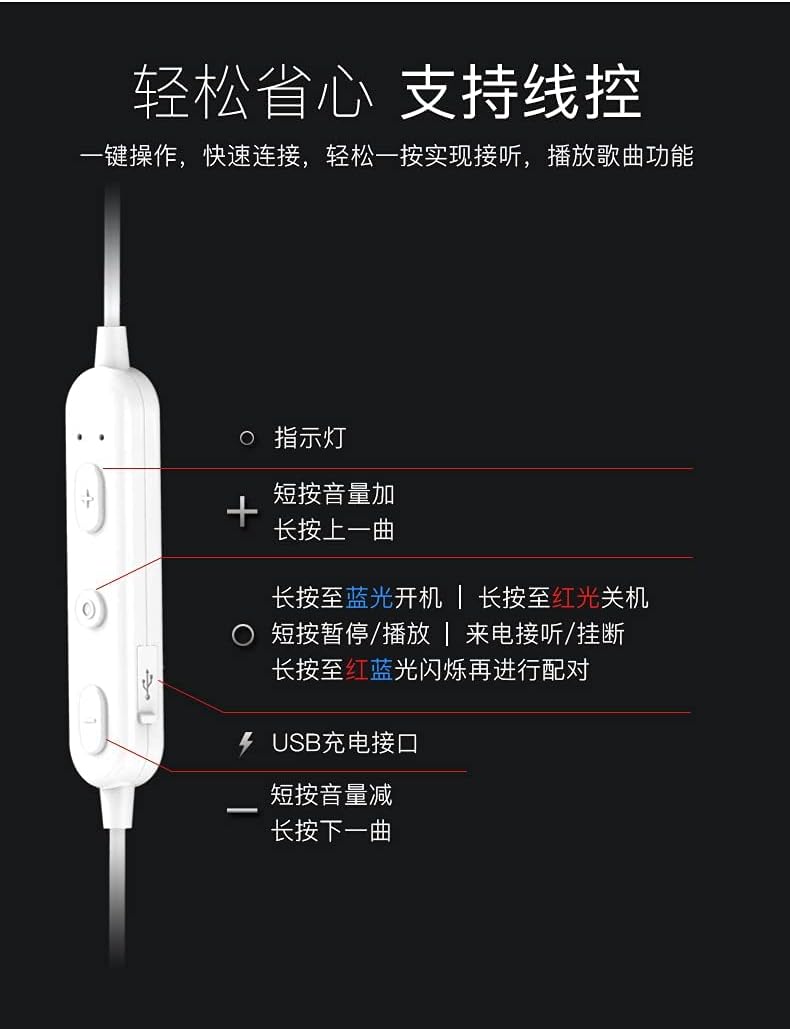
Imagine: Detaliat view of the earphone control unit, showing the indicator light, volume/track buttons, multi-function button, and USB charging port.
- Indicator luminos: Afișează starea (alimentare, asociere, încărcare).
- Butonul „+”: Short press for Volume Up; Long press for Previous Track.
- Buton multifuncțional (centru): Long press for Power On (blue light) / Power Off (red light); Short press for Play/Pause or Answer/Hang up calls; Long press until red and blue lights flash for Pairing Mode.
- Butonul '-': Short press for Volume Down; Long press for Next Track.
- Port de încărcare USB: Pentru conectarea cablului de încărcare.
Slot pentru card SD
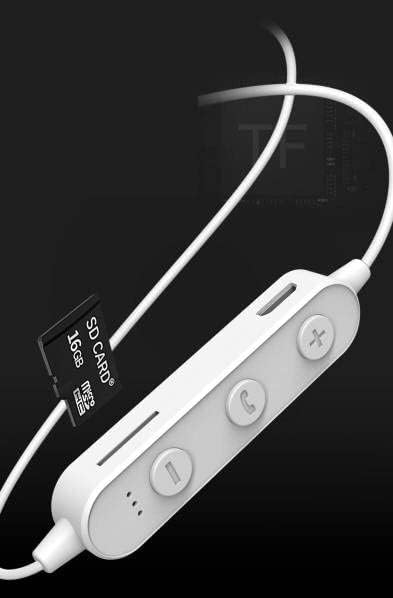
Imagine: Close-up of the control unit showing the SD card slot, indicating direct music playback without a phone. A 64GB card can store approximately 15,000 songs.
The earphones feature an integrated SD card slot, allowing you to play music directly from a memory card without needing a connected device. This is ideal for sports or activities where carrying a phone is inconvenient.
5. Configurare
5.1 Încărcarea căștilor
- Connect the USB charging cable to the USB charging port on the earphone control unit.
- Conectați celălalt capăt al cablului USB la un adaptor de alimentare USB (nu este inclus) sau la portul USB al unui computer.
- The indicator light will typically show a red light during charging and turn off or change color when fully charged.
- Așteptați aproximativ 1-2 ore pentru o încărcare completă.
5.2 Asociere Bluetooth
- Asigurați-vă că sunt oprite căștile.
- Press and hold the Multi-function Button (center button) for approximately 5-7 seconds until the indicator light flashes red and blue alternately. This indicates pairing mode.
- On your mobile phone or Bluetooth-enabled device, go to the Bluetooth settings and turn on Bluetooth.
- Caută available devices. You should see "YESIDO YSP03" or a similar name in the list.
- Select "YESIDO YSP03" to connect. Once successfully paired, the indicator light will typically flash blue slowly or turn off.
- Dacă vi se solicită o parolă, introduceți „0000”.
5.3 Introducerea unui card SD
- Locate the SD card slot on the control unit.
- Gently insert a formatted Micro SD card (TF card) with the metal contacts facing down until it clicks into place.
- The earphones will automatically detect the card and switch to SD card playback mode if no Bluetooth device is connected or if Bluetooth is disconnected.
6. Instrucțiuni de utilizare
6.1 Pornire/Oprire
- Pornire: Press and hold the Multi-function Button until the blue indicator light appears.
- Oprire: Press and hold the Multi-function Button until the red indicator light appears.
Redare muzică 6.2 (mod Bluetooth)
- Redare/Pauză: Apăsați scurt butonul multifuncțional.
- Creșterea volumului: Apăsați scurt butonul „+”.
- Volum scăzut: Apăsați scurt butonul „-”.
- Următoarea piesă: Long press the '-' Button.
- Pista anterioară: Long press the '+' Button.
6.3 Gestionarea apelurilor
- Răspundeți/Terminați apelul: Short press the Multi-function Button when an incoming call is received.
- Respinge apelul: Long press the Multi-function Button when an incoming call is received.
- Reapelează ultimul număr: Apăsați de două ori butonul multifuncțional.
6.4 SD Card Playback
- Once an SD card is inserted and detected, the earphones will automatically begin playing music from the card.
- The same controls for Play/Pause, Volume, Next/Previous Track apply as in Bluetooth mode.
7. Întreținere
- curatenie: Folosiți o lavetă moale și uscată pentru a curăța căștile. Nu utilizați substanțe chimice dure sau materiale abrazive.
- Depozitare: Depozitați căștile într-un loc răcoros și uscat, ferit de lumina directă a soarelui și de temperaturi extreme.
- Îngrijirea bateriei: To prolong battery life, charge the earphones regularly, even if not in frequent use. Avoid fully discharging the battery for extended periods.
8. Depanare
| Problemă | Soluţie |
|---|---|
| Căștile nu pornesc. | Ensure the earphones are fully charged. Press and hold the Multi-function Button for a longer duration. |
| Nu se poate realiza asocierea cu dispozitivul. | Ensure earphones are in pairing mode (red and blue flashing light). Turn off and on Bluetooth on your device. Move closer to the earphones. Forget the device in your phone's Bluetooth settings and try pairing again. |
| Nici un sunet. | Check volume levels on both earphones and your connected device. Ensure earphones are properly connected via Bluetooth or that the SD card is inserted correctly and contains playable files. |
| SD card not playing. | Ensure the SD card is inserted correctly and contains compatible audio files (e.g., MP3). Try re-inserting the card. Ensure no Bluetooth device is actively connected, as SD card playback might be prioritized when Bluetooth is disconnected. |
| Calitate slabă a sunetului. | Ensure there are no obstructions between the earphones and your device. Move closer to your device. Try a different audio source or file. |
9. Specificații
| Caracteristică | Detaliu |
|---|---|
| Marca | YESIDO |
| Numărul de model | YSP03 |
| Culoare | Alb |
| Plasarea urechii | In-ear |
| Tehnologia de conectivitate | Wireless (Bluetooth) |
| Controlul zgomotului | Nici unul |
| Dispozitive compatibile | Telefoane mobile |
| Utilizări specifice pentru produs | Sport |
| Caracteristica cablului | Fără cablu |
| Nivel de rezistență la apă | Nu este rezistent la apă |
| Tip control | Control vocal |
| Metoda de control | App (Voice Control implies app integration for some functions) |
Performanța bateriei

Imagine: Visual representation of battery performance metrics for the YESIDO YSP03 earphones.
- Timp de redare a muzicii: Aproximativ 9 ore
- Headphone Standby Time: Aproximativ 120 ore
- Durata apelului: Aproximativ 7.5 ore
*Note: These data are obtained from YESIDO laboratory tests, and slight deviations may occur due to changes in objective environment and usage patterns.
10. Garanție și asistență
10.1 Informații despre garanție
This product is provided without an explicit warranty. Please refer to your retailer's return policy for any issues within the applicable return period.
10.2 Asistență pentru clienți
For further assistance or inquiries, please contact the retailer where you purchased the product. You may also visit the official YESIDO website for general product information and potential support resources.