
1. Produs terminatview
The Cello C2220FSDE is a compact 22-inch Full HD LED television designed for versatile use. It features an integrated DVD player and a triple tuner (DVBT2/S2) for comprehensive signal reception. Its sleek design makes it suitable for various environments, including guest rooms, motorhomes, caravans, trucks, or boats.
Key features include HDMI and USB inputs for connecting external devices like game consoles and hard drives. The USB functionality also supports recording live television and playing stored media. This TV can also function as a monitor for laptops or desktop computers.

Imaginea 1.1: The integrated DVD player allows for direct playback of DVDs without additional devices.

Imaginea 1.2: Experience clear and detailed images with Full HD 1080p resolution.
2. Configurare și instalare
2.1 Despachetare și conținut
Scoateți cu grijă toate componentele din ambalaj. Asigurați-vă că sunt prezente următoarele articole:
- 1 x Cello 22-inch LED TV
- Cablu de alimentare
- Telecomanda
- Ghid de pornire rapidă
- 2 x baterii AAA
- Suport TV
2.2 Atașarea suportului
Place the TV screen face down on a soft, clean surface to prevent scratches. Align the stand with the mounting holes on the bottom of the TV and secure it using the provided screws.
2.3 Connecting Power and Antenna
- Conectați cablul de alimentare la intrarea de alimentare a televizorului și apoi la o priză de perete.
- Connect your TV aerial cable to the 'TV Aerial' input on the back of the TV.
- For satellite reception, connect a satellite dish cable (not supplied) to the 'DVB-S2' input.

Imaginea 2.1: Spate view of the TV showing power, antenna, and other connectivity ports.
2.4 Conexiuni la dispozitive externe
Televizorul oferă diverse porturi pentru conectarea dispozitivelor externe:
- HDMI: Conectați dispozitive de înaltă definiție, cum ar fi playere Blu-ray, console de jocuri sau set-top box-uri.
- USB: Connect USB storage devices for media playback or recording.
- VGA: Conectați un computer pentru a-l utiliza ca monitor.
- Ieșire audio de 3.5 mm: Conectați căști sau difuzoare externe.

Imaginea 2.2: Illustration of HDMI and USB ports for connecting various devices.

Imaginea 2.3: The integrated satellite tuner allows connection to a satellite dish for satellite TV reception.
3. Instrucțiuni de utilizare
3.1 Pornirea inițială și scanarea canalelor
- Introduceți bateriile AAA în telecomandă.
- Apăsați butonul de pornire de pe telecomandă sau de pe televizor pentru a-l porni.
- Follow the on-screen instructions for initial setup, including language selection and automatic channel scanning for DVB-T2 (terrestrial) and DVB-S2 (satellite) signals.
3.2 Funcții de bază ale televizorului
- Selectarea canalului: Use the 'CH+' / 'CH-' buttons or the numeric keypad on the remote control.
- Controlul volumului: Use the 'VOL+' / 'VOL-' buttons.
- Selectarea sursei: Press the 'SOURCE' button to switch between inputs (TV, HDMI, USB, DVD).
- Navigare prin meniu: Use the 'MENU' button to access settings and navigation arrows to browse.
3.3 Integrated DVD Player Operation
- Ensure the TV is powered on and the input source is set to 'DVD'.
- Gently insert a DVD disc into the slot on the side of the TV, label side facing the mirror side (as indicated on the slot).
- The DVD should load automatically. Use the remote control for playback functions (Play, Pause, Stop, Skip).
3.4 USB Recording and Media Playback
- Redare media: Insert a USB storage device into the USB port. Select 'USB' as the input source. Navigate through your files (photos, music, videos) using the remote control.
- USB Recording (PVR): While watching live TV, insert a USB storage device. Press the 'RECORD' button on the remote to start recording. You can also use the 'PAUSE' function for time-shifting live TV.
Video 3.1: This video demonstrates the physical controls on the TV and the various input/output ports available on the back and side of the unit, including the DVD slot, USB, HDMI, and antenna connections.
4. Întreținere
4.1 Curățarea televizorului
- Deconectați întotdeauna televizorul de la priză înainte de curățare.
- Folosiți o cârpă moale și uscată pentru a șterge ecranul și carcasa. Pentru petele persistente, ștergeți ușor.ampClătiți laveta cu apă sau cu un detergent de ecran blând, neabraziv.
- Do not use alcohol, benzene, thinners, or other volatile substances, as they may damage the screen or finish.
4.2 Îngrijirea playerului DVD
- Keep the DVD slot free from dust and debris.
- Only insert clean, undamaged discs.
5. Depanare
If you encounter issues with your Cello TV, refer to the following common problems and solutions:
| Problemă | Cauza posibila | Soluţie |
|---|---|---|
| Fără putere | Cablul de alimentare nu este conectat; priza defectă | Check power cord connection; try a different outlet |
| Nu există imagine, dar există sunet | Sursă de intrare selectată greșit; conexiune defectă prin cablu | Press 'SOURCE' to select correct input; check HDMI/VGA cable connections |
| Nu există sunet, dar imaginea este prezentă | Volume too low or muted; external audio device issue | Increase volume; check mute status; ensure external audio devices are connected correctly |
| Calitate slabă a imaginii (canale TV) | Weak antenna signal; incorrect antenna connection | Adjust antenna position; check antenna cable connection; perform a channel rescan |
| DVD-ul nu se redă | Disc inserted incorrectly; dirty or damaged disc; incorrect source selected | Re-insert disc correctly; clean or replace disc; select 'DVD' source |
| Telecomanda nu funcționează | Batteries depleted or inserted incorrectly; obstruction between remote and TV | Replace batteries; ensure correct polarity; remove obstructions; point remote directly at TV sensor |
For further assistance, please refer to the support section or the full instruction manual available online.
6. Specificații
Below are the detailed technical specifications for the Cello C2220FSDE 22-inch Full HD LED TV:
| Caracteristică | Caietul de sarcini |
|---|---|
| Dimensiunea ecranului | 22 inci (54.6 cm diagonală) |
| Marca | Violoncel |
| Tehnologia de afișare | LED |
| Rezoluţie | 1080p (Full HD, 1920 x 1080 pixeli) |
| Rata de reîmprospătare | 60 Hz |
| Caracteristica specială | Integrated DVD Player |
| Tehnologia de conectivitate | HDMI, USB, VGA |
| Raportul de aspect | 16:9 |
| Dimensiuni produs (D x L x H) | 5P x 50.4W x 34.2H cm |
| Greutatea articolului | 2.55 kilograme |
| Raport de contrast | 600:1 |
| Luminozitate maximă | 180 NIT Coating |
| Suport HDR | HDR10 |
| Timp de răspuns | 10 milisecunde |
| Tip tuner | DVB-C, DVB-S2, DVB-T2 |
| Mod ieșire audio | Stereo |
| Descrierea difuzorului | 2 x 3 W Pitch Perfect Sound |
| Consumul de energie | 21 kWh |
| Voltage | 230 Volts (100-240 V AC 50-60 Hz) |
| Standard de montare VESA | 100 x 100 mm |
| Anul modelului | 2023 |
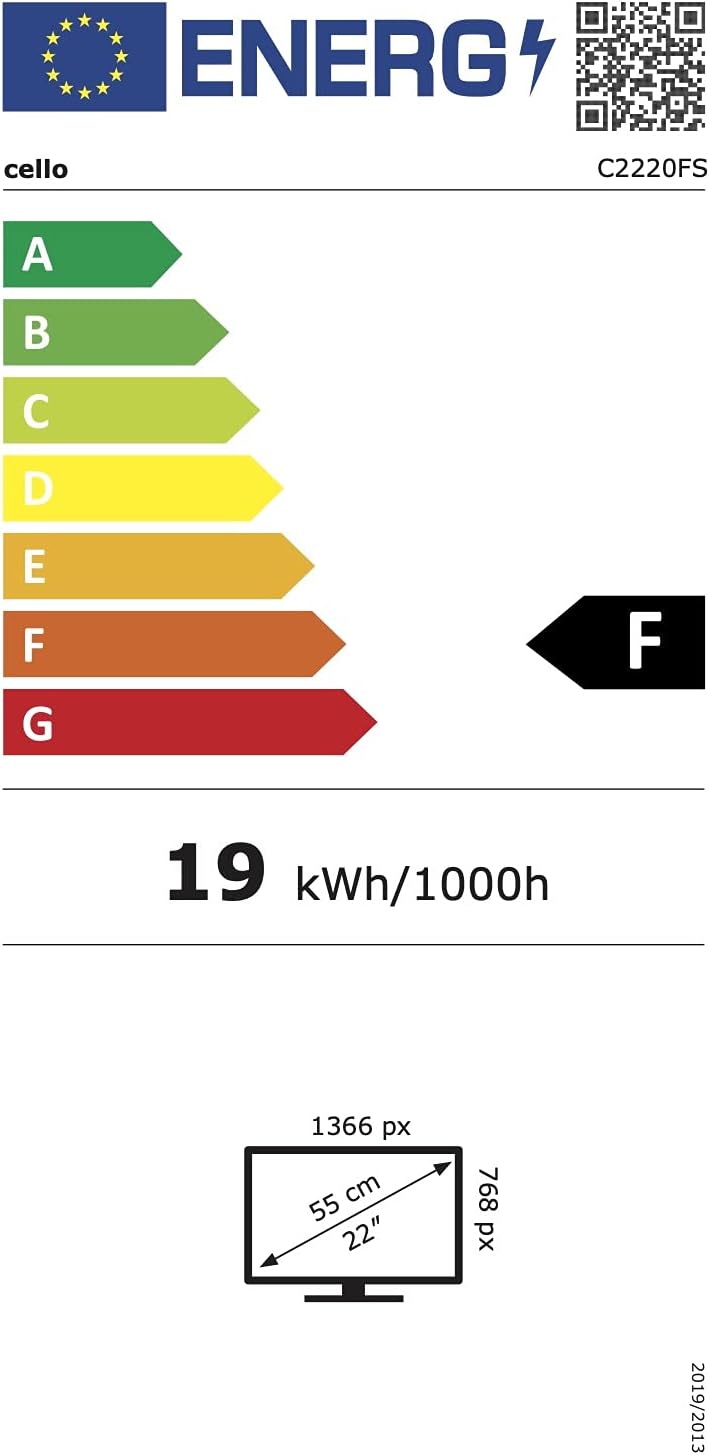
Imaginea 6.1: Energy efficiency label for the Cello C2220FSDE TV. For more details, visit Baza de date EPREL.

Imaginea 6.2: Detailed product information sheet. For more details, visit Baza de date EPREL.
7. Garanție și asistență
7.1 Informații despre garanție
This Cello TV comes with a Garanție limitată de 1 anVă rugăm să păstrați dovada achiziției pentru a putea face reclamații în garanție.
7.2 Asistență pentru clienți
For technical support or customer service, please contact Cello Electronics:
- Website: www.celloelectronics.de
- E-mail: consumersupport@celloelectronics.com
- Telefon: 03334330312
- Adresa: Dovecot Hills, Bishop Auckland, DL14 6XW Durham, United Kingdom
You can also download the full instruction manual for your device in your preferred language from the official Cello website: https://celloelectronics.de/instruction-books/.