
1. Introducere
This manual provides essential information for the proper installation, operation, and maintenance of your Axiom ONS-SE-155-1510-AX CWDM SFP Network Transceiver Module. Please read this manual thoroughly before using the product to ensure optimal performance and safety.
2. Produs terminatview
The Axiom ONS-SE-155-1510-AX is a high-performance CWDM Small Form-Factor Pluggable (SFP) transceiver module designed for optical data communication applications. It provides a fiber optic interface for network devices, enabling reliable and efficient data transmission over optical fiber.
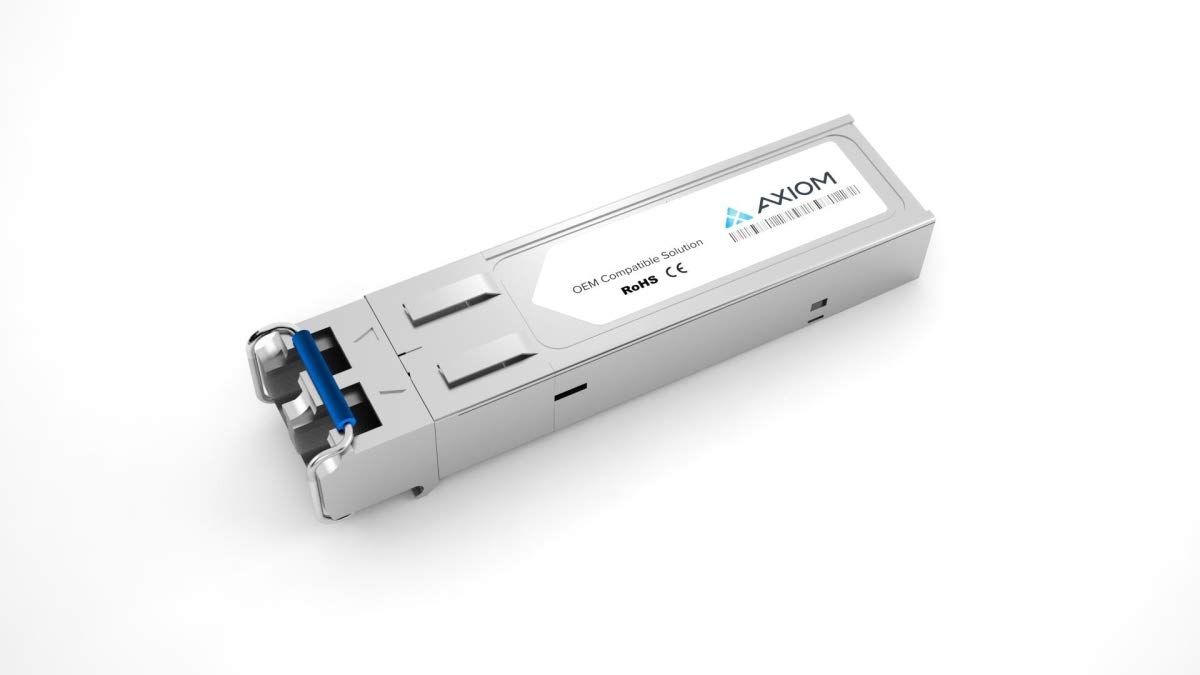
Figure 1: Axiom ONS-SE-155-1510-AX CWDM SFP Network Transceiver Module. This image displays the compact gray fiber optic module with an LC connector, illustrating its physical form factor.
Caracteristici cheie:
- 100% Guaranteed Compatibility in all OEM applications.
- Fully compliant with the Multi-Source Agreement (MSA) standards, ensuring broad compatibility with MSA-compliant platforms.
- Designed for OC-3/STM-1 applications, operating at a 1510nm CWDM wavelength.
- Fiber optic interface type: SFP with LC connector.
- Compact dimensions: 2.22" (56.5 mm) width, 0.528" (13.4 mm) depth, 0.335" (8.5 mm) height.
3. Informații de siguranță
Observe the following safety precautions to prevent injury and damage to the product:
- Siguranța laserului: This product contains a laser. Do not stare directly into the optical port when the module is powered on, as this can cause eye damage.
- Descărcare electrostatică (ESD): Always handle the SFP module with proper ESD precautions. Use an anti-static wrist strap and work on an ESD-safe surface.
- Manipulare: Avoid touching the electrical contacts or optical interfaces. Hold the module by its metal casing.
- Mediu: Operate the module within its specified environmental conditions (temperature, humidity) to prevent malfunction.
4. Conținutul pachetului
Verificați dacă pachetul dumneavoastră conține următorul articol:
- 1 x Axiom ONS-SE-155-1510-AX CWDM SFP Transceiver Module
5. Configurare
Follow these steps to install the SFP transceiver module into a compatible network device:
- Pregătiți dispozitivul: Ensure the network device (switch, router, etc.) is powered off or the SFP port is disabled, if possible, to prevent accidental damage.
- Îndepărtați capacul de protecție: Carefully remove the protective dust cap from the SFP module's optical port. Store the cap for future use.
- Insert SFP Module: Orient the SFP module correctly with the label facing up (or as indicated by your device's SFP slot). Gently slide the SFP module into the designated SFP slot until it clicks into place. Ensure it is fully seated.
- Conectați cablul de fibră optică: Remove the protective dust caps from your LC fiber optic cable. Connect the LC connector of the fiber optic cable to the SFP module's optical port. Ensure a secure connection.
- Power On/Enable Port: Power on the network device or enable the SFP port.
6. Instrucțiuni de utilizare
Once installed, the SFP module operates automatically. Verify its status using the network device's interface:
- Link Status Indicators: Check the link/activity LEDs on your network device's SFP port. A solid green or amber light typically indicates a successful link, while a blinking light indicates data activity. Refer to your network device's manual for specific LED interpretations.
- Device Management Interface: Access your network device's command-line interface (CLI) or web-based management interface to check the SFP module's status, link speed, and optical power levels.
7. Întreținere
The Axiom SFP module requires minimal maintenance. Follow these guidelines:
- Păstra curat: Always keep the optical ports clean. Use only approved fiber optic cleaning tools and methods. Dust and contaminants on the optical interface can significantly degrade performance.
- Protejați porturile: When the SFP module is not connected to a fiber optic cable, always keep the protective dust cap on the optical port to prevent contamination.
- Depozitare: Store the module in a dry, dust-free environment within its specified temperature range when not in use.
8. Depanare
Dacă întâmpinați probleme cu modulul SFP, luați în considerare următoarele:
- Fără lumină de legătură:
- Ensure the SFP module is fully seated in the slot.
- Verify the fiber optic cable is correctly connected at both ends and is not damaged.
- Check if the fiber optic cable type (e.g., single-mode) matches the SFP module requirements.
- Clean the optical connectors on both the SFP module and the fiber optic cable.
- Confirm the remote device is powered on and its corresponding SFP port is active.
- Poor Performance/Intermittent Connection:
- Inspect fiber optic cables for bends, kinks, or damage.
- Clean all optical connectors.
- Check the optical power levels via the network device's management interface. Ensure they are within the SFP module's specified operating range.
- Modul nerecunoscut:
- Re-seat the SFP module.
- Ensure your network device's firmware is up to date and supports the SFP module.
- Try the module in a different SFP slot or a different compatible device, if available.
9. Specificații
| Caracteristică | Caietul de sarcini |
|---|---|
| Marca | Axiomă |
| Numărul de model | ONS-SE-155-1510-AX |
| SFP Transceiver Type | Fibră optică |
| Tip de interfață | SFP |
| Conector fibră optică | LC |
| Lungime de undă | 1510 nm (CWDM) |
| Compatibilitate | MSA Compliant, Cisco OC-3/STM-1 |
| Culoare produs | Gri |
| Lăţime | 2.22" (56.5 mm) |
| Adâncime | 0.528" (13.4 mm) |
| Înălţime | 0.335" (8.5 mm) |
| Greutatea articolului | 0.64 uncii |
| Producător | AXIOM MEMORY SOLUTION,LC |
| Data primului disponibil | 17 iulie 2020 |
10. Garanție și asistență
Axiom products are designed for reliability and performance. For specific warranty information pertaining to your ONS-SE-155-1510-AX module, please refer to the warranty documentation included with your purchase or visit the official Axiom website-ul.
For technical support, troubleshooting assistance beyond this manual, or to inquire about product service, please contact Axiom customer support through their official channels. Have your product model number (ONS-SE-155-1510-AX) and purchase details ready when contacting support.