
1. Produs terminatview
The Festool OF 1010 EBQ Router Set is a versatile and powerful tool designed for precision routing tasks. This compact and lightweight router is ideal for edge profiling, grooving, rebating, and decorative work, offering excellent control and accuracy for both professional and DIY users.

Figura 1.1: The complete Festool OF 1010 EBQ Router Set, including the router unit, Systainer storage case, guide rail, and various accessories for diverse routing applications.
Caracteristici cheie:
- Consum de energie: 1010 W
- Viteza de mers în gol: 10,000 - 24,000 rpm
- clemele: 6-8 mm
- Milling Stroke: 55 mm
- Milling Depth Fine Adjustment: 8 mm
- Max. Average: 50 mm
- Conexiune de extracție a prafului: 27 mm
- Greutate: 2.7 kg
2. Instrucțiuni de siguranță
Always observe the following safety precautions when operating the Festool OF 1010 EBQ Router to prevent injury and damage to the tool.
- Citiți manualul: Familiarizați-vă cu toate instrucțiunile și avertismentele înainte de utilizare.
- Echipament individual de protecție (EIP): Purtați întotdeauna ochelari de protecție, protecție auditivă și mască de praf.
- Zona de lucru: Păstrați-vă zona de lucru curată, bine iluminată și fără dezordine. Asigurați o ventilație corespunzătoare.
- Securizarea piesei de lucru: Întotdeauna clamp sau fixați în alt mod piesa de prelucrat pentru a preveni mișcarea în timpul funcționării.
- Proper Bit Selection: Use only router bits designed for the tool and the material being worked on. Ensure bits are sharp and free of damage.
- Deconectați când nu este utilizat: Disconnect the router from the power source before making adjustments, changing bits, or performing maintenance.
- Evitați exagerarea: Păstrați o poziție adecvată și echilibrul în orice moment.
- Extracția prafului: Connect the router to a suitable dust extraction system to minimize dust exposure and maintain a clear view a piesei de prelucrat.
- Siguranta electrica: Nu expuneți uneltele electrice la ploaie sau la condiții de umezeală. Nu abuzați cablul.
3. Configurare
Proper setup ensures safe and efficient operation of your Festool router.
- Despachetarea: Carefully remove all components from the Systainer case. Inspect for any shipping damage.
- Collet and Router Bit Installation:
- Asigurați-vă că routerul este deconectat.
- Insert the appropriate collet (6mm or 8mm) into the spindle.
- Insert the router bit into the collet, ensuring at least 3/4 of the shank is seated.
- Strângeți ferm piulița pensetei cu cheia furnizată. Nu strângeți prea tare.

Figura 3.1: Un detaliat view of the Festool OF 1010 EBQ router, highlighting the collet area and the precision depth adjustment mechanism.
- Ajustare adâncime:
- Așezați freza pe o suprafață plană, cu burghiul atingând suprafața.
- Loosen the depth stop locking lever.
- Reglați limitatorul de adâncime la adâncimea de frezare dorită folosind butonul de reglare fină.
- Tighten the depth stop locking lever.
- Conexiune de extracție a prafului: Attach a 27mm dust extraction hose to the router's dust port for efficient chip removal.
4. Instrucțiuni de utilizare
Follow these steps for safe and effective operation of your Festool OF 1010 EBQ Router.
- Conexiune de alimentare: Plug the router into a suitable power outlet.
- Reglarea vitezei: Use the variable speed dial to select the appropriate RPM for your router bit and material. Refer to bit manufacturer recommendations.
- Pornirea routerului:
- Ensure the router bit is clear of the workpiece.
- Press the ON/OFF switch to start the motor. Allow the router to reach full speed before engaging the workpiece.
- rutare:
- Apply gentle, consistent pressure. Move the router smoothly along the workpiece.
- For optimal results and safety, always feed the router against the rotation of the bit (climb cutting is generally not recommended for handheld routers).
- Pentru tăieturi adânci, efectuați mai multe treceri, mărițiasinadâncimea cu fiecare trecere.

Figura 4.1: An operator using the Festool OF 1010 EBQ router in conjunction with a guide rail for precise and straight routing operations.
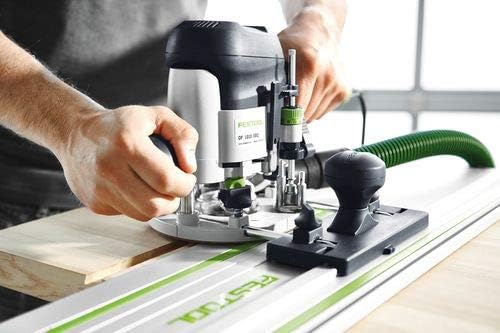
Figura 4.2: Demonstrates the router being used on a workpiece, showing the user's grip and control during operation.
- Oprirea routerului: Release the ON/OFF switch. Wait for the bit to come to a complete stop before lifting the router from the workpiece.
5. Întreținere
Regular maintenance ensures the longevity and optimal performance of your Festool router.
- curatenie: After each use, unplug the router and use a brush or compressed air to remove dust and debris from the motor vents, collet area, and base. Do not use solvents.
- Inspecția pensetei: Regularly inspect the collet and collet nut for wear or damage. Replace if necessary to ensure proper bit gripping.
- Inspecția cablului: Verificați cablul de alimentare pentru a depista eventuale tăieturi, uzuri sau deteriorări. Nu utilizați unealta dacă cablul este deteriorat.
- Depozitare: Store the router and its accessories in the Systainer case in a dry, secure location, away from direct sunlight and extreme temperatures.
- Serviciu: For any repairs or internal maintenance, contact an authorized Festool service center.
6. Depanare
This section addresses common issues you might encounter with your Festool OF 1010 EBQ Router.
| Problemă | Cauza posibila | Soluţie |
|---|---|---|
| Routerul nu pornește. | Fără alimentare; cablu deteriorat; întrerupător defect. | Verificați priza și cablul de alimentare. Dacă problema persistă, contactați serviciul de asistență. |
| Vibrații excesive. | Loose router bit; damaged bit; worn bearings. | Ensure bit is securely tightened. Replace damaged bit. Contact service for bearing issues. |
| Poor cut quality / burning wood. | Dull bit; incorrect speed; too fast feed rate. | Replace or sharpen bit. Adjust speed. Reduce feed rate. |
| Extracția prafului este ineficientă. | Hose clogged; dust bag full; improper connection. | Clear hose. Empty dust bag. Ensure secure hose connection. |
7. Specificatii tehnice
Detailed specifications for the Festool OF 1010 EBQ Router.
| Caietul de sarcini | Valoare |
|---|---|
| Marca | Festool |
| Numărul de model | 576201 |
| Consumul de energie | 1010 W |
| Viteza de mers în gol | 10,000 - 24,000 rpm |
| pensete | 6-8 mm |
| Milling Stroke | 55 mm |
| Milling Depth Fine Adjustment | 8 mm |
| Max. Average | 50 mm |
| Dust Extraction Connection | 27 mm |
| Greutate | 2.7 kg |
| Material | Metal |
| Sursa de alimentare | Electric cu fir |
| Viteza maximă de rotație | 24000 RPM |
8. Garanție și asistență
Festool offers comprehensive service and support for your product.

Figura 8.1: The Festool Service All-Inclusive program logo, signifying comprehensive customer support.
Festool Service All-Inclusive:
- Reparații gratuite timp de 36 luni: Enjoy free repairs for 36 months, including wear parts and labor.
- 36 Months Theft Protection: In case of theft, Festool will provide a new tool for a small excess fee.
- 10 Years Spare Parts Guarantee: Festool guarantees the availability of spare parts for at least 10 years after a product is discontinued.
- 15 Days Risk-Free Testing: Test your new Festool tool for 15 days without obligation.
For detailed terms and conditions, and to register your product, please visit the official Festool website or contact Festool customer support. Product registration is typically required within 30 days of purchase to activate the full warranty benefits.

Figura 8.2: An image detailing the benefits of the Festool All-Inclusive Guarantee, emphasizing peace of mind for users.