
1. Introducere
Thank you for choosing the Xtorm 15W Go Power Bank XG1021. This manual provides essential information for the safe and efficient operation, maintenance, and troubleshooting of your device. Please read this manual thoroughly before using the power bank and retain it for future reference.
2. Produs terminatview
The Xtorm 15W Go Power Bank XG1021 is a compact and portable external battery designed to charge your mobile devices on the go. Featuring a 10,000 mAh capacity and 15W USB-C output, it offers efficient power delivery.

Figure 2.1: The Xtorm 15W Go Power Bank XG1021 in Space Grey, showcasing designul său elegant și compact.
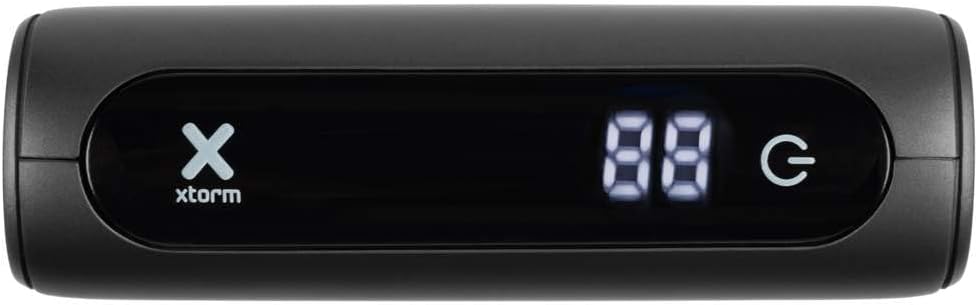
Figure 2.2: Front display of the power bank, indicating battery percentage and power status.
2.1. Compatibilitate universală
This power bank is designed for broad compatibility, capable of charging various devices including smartphones, tablets, and portable gaming consoles.

Figure 2.3: Illustration of the power bank's compatibility with different device types.
2.2. Design portabil
The Xtorm Go Power Bank is engineered for portability, making it an ideal travel companion. Its compact dimensions and light weight ensure it can be easily carried.

Figure 2.4: The power bank's compact size, suitable for travel.
3. Configurare
3.1. Despachetarea și inspecția inițială
Upon opening the package, ensure all components are present and undamaged. The box should contain the Xtorm 15W Go Power Bank, a USB-C cable, and this user manual.

Figure 3.1: Contents included in the Xtorm Power Bank Go package.
3.2. Încărcarea inițială a bateriei externe
Before first use, it is recommended to fully charge the Xtorm Go Power Bank. Connect the provided USB-C cable to the power bank's USB-C input port and the other end to a compatible USB wall charger (not included). The digital display will show the charging progress. Once 100% is displayed, the power bank is fully charged and ready for use.
4. Instrucțiuni de utilizare
4.1. Încărcarea dispozitivelor externe
- Conectați cablul de încărcare al dispozitivului la unul dintre porturile de ieșire ale power bank-ului (USB-A sau USB-C).
- Conectați celălalt capăt al cablului la dispozitiv.
- Acumulatorul extern va începe automat încărcarea dispozitivului. Afișajul digital va afișa procentul rămas al bateriei.tage de la banca de putere.
- Pentru a opri încărcarea, pur și simplu deconectați dispozitivul.
The 15W USB-C output allows for faster charging of compatible devices.

Figure 4.1: Fast charging an external device using the power bank.
4.2. Verificarea nivelului bateriei
The digital display on the front of the power bank indicates the current battery percentage. This display activates automatically when a device is connected or when the power bank is being charged.
5. Întreținere
- curatenie: Folosește o lavetă moale și uscată pentru a curăța acumulatorul extern. Evită utilizarea substanțelor chimice dure sau a materialelor abrazive.
- Depozitare: Depozitați bateria externă într-un loc răcoros și uscat, ferit de lumina directă a soarelui și de temperaturi extreme. Pentru depozitarea pe termen lung, se recomandă încărcarea bateriei externe la aproximativ 50-70% la fiecare trei luni pentru a menține starea bateriei.
- Îngrijirea bateriei: Do not expose the power bank to water or moisture. Avoid dropping or subjecting the device to strong impacts.
6. Depanare
- Bateria externă nu se încarcă: Ensure the USB-C cable is securely connected to both the power bank's input and the wall charger. Try a different cable or wall charger.
- Dispozitivul nu se încarcă de la bateria externă: Ensure the charging cable is securely connected to both the power bank's output and your device. Check if the power bank has sufficient charge. Try a different cable or output port.
- Încărcare lentă: Ensure you are using a compatible cable and that your device supports fast charging. The power bank's output may be limited by the connected device's input capabilities.
- Bateria externă se încălzește în timpul utilizării: It is normal for the power bank to become slightly warm during charging or discharging. If it becomes excessively hot, disconnect it immediately and contact support.
7. Specificații
Detailed technical specifications for the Xtorm 15W Go Power Bank XG1021:
| Caracteristică | Caietul de sarcini |
|---|---|
| Numele modelului | XG1021 |
| Marca | Xtorm |
| Capacitatea bateriei | 10,000 mAh (9800mAh / 36.2Wh Li-ion) |
| Tip conector | USB tip C |
| Intrare (USB-C) | 5 V = 3 A (15 W) |
| Ieșire (USB-C) | 5 V = 3 A (15 W) |
| Ieșire (USB-A) | 5V=3A |
| Ieșire totală | 15W |
| Compoziția bateriei | Litiu-ion |
| Caracteristica specială | Compact |
| Utilizare recomandată | Smartphone |
| Sursa de alimentare | Cablu electric |
| Culoare | Gri spațial |

Figure 7.1: Back of the power bank displaying printed specifications and regulatory marks.
8. Informații de siguranță
Pentru a asigura o funcționare în siguranță și a preveni deteriorarea dispozitivului sau vătămările corporale, vă rugăm să respectați următoarele instrucțiuni de siguranță:
- Do not expose the power bank to extreme temperatures (above 45°C or below -10°C) or direct sunlight.
- Nu expuneți bateria externă la apă, umezeală sau umiditate ridicată.
- Do not disassemble, modify, or attempt to repair the power bank yourself. This will void the warranty and may cause safety hazards.
- Evitați să scăpați sau să supună powerbank-ului la impacturi puternice.
- Păstrați bateria externă departe de materiale inflamabile și medii explozive.
- Folosiți doar cabluri și adaptoare de încărcare certificate.
- A nu se lăsa la îndemâna copiilor.

Figure 8.1: Internal safety mechanisms of the Xtorm Power Bank.
9. Garanție și asistență
Xtorm products are manufactured to high quality standards. For information regarding warranty terms and conditions, please refer to the official Xtorm website-ul web sau cardul de garanție inclus la achiziție.
For technical support, troubleshooting assistance, or general inquiries, please visit the Xtorm Support Helpdesk online or contact their customer service. You can also find more information and updates on Xtorm's official social media channels.
- Xtorm Support Helpdesk: www.xtorm.eu/support
- Social Media: Caută "Xtorm" on major platforms.