
1. Introducere
This manual provides detailed instructions for the safe and effective installation, operation, and maintenance of your Invision MX450 Monitor Arm. Please read this manual thoroughly before installation and retain it for future reference. The Invision MX450 is designed to provide an ergonomic and flexible mounting solution for monitors ranging from 24 to 49 inches, supporting weights from 2kg to 15kg.

Image 1.1: The Invision MX450 Monitor Arm supporting a display.
2. Informații de siguranță
Always ensure the monitor arm is securely fastened to the desk and the monitor is correctly attached to the VESA plate. Do not exceed the maximum weight capacity of 15kg. Improper installation or use may result in equipment damage or personal injury. Keep children and pets away from the installation area. Avoid placing fingers or hands near moving parts during adjustment.
3. Conținutul pachetului
Verificați dacă toate componentele sunt prezente înainte de a începe instalarea:
- Invision MX450 Monitor Arm Assembly
- Hardware Kit (screws, washers, spacers for VESA mounting)
- Birou Clamp componente
- Grommet Mount components
- Manual de instalare (acest document)
4. Configurare și instalare
The Invision MX450 offers two primary installation methods: C-clamp for desk edges and grommet mount for through-desk installation.
4.1. Verificare compatibilitate
- Monitor Size & Weight: Compatible with 24" to 49" screens, weighing between 2kg and 15kg.
- Standard VESA: Supports VESA patterns 75mm x 75mm and 100mm x 100mm. Measure your monitor's bolt hole pattern (horizontal then vertical) to confirm compatibility.
- Curved Monitor Note: For 49-inch curved screens, compatibility is limited to models with a 3000R radius rating or above. Deeply curved screens (e.g., Samsung G9 49") are not compatible due to potential leverage issues on the tilt mechanism.
- Grosimea biroului: Pentru C-clamp, desk thickness must be between 10mm and 90mm. For grommet mount, desk thickness must be between 20mm and 90mm.

Image 4.1: Technical specifications and VESA measurement guide.
4.2. Opțiuni de montare
Choose the appropriate mounting method for your desk:
- C-Clamp Instalare: Atașați C-clamp base to the edge of your desk. Ensure it is tightened securely to prevent movement.
- Instalare montare cu ochiuri: If your desk has a pre-drilled hole, use the grommet components to secure the arm through the desk. This method provides enhanced stability.
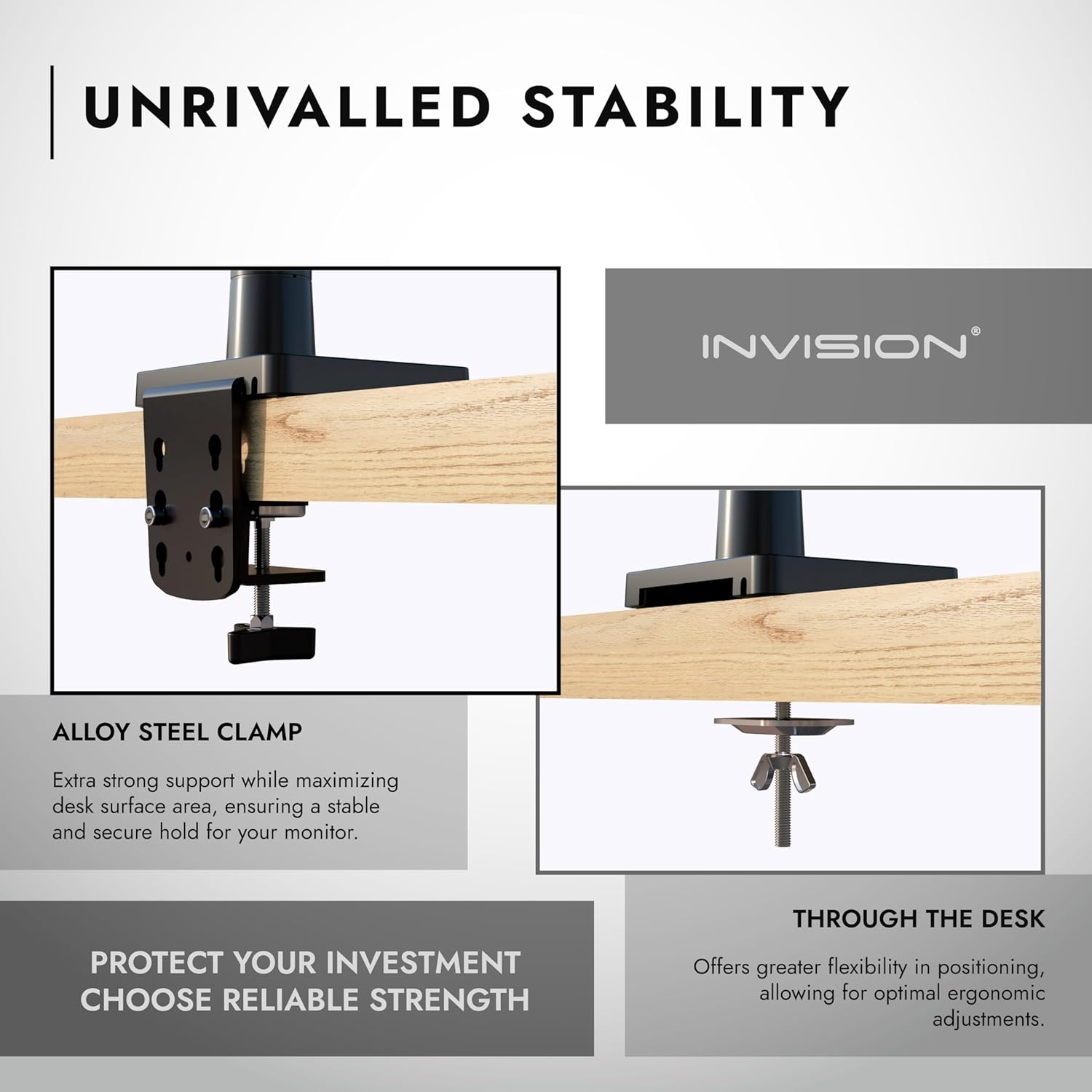
Image 4.2: C-clamp and Grommet mounting methods.
4.3. Atașarea monitorului
- Carefully attach the VESA plate to the back of your monitor using the provided screws. Ensure the screws are tightened firmly but do not overtighten.
- Slide the monitor (with VESA plate attached) onto the arm's mounting head until it clicks into place. Secure with any additional locking mechanisms if present.
5. Instrucțiuni de utilizare
The Invision MX450 features a gas spring mechanism for smooth and effortless adjustments, allowing you to optimize your viewexperiență.
5.1. Reglarea poziției monitorului
- Reglarea înălțimii: Gently push or pull the monitor up or down to achieve the desired height. The gas spring will hold it in position.
- Reach/Extension: Extend or retract the arm to bring the monitor closer or further away from you. The maximum reach is 650mm (25.6 inches).
- Înclinare: Tilt the monitor +85° upwards or -30° downwards to reduce glare or adjust for standing/sitting positions.
- pivotare: Swivel the monitor 180° left or right at the VESA plate connection.
- Rotaţie: Rotate the screen 360° from landscape to portrait orientation.

Image 5.1: Ergonomic monitor positioning with the MX450.

Image 5.2: Maximum reach and height capabilities.
5.2. Gestionarea cablurilor
The MX450 includes integrated cable management channels on both the lower and upper arms. Open the removable panels, route your cables through them, and close the panels to maintain a tidy and organized workspace.
6. Întreținere
The Invision MX450 is designed for durability and minimal maintenance. Regular checks can ensure continued optimal performance.
- curatenie: Wipe the arm with a soft, damp Evitați utilizarea de produse de curățare abrazive sau solvenți.
- Verificarea conexiunii: Periodically check all screws and connections (desk clamp/grommet, VESA plate) to ensure they remain tight and secure.
- Reglarea arcului cu gaz: If the monitor sags or is difficult to adjust, the gas spring tension may need fine-tuning. Refer to the specific adjustment mechanism on your arm (usually a screw on the arm joint) and adjust according to your monitor's weight.
7. Depanare
- Monitorul se lasă sau nu rămâne treaz: The gas spring tension may be too low for your monitor's weight. Increase the tension using the adjustment screw on the arm.
- Monitorul este dificil de mișcat: The gas spring tension may be too high. Decrease the tension using the adjustment screw.
- Brațul se simte instabil: Asigurați-vă că biroul clamp or grommet mount is securely tightened to the desk. Verify that the monitor is correctly attached to the VESA plate.
- Monitor Not VESA Compatible: If your monitor lacks VESA mounting holes or has an incompatible pattern, an Invision NV100 Non-VESA Monitor Adapter Mount Kit (ASIN B076QB3VRD) may be required.
8. Specificații
| Caracteristică | Caietul de sarcini |
|---|---|
| Model | MX450 |
| Dimensiuni de ecran compatibile | 24" - 49" (Note: 49" curved screens require 3000R radius or above) |
| Capacitate de încărcare | 2 kg până la 15 kg |
| Compatibilitate VESA | 75 mm x 75 mm, 100 mm x 100 mm |
| Unghi de înclinare verticală | +85° / -30° |
| Upright Maximum Elevation | 525 mm (20.7") |
| Maximum Reach/Extension | 650 mm (25.6") |
| Minimum Reach/Extension | 185 mm (7.3") |
| Screen Face Plate Rotation | 360° (Landscape to Portrait) |
| Screen Face Plate Swivel | 180° |
| Elbow Rotation | 360° |
| Base Swivel/Rotation | 360° |
| Grosimea biroului (C-Cl)amp) | 10 mm - 90 mm |
| Grosimea biroului (inele de fixare) | 20 mm - 90 mm |
| Material | Alloy Steel, Aluminium Alloy, SPCC |
| Culoare | Negru |

Image 8.1: Invision MX450 construction and performance comparison.

Image 8.2: Key features of the Invision MX450 design.
9. Informații despre garanție
The Invision MX450 Monitor Arm comes with a 2 an garanție on all parts. This warranty covers manufacturing defects and material faults under normal use. Please retain your proof of purchase for warranty claims.
10. Asistență pentru clienți
For any questions, installation assistance, or troubleshooting not covered in this manual, please contact Invision customer support. Our team is available to provide assistance and ensure a trouble-free experience.
Refer to your product packaging or the Invision website pentru date de contact specifice.