
Sinopé TH1124WF
Manual de utilizare termostat inteligent Wi-Fi Sinopé TH1124WF
Model: TH1124WF | Brand: Sinopé
Introducere
The Sinopé TH1124WF Smart Wi-Fi Thermostat is designed for precise control of electric baseboard heaters, convectors, fan-forced convectors, and radiant ceiling heating systems. This thermostat integrates seamlessly with popular smart home platforms such as Apple HomeKit, Amazon Alexa, Google Home, and Neviweb, offering enhanced comfort and energy management through its advanced features like scheduling, geofencing, and energy reporting. This manual provides detailed instructions for installation, operation, and maintenance to ensure optimal performance and longevity of your device.

Image: The Sinopé TH1124WF thermostat mounted on a wall, demonstrating its sleek design and integration into a modern living space with a baseboard heater.
Informații de siguranță
Please read all instructions carefully before installing and operating the thermostat. Failure to follow these instructions could result in fire, electric shock, serious injury, or property damage.
- AVERTIZARE: Înalt Voltage. Disconnect power at the circuit breaker before servicing.
- Instalarea trebuie efectuată de către un electrician calificat, în conformitate cu codurile electrice locale și naționale.
- Do not install if the thermostat is damaged.
- Ensure the thermostat is compatible with your heating system (electric baseboard, convectors, fan-forced convectors, radiant ceiling heating). Not compatible with HVAC systems or heating floors.
- Keep the thermostat away from water and moisture.
Produs terminatview
The TH1124WF thermostat features a clear LED display, intuitive controls, and robust connectivity options. It is designed for universal installation, compatible with both 2-wire and 4-wire connections.

Imagine: față view of the TH1124WF thermostat, highlighting its digital display with time, outdoor temperature, and indoor temperature, along with two control buttons.
Caracteristici cheie:
- Conectivitate Wi-Fi: Connects directly to your home Wi-Fi network (2.4 GHz) without a separate hub.
- Integrare Smart Home: Works with Apple HomeKit, Amazon Alexa, Google Home, and Neviweb.
- Control precis al temperaturii: Utilizes triac switching for unequaled temperature accuracy.
- Programări programabile: Create up to 8 periods per day for customized heating.
- Geofencing: Automatically adjusts heating based on your presence.
- Rapoarte de energie: Monitor your energy consumption and savings in real-time via the Neviweb aplicația.
- Afişa: Clear LED display showing time, indoor temperature, and outdoor temperature.
Configurare și instalare
Follow these steps carefully to install your Sinopé TH1124WF thermostat.
1. Preinstalare
- Opriți alimentarea: Locate your electrical panel and turn off the circuit breaker for the heating system you are working on. Verify the power is off using a voltage tester.
- Scoateți termostatul vechi: Carefully remove your existing thermostat from the wall.
- Identificați firele: Note the number of wires (2 or 4) and their connections. The TH1124WF is compatible with both.
2. Instrucțiuni de cablare
The TH1124WF thermostat has two non-polarized wires for connection. Use the included wire nuts to secure connections.

Imagine: Spate view of the TH1124WF thermostat, illustrating the wiring terminals and caution labels for high voltage. Ensure power is disconnected before handling.
- Conexiune cu 2 fire: Connect one thermostat wire to each of the two wires from your electrical box.
- Conexiune cu 4 fire: Connect one thermostat wire to the two wires coming from the power source (line) and the other thermostat wire to the two wires going to the heater (load).
Ensure all wire nuts are screwed on as tightly as possible to prevent loose connections and overheating.
3. Montare
- Carefully push the connected wires back into the electrical box.
- Secure the thermostat to the electrical box using the provided mounting screws.
- Ensure the thermostat is flush with the wall.
4. Initial Power-Up and Wi-Fi Connection
- Restore power at the circuit breaker. The thermostat display should light up.
- Descărcați Neviweb app from your device's app store (iOS or Android).
- Follow the in-app instructions to create an account and add your new thermostat. You will need your Wi-Fi network name (SSID) and password. The thermostat requires a 2.4 GHz Wi-Fi network.
- Once connected, the thermostat will display the current time and temperature.
5. Integrarea platformei Smart Home
The TH1124WF is compatible with multiple smart home ecosystems. Features may vary between platforms.

Image: Compatible platforms and voice assistants, including Neviweb, SmartThings, Apple HomeKit, Amazon Alexa, and Google Assistant.
- Apple HomeKit: Open the Home app on your iOS device and scan the HomeKit code on the thermostat or its packaging.
- Amazon Alexa / Google Home: Enable the Sinopé skill/action in the Alexa or Google Home app and link your Neviweb cont.
- SmartThings: Add the Sinopé device through the SmartThings app and follow the pairing instructions.
Instrucțiuni de operare
Learn how to use your TH1124WF thermostat for optimal comfort and energy efficiency.
1. Basic Temperature Control
Use the up and down buttons on the thermostat to adjust the set temperature. The display will show the current setpoint.

Imagine: Detaliată view of the thermostat's LED display, indicating current time, outdoor temperature, and the set indoor temperature.
2. Neviweb Caracteristicile aplicației
Neviiweb app unlocks the full potential of your thermostat.
- Programe: Create personalized heating schedules with up to 8 periods per day to match your routine.
- Geofencing: Set up geofencing to automatically adjust the temperature when you leave or return home, saving energy when you're away.
- Rapoarte de energie: View detailed energy consumption reports (24 hours, 30 days, 24 months) to track your usage and identify savings opportunities. You can input your electricity cost to see spending per radiator.
- Telecomanda: Adjust settings and monitor your thermostat from anywhere using the app.
- Configurare afișaj: Customize what information is shown on the thermostat display and enable/disable the backlight.

Image: A map displaying a geofencing zone, demonstrating how the thermostat can adjust settings based on your proximity to home.

Image: Screenshot from the Neviweb app displaying an energy consumption graph, allowing users to track their heating costs over time.
3. Control vocal
Once integrated with Amazon Alexa or Google Home, you can control your thermostat using voice commands. Examples include: "Alexa, set living room thermostat to 72 degrees" or "Hey Google, what's the temperature in the bedroom?"
Întreţinere
The Sinopé TH1124WF thermostat requires minimal maintenance.
- curatenie: Ștergeți ușor suprafața termostatului cu o lavetă moale șiamp pânză. Nu utilizați agenți de curățare abrazivi sau solvenți.
- Actualizări firmware: Ensure your thermostat's firmware is up-to-date through the Neviweb app to benefit from the latest features and improvements.
Depanare
If you encounter issues with your thermostat, refer to the following common problems and solutions.
| Problemă | Cauza posibila | Soluţie |
|---|---|---|
| Afișajul termostatului este gol. | Nu există curent la termostat. | Check the circuit breaker and ensure it is ON. Verify wiring connections. |
| Nu se poate conecta la Wi-Fi. | Incorrect Wi-Fi password, 5 GHz network, or weak signal. | Ensure you are connecting to a 2.4 GHz network. Double-check your Wi-Fi password. Move the thermostat closer to the router or use a Wi-Fi extender. |
| Thermostat not heating. | Set temperature is below ambient, or wiring issue. | Increase the set temperature. Verify wiring connections are secure. Ensure the thermostat is compatible with your heating system. |
| Citire inexactă a temperaturii. | Thermostat location or external factors. | Ensure the thermostat is not exposed to direct sunlight, drafts, or heat sources. Allow time for the sensor to stabilize. |
| Humming sound from baseboard. | Normal operation with triac switching. | This is often a normal characteristic of triac switching thermostats with certain baseboard heaters and is not indicative of a fault. |
For further assistance, please contact Sinopé customer support.
Specificații
Detailed technical specifications for the Sinopé TH1124WF Smart Wi-Fi Thermostat.
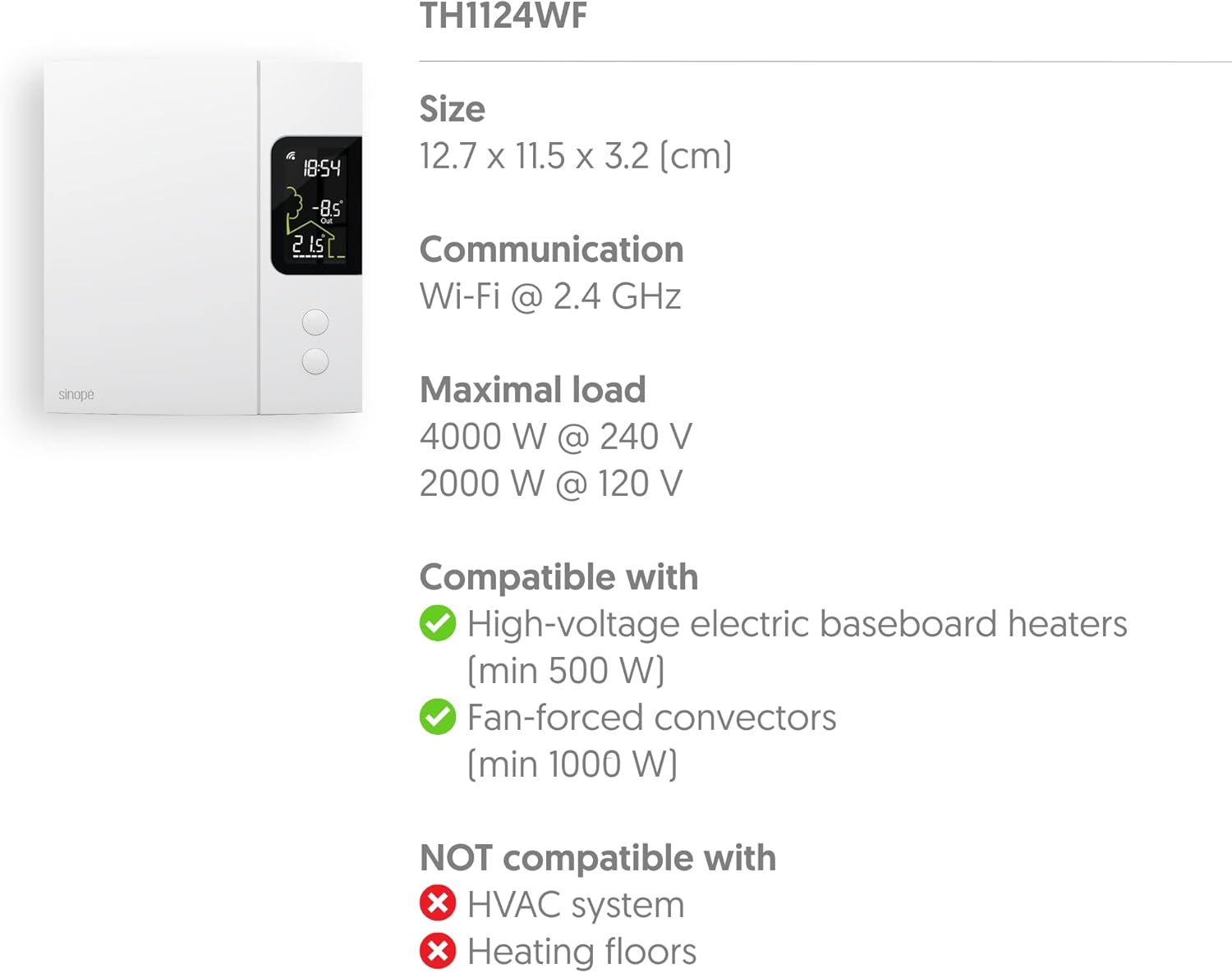
Image: Technical specifications diagram for the TH1124WF, detailing its physical dimensions, Wi-Fi communication, maximum load capacity, and heating system compatibility.
| Caracteristică | Detaliu |
|---|---|
| Numărul de model | TH1124WF |
| Dimensiunile produsului | 3.2 cm adâncime x 11.5 cm lățime x 12.7 cm înălțime |
| Voltage | 120/208/240 VAC, 60 Hz |
| Sarcina maxima | 4000 W @ 240 V (16.7 A) / 2000 W @ 120 V |
| Compatible Heating Types | Electric Baseboard Heaters (min 500 W), Convectors, Fan-forced Convectors (min 1000 W), Radiant Ceiling Heating |
| Incompatible Heating Types | HVAC systems, Heating floors |
| Tehnologia de conectivitate | Wi-Fi (2.4 GHz) |
| Tip controler | Neviweb, Apple HomeKit, Google Assistant, Amazon Alexa, SmartThings |
| Tip de afișare | LED with Backlight |
| Sursa de alimentare | Electric cu fir |
| Material | Plastic |
| Culoare | Alb |
| Greutatea articolului | 14.1 uncii |
| UPC | 667563001655 |
Videoclip oficial al produsului
Watch this official video from Sinopé Technologies for an overview of the Smart Wi-Fi baseboard thermostat.
Video: An official product video titled "New Wi-Fi baseboard thermostat by Sinope" showcasing the features and design of the Sinopé Smart Wi-Fi Thermostat TH1124WF.
Garanție și suport
Sinopé Technologies stands behind the quality of its products. For warranty information, technical support, or service inquiries, please refer to the official Sinopé website-ul lor web sau contactați direct serviciul lor de asistență pentru clienți. Păstrați dovada achiziției pentru solicitările de garanție.
Website: www.sinopetech.com
Ask a question about this manual
Ask about setup, troubleshooting, compatibility, parts, safety, or missing instructions. Manuals+ will review the question and use this page’s manual context to help answer it.