
Introducere
This manual provides comprehensive instructions for the installation, operation, maintenance, and troubleshooting of your Creative Sound BlasterX AE-5 Plus Pure Edition PCI-e Gaming Sound Card and DAC. This high-performance sound card is designed to deliver superior audio fidelity for gaming, music, and movies, featuring advanced audio processing, a discrete headphone amplifier, and customizable RGB lighting.

Image: The Creative Sound BlasterX AE-5 Plus Pure Edition sound card, showcasing designul său și iluminarea RGB.
Informații importante privind siguranța
- Deconectați întotdeauna alimentarea de la computer înainte de a instala sau de a scoate orice componente interne.
- Handle the sound card by its edges to avoid touching sensitive components.
- Asigurați o împământare corespunzătoare pentru a preveni deteriorarea cauzată de descărcări electrostatice (ESD).
- Nu expuneți dispozitivul la umezeală sau la temperaturi extreme.
- A nu se lăsa la îndemâna copiilor.
Conținutul pachetului
Verificați dacă toate articolele sunt prezente în colet:
- Creative Sound BlasterX AE-5 Plus Pure Edition Sound Card
- Four RGB LED Strips
- Ghid de pornire rapidă (nu este inclus în acest manual digital)
Caracteristicile produsului
- Suport Dolby Digital și DTS: Enjoy enhanced audio delivery to external devices with Dolby Digital Live and DTS Encoding. Supports 5.1 discrete and 7.1 virtual surround sound, along with Sound Blaster's Surround Virtualization technology.
- Iluminare RGB personalizabilă: The AE-5 Plus Pure Edition features customizable RGB LEDs on its body and includes four RGB LED strips. Control 16.8 million colors and various patterns via the Sound Blaster Command software.
- Xamp Discrete Headphone Bi-amp: A custom-designed discrete headphone amplifier that bi-amplifies each earcup individually. It offers 1Ω output impedance and can drive studio-grade headphones up to 600Ω, including high-end planar-magnetic headphones.
- SABRE32 Ultra-class PCI-e DAC: Delivers high-resolution audio playback up to 32-bit / 384 kHz with a 122 dB DNR, ensuring ultra-low distortion and jitter for pristine audio quality.
- Industry-Leading Audio Processing: Utilizes Sound Blaster's audio processing and enhancement technologies, accessible through the Sound Blaster Command software. Features customizable audio processing for clearer vocals, accurate audio cues, and bass boost.
Produs terminatview Video
Video: Un oficial s-a terminatview of the Creative Sound BlasterX AE-5 Plus PCIe Gaming Sound Card, highlighting its key features and capabilities.
Înființat
1. Instalare hardware
- Oprire: Opriți complet computerul și deconectați cablul de alimentare.
- Caz deschis: Deschideți carcasa computerului pentru a accesa placa de bază.
- Localizați slotul PCI-e: Găsiți un slot PCI Express x1 disponibil pe placa de bază.
- Install Sound Card: Carefully insert the Sound BlasterX AE-5 Plus Pure Edition into the PCI-e slot, ensuring it is seated firmly. Secure it with the case screw.
- Connect RGB Strips (Optional): If using the included RGB LED strips, connect them to the dedicated RGB header on the sound card. Position the strips within your PC case as desired.
- Închideți cazul: Închideți carcasa computerului și reconectați cablul de alimentare.
2. Instalare software
- Pornire: Porniți computerul.
- Descărcați driverele: Visit the official Creative website and download the latest Sound Blaster Command software and drivers for the AE-5 Plus Pure Edition.
- Instalați software-ul: Run the downloaded installer and follow the on-screen instructions to complete the installation. A system restart may be required.
- Configure Audio: Once installed, launch the Sound Blaster Command application to configure your audio settings, including speaker/headphone output, surround sound, and other enhancements.
Instrucțiuni de operare
Sound Blaster Command Software
The Sound Blaster Command software is your central hub for controlling all features of the AE-5 Plus Pure Edition. It allows for detailed customization of audio profiles, equalizer settings, and lighting effects.

Image: The Sound Blaster Command software interface, showing various audio and lighting customization options.
Configurare ieșire audio
- Speaker/Headphone Switching: Use the software to switch between speaker and headphone outputs. The card features a dedicated Xamp căști amplifier for optimal headphone performance.
- Sunet ambiental: Enable Dolby Digital Live or DTS Encoding for external audio devices. Configure 5.1 discrete or 7.1 virtual surround sound for immersive audio experiences.
- Mod direct: For the purest audio playback, activate Direct Mode. This bypasses all audio processing for unadulterated 32-bit/384kHz playback. Note that some surround features may be unavailable in this mode.
Xamp Căști discrete Ampmai în viață
Xamp amplifier provides clean, powerful audio to each earcup of your headphones independently. This ensures precise audio reproduction and compatibility with a wide range of headphones, from 16Ω to 600Ω.

Image: A diagram showing how the Xamp discrete headphone bi-amp provides separate amplification for left and right headphone channels.
Personalizare iluminare RGB
Utilize the Sound Blaster Command software to personalize the RGB lighting on your sound card and connected LED strips. Choose from 16.8 million colors and various dynamic lighting effects to match your system's aesthetic.
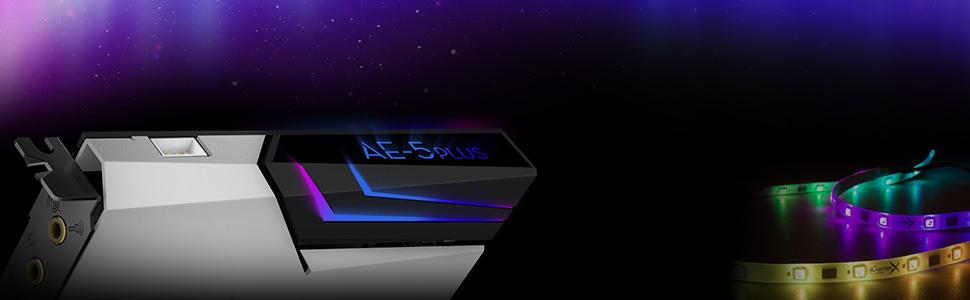
Image: The Sound BlasterX AE-5 Plus Pure Edition sound card with its integrated RGB lighting and additional RGB LED strips.
Scout Mode
Scout Mode is a feature designed for competitive gaming. When activated, it enhances important in-game audio cues such as footsteps and weapon switching sounds, allowing you to detect opponents more easily.

Image: A visual representation of Scout Mode in action, emphasizing enhanced audio cues for tactical advantage.
Crystal Voice
Crystal Voice technology provides clear voice communication by reducing background noise and enhancing vocal clarity during online gaming or communication applications.
Întreţinere
- curatenie: Periodically clean the sound card and surrounding areas inside your PC case with compressed air to remove dust buildup. Ensure the computer is powered off and unplugged before cleaning.
- Actualizări de software: Regularly check the Creative website for updated drivers and Sound Blaster Command software to ensure optimal performance and access to new features.
- Conditii de mediu: Operate the sound card within recommended temperature and humidity ranges to prolong its lifespan.
Depanare
| Problemă | Soluție posibilă |
|---|---|
| Fără ieșire de sunet |
|
| Iluminarea RGB nu funcționează |
|
| Audio distortion or crackling |
|
Specificații
| Caracteristică | Detaliu |
|---|---|
| Numărul de model | SB1740 |
| Procesor audio | Sound Core3D |
| DAC | SABRE32 Ultra-class PCI-e DAC |
| Rezoluție de redare | Până la 32 de biți / 384 kHz |
| Raport semnal-zgomot (SNR) | 122 dB |
| Căști Ampmai în viață | Xamp Discrete Headphone Bi-amp (1Ω output impedance, supports 16-600Ω headphones) |
| Suport surround | Dolby Digital Live, DTS Encoding, 5.1 Discrete, 7.1 Virtual |
| Interfață | PCI Express x1 |
| Iluminare RGB | Aurora Reactive Lighting System (16.8 million colors), includes 4 RGB LED strips |
| Compatibilitatea sistemelor de operare | Windows 7, Windows 8 (and likely newer Windows versions with updated drivers) |
| Dimensiuni (Lxlxh) | 5.71 x 0.79 x 5.04 inci |
| Greutate | 1.21 lire sterline |
Informații despre garanție
Creative products typically come with a limited hardware warranty. For specific warranty terms and conditions, please refer to the warranty card included with your product or visit the official Creative support website. Proof of purchase is generally required for warranty claims.
Sprijin
For further assistance, technical support, or to download the latest drivers and software, please visit the official Creative support website:
You may also find helpful resources and community forums on the Creative website-ul.