
1. Introducere
Thank you for choosing the SASWELL SASWG-04-RF-WIFI(TY) Smart TUYA Wi-Fi Gateway. This manual provides detailed instructions for the installation, operation, and maintenance of your new gateway. Please read this manual thoroughly before use to ensure proper functionality and to maximize the benefits of your smart home system. Keep this manual for future reference.
2. Produs terminatview
The SASWELL SASWG-04-RF-WIFI(TY) is a smart Wi-Fi gateway designed to connect your compatible SASWELL and Tuya-integrated RF devices to your home Wi-Fi network, enabling remote control and smart automation via the Tuya app. It acts as a central hub for communication between your smart devices and the internet.

Figura 2.1: Faţă view of the SASWELL SASWG-04-RF-WIFI(TY) Smart TUYA Wi-Fi Gateway. The gateway is white with a rectangular shape and perforated sides for ventilation. The front panel features three indicator lights for AP/WiFi, RF, and Power, along with the SASWELL logo.

Figura 2.2: Dimensions of the SASWELL SASWG-04-RF-WIFI(TY) Smart TUYA Wi-Fi Gateway. The gateway measures approximately 125mm in width, 80mm in height, and 26mm in depth.
Indicatoare luminoase:
- AP/WiFi Indicator: Shows the status of the Wi-Fi connection and Access Point mode.
- Indicator RF: Indicates the status of the Radio Frequency communication with connected devices.
- Indicator de alimentare: Se aprinde când dispozitivul este pornit.
3. Caracteristici cheie
- Seamless integration with Tuya WiFi products.
- Supports connection with up to ten SEA801-DF1 devices.
- Operates on a WiFi frequency of 2.412 GHz-2.484 GHz.
- Powered by a DC 5~12V 1A connection.
- Enables remote control and scheduling of connected devices via the Tuya app.
4. Compatibilitate
This gateway is designed to work exclusively with Tuya WiFi integrated products. Specifically, it is compatible with the SASWELL SEA801-DF1 thermostat. Please ensure that any devices you intend to connect are compatible with the Tuya platform and the gateway's RF communication protocol.

Figura 4.1: The SASWELL Gateway (left) shown in conjunction with the SEA801-DF1 thermostat (right). The image indicates that the gateway must be used with the SEA801-DF1, which is sold separately.
5. Ghid de instalare
5.1 Conținutul pachetului
Before proceeding with the setup, please verify that your package contains the following items:
- SASWELL SASWG-04-RF-WIFI(TY) Smart TUYA Wi-Fi Gateway
- Power Adapter (UK standard)
- Manual de utilizare (acest document)
5.2 Conectarea inițială
- Pornire: Connect the provided power adapter to the gateway's power input port and then plug it into a standard electrical outlet. The Power indicator light should illuminate.
- Conexiune retea: Ensure your Wi-Fi router is powered on and broadcasting a 2.4GHz network. The gateway will automatically attempt to connect to a configured network or enter pairing mode.
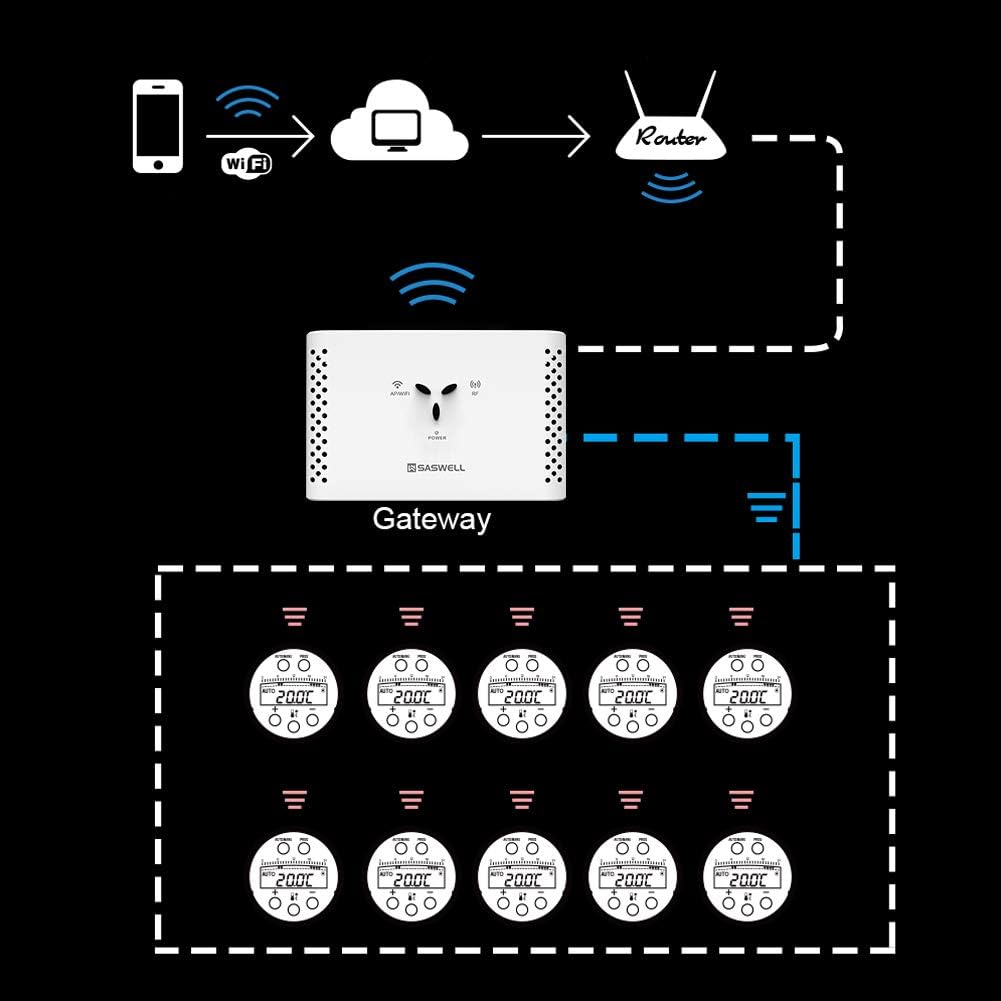
Figura 5.1: Network connection diagram illustrating how the gateway connects to your home network. A smartphone connects to the cloud via Wi-Fi and a router, which then communicates with the gateway. The gateway subsequently controls up to ten connected devices.
5.3 Pairing with Tuya App
To control your gateway and connected devices, you will need the Tuya Smart or Smart Life app (available on iOS and Android app stores).
- Descărcați aplicația: Descărcați și instalați aplicația Tuya Smart sau Smart Life pe smartphone-ul dvs.
- Înregistrare/Autentificare: Deschide aplicația și înregistrează un cont nou sau conectează-te cu unul existent.
- Adăugați dispozitiv: Atingeți pictograma „+” din colțul din dreapta sus al aplicației pentru a adăuga un dispozitiv nou.
- Selectați tipul dispozitivului: Choose 'Gateway' or 'Other' and follow the on-screen instructions to select your specific gateway model.
- Introduceți detaliile Wi-Fi: When prompted, enter your 2.4GHz Wi-Fi network name and password.
- Confirmați modul de asociere: Ensure the gateway's AP/WiFi indicator is blinking rapidly (or as indicated by the app for pairing mode).
- Împerechere completă: Follow the remaining steps in the app to complete the pairing process. Once successful, you can add compatible RF devices (like the SEA801-DF1) to the gateway within the app.
6. Instrucțiuni de utilizare
Once the gateway is successfully paired with the Tuya app and your compatible devices are added, you can begin controlling them remotely.
- Telecomanda: Use the Tuya app to adjust settings, schedules, and modes for your connected thermostats or other RF devices from anywhere with an internet connection.
- Automatizare: Create smart scenes and automations within the Tuya app to have your devices respond to specific conditions (e.g., turn on heating when temperature drops).
- Managementul dispozitivului: Aplicația vă permite view the status of all connected devices, add new ones, or remove existing ones.

Figura 6.1: Illustration demonstrating the capability of one SASWELL gateway to control up to ten individual valve devices, such as smart radiator thermostats, within a home environment.
7. Întreținere
To ensure the longevity and optimal performance of your SASWELL Wi-Fi Gateway, follow these simple maintenance guidelines:
- curatenie: Ștergeți ușor dispozitivul cu o lavetă moale și uscată. Nu utilizați agenți de curățare lichizi sau materiale abrazive.
- Plasare: Place the gateway in a dry, well-ventilated area, away from direct sunlight, heat sources, and excessive moisture. Avoid placing it near large metal objects that could interfere with wireless signals.
- Actualizări firmware: Regularly check the Tuya app for any available firmware updates for the gateway. Keeping the firmware updated ensures the best performance and security.
- Alimentare electrică: Folosiți întotdeauna adaptorul de alimentare original furnizat împreună cu dispozitivul.
8. Depanare
If you encounter issues with your SASWELL Wi-Fi Gateway, refer to the following common problems and solutions:
- Gateway not powering on:
- Ensure the power adapter is securely connected to both the gateway and a working electrical outlet.
- Verificați dacă priza funcționează conectând un alt dispozitiv.
- Gateway-ul nu se conectează la Wi-Fi:
- Confirm your Wi-Fi network is 2.4GHz. The gateway does not support 5GHz networks.
- Check that your Wi-Fi password is entered correctly in the Tuya app.
- Asigurați-vă că gateway-ul se află în raza de acțiune a routerului Wi-Fi.
- Restart your Wi-Fi router and the gateway, then attempt pairing again.
- Connected devices not responding:
- Verify the gateway is online and connected to Wi-Fi (check AP/WiFi indicator).
- Ensure the connected device (e.g., SEA801-DF1) is powered on and within range of the gateway.
- Check the device's battery level if applicable.
- Re-pair the device with the gateway if necessary.
- App cannot find the gateway during pairing:
- Make sure the gateway is in pairing mode (AP/WiFi indicator blinking as per app instructions).
- Temporarily disable 5GHz Wi-Fi on your router during pairing if you have a dual-band router.
- Ensure your smartphone is connected to the same 2.4GHz Wi-Fi network you are trying to connect the gateway to.
9. Specificatii tehnice
| Caietul de sarcini | Detaliu |
|---|---|
| Model | SASWG-04-RF-WIFI(TY) |
| Producător | SASWELL |
| Dimensiuni (L x l x H) | 125 x 80 x 26 mm (4.92 x 3.15 x 1.02 inchi) |
| Greutate | 240 de grame |
| Culoare | Alb |
| Sursa de alimentare | DC 5~12V 1A (via power adapter) |
| Frecvența Wi-Fi | 2.412 GHz - 2.484 GHz |
| Compatibilitate | Tuya WiFi integrated products, specifically SASWELL SEA801-DF1 |
| Max dispozitive conectate | Up to 10 SEA801-DF1 thermostats |
| Bateriile necesare | Nu |
10. Garanție și asistență
SASWELL products are manufactured to high-quality standards. For information regarding warranty coverage, please refer to the warranty card included with your product or visit the official SASWELL website. If you require technical assistance or have questions not covered in this manual, please contact SASWELL customer support through their official channels. Please have your product model number and purchase details ready when contacting support.