
1. Introducere
This manual provides instructions for the operation and maintenance of your Crosley CR612B-AB Corsair Tabletop AM/FM Bluetooth Radio with CD Player and Dual Alarm Clock. Please read this manual thoroughly before using the product to ensure proper function and to prevent damage.

Figure 1: Crosley CR612B-AB Corsair Tabletop AM/FM Bluetooth Radio with CD Player and Dual Alarm Clock.
2. Ce se află în cutie
Verificați dacă toate articolele enumerate mai jos sunt incluse în pachetul dumneavoastră:
- Crosley CR612B Corsair Radio Unit
- Adaptor de curent alternativ
- Manual de instructiuni
3. Produs terminatview
Familiarize yourself with the various components and controls of your Corsair radio.

Figure 2: Front Panel Controls and Features. This image highlights the headphone jack, alarm clock buttons (Alarm 1, Alarm 2), and the analog tuning dial.
- Buton de volum: Reglează nivelul de ieșire audio.
- Buton de acordare: Selectează frecvențele radio AM/FM.
- Butonul de mod: Switches between AM/FM radio, CD player, and Bluetooth modes.
- Buton Sleep: Activează funcția temporizatorului de somn.
- Butoane Alarmă 1 / Alarmă 2: Set and activate dual alarms.
- Butonul de timp: Used for setting the clock.
- AM/FM Button: Comută între benzile radio AM și FM.
- CD Player Controls: Play/Pause, Stop, Display, CD Mode, Skip/Search (Forward/Backward), Program.
- Jack pentru căști: Pentru ascultare privată.
- Buton de alimentare: Pornește sau oprește unitatea.
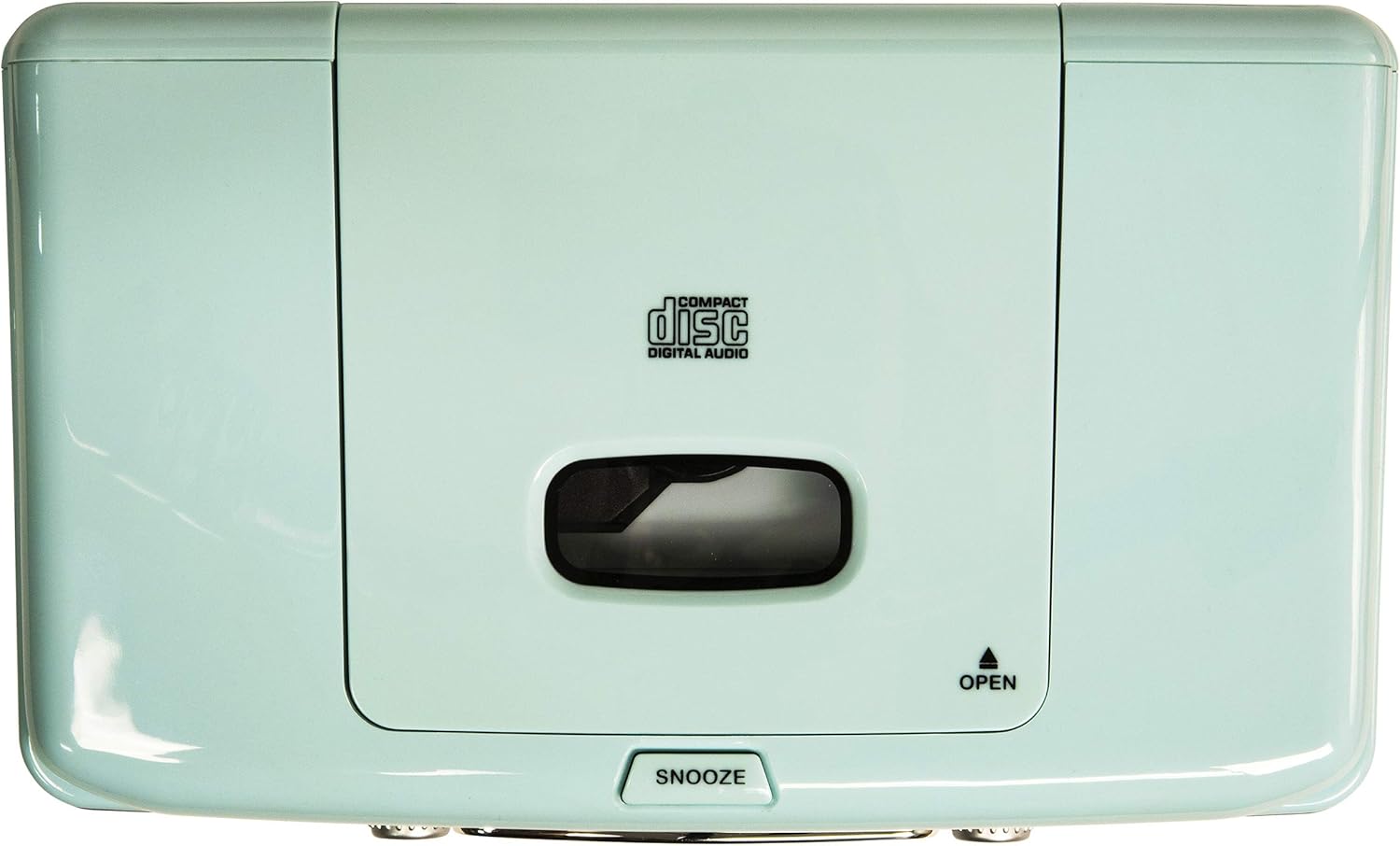
Figure 3: Top Panel. This image shows the top-loading CD player compartment and the Snooze button.

Figure 4: Rear Panel. This image displays the AC power input and the battery compartment for backup power.
4. Configurare
4.1 Conexiune la alimentare
- Asigurați-vă că unitatea este așezată pe o suprafață stabilă și plană.
- Conectați adaptorul de alimentare CA la mufa DC IN din spatele unității.
- Conectați adaptorul de curent alternativ la o priză standard de perete.
4.2 Backup baterie (opțional)
For alarm clock backup during power outages, install one 9V battery (not included) into the battery compartment on the rear of the unit. This will maintain time and alarm settings in case of a power interruption.
4.3 Configurarea antenei
The unit has a built-in AM antenna. For FM reception, extend the wire FM antenna located on the rear of the unit for optimal signal reception.
5. Instrucțiuni de utilizare
5.1 Pornire/Oprire
Apăsați tasta PUTERE butonul situat pe panoul frontal pentru a porni sau opri unitatea.
5.2 Funcționarea radioului AM/FM
- Apăsați tasta MOD button until 'RADIO' is displayed.
- Apăsați tasta AM/FM pentru a selecta banda AM sau FM.
- Rotiți TUNING butonul pentru a selecta postul de radio dorit.
- Reglați VOLUM butonul la nivelul de ascultare preferat.
Video 1: Crosley CR612B-AB Corsair AM/FM Bluetooth Radio. This video demonstrates the radio's AM/FM tuning functionality.
5.3 Funcționarea CD Player-ului
- Apăsați tasta MOD button until 'CD' is displayed.
- Apăsați tasta DESCHIDE button on the top of the unit to open the CD compartment.
- Introduceți un CD în compartiment cu eticheta în sus.
- Închideți capacul compartimentului CD.
- Apăsați tasta REDARE/PAUZĂ pentru a porni redarea.
- Utilizați SALTA / CĂUTĂ butoane pentru navigarea între piese.
- Apăsați tasta STOP buton pentru a încheia redarea.
- The PROGRAM button allows you to create a custom playback order for tracks.

Figure 5: CD Player Open. This image shows the top-loading CD player ready for disc insertion.
5.4 Funcționare Bluetooth
- Apăsați tasta MOD button until 'BT' (Bluetooth) is displayed. The unit will enter pairing mode, indicated by a flashing 'BT'.
- Activați Bluetooth pe dispozitivul dvs. extern (de exemplu, smartphone, tabletă).
- Caută 'Crosley Corsair' in your device's Bluetooth settings and select it to pair.
- Once paired, the 'BT' indicator will stop flashing, and you can stream audio from your device to the radio.
- Adjust the volume on both your external device and the radio for optimal sound.

Figure 6: Bluetooth Streaming. This image illustrates connecting an external device via Bluetooth to the radio.
Video 2: CR612B Corsair Tabletop AM/FM Bluetooth Radio with CD Player. This video provides an overview of the radio's features, including Bluetooth connectivity.
5.5 Funcții ceas deșteptător
- Setarea orei: Țineți apăsat butonul TIMP buton. Utilizați SALTA / CĂUTĂ butoane pentru a regla orele și minutele, apoi apăsați TIMP din nou pentru a confirma.
- Setting Alarm 1/2: Apăsați lung pe oricare ALARMA 1 or ALARMA 2 buton. Utilizați SALTA / CĂUTĂ buttons to set the alarm time. Press the respective ALARMA button again to select the alarm source (Buzzer, Radio, or CD) and confirm.
- Activarea/Dezactivarea alarmei: Apăsați scurt ALARMA 1 or ALARMA 2 pentru a activa sau dezactiva alarma. O pictogramă de alarmă va apărea pe ecran atunci când este activă.
- Amânați: Când sună o alarmă, apăsați butonul PUI DE SOMN button on top of the unit to temporarily silence it. The alarm will sound again after a few minutes.
- Temporizator de somn: Apăsați tasta DORMI Apăsați butonul în mod repetat pentru a seta un temporizator de oprire (de exemplu, 15, 30, 60, 90 de minute). Unitatea se va opri automat după expirarea timpului setat.
5.6 Utilizarea căștilor
Conectați căștile de 3.5 mm la CASCĂ JACK on the front panel for private listening. The main speakers will be muted automatically.
6. Întreținere
6.1 Curățare
- Ștergeți exteriorul unității cu o cârpă moale și uscată.
- Nu utilizați agenți de curățare abrazivi, ceară sau solvenți, deoarece aceștia pot deteriora finisajul.
- Keep the CD compartment clean and free of dust.
6.2 Depozitare
When not in use for extended periods, unplug the unit from the power outlet and store it in a cool, dry place.
7. Depanare
| Problemă | Cauza posibila | Soluţie |
|---|---|---|
| Fără putere | Cablul de alimentare nu este conectat corect. | Ensure the AC power adapter is firmly plugged into the unit and a working wall outlet. |
| Recepție radio proastă | Semnal slab. | Adjust the position of the FM wire antenna. For AM, try repositioning the unit. |
| CD-ul nu se redă | CD-ul a fost introdus incorect sau este murdar/zgâriat. | Ensure the CD is inserted label-side up. Clean the CD with a soft cloth. Try a different CD. |
| Bluetooth nu se conectează | Dispozitivul nu este în modul de asociere sau este prea departe. | Ensure the radio is in Bluetooth mode and 'BT' is flashing. Move your device closer to the radio. Check your device's Bluetooth settings. |
| Alarma nu sună | Alarma nu este setată sau dezactivată. | Verify alarm time and source are set correctly and the alarm is activated (icon visible). |
8. Specificații
| Marca | Crosley |
| Numărul de model | CR612B-AB |
| Culoare | Aqua Blue |
| Dimensiuni produs (L x l x H) | 6.75 cm L x 11.5 cm l x 7.25 cm Î |
| Tehnologia de conectivitate | Bluetooth |
| Benzile radio acceptate | AM/FM |
| Mod ieșire audio | Stereo |
| Sursa de alimentare | Adaptor AC |
| Cerința bateriei | 1 x 9V battery (for backup, not included) |
| Tip de afișare | LED |
| Material | Chrome (accents) |

Figure 7: Product Dimensions. This diagram provides the overall measurements of the unit.
9. Garanție și asistență
9.1 Informații despre garanție
Acest produs este acoperit de a One Year Limited Manufacturer's Warranty. Please refer to the warranty card included in your packaging for full details on coverage and terms.
9.2 Asistență pentru clienți
For technical assistance, troubleshooting, or warranty claims, please contact Crosley customer support. Contact information can typically be found on the manufacturer's official website-ul sau pe ambalajul produsului.