
1. Produs terminatview
The Alecto WS-1560 is a wireless weather station designed to provide accurate indoor and outdoor environmental data. Featuring a clear color display and a remote outdoor sensor, it offers comprehensive weather information and additional useful functions for your home.
Caracteristici cheie:
- Measures indoor and outdoor temperature and humidity.
- Long-range wireless outdoor sensor (up to 100 meters).
- 5.7-inch well-lit color display with animated weather forecast icons.
- Temperature and ice alarm functions.
- Ceas cu alarmă cu funcție de amânare.
- Memory function for latest and highest readings.
- Moon phase indicator, date, day, and time display.
- Battery-operated main unit and outdoor sensor with backup batteries.

Figure 1.1: Alecto WS-1560 Main Unit and Wireless Outdoor Sensor.
2. Conținutul pachetului
Ensure all components are present and in good condition upon unpacking:
- Alecto WS-1560 Main Unit (Indoor Display)
- Senzor exterior fără fir
- Manual de utilizare
- (Power adapter and batteries may be included depending on package)
Video 2.1: Illustrative video showing typical weather station components and basic setup. (Note: This video is for a related product and may not show the exact Alecto WS-1560 model.)
3. Configurare și instalare
3.1. Instalarea bateriei
Both the main unit and the outdoor sensor require batteries for operation. Ensure you use the correct type and polarity.
- Senzor exterior:
- Deschideți compartimentul bateriei de pe spatele senzorului exterior wireless.
- Introduceți 2 baterii AA (nu sunt incluse) respectând marcajele de polaritate (+/-).
- Închideți bine compartimentul bateriei.
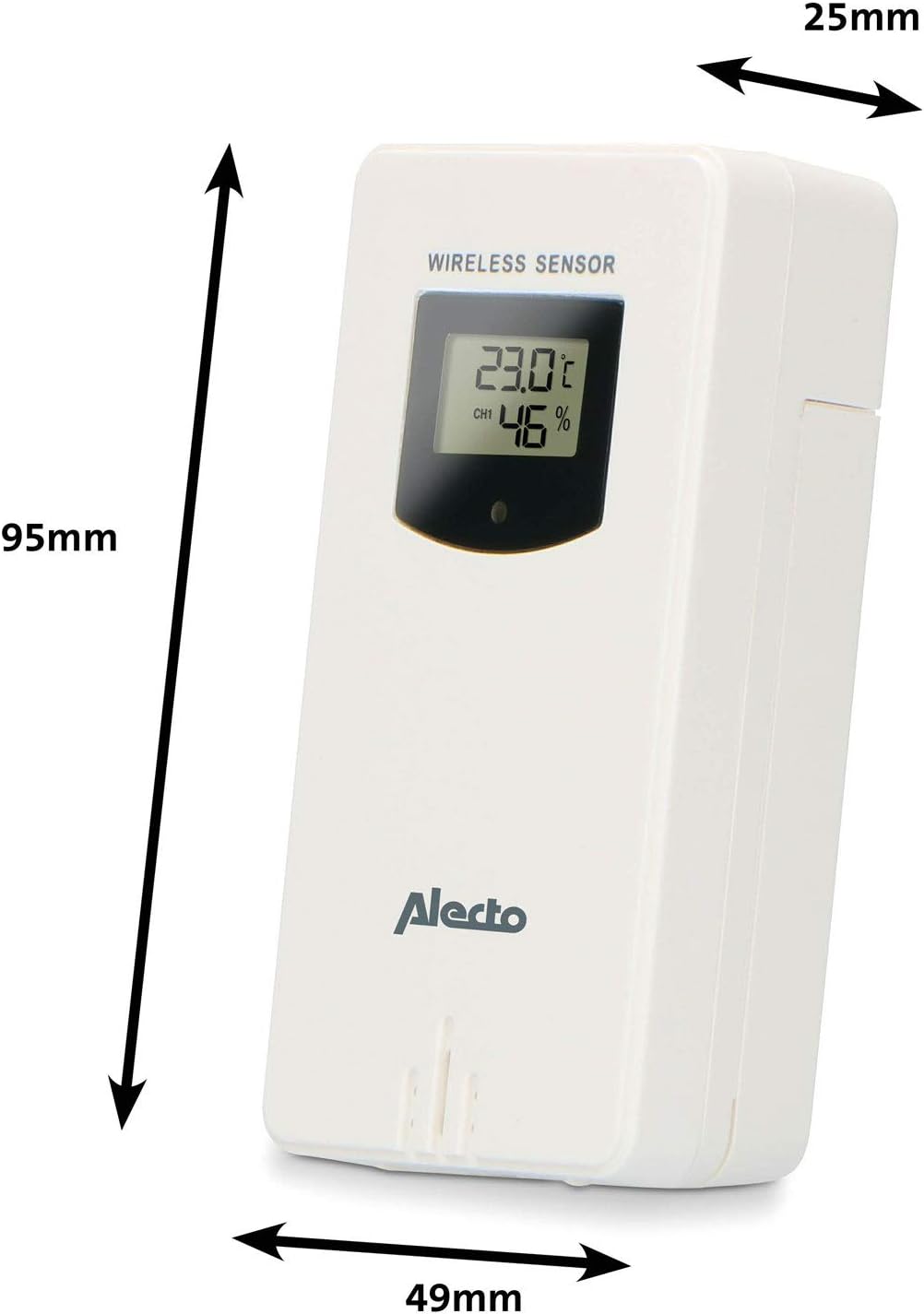
Figure 3.1: Wireless Outdoor Sensor dimensions and battery compartment location.
- Unitate principală:
- Deschideți compartimentul bateriilor din spatele unității principale.
- Insert 2x AA batteries (not included) according to the polarity markings (+/-). These serve as backup batteries.
- Închideți bine compartimentul bateriei.
- Connect the main unit to a power outlet using the provided power adapter (if included).

Figure 3.2: Main Unit dimensions and power input.
3.2. Plasarea senzorului
For accurate outdoor readings, proper placement of the wireless sensor is crucial:
- Place the sensor in a shaded area, away from direct sunlight, to prevent inaccurate temperature readings.
- Ensure good air circulation around the sensor.
- Mount the sensor vertically, approximately 1.5 to 2.5 meters (5 to 8 feet) above the ground.
- Avoid placing the sensor near heat sources (e.g., vents, windows) or moisture sources.
- The maximum transmission range is 100 meters (328 feet) in open air. Walls and other obstacles will reduce this range.

Figura 3.3: Example of outdoor sensor placement on a wall.
3.3. Conectarea senzorului cu unitatea principală
The main unit and sensor should automatically pair once both are powered on. If pairing does not occur:
- Ensure both units have fresh batteries and are within range.
- Press the "TX" button inside the outdoor sensor's battery compartment to manually send a signal.
- On the main unit, you may need to initiate a search for the outdoor sensor (refer to the "Operation" section for specific button functions).
4. Funcționare
4.1. Afișare aspect
Ecranul color de 5.7 inci oferă o imagine clarăview of all measured data. Key areas include:
- Temperatura și umiditatea exterioară: Displays current outdoor conditions.
- Temperatura și umiditatea interioară: Displays current indoor conditions.
- Animated Weather Forecast: Icons predict upcoming weather (sunny, partly cloudy, cloudy, rainy, snowy).
- Ora și data: Current time, day, and date.
- Presiune barometrică: Presiunea atmosferică actuală.
- Faza Lunii: Reprezentare grafică a fazei lunare actuale.
- Temperature/Ice Alarm Indicators: Alerts for specific temperature thresholds or potential ice conditions.

Figura 4.1: Detaliat view of the main unit's color display.
4.2. Funcții butoane
The main unit features several buttons for setting and adjusting functions. Common buttons include:
- A STABILIT: Enters setup mode for time, date, and other settings.
- Mod de administrare: Switches between display modes or confirms settings.
- SUS/JOS (sau +/-): Adjusts values during setup or cycles through channels.
- ALARMA: Setează sau activează funcția de alarmă.
- MEM: Displays maximum/minimum temperature and humidity records. Long press to clear records.
- SNOOZE / LUMINĂ: Activates snooze during an alarm or adjusts backlight brightness.
Video 4.2: Illustrative video demonstrating various features and settings of a weather station. (Note: This video is for a related product and may not show the exact Alecto WS-1560 model.)
4.3. Setarea orei și datei
- Press and hold the "SET" button until the time display starts flashing.
- Use the "UP" or "DOWN" buttons to adjust the hour, then press "SET" to confirm and move to minutes.
- Repetați pentru minute, an, lună și zi.
- Press "SET" again to exit the setting mode.
4.4. Setări alarmă
- Press the "ALARM" button once to view ora alarmei.
- Press and hold the "ALARM" button until the alarm time starts flashing.
- Use the "UP" or "DOWN" buttons to set the desired alarm hour and minute.
- Press "ALARM" to confirm.
- To activate/deactivate the alarm, press the "ALARM" button briefly when the alarm time is displayed. An alarm icon will appear/disappear.
4.5. Înregistrări maxime/minime
The weather station automatically records the maximum and minimum temperature and humidity values over a 24-hour period.
- Press the "MEM" button briefly to view the maximum recorded values.
- Press "MEM" again to view valorile minime înregistrate.
- Press "MEM" a third time to return to current readings.
- To clear the records, press and hold the "MEM" button for a few seconds.
5. Întreținere
- curatenie: Wipe the display and unit surfaces with a soft, damp pânză. Nu utilizați agenți de curățare abrazivi sau solvenți.
- Înlocuire baterie: Înlocuiți bateriile atât din unitatea principală, cât și din senzorul exterior atunci când indicatorul de baterie descărcată apare pe afișaj. Înlocuiți întotdeauna toate bateriile în același timp cu unele noi de același tip.
- Îngrijirea senzorului: Periodically check the outdoor sensor for debris or obstructions that might affect its readings. Ensure it remains in a shaded, well-ventilated area.
6. Depanare
| Problemă | Cauza posibila | Soluţie |
|---|---|---|
| No outdoor temperature/humidity reading (or "---" displayed) |
|
|
| Citiri inexacte ale temperaturii/umidității |
|
|
| Afișajul este slab sau gol |
|
|
7. Specificații
| Numărul de model | WS-1560 |
| Marca | Alecto |
| Sursă de alimentare (unitate principală) | Power Adapter (if included) + 2x AA batteries (backup) |
| Sursă de alimentare (senzor exterior) | 2x baterii AA |
| Dimensiuni produs (unitate principală) | 5.1 x 16.5 x 12.3 cm |
| Greutatea produsului | 440 g |
| Rază de acțiune a senzorului wireless | Până la 100 de metri (în aer liber) |
| Dimensiunea afișajului | 5.7 inchi / 14.5 cm |
| Origine | China |
8. Garanție și asistență
For warranty information, technical support, or service inquiries, please refer to the warranty card included with your product or visit the official Alecto webPăstrați bonul fiscal ca dovadă a achiziției.
Alecto Website: www.alecto.nl (General Alecto website, specific support page may vary)