
1. Introducere
Thank you for choosing the FLEXISPOT EG1 Electric Height Adjustable Desk. This manual provides essential information for the safe assembly, operation, and maintenance of your new desk. Please read these instructions carefully before use and retain them for future reference.

Image 1.1: The FLEXISPOT EG1 Electric Height Adjustable Desk in use, demonstrating its standing functionality.
2. Informații de siguranță
- Citiți toate instrucțiunile: Ensure you understand all assembly and operating instructions before using the desk.
- Capacitate de încărcare: Do not exceed the maximum load capacity of 70 kg (dynamic) / 85 kg (static) on the desktop. Overloading can cause damage or injury.
- Asamblare: Assemble the desk carefully according to the instructions. It is recommended that doi oameni efectuați asamblarea.
- Alimentare electrică: Use only the provided power adapter. Ensure the power cord is not damaged or pinched.
- Clearance: Keep the area around the desk clear during height adjustments to prevent obstructions or collisions.
- Copii și animale de companie: Țineți copiii și animalele de companie departe de birou în timpul funcționării pentru a preveni accidentele.
- Sistem anti-coliziune: The desk is equipped with an anti-collision system. However, always exercise caution during adjustments.
- Întreţinere: Deconectați sursa de alimentare înainte de curățare sau de efectuarea oricărei operațiuni de întreținere.
Avertizare: Assemble the desk carefully according to the instructions and do not exceed the load capacity of 70 kg without the desktop to prevent risk of injury or damage to the desk.
3. Conținutul pachetului
Verify that all components are present and undamaged before beginning assembly. All necessary assembly tools are included in the package.
- Desktop (120 x 60 cm, White)
- Desk Frame (White)
- Motorized Lifting Columns
- Panoul de control
- Adaptor de alimentare și cablu
- Tavă de gestionare a cablurilor
- Side Hooks
- Feronerie și scule de asamblare
- Manual de utilizare
4. Instructiuni de asamblare
Follow the included assembly manual for detailed, step-by-step instructions. Ensure all connections are secure before use. Assembly is required and recommended for two people.
4.1 Cable Management Tray Installation
The desk includes a small drawer under the desktop for cable management, helping to keep your workspace tidy and safe. Install this tray as indicated in the assembly guide.

Image 4.1: Under-desk cable management tray, designed to organize power strips and cables.
4.2 Side Hooks Attachment
Attach the provided hooks to either side of the desk frame. These hooks are useful for hanging laptop bags, headphones, or other accessories, optimizing your workspace.

Image 4.2: The desk features dual side hooks for accessories, anti-slip foot pads for stability, and a wheel-compatible design for mobility.
5. Instrucțiuni de utilizare
The FLEXISPOT EG1 desk features a motorized lifting mechanism for easy height adjustments and a smart control panel for personalized settings.
5.1 Reglarea înălțimii
The motorized lifting mechanism allows for smooth height adjustments from 71 cm to 121 cm. The adjustment speed is approximately 2.5 cm/s, with a low noise level of less than 50 dB during operation.

Image 5.1: The desk offers a comfortable height range from 73.5 cm to 118 cm, suitable for various users and activities.
5.2 Smart Control Panel
The control panel features up/down buttons for manual adjustment and four memory presets to save your preferred sitting and standing heights. The LED display shows the current desk height.
- Butoane Sus / Jos: Press and hold the ▲ (Up) or ▼ (Down) buttons to manually adjust the desk height. Release to stop.
- Presetări de memorie (1, 2, 3, 4): To save a height, adjust the desk to your desired position, then press the 'M' button followed by one of the number buttons (1, 2, 3, or 4). To recall a saved height, simply press the corresponding number button.
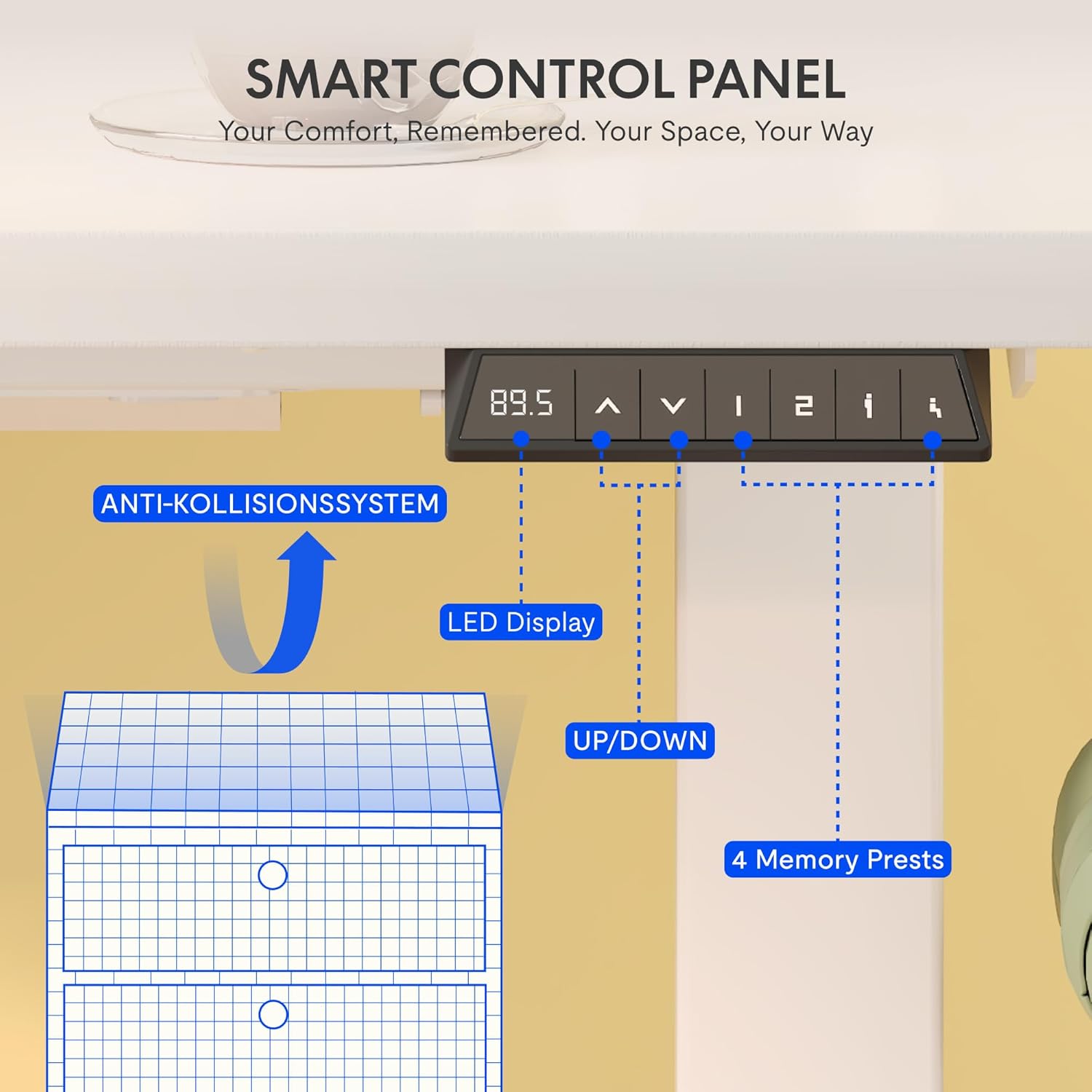
Image 5.2: The smart control panel features an LED display, up/down controls, and four programmable memory presets.
5.3 Sistem anti-coliziune
The desk is equipped with an anti-collision rebound function. If the desk encounters an obstacle during height adjustment, it will automatically stop and reverse slightly to prevent damage or injury.

Image 5.3: The anti-collision system detects obstacles and reverses desk movement to prevent damage.
6. Întreținere
- curatenie: Wipe clean with a dry cloth. Avoid using abrasive cleaners or harsh chemicals that may damage the surface.
- Inspectii: Verificați periodic toate șuruburile și conexiunile pentru a vă asigura că sunt strânse. Strângeți-le din nou dacă este necesar.
- Organizare de cabluri: Regularly check power cables for any signs of wear or damage. Ensure they are properly routed in the cable management tray.
7. Depanare
If you encounter any issues with your FLEXISPOT EG1 desk, please refer to the following common troubleshooting steps:
- Desk not moving:
- Verificați dacă cablul de alimentare este conectat corect atât la birou, cât și la priza de perete.
- Asigurați-vă că nu există obstacole care să împiedice mișcarea.
- Try resetting the desk (refer to the full assembly manual for specific reset procedures, if available).
- Uneven movement:
- Ensure the desk is not overloaded and weight is evenly distributed.
- Check for any loose connections in the frame or lifting columns.
- Panoul de control nu răspunde:
- Verificați alimentarea cu energie.
- Unplug the desk for 10 seconds and plug it back in to perform a soft reset.
If the problem persists, please contact FLEXISPOT customer support for assistance.
8. Specificații
Detailed technical specifications for the FLEXISPOT EG1 Electric Height Adjustable Desk.

Imaginea 8.1: Pesteview of key technical specifications and dimensions of the FLEXISPOT EG1 desk.
| Caracteristică | Caietul de sarcini |
|---|---|
| Numărul de model | EC1+PR1206 Bianco |
| UPC | 810000747115 |
| Dimensiuni produs (L x l x H) | 120D x 60B x 123H cm |
| Greutatea articolului | 29.4 kg |
| Greutate maximă recomandată | 85 kg (Static) / 70 kg (Dynamic) |
| Inaltimea minima | 71 cm |
| Înălțimea maximă | 121 cm |
| Mecanism de ridicare | Electric (Mono-motor) |
| Material de bază | Oțel aliat |
| Tip material de sus | Engineered Wood (MDF with high-pressure laminate) |
| Tip de finisare | Acoperit cu pulbere |
| Caracteristici speciale | Height Adjustable, Anti-Collision System, Cable Management Tray, Side Hooks |
| Asamblare necesară | Da |
| Persoane recomandate pentru asamblare | 2 |
| All Assembly Tools Included | Da |
| Instrucțiuni de întreținere | Ștergeți cu o cârpă uscată |
9. Garanție și asistență
FLEXISPOT is committed to providing high-quality ergonomic products. Our desks undergo rigorous testing to meet international industry standards (CE / BIFMA / ROHS certified).
- Garanția cadrului: 5 ani
- Motor and Controller Warranty: 3 ani
- Suport tehnic: Suport tehnic gratuit pe viață
For any technical assistance, warranty claims, or product inquiries, please contact FLEXISPOT customer support through the official FLEXISPOT website-ul sau comerciantul dvs. cu amănuntul.