
Introducere
The Power Dynamics PPA30 is a versatile 30W 100V amplifier designed for small to medium-sized public address and background music applications. This amplifier features multiple input options including microphone inputs, stereo line inputs, Bluetooth connectivity for wireless streaming, and a built-in MP3 player with USB and SD card support. A remote control is included for convenient operation.
Informații de siguranță
Please read these instructions carefully before using the device. Keep this manual for future reference. Always observe the following safety precautions:
- Nu expuneți dispozitivul la ploaie sau umezeală.
- Do not open the housing. There are no user-serviceable parts inside. Refer all servicing to qualified personnel.
- Asigurați-vă că sursa de alimentare voltage corespunde cerințelor specificate pe dispozitiv.
- Protejați cablul de alimentare împotriva călcării sau ciupitului.
- Disconnect the device from the mains during lightning storms or when unused for long periods.
- Place the device on a stable, level surface with adequate ventilation.
Conținutul pachetului
Vă rugăm să verificați dacă toate articolele sunt prezente și în stare bună la deschiderea coletului:
- Power Dynamics PPA30 Ampmai în viață
- Cablu de alimentare
- Telecomanda
- Manual de utilizare
Produs terminatview
Panoul frontal
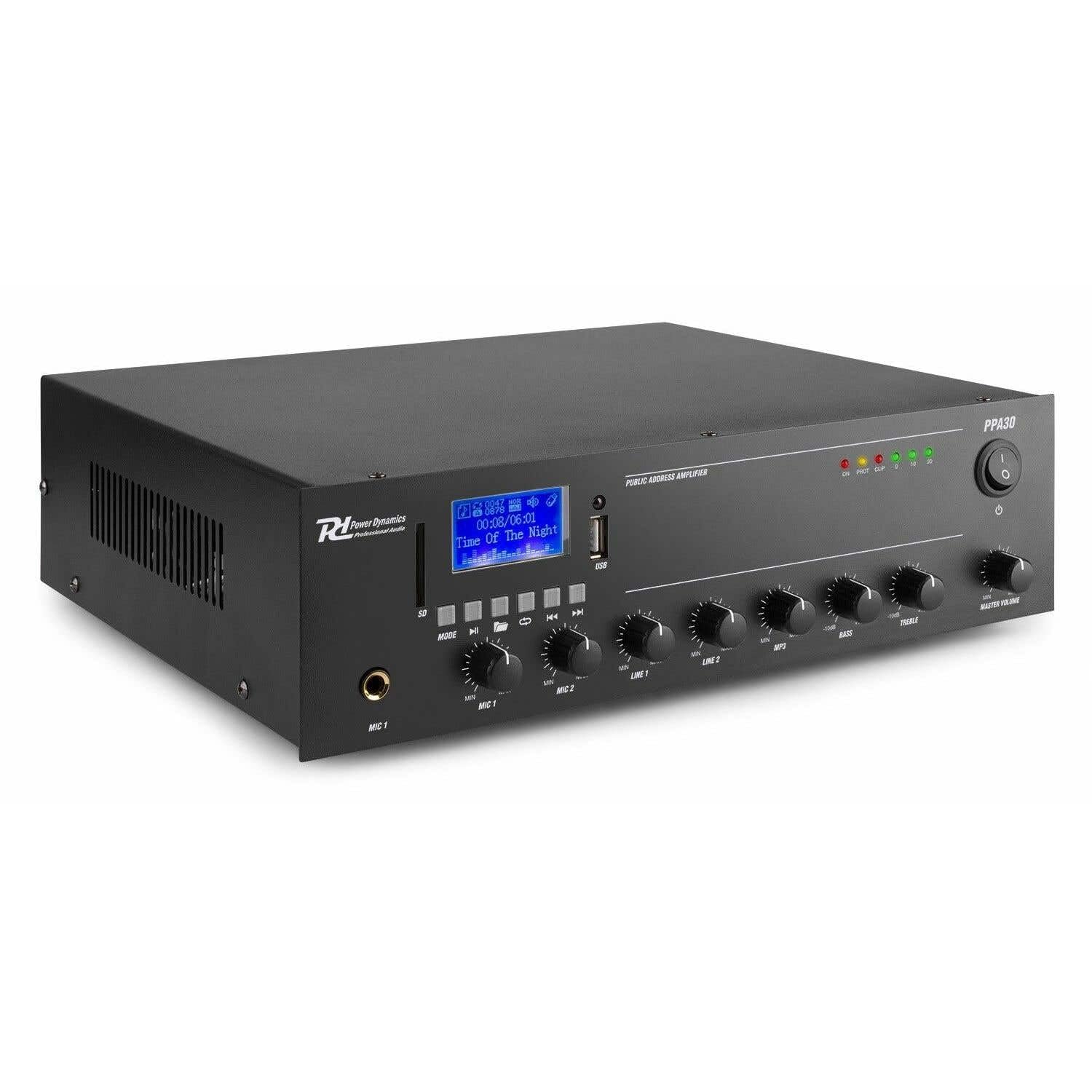
Figure 1: Front Panel Layout of the PPA30 AmpAceastă imagine afișează amplifier's front face, including the display screen, USB/SD card slots, control buttons for media playback, input volume controls for microphones and line inputs, bass and treble adjustments, and the master volume knob. The power switch and indicator lights are also visible.
The front panel provides access to all primary controls and indicators:
- Întrerupător: Întoarce ampmai viață pornită sau oprită.
- Ecran de afișare: Afișează modul curent, informații despre piesă și alți indicatori de stare.
- Sloturi pentru carduri USB/SD: For connecting USB drives or SD cards for MP3 playback.
- Butonul de mod: Switches between input sources (Bluetooth, USB, SD, Line 1, Line 2).
- Comenzi redare media: Play/Pause, Previous, Next, Repeat.
- Intrări MIC 1 și MIC 2: Intrări jack de 6.3 mm pentru microfoane.
- MIC 1 & MIC 2 Volume Controls: Adjusts the volume for each microphone input.
- LINE 1 & LINE 2 Volume Controls: Adjusts the volume for line inputs.
- MP3 Volume Control: Adjusts the volume for USB/SD/Bluetooth playback.
- Bass & Treble Controls: Adjusts the low and high frequencies of the audio output.
- Volumul principal: Controlează volumul general de ieșire al ampmai în viață.
- Indicatoare luminoase: Power (ON), Protection (PROT), Clip, and Output Level (0, 10, 20).
Panoul din spate

Figure 2: Rear Panel Connections of the PPA30 Amplifier. This image illustrates the back of the amplifier, detailing the AC power input, DC input, speaker output terminals (COM, 8Ω, 70V, 100V), and RCA line inputs (LINE OUT, LINE 1, LINE 2, MIC 2). Safety warnings and product information are also visible.
The rear panel houses the power input, speaker outputs, and additional audio inputs:
- Intrare alimentare CA: Se conectează la sursa principală de alimentare.
- Intrare DC: Optional 12V DC power input.
- Terminale de ieșire pentru difuzor: Connections for 100V, 70V, and 8 Ohm speakers. Ensure correct impedance matching.
- IEȘIRE LINIE: Ieșire RCA pentru conectarea la un alt dispozitiv ampdispozitiv de înregistrare sau de salvare.
- LINE 1 & LINE 2 Inputs: RCA stereo inputs for external audio sources (e.g., CD player, mixer).
- Intrare MIC 2: Additional 6.3mm jack input for a microphone.
Telecomanda

Figure 3: Remote Control for the PPA30 Amplifier. This image shows the handheld remote control with buttons for power, mode selection, volume adjustment, track navigation, EQ settings, and direct number input for track selection.
The remote control allows for convenient operation from a distance. Functions include power on/off, mode selection, volume control, track navigation, and EQ settings.
Înființat
- Plasare: Poziționați amplifier on a flat, stable surface. Ensure adequate ventilation around the unit to prevent overheating.
- Conexiune difuzor: Connect your 100V, 70V, or 8 Ohm speakers to the appropriate terminals on the rear panel. Ensure correct polarity (+ to + and - to - or COM). For 100V/70V systems, ensure your speakers are compatible and correctly wired for constant voltage.
- Conexiune sursă audio:
- Microfoane: Plug microphones into the MIC 1 or MIC 2 inputs on the front panel.
- Dispozitive de linie: Connect external audio sources (e.g., CD player, mixer) to the LINE 1 or LINE 2 RCA inputs on the rear panel.
- Card USB/SD: Insert a USB drive or SD card into the respective slot on the front panel for MP3 playback.
- Conexiune de alimentare: Connect the supplied power cable to the AC power input on the rear panel and then to a suitable mains outlet.
- Pornire inițială: Porniți amplifier using the power switch on the front panel. The 'ON' indicator light should illuminate.
Instrucțiuni de operare
Selectarea sursei de intrare
Apăsați tasta MOD button on the front panel or remote control to cycle through available input sources: Bluetooth, USB, SD, Line 1, Line 2.
Funcționare Bluetooth
- Selectați modul Bluetooth folosind MOD butonul. Afișajul va indica modul Bluetooth.
- Pe smartphone, tabletă sau computer, activați Bluetooth și căutați dispozitivele disponibile.
- Select "PPA30" from the list of devices to pair. Once paired, you can stream audio wirelessly to the ampmai în viață.
- Adjust the MP3 volume control on the front panel or the volume buttons on the remote control.
Redare card USB/SD
- Introduceți o unitate USB sau un card SD care conține fișiere MP3 files în slotul corespunzător.
- The amplifier should automatically switch to USB or SD mode and begin playback. If not, select the correct mode using the MOD buton.
- Use the Play/Pause, Previous, Next, and Repeat buttons on the front panel or remote control to manage playback.
- Adjust the MP3 volume control.
Utilizarea microfonului
- Connect your microphone(s) to the MIC 1 or MIC 2 inputs.
- Slowly increase the corresponding MIC 1 or MIC 2 volume control until the desired level is reached.
- Avoid setting the volume too high to prevent feedback or clipping (indicated by the 'CLIP' light).
Utilizarea intrării de linie
- Connect your external audio source to the LINE 1 or LINE 2 RCA inputs.
- Select the appropriate line input using the MOD buton.
- Adjust the corresponding LINE 1 or LINE 2 volume control.
Controlul tonului
Utilizați BASS şi TRIPLA knobs on the front panel to adjust the low and high frequencies of the overall audio output to suit your preference or room acoustics.
Volumul principal
The VOLUMUL PRINCIPAL knob controls the overall output level of all active audio sources. Adjust this to achieve the desired listening volume.
Întreţinere
- curatenie: Utilizați o cârpă moale și uscată pentru a curăța exteriorul ampNu utilizați agenți de curățare abrazivi sau solvenți.
- Ventilare: Asigurați-vă că orificiile de ventilație nu sunt blocate pentru a preveni supraîncălzirea.
- Depozitare: Dacă depozitați unitatea pentru o perioadă lungă de timp, deconectați-o de la priză și depozitați-o într-un loc răcoros și uscat.
Depanare
| Problemă | Cauza posibila | Soluţie |
|---|---|---|
| Fără putere | Cablul de alimentare nu este conectat; Întrerupătorul este oprit; Nu există curent de la priză. | Check power cable connection; Turn power switch on; Test outlet with another device. |
| Fără ieșire de sunet | Incorrect input selected; Volume too low; Speaker connections loose; Speakers faulty. | Select correct input (MODE button); Increase Master Volume and input specific volume; Check speaker wiring; Test with different speakers. |
| Sunet distorsionat | Volume too high (clipping); Incorrect tone settings; Faulty audio source. | Reduce Master Volume or input volume until 'CLIP' light is off; Adjust Bass/Treble controls; Test with a different audio source. |
| Bluetooth nu se conectează | Bluetooth mode not selected; Device not in pairing mode; Interference. | Asigura amplifier is in Bluetooth mode; Make sure your device's Bluetooth is on and searching; Move closer to the amplifier; Restart both devices. |
| Probleme de redare pe USB/SD | Incorect file format; corupt fileCardul USB/SD nu a fost introdus corect. | Asigura files are MP3 format; Try a different USB/SD card; Reinsert the card/drive. |
Specificații
| Caracteristică | Caietul de sarcini |
|---|---|
| Marca | Dinamica puterii |
| Model | PPA30 |
| Putere de ieșire | 30 wați |
| Numărul de canale | 2 |
| Voltage (AC) | 220-230 Volt (AC) |
| Dimensiuni articol (Lxlxh) | 27 x 32 x 8.6 cm |
| Greutatea articolului | 3.25 kilograme |
| Tip de montare | Freestanding |
| Temperatura de operare | Până la 40 de grade Celsius |
| Certificari | CE, RoHS |
Garanție și suport
This product is covered by a standard manufacturer's warranty. Please refer to the warranty card included in your package for specific terms and conditions. For technical support, service, or warranty claims, please contact your retailer or the Power Dynamics customer service department. Keep your proof of purchase for warranty validation.
For more information, visit the official Power Dynamics website: www.power-dynamics.eu