
1. Introducere
The Aerocool LUXPRO550 is a 550W power supply unit designed for desktop computers, offering reliable and efficient power delivery. This unit is 80 Plus 230V EU Bronze certified, ensuring over 88% efficiency. It features high-quality 105°C Japanese capacitors and a 14cm FDB fan for enhanced durability and optimized thermal performance. This manual provides essential information for the safe and correct installation, operation, and maintenance of your LUXPRO550 power supply.

Image 1.1: The Aerocool LUXPRO550 Power Supply Unit, highlighting its high efficiency and 80 Plus Bronze certification.
2. Măsuri de siguranță
- Deconectați întotdeauna cablul de alimentare de la priza de perete înainte de a instala sau de a scoate sursa de alimentare.
- Nu deschideți sursa de alimentare casing. Volum ridicattagÎn interior sunt prezente componente care pot provoca electrocutare.
- Asigurați o împământare adecvată pentru a preveni pericolele electrice.
- Instalați sursa de alimentare într-o zonă bine ventilată, departe de surse de căldură și umiditate.
- Folosiți doar cablurile furnizate împreună cu sursa de alimentare.
- This product is designed for use in computer systems only. Do not use it for any other purpose.
3. Ghid de instalare
The LUXPRO550 power supply supports all Intel ATX12V formats and features flat, black cables for optimized internal airflow and ease of installation.
3.1. Pregătirea pentru instalare
- Opriți computerul și deconectați cablul de alimentare de la priza de perete.
- Open your computer case. Refer to your computer case manual for specific instructions.
- Dacă înlocuiți o sursă de alimentare existentă, deconectați toate cablurile de la vechea sursă și scoateți-o din carcasă.
3.2. Instalarea sursei de alimentare
- Carefully place the LUXPRO550 into the power supply bay of your computer case.
- Secure the power supply to the case using the provided screws.
- Connect the 20+4 pin ATX motherboard power connector to your motherboard.
- Connect the 4+4 pin CPU power connector to your motherboard.
- Connect SATA power connectors to your storage drives (HDDs, SSDs) and optical drives.
- Connect PCIe 6+2 pin connectors to your graphics card(s) if required.
- Connect any other peripheral connectors (e.g., Molex) as needed for case fans or other components.
- Ensure all connections are secure. Use cable ties to manage cables for better airflow.
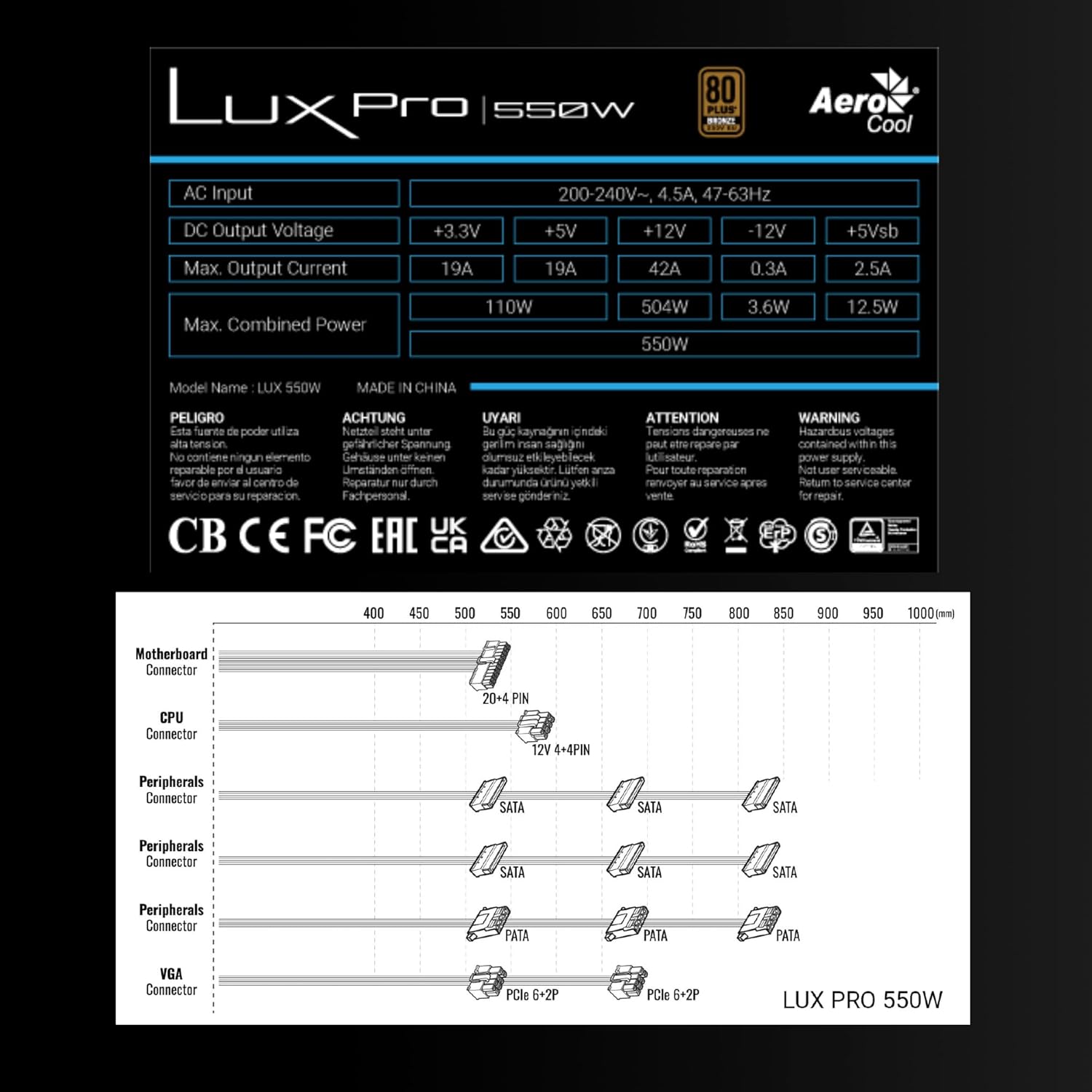
Image 3.1: Connector types and lengths for the LUXPRO550 power supply. This diagram illustrates the available connectors including Motherboard (20+4 PIN), CPU (12V 4+4 PIN), Peripherals (SATA, PATA), and VGA (PCIe 6+2 PIN).
3.3. Pasi finali
- Închideți carcasa computerului.
- Conectați cablul de alimentare CA la sursa de alimentare și apoi la o priză de perete.
- Flip the power switch on the back of the PSU to the 'ON' position.
- Porniți computerul.
4. Instrucțiuni de utilizare
The Aerocool LUXPRO550 is designed for continuous and stable operation once correctly installed. Its 80 Plus Bronze certification ensures high energy efficiency, reducing power consumption and heat generation.
4.1. Active PFC Technology
The integrated Active Power Factor Correction (APFC) technology ensures efficient and reliable power distribution, contributing to overall system stability and energy savings.
4.2. Funcționarea ventilatorului
The 14cm FDB (Fluid Dynamic Bearing) fan features optimized thermal speed control. It operates silently, starting at less than 700 RPM, and only increases speed as the load approaches 40% at ambient temperatures of 25°C, ensuring quiet operation under typical loads.

Image 4.1: The 14cm FDB fan of the LUXPRO550, illustrating its optimized thermal speed control for efficient cooling.
5. Întreținere
The LUXPRO550 is built with high-quality components, including 105°C Japanese capacitors, designed for maximum reliability and a long operational lifespan with minimal maintenance.

Image 5.1: High-quality 105°C Japanese capacitors, contributing to the power supply's reliability and extended lifespan.
5.1. Îngrijire generală
- Keep the power supply and computer case free from dust. Dust accumulation can hinder cooling and reduce efficiency.
- Use compressed air to gently clean the fan and ventilation grilles periodically. Ensure the computer is powered off and unplugged before cleaning.
- Do not obstruct the airflow around the power supply.
În interior nu se află piese care pot fi reparate de utilizator. Nu încercați să deschideți sau să reparați unitatea singur.
6. Depanare
If you encounter issues with your LUXPRO550 power supply, please follow these basic troubleshooting steps:
- Fără putere:
- Asigurați-vă că este conectat corect cablul de alimentare CA atât la sursa de alimentare, cât și la priza de perete.
- Verificați dacă întrerupătorul de alimentare de pe spatele sursei de alimentare este în poziția „ON”.
- Verificați dacă priza de perete funcționează conectând un alt dispozitiv.
- Sistemul nu pornește:
- Double-check all power connections to the motherboard, CPU, graphics card, and storage devices.
- Ensure all components are properly seated in their slots.
- If possible, test the power supply with another known working system or test another power supply with your system to isolate the issue.
- Zgomote neobișnuite:
- A slight hum is normal. If you hear grinding or loud fan noises, ensure the fan is not obstructed by cables or dust.
- Dacă zgomotul persistă, contactați serviciul de asistență pentru clienți.
If these steps do not resolve the issue, please contact Aerocool customer support or your retailer for further assistance. Do not attempt to repair the unit yourself.
7. Specificații
| Caracteristică | Caietul de sarcini |
|---|---|
| Numele modelului | LUXPRO550 |
| Marca | AeroCool |
| Wattage | 550 wați |
| Certificare de eficiență | 80 Plus Bronze 230V EU (over 88% efficiency) |
| Factor de formă | ATX |
| Condensatoare | Japanese 105°C |
| Tip ventilator | 14cm FDB (Fluid Dynamic Bearing) with thermal speed control |
| PFC | PFC activ |
| Dimensiuni (Lxlxh) | 16 x 15 x 8.5 cm |
| Greutate | 1.4 kg |
| Dispozitive compatibile | PC |
7.1. Vol. ieșire DCtage Tabel
The following table details the DC output voltages and maximum currents for the LUXPRO550:
| Ieșire DC Voltage | +3.3V | +5V | +12V | -12V | +5Vsb |
|---|---|---|---|---|---|
| Max. Curent de ieșire | 19A | 19A | 42A | 0.3A | 2.5A |
| Max. Putere combinată | 110W | 504W | 3.6W | 12.5W | |
| Total Combined Power | 550W | ||||
8. Garanție și asistență
8.1. Informații despre garanție
The Aerocool LUXPRO550 power supply comes with an extended 5 an garanție, reflecting its high reliability and the quality of its components, such as the 105°C Japanese capacitors.
Vă rugăm să păstrați dovada achiziției pentru cererile de garanție.
8.2. Asistență pentru clienți
For technical assistance, warranty claims, or any questions regarding your Aerocool LUXPRO550 power supply, please contact Aerocool customer support through their official website-ul sau distribuitorul local.
Do not attempt to open or repair the power supply unit, as this will void the warranty.


