
1. Introducere și Pesteview
Thank you for choosing the Comix S3508D Desktop Micro-Cut Paper Shredder. This manual provides essential information for the safe and efficient operation, maintenance, and troubleshooting of your new shredder. Please read it thoroughly before use and retain it for future reference.
The Comix S3508D is designed for personal and home office use, offering secure destruction of sensitive documents, CDs/DVDs, and credit cards with its micro-cut technology. Key features include:
- Continuous shredding for up to 30 minutes.
- Separate waste bin design for CD/DVD fragments, allowing for easy waste separation.
- Energy-saving technology that automatically shuts off the device after 30 minutes of inactivity.
2. Instrucțiuni importante de siguranță
Pentru a reduce riscul de vătămare corporală sau deteriorare, vă rugăm să respectați următoarele măsuri de siguranță:
- A nu se lăsa la îndemâna copiilor și a animalelor de companie. The shredder has sharp blades and moving parts.
- Avoid loose clothing, jewelry, and long hair near the paper entry slot.
- Do not insert fingers or hands în fanta de intrare a hârtiei.
- Do not spray any flammable products onto the shredder or use it near flammable materials.
- Unplug the shredder before moving, cleaning, or emptying the waste bin.
- Do not shred metal objects, wet paper, or adhesive labels as this can damage the blades.
- Operați tocătorul pe o suprafață plană și stabilă.
- Do not overload the shredder. Refer to the maximum sheet capacity in the specifications.
- Do not open the shredder housing. În interior nu există piese care pot fi reparate de utilizator.
3. Componentele produsului
Familiarize yourself with the main parts of your Comix S3508D shredder:
- Shredder Head: Contains the cutting mechanism and control panel.
- Fantă de introducere a hârtiei: For inserting documents.
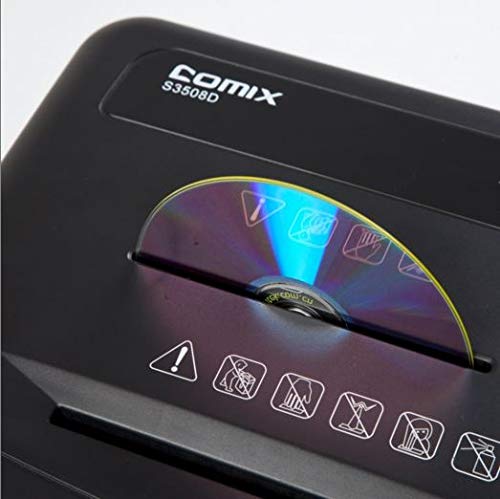
- CD/DVD Entry Slot: A separate slot for optical media.
- Comutator de control: For selecting ON/OFF, Auto, Forward, and Reverse modes.
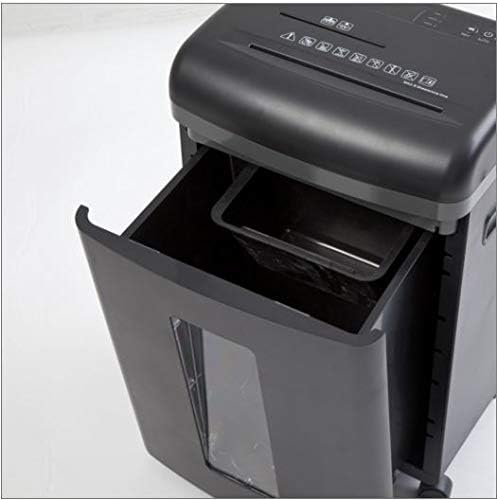
- Coș de gunoi: Collects shredded paper and media.
- CD/DVD Waste Compartment: A smaller, separate compartment within the main bin for shredded optical media.
- Role Wheels for easy mobility.
4. Configurare
- Despacheta: Scoateți cu grijă tocătorul de documente din ambalaj. Păstrați ambalajul pentru transport sau depozitare ulterioară.
- Poziţie: Place the shredder on a level and stable surface. Ensure there is enough space around the unit for proper ventilation and access to the power outlet.
- Conectare alimentare: Conectați cablul de alimentare la o priză electrică standard.
- Verificați coșul: Asigurați-vă că recipientul pentru deșeuri este introdus corect în corpul tocătorului. Tocătorul nu va funcționa dacă recipientul nu este așezat corect.
5. Instrucțiuni de utilizare
Funcțiile comutatorului de control:
- OPRIT: Tocătorul de documente este oprit.
- MAȘINĂ: The shredder is in standby mode. It will automatically start when paper is inserted and stop when shredding is complete. This is the recommended setting for normal operation.
- REDIRECŢIONA: Manually runs the shredder forward. Use this for continuous shredding if needed, but be mindful of the duty cycle.
- VERSO: Manually runs the shredder in reverse. Use this to clear paper jams.
Distrugerea documentelor:
- Setați comutatorul de control pe AUTO.
- Insert up to 8 sheets of A4 (70gsm) paper straight into the paper entry slot. The shredder will automatically start and stop.
- Do not exceed the maximum sheet capacity to prevent jams and damage.
Shredding CDs/DVDs and Credit Cards:
- Setați comutatorul de control pe AUTO.
- Insert one CD/DVD or credit card at a time into the dedicated CD/DVD entry slot.
- The shredded media will fall into the separate CD/DVD waste compartment within the main bin.
Ciclu de funcționare:
The Comix S3508D is designed for a continuous run time of 30 minutes ON, urmată de o 40 minute OPRIT cool-down period. Exceeding the duty cycle may cause the shredder to overheat and activate its thermal protection, temporarily shutting down the unit. Allow it to cool down before resuming operation.
6. Întreținere
Golirea coșului de gunoi:
- Always set the control switch to OFF and unplug the shredder before emptying the bin.
- Pull out the waste bin from the front of the shredder.
- Dispose of the shredded waste. Remember to empty the separate CD/DVD compartment as well.
- Slide the waste bin back into place until it clicks securely.
Shredder Oiling:
Regular oiling is recommended to maintain optimal performance and extend the life of your shredder, especially after emptying the waste bin 2-3 times or after heavy use. Use shredder oil (vegetable oil is not recommended).
- Setați comutatorul de control pe OFF.
- Aplicați un strat subțire de ulei pentru distrugător de documente pe fanta de intrare a hârtiei.
- Setați comutatorul de control pe REDIRECŢIONA for 2-3 seconds to distribute the oil, then switch back to OFF.
curatenie:
Ștergeți exteriorul tocătorului de documente cu o cârpă moale și uscată. Nu utilizați substanțe de curățare abrazive sau solvenți.
7. Depanare
| Problemă | Cauza posibila | Soluţie |
|---|---|---|
| Tocătorul de documente nu funcționează. | 1. Cablul de alimentare nu este conectat.
2. Waste bin not properly inserted. 3. Supraîncălzire. |
1. Ensure power cord is securely plugged into an outlet.
2. Push the waste bin firmly into place. 3. Allow the shredder to cool down for 40 minutes. |
| Blocaj de hârtie. | 1. Too much paper inserted.
2. Paper inserted incorrectly. |
1. Set switch to VERSO to clear paper. Remove excess paper.
2. If jam persists, unplug, carefully remove paper, then plug in and try VERSO din nou. |
| Shredder runs continuously in AUTO mode. | Senzorul este blocat sau murdar. | Unplug the shredder and clean the paper entry sensor (usually a small clear window) with a soft cloth. |
8. Specificații
| Caracteristică | Detaliu |
|---|---|
| Marca | Comix |
| Model | S3508D |
| Tipul de maruntire | Micro-tăiat |
| Dimensiunea mărunțișului | 2 x 12 mm |
| Standard Sheet Capacity (70gsm) | 8 de coli |
| CD/DVD/Card Capacity | câte unul |
| Lățimea de intrare | 220 mm |
| Shred Speed | 2.3 meters/minute |
| Ciclul de funcționare | 30 minute ON / 40 minute OFF |
| Caracteristica specială | Modul de economisire a energiei |
| Greutatea articolului | 2.2 lire sterline |
| ASIN | B083XFNHQH |
9. Garanție și asistență
Comix products are manufactured to high-quality standards. For warranty information, please refer to the warranty card included with your purchase or contact your retailer. For technical support or service inquiries, please contact Comix customer service through the contact information provided on the official Comix website-ul sau documentația achiziției dumneavoastră.