
1. Introducere
Mulțumesc pentru achizițieasing the ICON 12-inch Bluetooth Speaker. This manual provides detailed instructions for the safe and efficient operation of your new speaker. Please read this manual thoroughly before use and retain it for future reference.
2. Conținutul pachetului
- ICON 12-inch Bluetooth Speaker
- Cablu de alimentare
- Microfon fără fir
- Telecomanda
- Manual de utilizare

Image: The ICON Bluetooth speaker shown with its included wireless microphone and remote control, highlighting the complete package contents.
3. Produs terminatview
The ICON 12-inch Bluetooth Speaker is a versatile audio system designed for various applications, offering powerful sound output and multiple connectivity options. It features a built-in rechargeable battery for portability and integrated wheels and a retractable handle for easy transport.

Imagine: față view of the ICON 12-inch Bluetooth Speaker, showcasing its robust design and blue illuminated woofer.

Imagine: Spate view of the ICON 12-inch Bluetooth Speaker, displaying the main control panel and retractable handle.
Caracteristici cheie:
- Powerful 6000W PMPO Output
- Bluetooth Connectivity for Wireless Streaming
- Redare de pe USB și card SD
- Intrare AUX de 3.5 mm
- Radio FM încorporat
- Intrări de microfon și chitară
- Rechargeable Battery for Extended Playtime
- Integrated Equalizer for Sound Customization
- TWS (True Wireless Stereo) Functionality for connecting multiple speakers
- Efecte de lumină LED

Image: Visual representation of the ICON Bluetooth Speaker's key features, including excellent sound quality, Bluetooth compatibility, AUX input, rechargeable battery, FM radio, and equalizer.
4. Configurare
4.1 Încărcare inițială
Before first use, fully charge the speaker's internal battery. Connect the power cable to the AC INPUT port on the rear panel and plug it into a standard wall outlet. The charging indicator will illuminate. Charging time may vary.
4.2 Panoul de control pesteview
Familiarize yourself with the control panel located on the rear of the speaker.
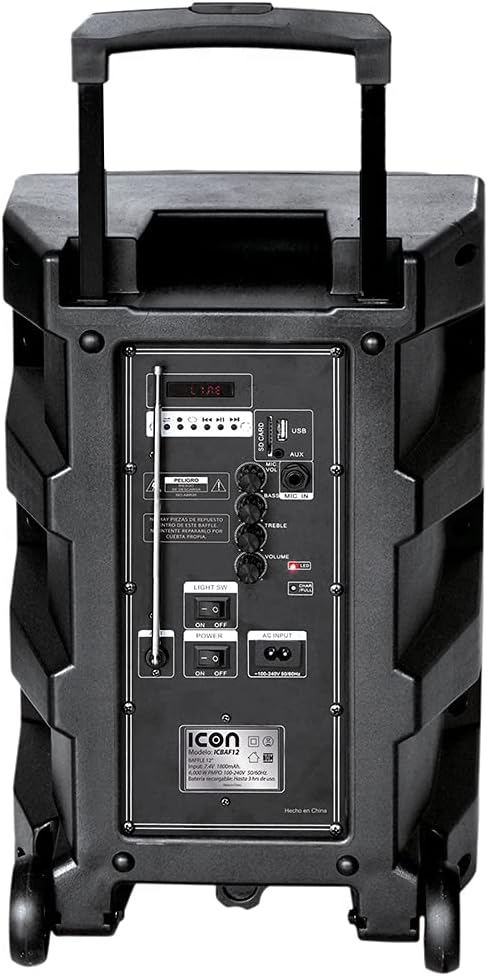
Imagine: Detaliată view of the ICON speaker's rear control panel, showing various inputs, volume, treble, and bass controls.
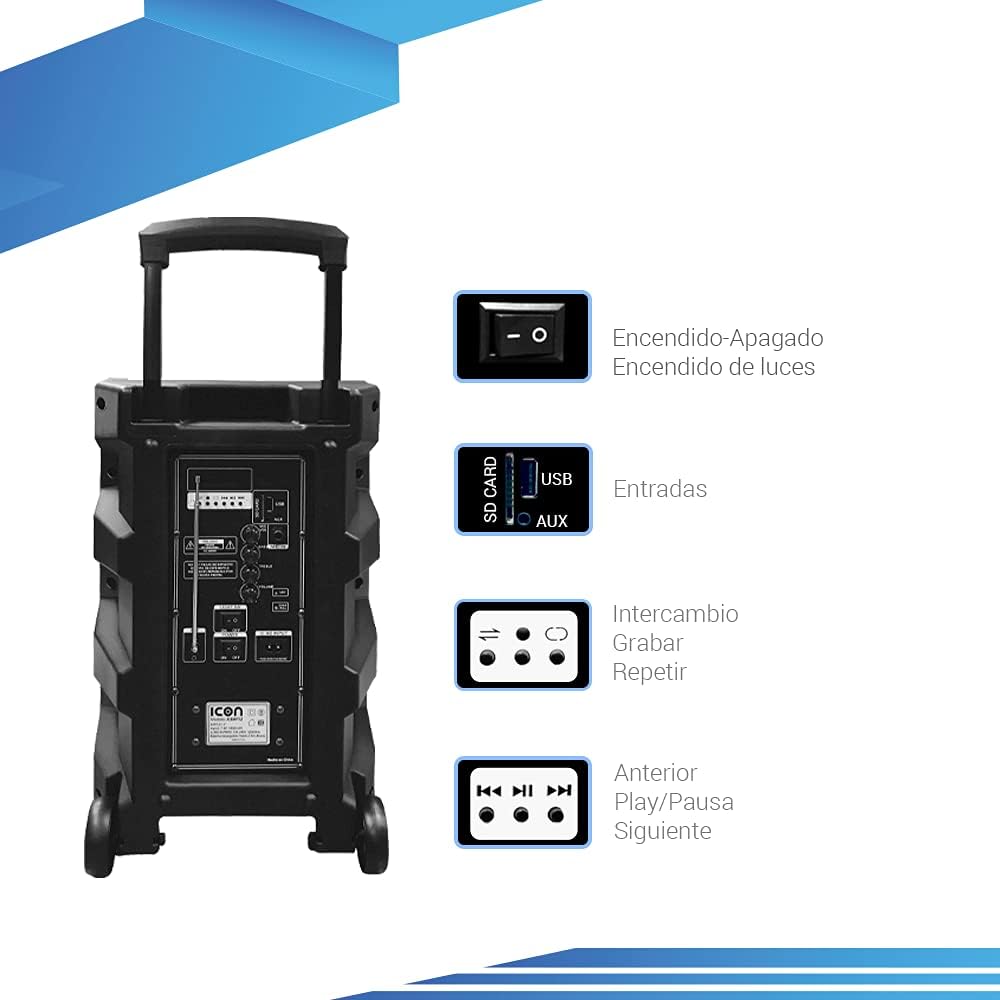
Image: Diagram illustrating key controls on the ICON speaker, including the power switch, light switch, input ports (SD Card, USB, AUX), and playback control buttons (Mode Switch, Record, Repeat, Previous, Play/Pause, Next).
- Întrerupător: Turns the speaker On or Off.
- SW LUMINĂ: Toggles the LED light effects On or Off.
- SD CARD / USB / AUX Inputs: For connecting external media or devices.
- Comutator mod: Cycles through input modes (Bluetooth, USB, SD, AUX, FM).
- Butonul ÎNREGISTRARE: Initiates recording (e.g., microphone input to USB/SD).
- Buton REPEAT: Repetă piesa sau lista de redare curentă.
- PREVIOUS / PLAY/PAUSE / NEXT Buttons: Comenzi standard pentru redarea media.
- Butonul VOLUM: Reglează volumul principal.
- TREBLE / BASS Knobs: Ajustează frecvențele înalte și joase.
- MIC INPUT / GUITAR INPUT: For connecting microphones and guitars.
5. Instrucțiuni de utilizare
5.1 Pornire/Oprire
To turn the speaker ON, flip the PUTERE switch to the 'ON' position. To turn it OFF, flip the switch to 'OFF'.
5.2 Asociere Bluetooth
- Turn on the speaker. It will automatically enter Bluetooth pairing mode, indicated by a flashing Bluetooth icon on the display.
- Pe dispozitivul mobil (smartphone, tabletă, laptop), activați Bluetooth și căutați dispozitivele disponibile.
- Select "ICON Speaker" (or similar name) from the list of devices.
- Once paired, the speaker will emit a confirmation sound, and the Bluetooth icon will stop flashing. You can now play audio wirelessly from your device.
5.3 Redare de pe USB/card SD
- Introduceți o unitate flash USB sau un card SD (cu fișiere audio MP3) files) în portul respectiv.
- The speaker will automatically switch to USB/SD mode and begin playing the first compatible track. If not, press the MOD button to select USB/SD mode.
- Utilizați ANTERIOR, REDARE/PAUZĂ, și URMĂTORUL butoane pentru a controla redarea.
5.4 Intrare AUX
Conectați un dispozitiv audio extern (de exemplu, un player MP3, un computer) la AUX input using a 3.5mm audio cable. Press the MOD button until AUX mode is selected.
5.5 Funcționarea radioului FM
- Apăsați tasta MOD buton pentru a comuta la modul Radio FM.
- Țineți apăsat butonul REDARE/PAUZĂ pentru a scana automat și a salva posturile FM disponibile.
- Utilizați ANTERIOR şi URMĂTORUL butoane pentru a naviga între posturile salvate.
5.6 Microphone and Guitar Usage
Plug your microphone or guitar into the respective INTRARE MIC or INTRAREA CHITARII jacks. Adjust the volume using the main VOLUM knob and any dedicated microphone/guitar volume controls if present.
Funcție 5.7 TWS (True Wireless Stereo)
The TWS function allows you to connect two ICON speakers wirelessly for a true stereo sound experience.
- Asigurați-vă că ambele difuzoare sunt pornite și nu sunt conectate la niciun dispozitiv Bluetooth.
- On one speaker (this will be the master), press and hold the TWS button (if available, or a combination of buttons as per specific model instructions, often the 'Mode' button or a dedicated TWS button).
- The speaker will search for another TWS-compatible speaker. Once connected, you will hear a confirmation sound.
- Now, connect your mobile device to the master speaker via Bluetooth as described in section 5.2. Audio will play through both speakers in stereo.
6. Întreținere
6.1 Curățare
Wipe the speaker's exterior with a soft, dry cloth. Do not use abrasive cleaners, waxes, or solvents. Ensure no liquids enter the speaker's openings.
6.2 Îngrijirea bateriei
- Pentru a prelungi durata de viață a bateriei, evitați descărcarea completă frecventă a acesteia.
- Recharge the battery regularly, even if the speaker is not in use for extended periods (e.g., every 3 months).
- Păstrați difuzorul într-un loc răcoros și uscat atunci când nu este utilizat.
6.3 Depozitare
When storing the speaker for a long time, ensure it is turned off and disconnected from the power source. Store it in a clean, dry environment away from extreme temperatures and direct sunlight.
7. Depanare
| Problemă | Cauza posibila | Soluţie |
|---|---|---|
| Difuzorul nu pornește. | Battery is depleted; Power cable not connected; Power switch is OFF. | Charge the speaker; Ensure power cable is securely connected; Flip POWER switch to ON. |
| Nici un sunet. | Volumul este prea mic; Mod de intrare selectat incorect; Dispozitivul nu este conectat corect. | Increase volume; Press MODE button to select correct input; Reconnect device/re-pair Bluetooth. |
| Conexiunea Bluetooth eșuează. | Difuzorul nu este în modul de asociere; Dispozitivul este prea departe; Interferență. | Asigurați-vă că difuzorul este în modul de asociere; Mutați dispozitivul mai aproape; Opriți celelalte dispozitive Bluetooth. |
| Sunet distorsionat. | Volum prea mare; Calitatea sursei audio este slabă. | Reduceți volumul; Încercați o altă sursă audio. |
| Microfonul nu funcționează. | Microphone not plugged in correctly; Microphone volume too low; Microphone batteries dead (if wireless). | Ensure microphone is fully inserted; Adjust microphone volume; Replace microphone batteries. |
8. Specificații
| Caracteristică | Caietul de sarcini |
|---|---|
| Numărul de model | US-ICBAF12 |
| Putere de ieșire | 6000 wați PMPO |
| Dimensiunea difuzorului | 12 inci |
| Tehnologia de conectivitate | Bluetooth, USB, AUX, SD Card |
| Dispozitive compatibile | Laptop, Smartphone |
| Sursa de alimentare | Rechargeable Battery, AC Input |
| Dimensiuni produs (L x l x H) | 38 x 36.5 x 54 cm |
| Greutatea produsului | 7.62 kg |
| Caracteristici speciale | Bluetooth, FM Radio, Microphone Input, Guitar Input, TWS Function, LED Lights |

Image: Packaging of the ICON Bluetooth Speaker, displaying key features and product dimensions (37.5 cm x 36 cm x 54 cm).
9. Garanție și asistență
This product is covered by a limited warranty. Please refer to the warranty card included in your package for specific terms and conditions. For technical support, troubleshooting assistance, or warranty claims, please contact your retailer or the manufacturer's customer service department. Keep your purchase receipt as proof of purchase.
For more information, visit the official ICON store on Amazon: ICON Store