
1. Introducere
Thank you for choosing the Alomejor Digital Drum Metronome Practice Pad. This device is designed to assist drummers and musicians in developing precise rhythm and tempo. It features a digital LCD screen, multiple practice modes, and an earphone jack for private practice sessions. Please read this manual thoroughly before using the product to ensure proper operation and longevity.
Continutul pachetului:
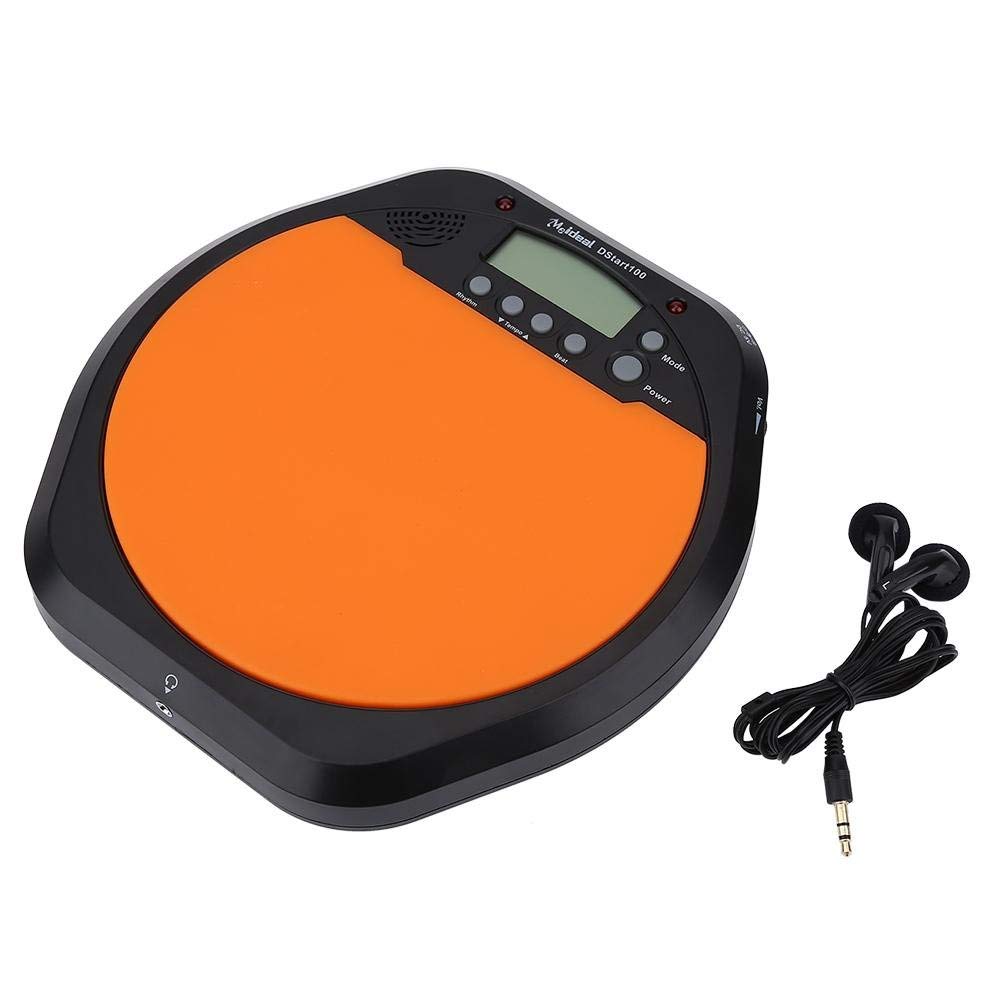
- 1 x Digital Drum Metronome Practice Pad
- 1 x căști
- (2 x AAA batteries not included)
2. Caracteristicile produsului
- Design multifuncțional: Offers various modes for comprehensive rhythm training.
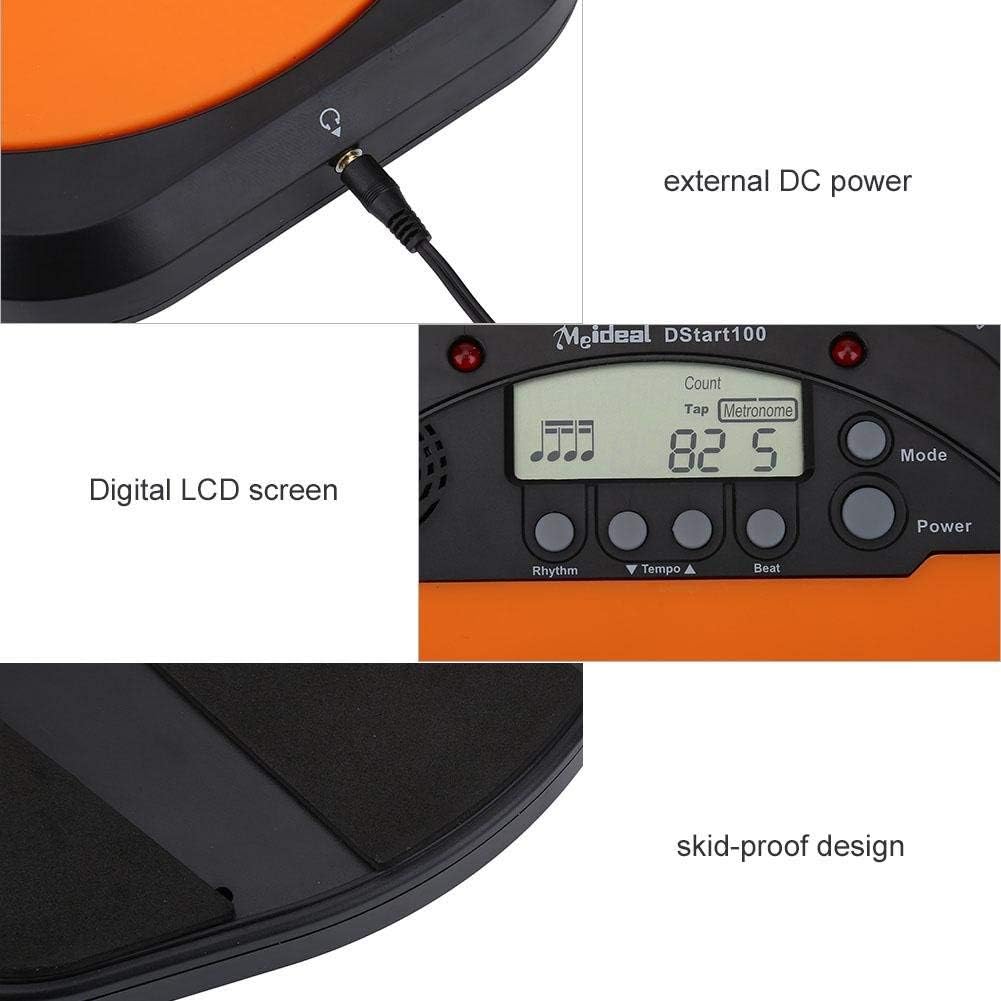
- Ecran LCD digital: Provides clear visual feedback for tempo, rhythm, and count.
- Atingeți Funcția: Allows users to test and set their ideal tempo or match a song's tempo.
- Realistic Drum Feel: Engineered to provide a responsive surface similar to a real drum.
- Mufă pentru căști: Enables silent practice, ideal for use in various environments without disturbing others.
- External DC Power Option: Supports external power supply for extended use (adapter not included).
- Construcție durabilă: Features anti-shock and anti-slip design for stability and longevity.


3. Configurare
3.1 Instalarea bateriei
- Locate the battery compartment on the underside of the practice pad.
- Deschideți capacul compartimentului bateriei.
- Introduceți două (2) baterii AAA, asigurându-vă că polaritatea este corectă (+/-).
- Închideți bine capacul compartimentului bateriei.

3.2 Conexiune la alimentare
- Putere baterie: Once batteries are installed, the device is ready for use.
- External DC Power (Optional): For continuous use, connect a compatible DC power adapter (not included) to the external DC power port located on the side of the unit.

3.3 Conectarea căștilor
To practice silently, plug the included earphone into the 3.5mm headphone jack located on the side of the practice pad.

4. Instrucțiuni de utilizare
4.1 Pornire/Oprire
- Apăsați tasta Putere butonul pentru a porni dispozitivul.
- Țineți apăsat butonul Putere butonul pentru a opri dispozitivul.
4.2 Selectarea modului
Apăsați tasta Modul button to cycle through the available practice modes:
- Mod Metronom: Provides a steady click for tempo practice.
- Tapping Mode: Allows you to tap a rhythm, and the device will display the calculated tempo.
- Mod de numărare: Helps in practicing specific counts or measures.

4.3 Adjusting Tempo and Rhythm
- Utilizați Tempo ▲ şi Tempo ▼ buttons to increase or decrease the metronome's tempo (BPM).
- Utilizați Ritm button to change the rhythm pattern.
- Utilizați Bate button to adjust the beat subdivision.
The LCD screen will display the current tempo, rhythm, and beat settings.
5. Întreținere
- curatenie: Wipe the surface of the practice pad with a soft, dry cloth. Do not use abrasive cleaners or solvents.
- Depozitare: Depozitați dispozitivul într-un loc răcoros și uscat, ferit de lumina directă a soarelui și de temperaturi extreme.
- Îngrijirea bateriei: Scoateți bateriile dacă dispozitivul nu va fi utilizat pentru o perioadă lungă de timp, pentru a preveni scurgerile.
- Evitați impactul: While designed to be shockproof, avoid dropping the device or subjecting it to strong impacts.
6. Depanare
| Problemă | Cauza posibila | Soluţie |
|---|---|---|
| Dispozitivul nu pornește. |
|
|
| Nu se aude sunet din difuzor/căști. |
|
|
| Tap function is inaccurate. |
|
|
7. Specificații
| Marca | Alomejor |
| Numărul de model | Alomejorrxzdnhs6e2 |
| Culoare | Negru/Portocaliu |
| Material | Plastic |
| Dimensiuni (aprox.) | 207 x 206 x 29 mm (8.15 x 8.11 x 1.14 inchi) |
| Greutate (aproximativ) | 496 g (1.1 lbs) |
| Gama Tempo | 30-280 bpm |
| Alimentare electrică | 2 x AAA batteries (not included) or external DC power (adapter not included) |
8. Garanție și asistență
Alomejor products are designed for quality and performance. While specific warranty details are not provided in this manual, please refer to your purchase documentation or contact the retailer for information regarding warranty coverage and customer support.
For any issues or inquiries, please contact Alomejor customer service through the platform where you purchased the product.