
1. Produs terminatview
The Lindy Single Display Short Bracket with Pole and Desk Clamp, Model 40656, provides a robust solution for mounting a single monitor to a standard office desk or table. This mount allows for easy adjustment of the display, including tilt, pivot, and rotation, to achieve an optimal viewing angle. It is compatible with most monitors adhering to VESA standards of 75 x 75mm or 100 x 100mm.
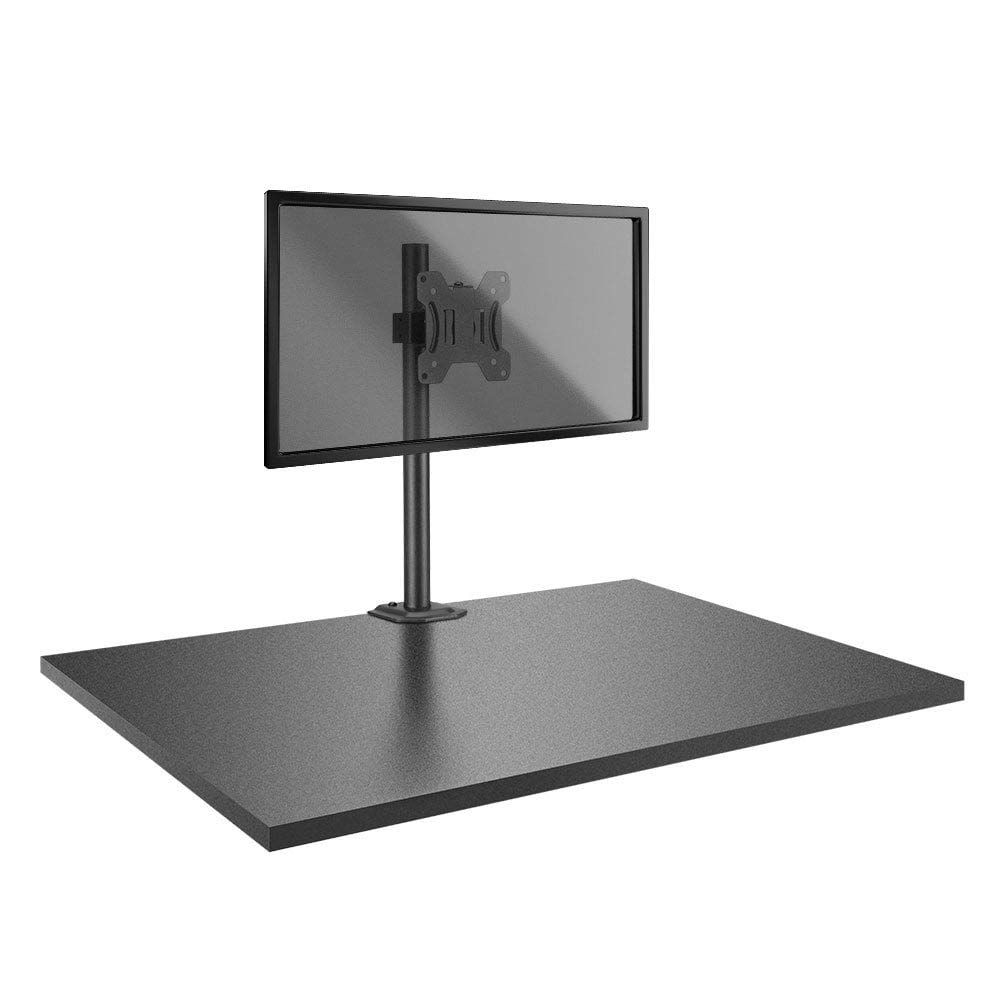
Image: The Lindy Single Display Short Bracket with Pole and Desk Clamp, Model 40656, shown installed on a desk with a monitor (monitor not included).
Caracteristici cheie:
- Mounts a single monitor to a standard office desk.
- Allows tilt, pivot, or rotate for simple maneuverability.
- Conforms to VESA standards (75 x 75mm and 100 x 100mm).
- Constructed with a robust, lightweight metal pole and an aluminum powder-coated bracket.
2. Informații de siguranță
Please read and understand all instructions before attempting installation. Failure to follow these instructions may result in property damage, injury, or product malfunction.
- Ensure the desk surface is stable and can safely support the combined weight of the mount and your monitor.
- Do not exceed the maximum weight capacity of the mount. Refer to the 'Specifications' section for details.
- Ensure all screws are securely tightened to prevent accidental detachment of the monitor.
- Țineți copiii și animalele de companie departe de zona de instalare în timpul asamblării.
- Avoid placing the mount in areas with excessive vibration, direct sunlight, or high humidity.
- Folosiți doar hardware-ul furnizat sau piesele de schimb aprobate de producător.
3. Conținutul pachetului
Verificați dacă toate componentele sunt prezente înainte de a începe instalarea:
- Pole with integrated desk clamp
- Short VESA bracket
4. Instrucțiuni de configurare
Follow these steps to properly install your Lindy Single Display Short Bracket:
Pasul 1: Atașați suportul de birouamp la birou
- Poziționați biroul clamp base on the edge of your desk, ensuring it is stable and flush.
- Strângeți clamp screw firmly until the mount is securely fastened to the desk. Do not overtighten.

Imagine: Laterală view of the pole with the desk clamp, illustrating how it attaches to a desk surface.
Step 2: Assemble Pole and Bracket
- Slide the short VESA bracket onto the pole.
- Position the bracket at your desired height and secure it using the integrated locking mechanism or screws.

Image: The pole and desk clamp assembly with the short VESA bracket positioned on the pole.
Step 3: Attach VESA Bracket to Monitor
- Așezați cu grijă monitorul cu fața în jos pe o suprafață moale și curată pentru a preveni zgârieturile.
- Align the VESA mounting holes on the back of your monitor with the holes on the short bracket.
- Secure the bracket to the monitor using the appropriate screws (typically M4 or M5, not included with mount). Ensure they are tightened firmly but do not overtighten.

Imagine: Prim-plan view of the VESA mounting plate, showing the screw holes for monitor attachment.
Step 4: Mount Monitor to Pole
- With assistance, carefully lift the monitor (with the attached bracket) and slide the bracket onto the pole.
- Ensure the bracket is securely seated on the pole and tighten any locking screws on the bracket to prevent vertical movement.
5. Instrucțiuni de utilizare
Once installed, the Lindy Single Display Short Bracket allows for flexible monitor positioning:
- Reglarea înclinării: Loosen the tilt knob on the VESA bracket, adjust the monitor to your desired vertical angle (up to 12 degrees), and then re-tighten the knob to secure the position.
- Ajustare pivot: The monitor can be rotated 360 degrees around the VESA plate, allowing for easy switching between landscape and portrait orientations.
- Ajustare rotație: The entire monitor assembly can be rotated around the pole for horizontal viewajustări ale unghiului.
6. Întreținere
Pentru a asigura longevitatea și funcționarea în siguranță a suportului de monitor:
- Verificați periodic toate șuruburile și conexiunile pentru a vă asigura că rămân strânse. Strângeți-le din nou, dacă este necesar.
- Clean the mount with a soft, dry cloth. Avoid using abrasive cleaners, solvents, or chemical sprays.
- Inspect the mount periodically for any signs of wear, damage, or corrosion. If damage is found, discontinue use and contact support.
7. Depanare
Dacă întâmpinați probleme cu suportul monitorului, consultați următoarele probleme și soluții frecvente:
- Monitor is wobbly:
- Asigurați-vă că biroul clamp este fixat bine pe birou.
- Check all screws connecting the VESA bracket to the pole and the monitor.
- Monitor does not stay in desired position (e.g., tilts down):
- Tighten the tilt adjustment knob on the VESA bracket.
- Difficulty rotating or pivoting the monitor:
- Ensure no cables are obstructing the movement of the monitor or bracket.
- Check for any overtightened screws that might restrict motion.
8. Specificații
| Caracteristică | Detaliu |
|---|---|
| Marca | Lindy |
| Numărul de model | 40656 |
| Greutatea articolului | 4.4 lire sterline |
| Dimensiunile produsului | 4.17 x 4.33 x 20.08 inci |
| Material | Aluminiu, Metal |
| Tip de montare | Suport de masă |
| Tipul de mișcare | Rotate, Tilt |
| Dispozitive compatibile | Monitors (Television) |
| Unghi maxim de înclinare | 12 de grade |
| Compatibilitate VESA | 75 x 75 mm, 100 x 100 mm |
9. Garanție și asistență
Informații despre garanție:
This Lindy product is covered by a 2 ani garanție de la data achiziției. Vă rugăm să păstrați dovada achiziției pentru reclamațiile în garanție.
Asistență clienți:
For technical assistance, troubleshooting, or to make a warranty claim, please contact Lindy customer support. Visit the official Lindy website for up-to-date contact information and support resources.


