
1. Introducere
The NETGEAR GS308PP is an 8-Port Gigabit Ethernet Unmanaged PoE+ Switch designed for reliable network connectivity and power delivery. It features 8 PoE+ ports with an 83W total power budget, supporting various power-hungry devices. This switch utilizes NETGEAR FlexPoE integrated technology, allowing for future PoE budget expansion. Its plug-and-play design requires no software installation or configuration, making it easy to set up for desktop or wall-mount installations.
2. Produs terminatview
The GS308PP switch features eight Gigabit Ethernet ports on the front panel, each supporting Power-over-Ethernet Plus (PoE+). Each port has corresponding LED indicators for Link/ACT status and PoE mode. The rear panel includes the power input and a Kensington lock slot.
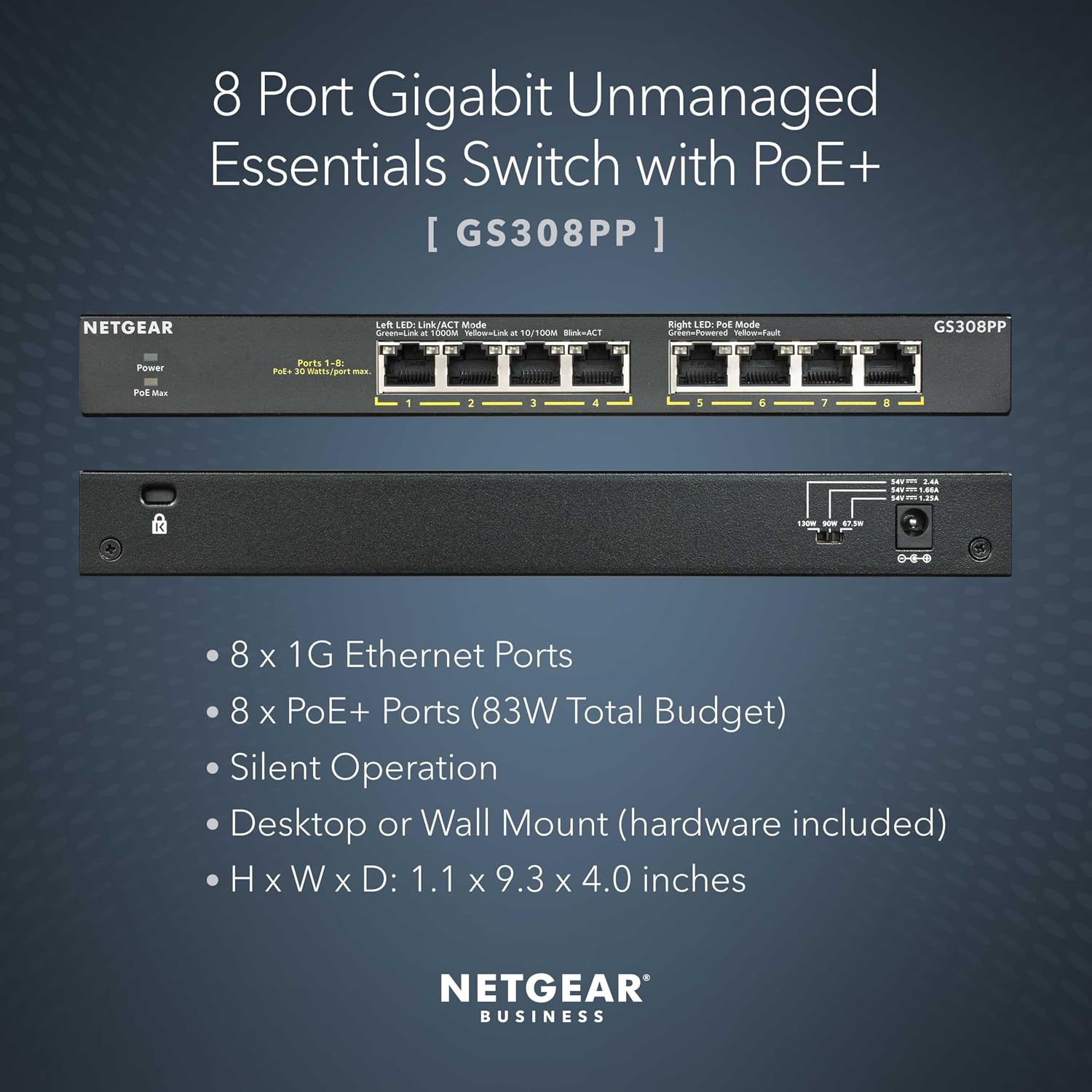
Imagine: Fata si spate view of the NETGEAR GS308PP switch, highlighting 8 Gigabit Ethernet ports, PoE+ capabilities, and physical dimensions.
Conținutul pachetului
- NETGEAR GS308PP 8-Port Gigabit Ethernet Unmanaged PoE+ Switch
- Adaptor de alimentare
- Wall-mount kit (screws and anchors)
- Ghid de instalare
3. Instrucțiuni de configurare
The NETGEAR GS308PP switch is designed for simple plug-and-play installation, requiring no software configuration.
Instalare pas cu pas:
- Despachetați comutatorul: Scoateți cu grijă întrerupătorul și toate accesoriile din ambalaj.
- Alegeți o locație: Select a suitable location for the switch. It can be placed on a desktop or mounted on a wall using the included hardware. Ensure adequate ventilation around the device.
- Conectarea dispozitivelor de rețea: Connect your network devices (e.g., computers, access points, IP cameras, NAS) to the Gigabit Ethernet ports (1-8) on the front panel using standard Ethernet cables (Cat5e or Cat6 recommended).
- Conectare alimentare: Connect the provided power adapter to the power input on the rear panel of the switch, then plug the adapter into a power outlet.
- Verificați funcționarea: Once powered on, observe the LED indicators. The Link/ACT LEDs should illuminate for active connections, and the PoE LEDs should light up for devices receiving power.

Imagine: Diagram illustrating the plug-and-play setup of the GS308PP switch, connecting various devices like WiFi Access Points, IP Cameras, Computers, and NAS.
4. Instrucțiuni de utilizare
The NETGEAR GS308PP is an unmanaged switch, meaning it operates automatically without requiring user configuration. Once connected and powered, it will facilitate network communication and power delivery.
Indicatoare LED:
- LED de alimentare: Se aprinde când comutatorul este pornit.
- Link/ACT LEDs (per port):
- Verde continuu: Este stabilită o legătură de rețea validă.
- Verde intermitent: Activitate de date pe port.
- Off: No link or connection issue.
- LED-uri PoE (per port):
- Solid Green: Power is being supplied to a PoE-compatible device.
- Flashing Green: PoE fault detected (e.g., overcurrent, short circuit).
- Off: No PoE device connected or no power being supplied.
Power-over-Ethernet (PoE+) Functionality:
The switch provides 8 PoE+ ports with a total power budget of 83W. It supports dynamic PoE allocation, which redistributes unused power to support power-hungry devices more efficiently. Ensure that connected devices requiring power are PoE+ compatible.

Imagine: Table illustrating power requirements for various powered devices (WiFi Access Points, Cameras, VoIP Phones) across PoE, PoE+, and PoE++ standards.
5. Întreținere
The NETGEAR GS308PP switch is designed for minimal maintenance. Its fanless design ensures silent operation and reduces the accumulation of dust. The switch also incorporates IEEE 802.3az Energy Efficient Ethernet technology to optimize power consumption.
Îngrijire generală:
- Keep the switch in a clean, dry environment.
- Ensure proper ventilation by not obstructing the air vents.
- Evitați expunerea comutatorului la temperaturi extreme sau umiditate.
- Nu încercați să deschideți c.asing; în interior nu există piese care pot fi reparate de utilizator.
6. Depanare
If you encounter issues with your NETGEAR GS308PP switch, refer to the following common troubleshooting steps:
Probleme comune și soluții:
- Fără putere:
- Asigurați-vă că adaptorul de alimentare este conectat corect la comutator și la o priză funcțională.
- Verificați dacă LED-ul de alimentare de pe comutator este aprins.
- Nicio legătură/activitate pe un port:
- Verificați dacă cablul Ethernet este conectat în siguranță atât la portul switch-ului, cât și la dispozitivul conectat.
- Încercați să utilizați un alt cablu Ethernet.
- Asigurați-vă că dispozitivul conectat este pornit și funcționează corect.
- Check the Link/ACT LED for the specific port.
- Dispozitivul PoE nu primește energie:
- Confirm that the connected device is PoE+ (802.3at) compatible.
- Check the PoE LED for the specific port. If flashing, a PoE fault may be present.
- Ensure the total power budget of 83W is not exceeded by all connected PoE devices.
- Try connecting the PoE device to a different port.
- Viteză redusă a rețelei:
- Asigurați-vă că toate dispozitivele și cablurile conectate acceptă Gigabit Ethernet pentru performanțe optime.
- Check for excessive network traffic or faulty cables.
If these steps do not resolve the issue, please contact NETGEAR technical support for further assistance.
7. Specificații
| Caracteristică | Caietul de sarcini |
|---|---|
| Marca | Netgear |
| Numărul de model | GS308PP-100NAS |
| Numărul de porturi | 8 Gigabit Ethernet |
| Porturi PoE | 8 PoE+ (802.3at) |
| Buget total de putere PoE | 83W |
| Rata de transfer de date | 1000 de megabiți pe secundă (Mbps) |
| Tip comutator | Negestionat |
| Material carcasă | Metal |
| Dimensiuni (L x l x H) | 23.6L x 10.2W x 2.8H centimetri |
| Greutatea articolului | 1.32 lire sterline |
| Voltage | 110 volți (AC) |
| Caracteristici | Fanless Design, IEEE 802.3az Energy Efficient Ethernet |
| Regional Compatibility | U.S. & CA only |
8. Garanție și asistență
For detailed warranty information, product registration, and technical support, please visit the official NETGEAR website or contact NETGEAR customer service directly. Support resources typically include FAQs, troubleshooting guides, and software/firmware downloads.
Asistență NETGEAR Website: www.netgear.com/support


