
Homcloud TY-WCS4S
Homcloud Wi-Fi Speed 4S Pan&Tilt Camera User Manual
Model: TY-WCS4S
Introducere
Thank you for choosing the Homcloud Wi-Fi Speed 4S Pan&Tilt Camera. This manual provides detailed instructions for the installation, operation, and maintenance of your new smart home security device. Please read this manual thoroughly before use to ensure proper functionality and safety.

Imagine: față view of the Homcloud Wi-Fi Speed 4S Pan&Tilt Camera, showcasindatorită designului său compact.
Conținutul pachetului
Vă rugăm să verificați dacă toate componentele sunt prezente în pachet:
- Homcloud Wi-Fi PTZ Camera (Model TY-WCS4S)
- Adaptor de alimentare (5V)
- Accesorii de montare (șuruburi, dibluri)
- Manual de utilizare
Ghid de instalare
1. Pornire
- Conectați adaptorul de alimentare la portul de intrare a camerei.
- Plug the power adapter into a standard electrical outlet. The camera will power on and initiate its self-check sequence.
- Wait for the indicator light to flash, indicating it's ready for network configuration.
2. Instalarea aplicației și crearea contului
The Homcloud camera operates with the Homcloud App. Download the app from your smartphone's app store:

- Open the Homcloud App and register a new account if you don't have one, or log in with an existing account.
3. Adăugarea camerei la aplicație
- In the Homcloud App, tap the "+" icon (usually in the top right corner) to add a new device.
- Select "Security & Video Surveillance" or search for "Camera (Wi-Fi)".
- Follow the on-screen instructions to connect the camera to your Wi-Fi network. Ensure your Wi-Fi network is 2.4GHz, as 5GHz networks are not supported.
- You may be prompted to scan a QR code displayed on your phone screen with the camera lens. Hold the phone approximately 15-20 cm (6-8 inches) in front of the camera until you hear a confirmation sound.
- Once connected, you can name your camera and assign it to a specific room.
4. Montarea camerei (opțional)
The camera can be placed on a flat surface or mounted on a wall.
- Montare pe perete: Use the provided mounting bracket, screws, and wall plugs to secure the camera to a desired wall location. Ensure the camera is positioned to cover the desired surveillance area.
Instrucțiuni de operare
Trăi View și Control
Once connected, open the Homcloud App and select your camera to access the live video feed.
- Pan & Tilt: Use the directional controls within the app to remotely rotate the camera horizontally (355°) and vertically (90°) to adjust the viewunghiul de ing.
- Audio bidirecțional: Atingeți pictograma microfonului pentru a vorbi prin difuzorul camerei și pentru a asculta sunetul de la microfonul camerei.
- Snapshot & Record: Capture still images or record video clips directly from the live view.
- Vedere de noapte: The camera automatically switches to night vision mode in low-light conditions, providing clear black and white video using its LED illuminators.
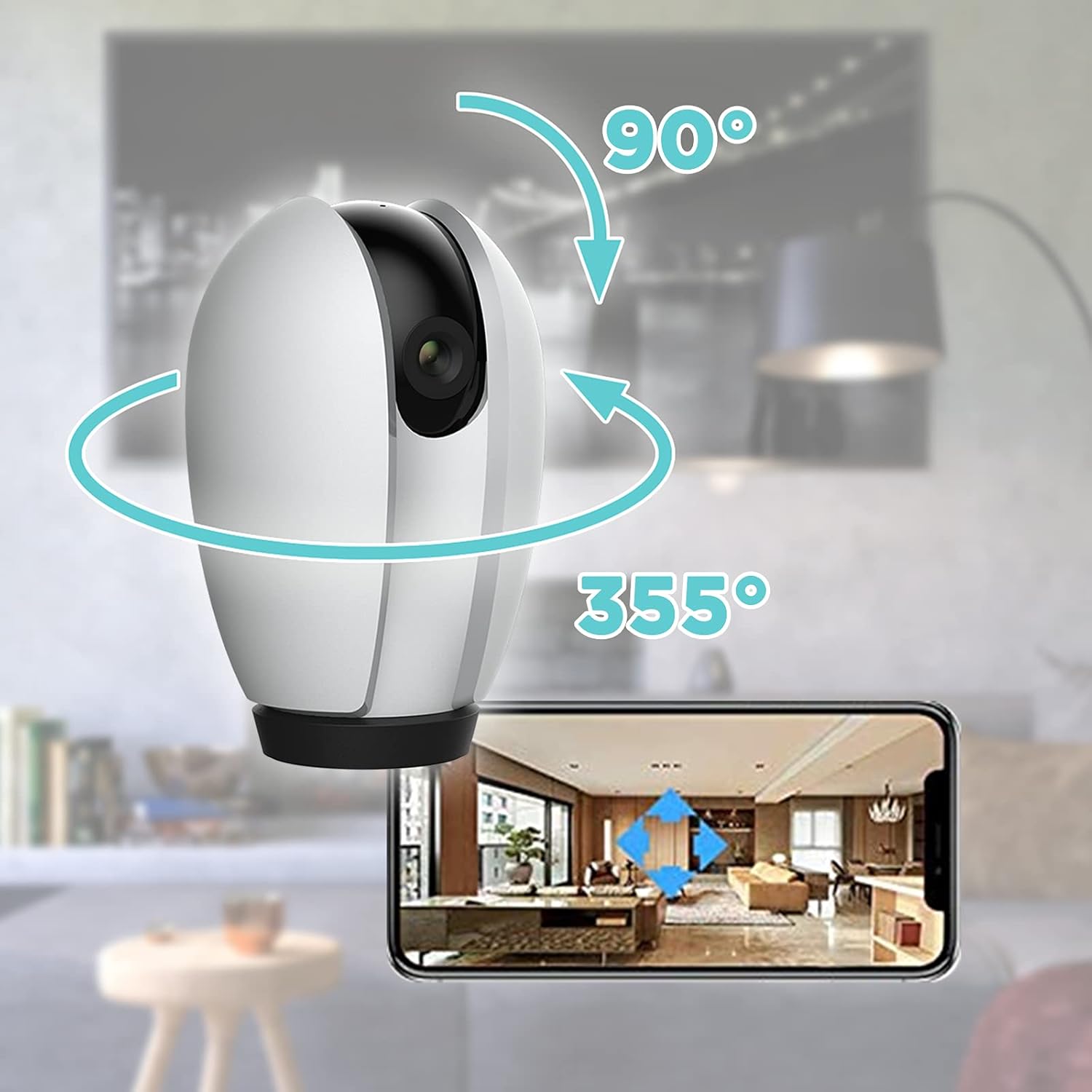
Image: Illustration of the camera's 355-degree horizontal pan and 90-degree vertical tilt capabilities, controlled via the smartphone app.
Detectarea mișcării și alerte
Configure motion detection settings in the app to receive alerts when movement is detected.
- Sensibilitate: Reglați sensibilitatea detectării mișcării pentru a minimiza alarmele false.
- Zone de activitate: Definiți zone specifice din raza de acțiune a camerei view pentru detectarea mișcării.
- Notificări de alertă: Enable push notifications to receive instant alerts on your smartphone.
Opțiuni de stocare
The camera supports local storage and cloud storage (subscription may be required).
- Card MicroSD: Insert a MicroSD card (not included) into the camera's slot for continuous recording or event-triggered recording. The camera supports up to 128GB.
- Stocare în cloud: Check the Homcloud App for available cloud storage plans to securely store your video recordings online.
Integrare Smart Home
The Homcloud Wi-Fi Speed 4S Pan&Tilt Camera is compatible with popular smart home platforms:
- Funcționează cu Alexa: Integrare cu Amazon Alexa pentru control vocal.
- Funcționează cu Asistentul Google: Integrate with Google Assistant for voice control.

Image: The Homcloud camera highlighting its compatibility with Wi-Fi, Amazon Alexa, and Google Assistant for seamless smart home integration.
Întreţinere
- curatenie: Folosiți o cârpă moale și uscată pentru a curăța obiectivul și corpul camerei. Nu utilizați agenți de curățare lichizi sau materiale abrazive.
- Actualizări firmware: Regularly check the Homcloud App for firmware updates to ensure optimal performance and security.
- Ciclu de alimentare: If the camera becomes unresponsive, unplug it from the power source for 10 seconds and then plug it back in.
Depanare
| Problemă | Cauza posibila | Soluţie |
|---|---|---|
| Camera offline în aplicație | Fără curent; Wi-Fi deconectat; Problemă cu routerul. | Check power connection. Verify Wi-Fi signal strength. Restart router and camera. Re-add camera if necessary. |
| Nu se poate conecta la Wi-Fi | Parolă Wi-Fi incorectă; Rețea de 5 GHz; Semnal slab. | Asigurați-vă că parola Wi-Fi de 2.4 GHz este corectă. Mutați camera mai aproape de router. Resetați camera și încercați din nou. |
| Alertele de mișcare nu au fost primite | App notifications disabled; Motion detection off; Sensitivity too low. | Enable app notifications. Turn on motion detection in app. Increase sensitivity. |
| Calitate video slabă | Insufficient light; Dirty lens; Weak Wi-Fi signal. | Ensure adequate lighting. Clean the camera lens. Improve Wi-Fi signal. |
Specificații
| Caracteristică | Detaliu |
|---|---|
| Numărul de model | TY-WCS4S |
| Marca | Homcloud |
| Rezoluție video | 1080p (Effective 1080) |
| Pan Range | 355 de grade |
| Interval de înclinare | 90 de grade |
| Conectivitate | Wi-Fi (doar 2.4 GHz) |
| Intrare de putere | 5 volți, 5 wați |
| Material | Policarbonat (PC) |
| Dimensiuni (L x l x H) | 12 x 10 x 6 cm |
| Greutate | 250 de grame |
| Caracteristici speciale | Viziune nocturnă, Sunet bidirecțional, Detectare mișcare |
| Utilizare recomandată | Supraveghere |
Garanție și suport
Homcloud products typically come with a standard manufacturer's warranty. Please refer to the warranty card included in your product packaging or visit the official Homcloud website-ul pentru termenii și condițiile detaliate ale garanției.
For technical support, troubleshooting assistance, or any inquiries regarding your Homcloud Wi-Fi Speed 4S Pan&Tilt Camera, please contact Homcloud customer service through their official website or the contact information provided in the Homcloud App.
Resurse online:
- Homcloud Official Website: www.homcloud.com (Notă: Acesta este un substituent) URL deoarece nu există un sprijin specific URL was provided in the input. Users should refer to their product documentation for exact support details.)
- Homcloud App Support Section
Ask a question about this manual
Ask about setup, troubleshooting, compatibility, parts, safety, or missing instructions. Manuals+ will review the question and use this page’s manual context to help answer it.