
ProfiCare PC-BSR 3042
Manual de instrucțiuni pentru aspiratorul robot ProfiCare PC-BSR 3042
Model: PC-BSR 3042
1. Introducere
Thank you for choosing the ProfiCare PC-BSR 3042 Robot Vacuum Cleaner. This manual provides essential information for the safe and efficient operation, maintenance, and troubleshooting of your new appliance. Please read these instructions thoroughly before first use and keep them for future reference.
The ProfiCare PC-BSR 3042 is designed to independently clean various hard floor surfaces and short-pile carpets, effectively removing dirt, dust, crumbs, and pet hair. Its extra-flat design allows for cleaning under furniture, and its quiet operation ensures minimal disturbance.
2. Instrucțiuni de siguranță
Respectați întotdeauna următoarele măsuri de siguranță pentru a preveni vătămările corporale sau deteriorarea aparatului:
- Citiți cu atenție toate instrucțiunile înainte de a utiliza aparatul.
- Acest aparat este destinat numai pentru uz casnic.
- Do not allow children to play with the appliance. Supervise children and individuals with reduced physical, sensory, or mental capabilities when the appliance is in use.
- Do not immerse the appliance, power adapter, or remote control in water or other liquids.
- Use only the original power adapter supplied with the appliance.
- Nu utilizați aparatul pentru a aspira materiale inflamabile sau combustibile, cenușă fierbinte sau obiecte ascuțite.
- Ensure the dustbin and filter are correctly installed before operation.
- Țineți părul, hainele largi, degetele și toate părțile corpului departe de deschideri și părți în mișcare.
- The appliance features automatic stair detection. However, always exercise caution near stairs or elevated surfaces.
- If the appliance is damaged, do not operate it. Contact customer support for assistance.
3. Conținutul pachetului
Vă rugăm să verificați dacă toate articolele sunt prezente și în stare bună:
- ProfiCare PC-BSR 3042 Robot Vacuum Cleaner
- Adaptor de alimentare
- Telecomanda
- Side Brushes (2 pre-installed, 2 extra)
- Filtru HEPA (preinstalat)
- Cleaning Brush for Filter
- Manual de instructiuni
4. Produs terminatview
Familiarize yourself with the components of your robot vacuum cleaner.
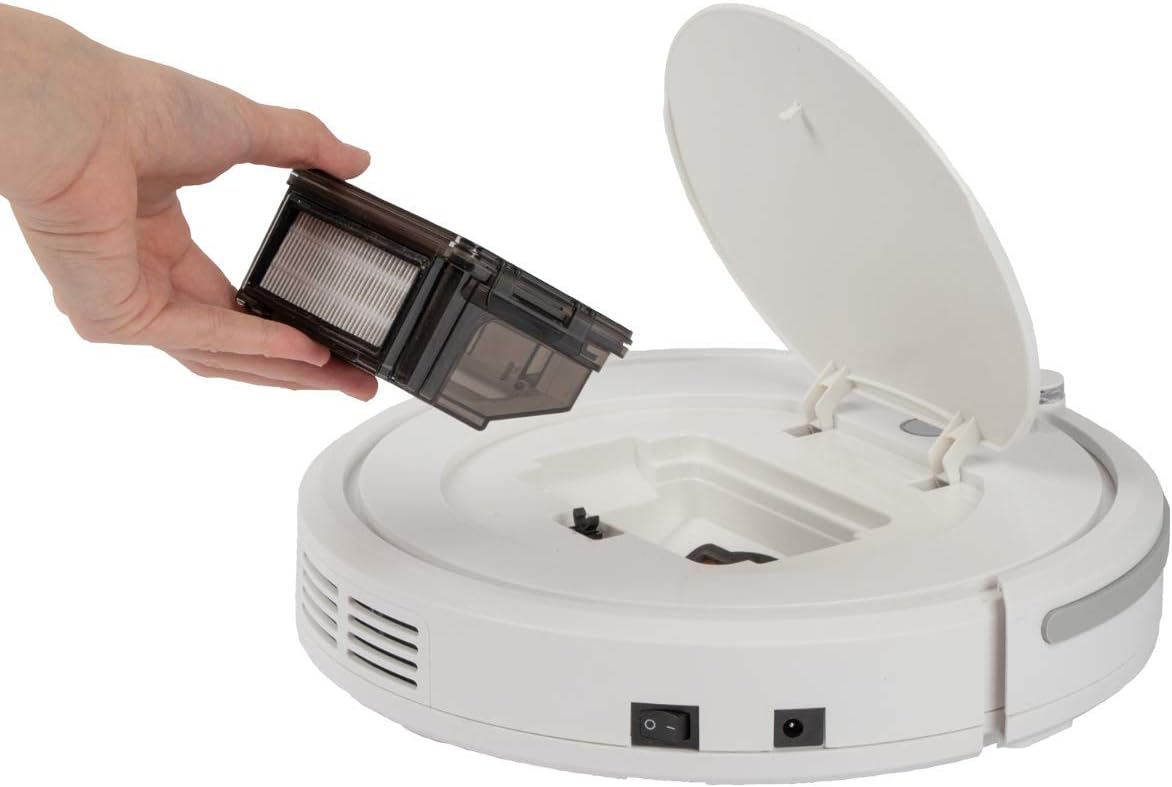
Figura 4.1: Top view of the robot vacuum cleaner, showing the main power button, HEPA filter indicator, and remote sensor area.

Figura 4.2: The multi-function remote control for operating the robot vacuum cleaner.
Componentele unității principale:
- Buton de alimentare: Located on the top surface for manual start/stop.
- Dustbin Compartment: Houses the removable dustbin and HEPA filter.
- Perii laterale: Two rotating brushes for sweeping debris into the vacuum's path.
- Port de încărcare: Pentru conectarea adaptorului de alimentare.
- Senzori cu infrarosu: For obstacle detection and stair avoidance.
- Roțile motrice: Rubberized and spring-mounted for smooth movement across various surfaces.
Funcții de control de la distanță:
- Start / Pauză: Initiates or pauses cleaning.
- Săgeți direcționale: Manually guides the robot.
- FOCUS (Spot Cleaning): Directs the robot to clean a specific area intensively.
- RANDOM (Random Cleaning): Robot cleans in a random pattern.
- AUTO (Systematic Cleaning): Robot cleans in a systematic pattern.
- RĂSPUNDE: Locates the robot.
5. Configurare
5.1. Încărcarea bateriei
- Connect the power adapter to the charging port on the side of the robot vacuum cleaner.
- Conectați adaptorul de alimentare la o priză de perete.
- Allow the robot to charge for approximately 5 hours before its first use. The charging indicator light will show the charging status.
5.2. Instalarea periilor laterale
The robot comes with two side brushes pre-installed. If replacement is needed:
- Turn the robot vacuum cleaner upside down.
- Align the new side brush with the brush post and press down until it clicks into place. Ensure the brushes are securely attached.
5.3. Pregătirea zonei de curățare
- Remove any large obstacles, loose cables, or delicate items from the floor.
- Asigurați-vă că ușile către zonele pe care doriți să le curățați sunt deschise, iar ușile către zonele pe care doriți să le evitați sunt închise.
6. Operating the Robot Vacuum Cleaner
6.1. Pornirea unui ciclu de curățare
You can start the robot in two ways:
- Pornire manuală: Press the power button on the top of the robot.
- Pornire prin telecomandă: Press the "Start/Pause" button on the remote control.
The robot will begin cleaning in its default mode (Systematic or Random, depending on the last setting).
6.2. Selectarea modurilor de curățare
Use the remote control to select a specific cleaning program:
- AUTO (Systematic Cleaning): The robot cleans in a structured, back-and-forth pattern to cover the entire area efficiently.
- RANDOM (Random Cleaning): The robot navigates randomly, changing direction upon encountering obstacles.
- FOCUS (Spot Cleaning): Robotul curăță o zonă concentrată într-un model spiralat, ideal pentru petele foarte murdare.
6.3. Pausing and Resuming
Press the "Start/Pause" button on the robot or remote control to pause the cleaning cycle. Press it again to resume.
6.4. Stopping the Robot
To stop the robot completely, press and hold the power button on the robot until it turns off, or press the "Start/Pause" button on the remote and then the power button on the robot.
6.5. Funcția Timer
The remote control includes a timer function to schedule cleaning times. Refer to the remote control section in this manual for detailed instructions on setting the timer.
6.6. Stair Detection
The robot is equipped with infrared sensors that automatically detect stairs and prevent it from falling. Ensure these sensors are kept clean for optimal performance.
7. Întreținere
Întreținerea regulată asigură performanțe optime și prelungește durata de viață a aspiratorului robot.
7.1. Golirea și curățarea recipientului de gunoi

Figura 7.1: Removing the dustbin for emptying and cleaning.
- Turn off the robot vacuum cleaner.
- Deschideți capacul superior al robotului.
- Prindeți mânerul recipientului de praf și ridicați-l afară.
- Deschideți coșul de gunoi și goliți conținutul acestuia într-un coș de gunoi.
- Clătiți recipientul de praf cu apă, dacă este necesar, asigurându-vă că este complet uscat înainte de reinstalare.
7.2. Curățarea filtrului HEPA
The HEPA filter is located inside the dustbin. Clean it regularly to maintain suction power.
- Scoateți recipientul de praf așa cum este descris mai sus.
- Carefully remove the HEPA filter from the dustbin.
- Use the provided cleaning brush to remove dust and debris from the filter. Do not wash the HEPA filter with water unless specified by the manufacturer.
- Reinsert the clean HEPA filter into the dustbin and then place the dustbin back into the robot.
7.3. Curățarea periilor laterale
Periodically check and clean the side brushes for tangled hair or debris.
- Turn off the robot and flip it over.
- Trageți ușor de periile laterale în sus pentru a le scoate.
- Remove any hair or debris wrapped around the brushes or brush posts.
- Reattach the brushes by pressing them down onto their posts until they click.
7.4. Cleaning Sensors and Wheels
Wipe the infrared sensors (located around the bumper and underneath the robot) and the drive wheels with a clean, dry cloth to ensure proper navigation and movement.
8. Depanare
If you encounter issues with your robot vacuum cleaner, refer to the following table for common problems and solutions.
| Problemă | Cauza posibila | Soluţie |
|---|---|---|
| Robotul nu pornește. | Bateria este descărcată sau descărcată. | Charge the robot for 5 hours. |
| Robotul se oprește pe neașteptate. | Battery is low; Obstacle detected; Wheels/brushes jammed. | Charge the robot; Remove obstacles; Clean wheels and brushes. |
| Performanță slabă de curățare. | Dustbin full; Filter clogged; Side brushes worn or dirty. | Goliți recipientul de praf; Curățați/înlocuiți filtrul; Curățați/înlocuiți periile laterale. |
| Robotul nu se încarcă. | Power adapter not connected; Faulty adapter/port. | Ensure secure connection; Try a different outlet; Contact support. |
| Robotul cade pe scări. | Stair sensors are dirty or blocked. | Clean the stair sensors thoroughly. |
9. Specificații
Technical details for the ProfiCare PC-BSR 3042 Robot Vacuum Cleaner:

Figura 9.1: Dimensions of the robot vacuum cleaner.
| Caracteristică | Detaliu |
|---|---|
| Numărul de model | 330420 |
| Tip baterie | Ni-MH |
| Volumul baterieitage | 14.4 V |
| Capacitatea bateriei | 1500 mAh |
| Timp de funcționare a bateriei | Până la 90 de minute |
| Timp de încărcare a bateriei | Aproximativ. 5 ore |
| Nivel de zgomot | Aproximativ. 61 dB |
| Dimensiuni (diametru x inaltime) | 290 mm x 75 mm |
| Greutate | 1.9 kg |
| Tip filtru | Filtrul HEPA |
| Programe de curățare | 3 (Random, Systematic, Spot) |
| Caracteristici speciale | Automatic stair detection, Mechanical furniture barrier, Remote control, Timer function |
| Recomandare de suprafață | Hard floors, short-pile carpets |
10. Garanție și asistență
10.1. Garanția producătorului
This product is covered by a manufacturer's warranty. Please refer to the warranty card included in your package or contact ProfiCare customer service for specific terms and conditions. Spare parts availability is typically 2 years from the date of purchase.
10.2. Asistență pentru clienți
For technical assistance, troubleshooting beyond this manual, or warranty claims, please contact your retailer or the ProfiCare customer support team. Contact information can usually be found on the product packaging or the official ProfiCare website-ul.
Ask a question about this manual
Ask about setup, troubleshooting, compatibility, parts, safety, or missing instructions. Manuals+ will review the question and use this page’s manual context to help answer it.