
Introducere
Thank you for choosing the 70mai RC03 Rear Car Camera. This manual provides detailed instructions for the installation, operation, and maintenance of your device. Please read this manual thoroughly before using the product to ensure proper function and safety.
The 70mai RC03 is designed to enhance your driving safety by providing a clear view of the area behind your vehicle, with the flexibility for front installation as well.
Produs terminatview
Caracteristici cheie
- Reversible Rear Camera: Can be installed at the rear or front of the vehicle for flexible monitoring.
- Dual Recording Capability: Supports recording in 720 HD resolution.
- Vedere îmbunătățită: Features night vision and a wide-angle lens for comprehensive coverage.
- Design durabil: IPX7 water resistance ensures reliable performance in various weather conditions.
Conținutul pachetului
The following items are included in your 70mai RC03 Rear Car Camera package:
- 1 x Xiaomi 70mai RC03 Rear Camera
- 1 x cablu video
- 2 șuruburi de instalare
Componentele produsului
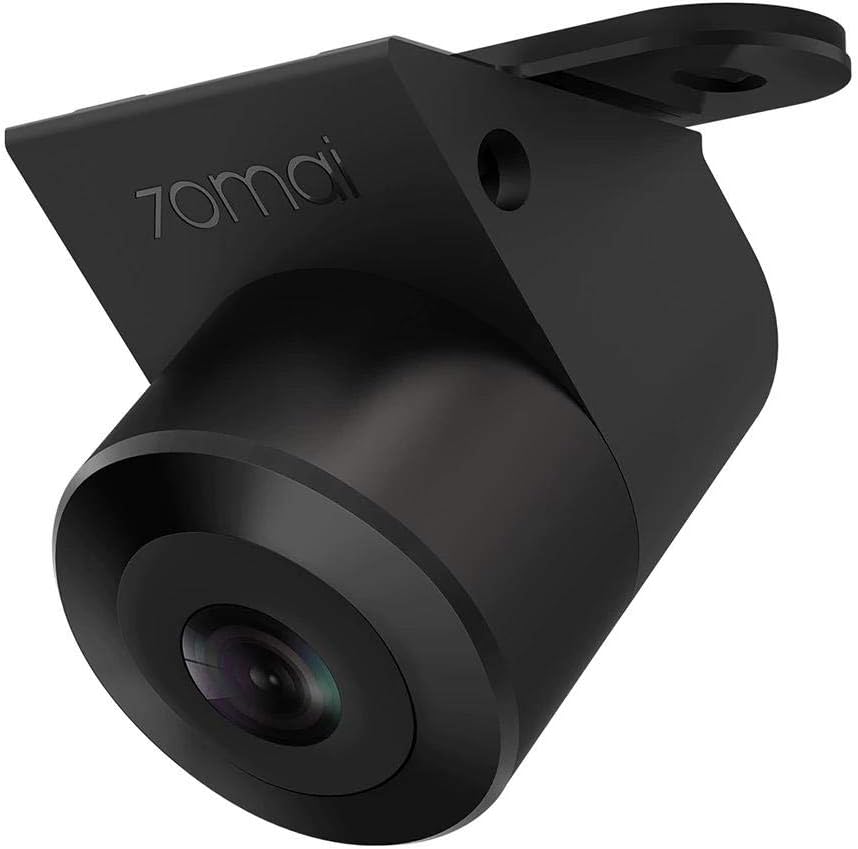
Figura 1: The 70mai RC03 Rear Car Camera unit. This image shows the compact design of the camera with its lens and mounting bracket.

Figura 2: The 70mai RC03 Rear Car Camera installed on the exterior of a vehicle, demonstrating its water-resistant design with water droplets visible on the casing. This illustrates a typical installation scenario.
Informații de siguranță
- Ensure all wiring is correctly connected and secured to prevent interference with vehicle operation.
- Nu încercați să dezasamblați sau să modificați camera. Acest lucru poate anula garanția și poate provoca daune.
- Keep the camera lens clean for optimal performance.
- Consultați un profesionist pentru instalare dacă nu sunteți sigur de vreun pas.
Configurare și instalare
The 70mai RC03 camera is designed for surface mounting and connects via an RCA connector. It can be installed as a rear or front camera.
- Alegeți locația de instalare: Decide whether to install the camera at the rear or front of your vehicle. Ensure the chosen spot provides a clear, unobstructed view and allows for secure mounting.
- Montați camera: Use the provided installation screws to securely attach the camera to the chosen surface. Ensure the camera is oriented correctly for the desired viewunghiul de ing.
- Conectați cablul video: Connect one end of the video cable to the camera's RCA port.
- Traseu cablu: Carefully route the video cable through your vehicle's interior to the main recording unit or display. Ensure the cable is not pinched or exposed to moving parts.
- Conectarea la unitatea principală: Connect the other end of the video cable (RCA connector) to the corresponding input on your main dash cam or display unit.
- Conexiune de alimentare: Connect the camera's power cable (if separate) to a suitable power source in your vehicle, typically linked to the reverse light circuit for rear cameras or an accessory power source for front cameras.
- Funcționalitate de testare: After installation, power on your vehicle and the main recording unit to verify that the camera is functioning correctly and providing a clear image. Adjust the camera angle if necessary.
Instrucțiuni de operare
The 70mai RC03 camera operates in conjunction with a compatible main dash cam or display unit. Refer to your main unit's manual for specific instructions on viewing and recording footage.
- Pornire/Oprire: The camera typically powers on and off automatically with your vehicle's ignition or when the main unit is activated.
- Înregistrare: When connected to a compatible 70mai dash cam, the RC03 will automatically begin recording in 720p resolution, providing dual recording capability.
- Vedere de noapte: The camera is equipped with night vision technology to provide clear images in low-light conditions.
- Unghi larg View: The wide-angle lens captures a broad field of view, minimizing blind spots.
Întreţinere
- Curățarea lentilei: Curățați regulat obiectivul camerei cu o lavetă moale,amp o lavetă pentru a asigura o calitate clară a imaginii. Evitați substanțele de curățare abrazive.
- Rezistenta la apa: The camera has an IPX7 water resistance rating, meaning it can withstand immersion in water up to 1 meter for 30 minutes. However, avoid prolonged submersion or high-pressure water jets.
- Verificarea cablului: Periodically check all cables for wear, damage, or loose connections.
- Actualizări firmware: If applicable, check the 70mai official website for any available firmware updates for your camera or main unit.
Depanare
If you encounter issues with your 70mai RC03 camera, refer to the following common problems and solutions:
- Nicio imagine pe ecran:
- Check all cable connections, especially the RCA video cable and power supply.
- Ensure the main dash cam or display unit is powered on and correctly configured to receive input from the RC03.
- Verify the camera's power source is active (e.g., reverse light circuit).
- Fuzzy or Distorted Image:
- Curățați temeinic obiectivul camerei.
- Verificați dacă există obstrucții în câmpul de acțiune al camerei view.
- Ensure the video cable is not damaged or experiencing interference.
- Camera nu înregistrează:
- Confirm that the main dash cam is recording and properly configured for dual-channel recording.
- Check the storage capacity of your main dash cam's memory card.
Specificații
| Numărul de model | Midrive RC03 |
| Producător | Xiaomi |
| Marca | 70mai |
| Tehnologia senzorilor optici | CMOS |
| Effective Capture Resolution | 720 Pixels (720p) |
| Tip de lentile | Unghi larg |
| Real View Unghi | 138 de grade |
| Câmpul de View | 146 de grade |
| Tip conector | RCA |
| Tip de instalare | Montare la suprafață |
| Rezistenta la apa | IPX7 |
| Display Technology (if applicable to main unit) | LCD |
| Screen Size (if applicable to main unit) | 3 inchi |
| baterii | 1 AA - included (likely for main unit, not camera itself) |
Garanție și suport
For warranty information and customer support, please refer to the documentation provided with your main 70mai dash camera unit or visit the official 70mai webInformațiile privind disponibilitatea pieselor de schimb și garanțiile de actualizare a software-ului nu sunt disponibile în acest moment.
For technical assistance or inquiries, please contact 70mai customer service through their official channels.