
Introducere
This manual provides essential instructions for the safe and efficient operation of your Powertech UPS Line Interactive PT-950C. Please read this manual thoroughly before installation and use, and retain it for future reference. The Uninterruptible Power Supply (UPS) is designed to protect your electronic equipment from power outages, surges, and sags, ensuring continuous operation and data integrity.
Instrucțiuni importante de siguranță
- Nu deschideți unitatea UPS.asing. În interior nu există piese care să poată fi reparate de utilizator. Consultați personalul de service calificat.
- Do not install the UPS in direct sunlight, near heat sources, or in environments with excessive dust, moisture, or flammable liquids.
- Asigurați o ventilație adecvată în jurul UPS-ului. Nu blocați orificiile de ventilație.
- Conectați UPS-ul doar la o priză de curent alternativ cu împământare.
- Do not connect appliances that could overload the UPS, such as laser printers, heaters, or vacuum cleaners.
- In case of fire, use a dry chemical extinguisher. Water can be dangerous near electrical equipment.
- Disconnect the UPS from the AC power outlet before cleaning. Use a dry cloth.
Produs terminatview și Componente
The Powertech PT-950C UPS features a compact design with multiple Schuko outlets for connecting your devices. Below is an illustration of the unit's main features.
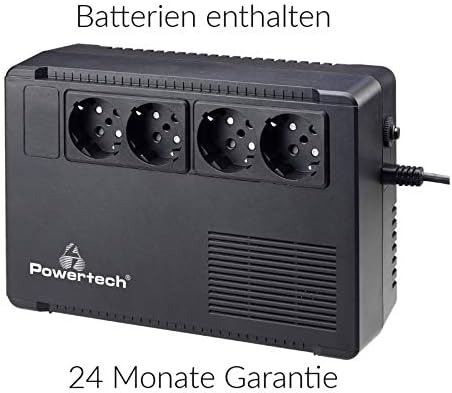
Figura 1: Faţă view of the Powertech PT-950C UPS, showing four Schuko-type power outlets. The Powertech logo is visible on the lower left, and ventilation grilles are on the right side. A power cord is connected to the right side of the unit.
Componente cheie:
- Schuko Outlets (4x): Provide battery backup and surge protection for connected equipment.
- Buton de alimentare: Controls the UPS power on/off status.
- AC Input Cord: Connects the UPS to the wall power outlet.
- Indicatoare LED: (Typically located on the front panel, exact position may vary) Display operational status such as AC mode, battery mode, and fault conditions.
Instrucțiuni de configurare
- Despachetarea: Scoateți cu grijă unitatea UPS din ambalaj. Verificați dacă există daune în urma transportului.
- Plasare: Place the UPS on a flat, stable surface in a well-ventilated area, away from direct sunlight, heat, dust, and moisture. Ensure there is sufficient space around the unit for airflow.
- Încărcare inițială: Connect the UPS to a standard grounded AC wall outlet using its integrated power cord. Allow the unit to charge for at least 8 hours before connecting any equipment to ensure optimal battery performance. The UPS will charge whether it is turned on or off.
- Echipament de conectare: After the initial charge, connect your computer, monitor, and other critical electronic devices to the Schuko outlets on the UPS. Ensure the total power consumption of connected devices does not exceed the UPS's capacity (570W).
- Pornire: Press the power button on the UPS to turn it on. The indicator light should illuminate, confirming operation.
Operarea UPS-ului
- Pornire/Oprire: Press and hold the power button for approximately 2-3 seconds to turn the UPS on or off.
- Mod AC: When connected to a stable AC power source, the UPS operates in AC mode, providing power to connected devices and charging its internal battery. An indicator light (e.g., green LED) typically confirms this status.
- Mod baterie: În timpul unui outage sau volum semnificativtage fluctuation, the UPS automatically switches to battery mode, providing power from its internal battery. An audible alarm may sound, and an indicator light (e.g., flashing green or amber LED) will signal this mode.
- Avertizare baterie descărcată: If the battery level becomes critically low during battery mode, the UPS will emit a more frequent alarm, indicating that connected devices should be safely shut down.
- Avertisment de suprasarcină: If the connected load exceeds the UPS's capacity, an alarm will sound, and a fault indicator may illuminate. Disconnect non-essential equipment immediately to prevent damage.
Întreţinere
- Îngrijirea bateriei: To maximize battery life, ensure the UPS is always connected to an AC power source. If the UPS is stored for an extended period, recharge it every three months for at least 8 hours.
- curatenie: Disconnect the UPS from the wall outlet and all connected devices before cleaning. Use a soft, dry cloth to wipe the exterior. Do not use liquid or aerosol cleaners.
- Înlocuire baterie: The internal battery is not user-replaceable. Contact qualified service personnel for battery replacement. Improper replacement can lead to hazards.
Depanare
| Problemă | Cauza posibila | Soluţie |
|---|---|---|
| UPS-ul nu pornește. | No AC input power; Low battery; UPS fault. | Check AC power connection; Allow UPS to charge for 8 hours; Contact support if fault persists. |
| UPS-ul emite un semnal sonor continuu în modul AC. | Stare de suprasarcină. | Disconnect non-essential equipment until the alarm stops. Ensure total load is within 570W. |
| Timp scurt de backup. | Bateria nu este complet încărcată; Bateria se apropie de sfârșitul duratei de viață; Supraîncărcare. | Ensure initial 8-hour charge; Reduce connected load; Consider battery replacement by service personnel. |
| UPS-ul nu furnizează energie electrică dispozitivelor conectate. | UPS is off; Battery discharged; Fault condition. | Turn on UPS; Allow battery to charge; Check for fault indicators and contact support. |
Specificații
- Model: PT-950C
- Capacitate: 950VA / 570W
- Tip: Line Interactive
- Vol. De intraretage: 220-240 VAC
- Ieșire Voltage (Battery Mode): 220-240 VAC (simulated sine wave)
- Prize: 4 x Schuko (Battery Backup & Surge Protected)
- Timp de transfer: Tipic 2-6 ms
- Tip baterie: Sealed Lead-Acid, Maintenance-Free (Batteries included)
- Timp de reîncărcare: 6-8 ore la 90% capacitate
- Protecţie: Overload, Discharge, Overcharge, Short Circuit
Garanție și suport
The Powertech UPS Line Interactive PT-950C comes with a 24 luni garantie de la data achiziției, acoperind defectele de fabricație. Vă rugăm să păstrați dovada achiziției pentru reclamațiile în garanție.
For technical support, troubleshooting assistance beyond this manual, or warranty service, please contact your retailer or the Powertech customer service department. Refer to the product packaging or Powertech's official website pentru informații de contact.