
1. Introducere și Pesteview
This manual provides detailed instructions for the installation, operation, and maintenance of your Soundstream VRN-DD7HB Double DIN Bluetooth In-Dash Car Stereo Receiver. Please read this manual thoroughly before using the product to ensure proper functionality and to prevent damage.
The VRN-DD7HB is designed to enhance your in-car audio experience with features such as Smart Sense Glass Panel Touch Screen Technology, Bluetooth V4.0 for hands-free calling and A2DP wireless audio playback, and compatibility with OEM steering wheel controls and rear view camere de luat vederi.
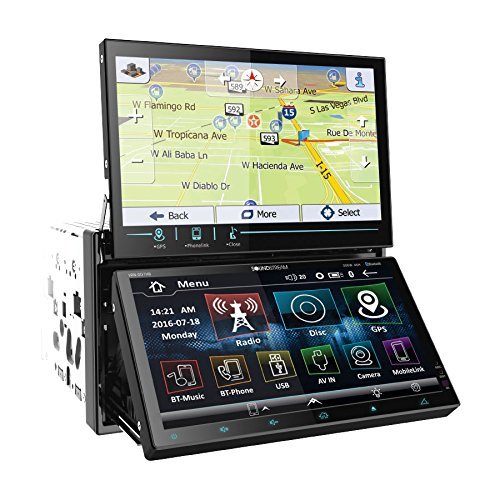
Figura 1.1: Faţă view of the Soundstream VRN-DD7HB Car Stereo Receiver, showcasing its double DIN form factor and touchscreen display.
2. Informații de siguranță
Pentru a asigura o funcționare în siguranță și a preveni vătămările corporale sau deteriorarea, respectați următoarele precauții:
- Nu utilizați unitatea într-un mod care vă distrage atenția de la condus. Acordați întotdeauna prioritate siguranței rutiere.
- Consult a professional for installation to avoid electrical damage or improper wiring.
- Do not disassemble or modify the unit. This may cause malfunction or electric shock.
- Mențineți volumul la un nivel la care puteți auzi în continuare sunetele traficului exterior.
- Propunerea 65 Avertisment: Acest produs conține substanțe chimice cunoscute de statul California pentru a provoca cancer și malformații congenitale sau alte vătămări ale reproducerii.
3. Configurare și instalare
Professional installation is highly recommended for this car stereo receiver. Incorrect wiring can cause severe damage to the unit or your vehicle's electrical system.
3.1 Conexiuni de cablare
Ensure all power, ground, speaker, and accessory wires are connected correctly according to your vehicle's wiring diagram and the unit's wiring harness. Pay close attention to the following:
- Putere (Galben): Conectați la o sursă constantă de 12V.
- Accesoriu (Roșu): Conectați la o sursă de alimentare comutată de 12V (aprindere).
- La sol (negru): Conectați în siguranță la un punct de împământare curat al șasiului.
- Ieșiri difuzoare: Connect to your vehicle's speakers, ensuring correct polarity.
- Spate View Intrare cameră: Connect the video output of your rear view camera to the designated input on the receiver. Ensure the reverse trigger wire is connected to your vehicle's reverse light circuit.
- Intrare control volan: Connect to your vehicle's OEM steering wheel control interface (if applicable). Refer to your vehicle's manual and the steering wheel control interface instructions for proper connection.
3.2 Montare
Mount the double DIN unit securely into your vehicle's dashboard using the provided mounting hardware. Ensure there is adequate space for ventilation and wiring.
4. Instrucțiuni de utilizare
4.1 Pornire/Oprire
Press the power button (usually located on the front panel or a soft-touch button on the screen) to turn the unit on or off. The unit will also power on/off with your vehicle's ignition.
4.2 Operarea ecranului tactil
The VRN-DD7HB features a Smart Sense Glass Panel Touch Screen. Navigate menus, select functions, and adjust settings by touching the corresponding icons or areas on the display.
4.3 Conectivitate Bluetooth
- Împerecherea unui dispozitiv:
- Asigurați-vă că Bluetooth este activat pe dispozitivul dvs. mobil.
- On the VRN-DD7HB, navigate to the Bluetooth menu.
- Caută available devices on your mobile phone. The unit should appear as "Soundstream VRN-DD7HB" or similar.
- Select the unit on your phone to pair. Enter the PIN (usually "0000") if prompted.
- După asociere, unitatea va confirma conexiunea.
- Apeluri fără mâini: After pairing, you can make and receive calls directly through the unit using the built-in front panel Bluetooth microphone and your car's speakers.
- A2DP Audio Playback: Stream audio wirelessly from your paired device. Select the Bluetooth audio source on the receiver and control playback (play/pause, skip) from the unit or your phone.
4.4 Spate View Intrarea camerei
When the vehicle is shifted into reverse, the unit will automatically display the image from the connected rear view camera on its 800x480 widescreen resolution display. This feature provides assistance for parking and maneuvering.
4.5 Comandă la volan
If an OEM steering wheel control interface is connected, you can program the unit to respond to your vehicle's steering wheel buttons for functions such as volume control, track skipping, and mode selection. Refer to the unit's settings menu for steering wheel control configuration.
5. Întreținere
Proper maintenance ensures the longevity and optimal performance of your car stereo receiver.
- Curățarea ecranului: Folosiți o lavetă moale, fără scame, pentru a șterge ușor ecranul tactil. Pentru petele persistente, ștergeți ușor.ampCurățați laveta cu apă sau cu un produs de curățare sigur pentru ecran. Evitați materialele abrazive sau substanțele chimice dure.
- Curatenie generala: Păstrați unitatea curată de praf și resturi. Folosiți o perie moale sau aer comprimat pentru a curăța orificiile de ventilație și zonele butoanelor.
- Evitați temperaturile extreme: Nu expuneți unitatea la căldură sau frig extrem, deoarece acest lucru îi poate afecta performanța și durata de viață.
6. Depanare
If you encounter issues with your VRN-DD7HB, refer to the following common problems and solutions:
| Problemă | Cauză/Soluție posibilă |
|---|---|
| Unitatea nu pornește. |
|
| Niciun sunet de la difuzoare. |
|
| Dispozitivul Bluetooth nu se poate conecta. |
|
| Spate view camera image not displayed. |
|
7. Specificații
| Caracteristică | Detaliu |
|---|---|
| Numărul de model | VRN-DD7HB |
| Afişa | Smart Sense Glass Panel Touch Screen, 800x480 Widescreen Resolution |
| Versiune Bluetooth | V4.0 (Hands-Free Calling, A2DP Audio Playback) |
| Microfon | Built-in Front Panel Bluetooth Microphone |
| Tehnologia de conectivitate | Bluetooth, USB, mufă de 3.5 mm |
| Dispozitive compatibile | Smartphone, difuzor |
| Tip controler | Android (via Bluetooth/USB connection) |
| Mod ieșire audio | Stereo |
| Configurare canal de sunet surround | 4.0 |
| Putere de ieșire | 220 wați |
| Culoare | NEGRU |
| Dimensiunile produsului | 11.3 x 4.7 x 9.2 inci |
| Greutatea articolului | 9.01 lire sterline |
8. Garanție și asistență
This product is offered as a renewed item. Renewed products are professionally inspected and tested to work and look like new. If not satisfied with the purchase, renewed products are typically eligible for replacement or refund under the Amazon Renewed Guarantee. Please refer to the specific terms and conditions of the Amazon Renewed Guarantee for details regarding your purchase.
For technical support or further assistance, please contact the seller or refer to the Soundstream official website pentru informații generale despre produse.