
Introducere
This manual provides essential information for the safe operation and maintenance of your Potensic T35 GPS Drone. Please read this manual thoroughly before operating the drone to ensure proper function and to avoid damage or injury. Keep this manual for future reference.
Ghid de siguranță
- Operați întotdeauna drona în zone deschise, departe de oameni, clădiri și obstacole.
- Păstrați o distanță sigură față de dronă în timpul zborului.
- Nu zburați pe vânturi puternice sau în condiții meteorologice nefavorabile.
- Asigurați-vă că bateriile sunt complet încărcate înainte de fiecare zbor.
- Respectați toate reglementările și legile locale privind operarea dronelor.
- Țineți degetele și hainele largi departe de elicele în rotație.
Conținutul pachetului
Verificați dacă toate articolele sunt prezente în colet:
- Potensic T35 GPS Drone
- Telecomanda
- 2 x 2500mAh Drone Batteries
- Cablu de încărcare USB
- Elice de rezervă
- Gărzile elice
- Şurubelniţă
- Manual de utilizare
Produs terminatview
Componentele dronei
Familiarize yourself with the main parts of your T35 drone.

Image: The Potensic T35 GPS Drone, showcasing its overall design with propellers and integrated camera.
Caracteristici cheie
- 1080P HD Camera with 120° FOV: Captures high-definition aerial footage. The camera angle is 90° adjustable. A 4-32G SD card is required for 1080P recording.
- FPV Live Video: Real-time video transmission to your smartphone via Wi-Fi.
- Dual GPS System: Provides stable flight and precise positioning.
- GPS Return Home: Automatically returns the drone to its takeoff point in case of low battery, signal loss, or manual activation.
- Modul Urmăriți-mă: The drone follows your movement, capturing footage automat.
- Menținerea altitudinii: Maintains a consistent altitude for stable hovering.
- Draw the Dot (Waypoint Flight): Plan a flight path by drawing points on the app screen, and the drone will follow it.
- Baterie de 2500 mAh: Provides extended flight time. Two batteries are included for longer sessions.
Înființat
1. Instalarea și încărcarea bateriei
- Insert the 2500mAh battery into the drone's battery compartment until it clicks into place.
- To charge, remove the battery and connect it to the USB charging cable. Plug the USB cable into a compatible USB power source (e.g., computer, USB wall adapter). The charging indicator will show charging status.

Image: Two 2500mAh drone batteries, ready for charging or installation.
2. Propeller and Propeller Guard Installation
- Attach the propellers to the motor shafts, ensuring correct orientation (A and B propellers).
- Secure the propeller guards to the drone's arms using the provided screws and screwdriver.
3. Configurarea telecomenzii
- Install 4 AA batteries (not included) into the remote controller.
- Mount your smartphone onto the controller's phone holder.
4. Instalarea aplicației
- Download and install the official Potensic drone app from your smartphone's app store (iOS or Android).
- Connect your smartphone to the drone's Wi-Fi network (usually named 'Potensic_XXXXXX') in your phone's Wi-Fi settings.
Instrucțiuni de operare
1. Pornire și asociere
- Așezați drona pe o suprafață plană și plană.
- Porniți drona, apoi porniți telecomanda.
- Push the left joystick up then down to pair the drone with the controller. The drone's indicator lights will become solid.
2. Calibrarea GPS-ului
- Perform compass calibration as instructed by the app or manual. This typically involves rotating the drone horizontally and vertically.
- Wait for the drone to acquire sufficient GPS satellites (indicated by solid green lights or app status).
3. Decolare și aterizare
- Pornire cu o singură cheie: Press the one-key takeoff button on the controller or in the app. The drone will automatically ascend to a safe altitude.
- Manual Takeoff: Push both joysticks down and outwards to start the motors. Then push the left joystick up to ascend.
- Aterizare cu o singură tastă: Apăsați butonul de aterizare cu o singură tastă. Drona va coborî și va ateriza automat.
- Aterizare manuală: Gently pull the left joystick down to descend.
4. Moduri de zbor
The Potensic T35 offers several intelligent flight modes:
- GPS Return Home: When activated, the drone will fly back to its recorded takeoff point. This feature is also triggered automatically by low battery or signal loss.
- Modul Urmăriți-mă: Enable this mode in the app. The drone will use GPS to track your mobile device and follow you, maintaining a set distance and altitude.
- Menținerea altitudinii: This mode is active by default, allowing the drone to maintain its current altitude without constant throttle input.
- Draw the Dot (Waypoint Flight): In the app, draw a series of points on the map. The drone will fly along this predefined path while maintaining its altitude.
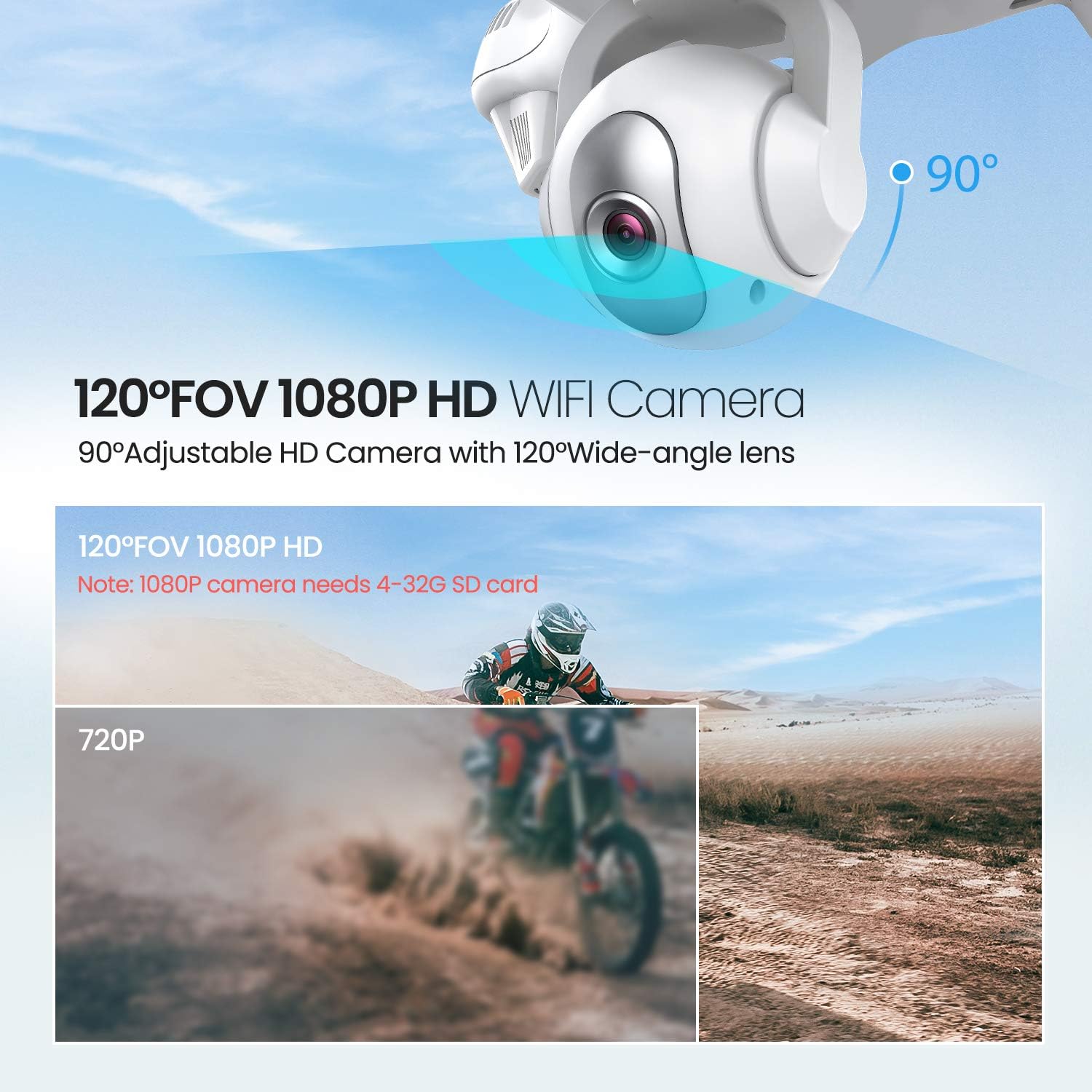
Image: The drone illustrating its GPS Auto Return function, showing a flight path back to a designated home point.

Image: The drone demonstrating its Follow Me Technology, tracking a moving subject.

Image: A user interacting with the 'Draw the Dot' feature on a smartphone, planning the drone's flight path.
Funcționarea camerei
1. Cameră HD 1080P
The T35 drone is equipped with a 1080P HD camera with a 120° wide-angle lens. The camera angle can be adjusted by 90° for optimal viewing.

Image: Close-up of the drone's 120° FOV 1080P HD Wi-Fi camera, highlighting its adjustable angle.
2. FPV Live Video
Once connected to the drone's Wi-Fi, open the Potensic app to view real-time FPV (First Person View) video directly on your smartphone. This allows for precise framing of photos and videos.
3. Recording and Photos
- Insert a 4-32GB SD card into the drone's camera slot for 1080P video recording and photo storage.
- Use the dedicated buttons on the remote controller or the app interface to start/stop video recording or take photos.
Întreţinere
- curatenie: Folosește o lavetă moale și uscată pentru a curăța drona și telecomanda. Nu folosești substanțe chimice dure sau solvenți.
- Elice: Regularly inspect propellers for damage. Replace any bent or chipped propellers immediately.
- Îngrijirea bateriei: Store batteries in a cool, dry place. Do not overcharge or over-discharge batteries.
- Depozitare: When not in use, store the drone and its components in a protective case to prevent damage.
Depanare
| Problemă | Cauza posibila | Soluţie |
|---|---|---|
| Drona nu pornește | Bateria nu este instalată corect sau este descărcată | Asigurați-vă că bateria este complet încărcată și introdusă corect. |
| Drone cannot pair with controller | Incorrect pairing sequence or low controller battery | Follow pairing instructions. Replace controller batteries. |
| Zbor instabil / Derivă | Improper calibration or strong winds | Perform GPS and gyroscope calibration. Avoid flying in windy conditions. |
| No FPV video feed | Wi-Fi not connected or app issue | Ensure phone is connected to drone's Wi-Fi. Restart app and drone. |
| GPS Return Home not working | Insufficient GPS satellites or no recorded home point | Ensure drone acquires enough GPS signals before takeoff. |
Specificații
| Caracteristică | Detaliu |
|---|---|
| Marca | Potensic |
| Numele modelului | T35 |
| Rezoluție captură video | 1080p |
| Tehnologia de conectivitate | Wifi |
| Capacitatea bateriei | 2500 Miliamp Ore |
| Tip control | Telecomanda |
| Tip media | SD Card (4-32GB recommended for 1080P) |
| Interval de vârstă (Descriere) | Adult |
Videoclip oficial al produsului
Urmărește acest videoclip oficial pentru mai mult de...view of the Potensic T35 GPS Drone's features and operation.
Video: O prezentare video oficială a produsuluiasing the Potensic T35 GPS Drone in action, highlighting its various features and capabilities.
Garanție și suport
For warranty information, technical support, or service inquiries, please refer to the contact details provided on the Potensic official website-ul sau documentația achiziției. Păstrați dovada achiziției pentru solicitări de garanție.


