
1. Introducere
Thank you for choosing the Easytry123 Replacement Remote Control. This remote is designed to function as a replacement for various Sony CRT HDTV TV models, including RM-Y165, KV-36HS20, KV-32XBR200, RM-Y184, KV-36HS20H, KV-32XBR450, and KV-36XBR450H. This manual provides essential information for setting up, operating, and maintaining your new remote control.
Important Note: As a replacement unit, this remote control may not support all functions of your original remote. Please ensure your TV model is listed as compatible before use.
2. Produs terminatview
The Easytry123 Replacement Remote Control is an ergonomic, infrared (IR) device designed for ease of use with compatible Sony televisions. It features a standard layout for common television functions.
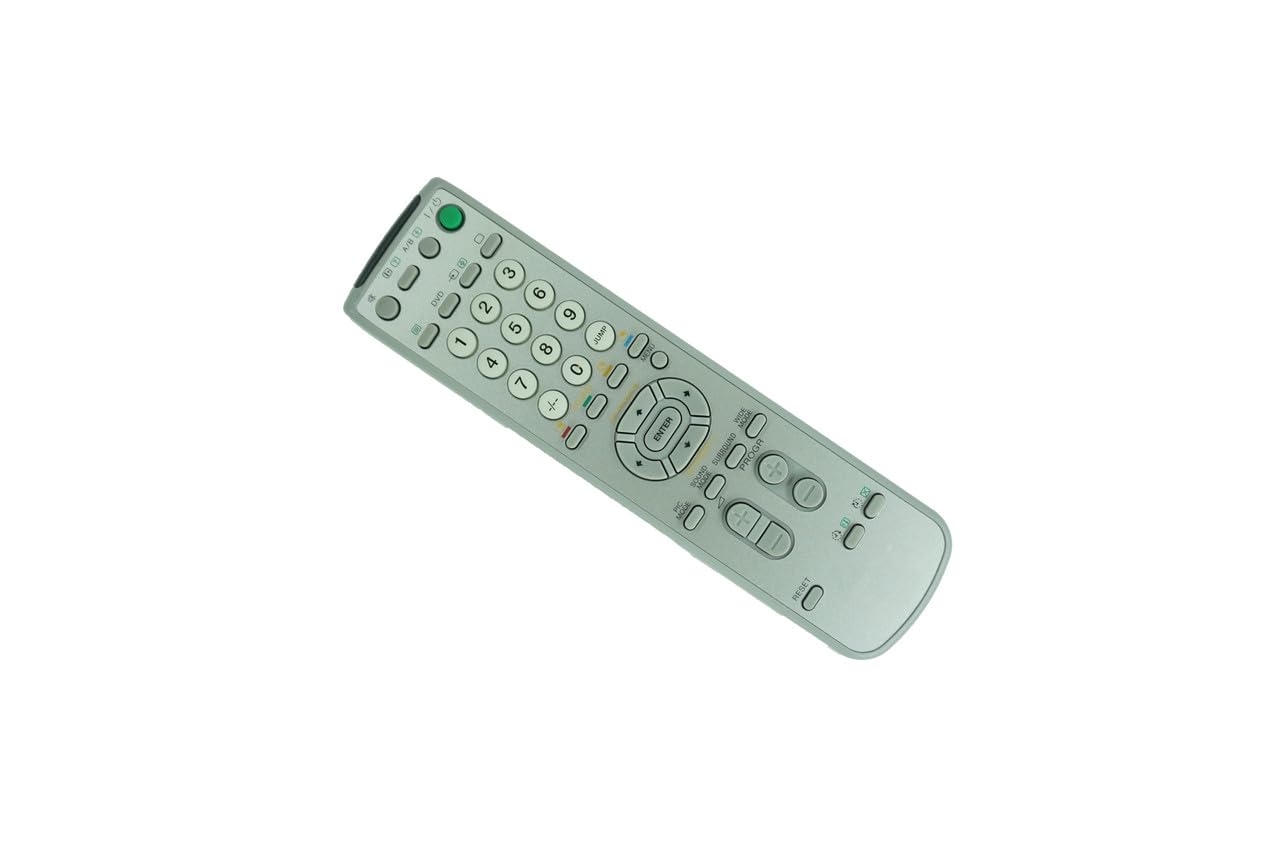
Figura 2.1: Față view of the Easytry123 Replacement Remote Control. This image displays the full button layout, including number keys, channel and volume controls, menu navigation, and power button.

Figura 2.2: Înclinat view of the Easytry123 Replacement Remote Control. This image provides a perspective view of the remote, highlighting its ergonomic design and button placement.
Caracteristici cheie:
- Design ergonomic: Confortabil de ținut în mână și de utilizat.
- Conectivitate în infraroșu: Standard IR signal for reliable communication with your TV.
- Înlocuire directă: Functions without complex programming for listed compatible models.
3. Configurare
3.1 Instalarea bateriei
The remote control requires two (2) AA batteries (not included) for operation.
- Localizați capacul compartimentului bateriei de pe spatele telecomenzii.
- Glisați capacul în jos sau apăsați zăvorul (dacă există) pentru a deschide compartimentul.
- Introduceți două baterii AA noi, asigurându-vă că bornele pozitive (+) și negative (-) se aliniază corect cu marcajele din interiorul compartimentului.
- Glisați capacul compartimentului bateriei la loc până când se aude un clic.
Nota: Always use fresh batteries and replace both batteries at the same time. Do not mix old and new batteries or different types of batteries.
3.2 Utilizare inițială
This replacement remote control is designed to work directly with compatible Sony CRT HDTV TV models without requiring any programming. Once batteries are installed, point the remote at your television and begin operation.
4. Instrucțiuni de utilizare
The remote control provides standard functions for your television. Familiarize yourself with the button layout shown in Figure 2.1.
- Buton de alimentare: Located at the top right, typically green. Press to turn the TV on or off.
- Butoane numerice (0-9): Used for direct channel selection.
- Canal sus/jos: Navigați prin canale secvențial.
- Volum sus/jos: Reglați nivelul audio.
- Buton mut: Temporarily silences the TV audio.
- Buton de meniu: Accesses the TV's on-screen menu system.
- Navigation (Arrow) Buttons & ENTER: Used to navigate within menus and confirm selections.
- Buton Intrare/Sursă: Switches between different video input sources (e.g., TV, DVD, AV).
For specific advanced functions or TV settings, refer to your television's original user manual.
5. Întreținere
5.1 Curățare
Pentru a curăța telecomanda, ștergeți-o ușor cu o cârpă moale și uscată. Pentru murdăria persistentă, ștergeți ușorampClătiți laveta cu apă sau cu un detergent blând, neabraziv. Evitați utilizarea substanțelor chimice dure sau a umidității excesive, deoarece acestea pot deteriora componentele electronice ale telecomenzii.
5.2 Înlocuirea bateriei
Replace batteries when the remote's response becomes sluggish or stops working. Follow the battery installation steps in Section 3.1. Dispose of used batteries responsibly according to local regulations.
5.3 Depozitare
Dacă telecomanda nu va fi utilizată pentru o perioadă lungă de timp, scoateți bateriile pentru a preveni scurgerile și deteriorarea dispozitivului.
6. Depanare
- Telecomanda nu răspunde:
- Ensure the remote is pointed directly at the TV's IR receiver.
- Verificați dacă există obstacole între telecomandă și televizor.
- Înlocuiți bateriile cu baterii AA noi.
- Verify that your TV model is listed as compatible with this remote.
- Unele funcții nu funcționează:
- As a replacement remote, some advanced or specific functions of your original TV remote may not be supported. This is normal for universal or replacement remotes.
- Refer to your TV's original manual for specific function details.
- Butoanele sunt lipicioase sau nu răspund:
- Clean the remote control as described in Section 5.1.
- Ensure no liquids have entered the remote.
7. Specificații
| Marca | Easytry123 |
| Numărul de model | B07VFRVV8P |
| Dispozitive compatibile | Sony CRT HDTV Televisions (e.g., RM-Y165, KV-36HS20, KV-32XBR200, RM-Y184, KV-36HS20H, KV-32XBR450, KV-36XBR450H) |
| Tehnologia de conectivitate | infraroșu (IR) |
| Sursa de alimentare | 2 x baterii AA (nu sunt incluse) |
| Caracteristica specială | Design ergonomic |
| Numărul de butoane | 12 (as per product specifications, though visual inspection shows more) |
8. Garanție și asistență
Specific warranty information for this Easytry123 Replacement Remote Control is not provided in the product details. For any questions regarding warranty, returns, or technical support, please contact the seller directly through your purchase platform.
For further assistance or inquiries, please refer to the contact information provided by the retailer or seller where you purchased this product.