
1. Introducere
This user manual provides comprehensive instructions for the operation, setup, maintenance, and troubleshooting of your TOPVISION Portable Projector, model TP-98. Please read this manual thoroughly before using the projector to ensure proper functionality and to maximize your viewexperiență. Păstrați acest manual pentru referințe viitoare.
2. Produs terminatview
The TOPVISION TP-98 projector is designed to deliver a high-quality visual experience with its advanced features and versatile connectivity. It is suitable for both home entertainment and professional presentations.
2.1 Caracteristici cheie
- Rezoluție nativă 1080P Full HD: Provides clear and detailed images, supporting 4K video input.
- High Brightness: 9500 Lumens for vibrant and bright projections.
- Dimensiune mare a afișajului: Capable of projecting images up to 350 inches for an immersive viewexperiență.
- Difuzoare stereo Hi-Fi încorporate: Dual integrated speakers with SRS sound for enhanced audio.
- L extinsamp Viaţă: LED lamp designed for up to 150,000 hours of use.
- Opțiuni multiple de conectivitate: Includes HDMI, USB, AV, and 3.5mm audio output ports.
- Sistem de racire eficient: Designed for low power consumption and reduced fan noise.
2.2 Componentele produsului

Imaginea 2.1: The TOPVISION TP-98 Portable Projector shown with its included carrying case. The projector is white with a black control panel on top and a prominent lens on the front. The carrying case is black with the TOPVISION logo.

Imaginea 2.2: Un prim plan view of the TOPVISION projector's control panel located on the top surface. It features buttons for power, menu navigation, source selection, and volume control, designed for intuitive operation.
3. Configurare
3.1 Plasarea
For optimal projection, place the projector on a stable, flat surface. Ensure there is adequate ventilation around the unit. The distance from the screen will determine the image size. Refer to the "Display Adjustment" section for recommended projection distances.

Imaginea 3.1: Diagram illustrating the relationship between projection distance and screen size. It shows that a 45-inch display requires approximately 2 meters, a 120-inch display requires 3.5 meters, a 240-inch display requires 5 meters, and a 350-inch display requires 8 meters.
3.2 Conexiune la alimentare
- Conectați cablul de alimentare la portul de intrare al proiectorului.
- Conectați celălalt capăt al cablului de alimentare la o priză electrică standard.
- The power indicator light on the projector will illuminate, indicating it is ready for use.
4. Instrucțiuni de utilizare
4.1 Pornire/Oprire
- To power on the projector, press the power button on the control panel or the remote control.
- Pentru a opri, apăsați din nou butonul de pornire. Confirmați oprirea dacă vi se solicită.
4.2 Selectarea sursei
After powering on, select your desired input source (HDMI, USB, AV) using the 'Source' button on the control panel or remote. Navigate through the options using the arrow keys and confirm with 'OK'.
4.3 Navigare prin meniu
Use the 'Menu' button to access settings such as picture mode, sound settings, and system preferences. Use the arrow keys to navigate and 'OK' to select. 'Exit' or 'Return' button to go back.
5. Conectivitate
The TOPVISION projector offers a variety of ports for connecting different devices:
- HDMI (x2): For connecting laptops, game consoles (PS4, Xbox), TV boxes, and other HDMI-enabled devices.
- USB (x2): Pentru conectarea unităților flash USB pentru redarea de fișiere media files direct.
- DE: Pentru conectarea dispozitivelor mai vechi folosind un cablu AV.
- Ieșire audio de 3.5 mm: Pentru conectarea difuzoarelor externe sau a căștilor.

Imaginea 5.1: An illustration demonstrating the various connectivity options of the TOPVISION projector. It highlights HDMI, USB, and AV inputs, along with a line out. Below, icons show compatibility with mobile phones/tablets, USB disks, laptops, Chromecast, audio devices, Fire TV Stick, Xbox/PS4, and DVD players.

Imaginea 5.2: A visual guide detailing how to connect various devices to the projector. It shows: (a) iOS devices requiring a Lightning to HDMI adapter, (b) iOS devices using an Airplay/Miracast dongle for wireless connection, (c) Android phones using a Miracast dongle for wireless connection, and (d) PCs/laptops/PS4/TV Boxes connecting directly via an HDMI cable.
Note on Streaming Services: Due to copyright restrictions, direct streaming of content from apps like Netflix, Prime Video, or Hulu is not supported via direct phone connection. To view these services, connect a laptop, Chromecast, wireless dongle, TV Stick, or Roku device to the projector's HDMI port.
6. Reglare afișaj
6.1 Ajustarea focalizării
Rotate the focus ring located near the projector lens until the projected image appears sharp and clear. This adjustment compensates for different projection distances.
6.2 Corecție trapezoială
If the projected image appears trapezoidal (wider at the top or bottom), use the keystone correction dial (usually located near the focus ring) to adjust the image geometry. This corrects the distortion when the projector is not perfectly perpendicular to the screen. The projector supports ±30 degrees keystone correction.
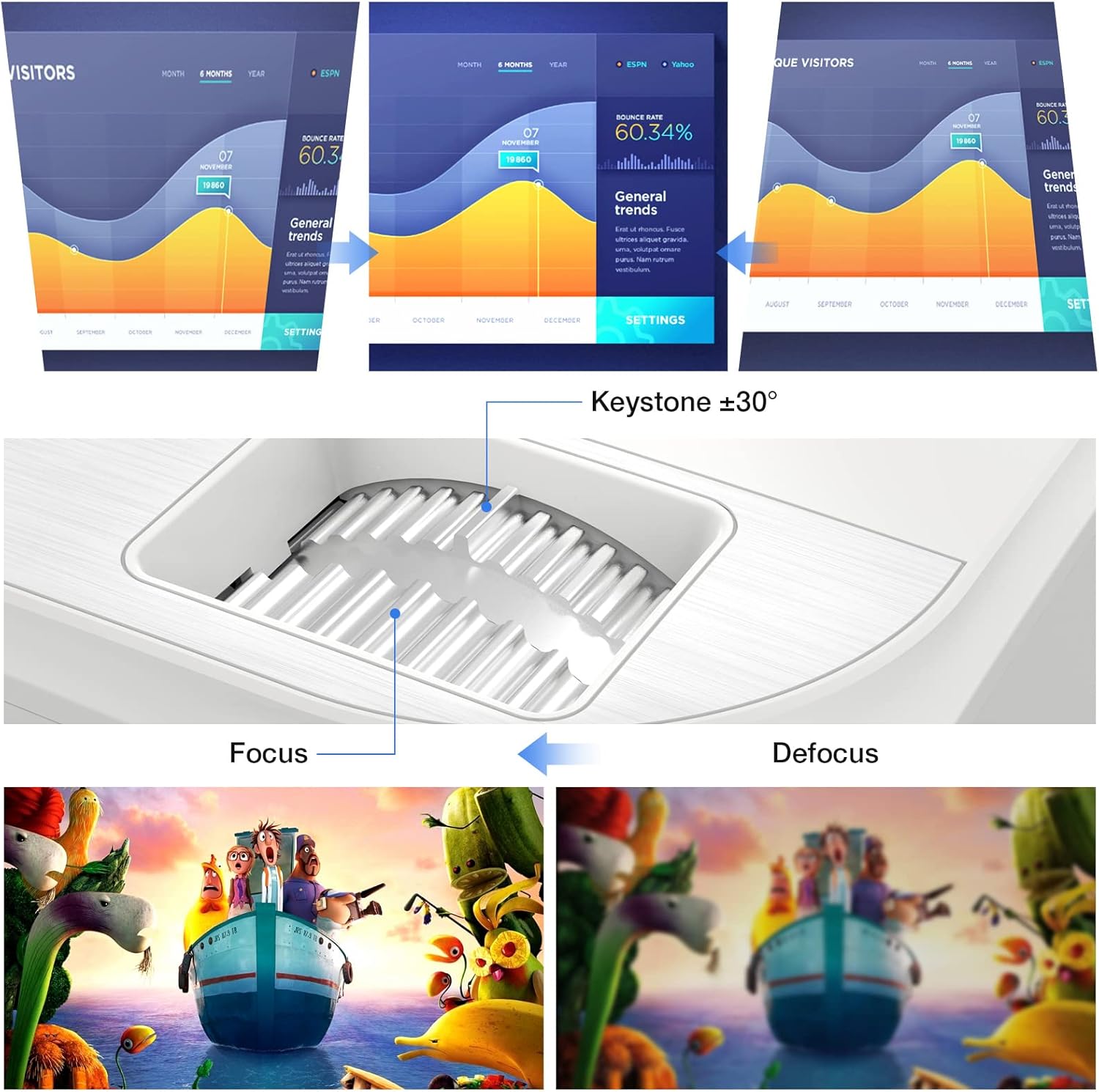
Imaginea 6.1: A diagram illustrating the focus and keystone adjustment mechanisms on the projector. It shows the keystone dial for correcting trapezoidal distortion (up to ±30 degrees) and the focus ring for sharpening the image, with visual examples of focused versus defocused projections.
7. Întreținere
7.1 Curățare
- Obiectiv: Folosiți o lavetă moale, fără scame, special concepută pentru lentile optice. Nu utilizați produse de curățare abrazive.
- Corpul proiectorului: Ștergeți suprafața cu o cârpă moale și uscată. Pentru petele persistente, ștergeți ușoramp Se poate folosi o lavetă, dar asigurați-vă că nu pătrunde lichid în dispozitiv.
- Orificii de ventilație: Regularly check and clean the ventilation ports to prevent dust buildup, which can affect cooling performance. Use a soft brush or compressed air.
7.2 Lamp Viaţă
LED-ul proiectorului lamp has an estimated lifespan of 150,000 hours, providing long-term, consistent performance without frequent lamp înlocuitori.
7.3 Sistem de răcire
The projector features an optimized cooling system to maintain stable operating temperatures and minimize fan noise. Ensure proper airflow around the projector by not blocking the ventilation openings.
8. Depanare
| Problemă | Cauza posibila | Soluţie |
|---|---|---|
| Nicio imagine proiectată | Cablu de alimentare slăbit; Sursă de intrare incorectă; Dispozitiv neconectat corect. | Check power connection; Select correct input source (HDMI, USB, AV); Ensure source device is powered on and connected securely. |
| Imaginea este neclară | Focalizarea nu este ajustată; Proiectorul este prea aproape/departe de ecran. | Reglați inelul de focalizare; Reglați distanța de proiecție. |
| Imaginea este trapezoidală | Proiectorul nu este perpendicular pe ecran. | Use keystone correction dial to adjust. |
| Nici un sunet | Volume too low; Muted; External speakers not connected; Source device audio settings. | Increase volume; Unmute projector; Connect external speakers if desired; Check audio output settings on source device. |
| Telecomanda nu funcționează | Baterii descărcate/introduse incorect; Obstrucție între telecomandă și proiector. | Replace batteries; Ensure clear line of sight to IR receiver on projector. |
9. Specificații
| Caracteristică | Detaliu |
|---|---|
| Marca | TOPVISION |
| Numărul de model | TP-98 |
| Rezoluție nativă | 1920 x 1080p Full HD |
| Rezoluție maximă a afișajului | Supports 4K UHD |
| Luminozitate | 9500 lumeni |
| Raport de contrast | 12000:1 |
| Lamp Viaţă | 150,000 de ore |
| Dimensiunea proiecției | 45 - 350 inci |
| Corecție corecție | ±30 grade |
| Conectivitate | 2x HDMI, 2x USB, 1x AV, 1x 3.5mm Audio Out |
| Dimensiunile produsului | 30L x 25W x 11H cm |
| Greutate | 4.3 kg |
| Tip de afișare | LCD |
| Caracteristici speciale | Built-in Stereo Speakers, Touch Sensitive Panel |
10. Garanție și asistență
TOPVISION provides a 3-year free repair service for this product. Additionally, lifetime professional technical support is available. If you encounter any issues or require assistance, please do not hesitate to contact TOPVISION customer service.
For support, please refer to the contact information provided on the TOPVISION official website-ul sau documentația achiziției dumneavoastră.