
1. Introducere
The CEM DT-9516 is a professional True RMS Digital Multimeter designed for safe, reliable, and accurate electrical measurements. This compact and easy-to-use instrument is ideal for identifying and resolving issues in various electrical and electronic systems. It features auto-ranging capabilities and a 6000-count display, making it suitable for both professional and hobbyist applications.
2. Informații de siguranță
Read all safety information and operating instructions before using this meter.
Acest dispozitiv respectă următoarele standarde de siguranță:
- EN61010-1 CAT IV 600V, CAT III 1000V
- 1000V input protection on all ranges
- 10A/1000V and 0.8A/1000V fuses protection on current ranges
Măsuri generale de siguranță:
- Asigurați-vă întotdeauna că sondele de testare sunt în stare bună și conectate corect.
- Nu încercați să măsurați volumultagsau curenți care depășesc limitele maxime specificate.
- Procedați cu precauție atunci când lucrați cu circuite sub tensiune.
- Înlocuiți bateriile și siguranțele numai cu cele de tipurile și valorile specificate.
- Nu utilizați contorul dacă acesta pare deteriorat sau dacă carcasa este deschisă.
3. Configurare și utilizare inițială
3.1 Instalarea bateriei
The CEM DT-9516 requires three (3) AAA batteries for operation. These are typically included with the device.
- Localizați capacul compartimentului bateriei pe spatele multimetrului.
- Folosiți o șurubelniță pentru a deschide compartimentul bateriei.
- Insert three AAA batteries, observing the correct polarity (+ and -) as indicated inside the compartment.
- Puneți la loc capacul compartimentului bateriei și fixați-l cu șurubul.

Figure 1: CEM DT-9516 Multimeter with test leads, AAA batteries, and a protective carrying case.
3.2 Conectarea cablurilor de testare
Before taking any measurements, ensure the test leads are correctly connected to the multimeter.
- Conectați roşu cablu de testare către VΩHz%CAP input jack (positive input).
- Conectați negru cablu de testare către COM input jack (common/negative input).
- For current measurements (mA, µA), connect the red lead to the mAµA mufă de intrare.
- For high current measurements (up to 10A), connect the red lead to the 10A mufă de intrare.

Figura 2: Detaliat view of the multimeter's input jacks and function switch, indicating where to connect test leads for various measurements.
4. Instrucțiuni de utilizare
The DT-9516 features an intuitive interface with a large LCD display and a rotary function switch for selecting measurement modes.

Figura 3: Pesteview of the CEM DT-9516 Multimeter's controls and display elements.
4.1 Function Switch and Auto Ranging
Turn the rotary switch to the desired measurement function. The DT-9516 is an auto-ranging multimeter, meaning it automatically selects the appropriate measurement range for the input signal, simplifying operation.

Figure 4: The multimeter's auto-ranging feature allows for intuitive operation without manual range selection.
4.2 Funcții de măsurare
The DT-9516 offers a wide range of measurement capabilities:
- Voltage (AC/DC): Select the 'V' position on the rotary switch. The meter will automatically detect AC or DC voltage.
- Curent (AC/DC): Select the 'mAµA' or '10A' position. Ensure test leads are connected to the correct current input jacks.
- Rezistență (Ω): Select the 'Ω' position.
- Capacitate (CAP): Select the 'CAP' position.
- Frecvență (Hz%): Select the 'Hz%' position.
- Test de diodă: Select the diode symbol position.
- Continuitate: Select the continuity symbol position. An audible tone indicates continuity.
- Temperatură: Select the temperature symbol position. This function typically requires a K-type thermocouple (sold separately).
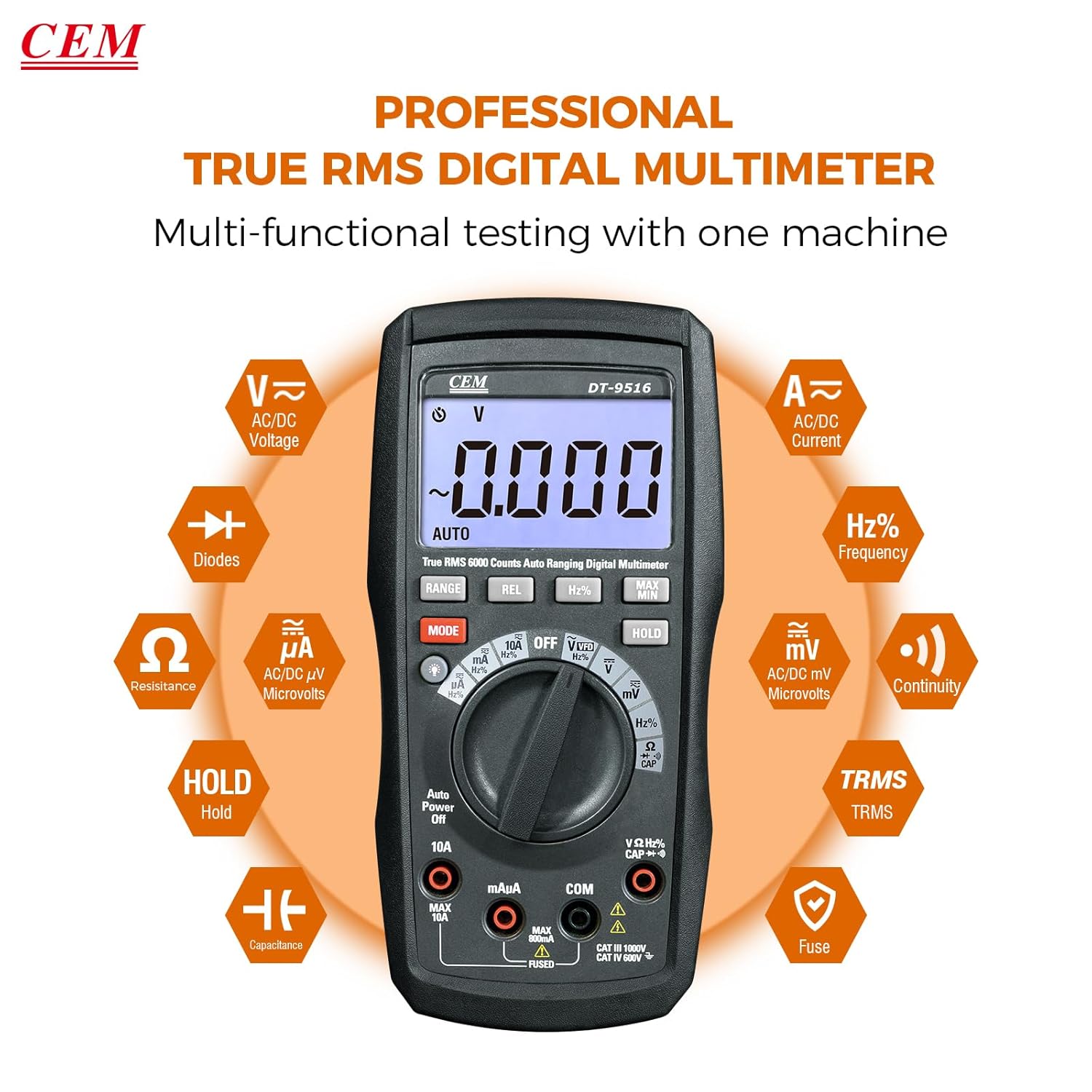
Figure 5: The multimeter's multi-functional testing capabilities are clearly illustrated.

Figure 6: The 6000-count display provides higher resolution and more accurate readings.
4.3 Funcții speciale
- Funcția VFD: The Variable Frequency Drive (VFD) function utilizes a low-pass filter for accurate measurement of VFD signals. Select the 'VFD' position on the rotary switch.
- Reținere date (HOLD): Apăsați tasta ȚINE button to freeze the current measurement on the display. Press again to release. This is useful for recording readings in difficult-to-view locații.
- MAX / MIN: Apăsați tasta MAX/MIN button to record the maximum and minimum values during a measurement session.
- REL (Relative Measurement): Apăsați tasta REL button to store the current reading as a reference value. Subsequent measurements will be displayed as a deviation from this reference.
- Iluminare de fundal: Press the backlight button (often integrated with another function or a dedicated button) to illuminate the display for better visibility in low-light conditions.

Figure 7: The VFD function enables precise measurement of variable frequency drive signals.

Figure 8: The Data Hold function allows users to lock and record measurement values with a single button press.

Figure 9: The high-definition LCD display ensures clear digital readings at a glance, even with multiple indicators.
5. Întreținere
5.1 Curățare
Ștergeți carcasa cu reclamăamp o lavetă și un detergent blând. Nu utilizați substanțe abrazive sau solvenți. Nu lăsați terminalele de intrare să fie curățate de murdărie și umezeală.
5.2 Înlocuirea bateriei
When the battery indicator appears on the display, replace the batteries as described in Section 3.1. Always use three new AAA batteries.
5.3 Înlocuirea siguranței
If the current measurement functions cease to operate, the internal fuses may need replacement. Refer to the safety section for fuse specifications (10A/1000V and 0.8A/1000V). Fuse replacement should only be performed by qualified personnel.
Warning: Disconnect all test leads from the meter and any circuit before opening the case for battery or fuse replacement.
6. Depanare
- Fără afișare: Verificați instalarea și încărcarea bateriilor. Înlocuiți bateriile dacă este necesar.
- Citiri incorecte:
- Ensure test leads are properly connected to the correct input jacks for the selected function.
- Verify the function switch is set to the appropriate measurement type.
- Verificați dacă există cabluri de testare deteriorate.
- For current measurements, check the internal fuses.
- "OL" or "OVERLOAD" on Display: The measured value exceeds the selected range. The auto-ranging feature should typically prevent this, but if it occurs, ensure the meter is capable of measuring the expected value.
7. Specificații
| Caracteristică | Detaliu |
|---|---|
| Numărul de model | DT-9516 |
| Afişa | LCD cu 6000 de puncte |
| Categoria de siguranță | CAT IV 600V, CAT III 1000V |
| Voltage Măsurare | AC/DC până la 1000V |
| Măsurarea curentului | AC/DC up to 10A |
| Măsurarea rezistenței | Până la 60 MΩ |
| Măsurarea capacității | Up to 6000µF |
| Măsurarea frecvenței | Până la 10MHz |
| Testul diodei | Da |
| Test de continuitate | Da (cu indicator sonor) |
| Caracteristici speciale | True RMS, Auto Ranging, VFD Function, Data Hold, MAX/MIN, Relative Measurement, Backlight |
| baterii | 3 x AAA (incluse) |
| Dimensiuni pachet | 20.6 x 13 x 7.9 cm |
| Greutate | 654 g |
| Producător | Shenzhen Everbest Machinery Industry Co.,Ltd. |
| UPC | 887327951600 |
8. Garanție și asistență
CEM products are manufactured to high-quality standards. For specific warranty terms and conditions, please refer to the warranty card included with your product or contact CEM customer support.
For technical assistance, troubleshooting, or service inquiries, please contact your local CEM distributor or visit the official CEM website pentru resurse de asistență.