
1. Introducere
This manual provides essential information for the safe and efficient operation of your RAGGIE RGS 1500W 12V Solar Power Inverter. This device is designed to convert 12V DC electricity from batteries or solar panels into 220V AC electricity, allowing you to power standard household appliances from a DC power source. Please read this manual thoroughly before installation and use.
2. Informații de siguranță
AVERTISMENT: Nerespectarea acestor instrucțiuni de siguranță poate duce la electrocutare, incendiu, vătămări corporale grave sau deces.
- Ensure the inverter is installed in a well-ventilated, dry, and cool environment, away from direct sunlight, heat sources, and flammable materials.
- Do not expose the inverter to rain, moisture, or liquids.
- Connect the inverter only to a 12V DC power source. Connecting to a different voltage poate deteriora unitatea.
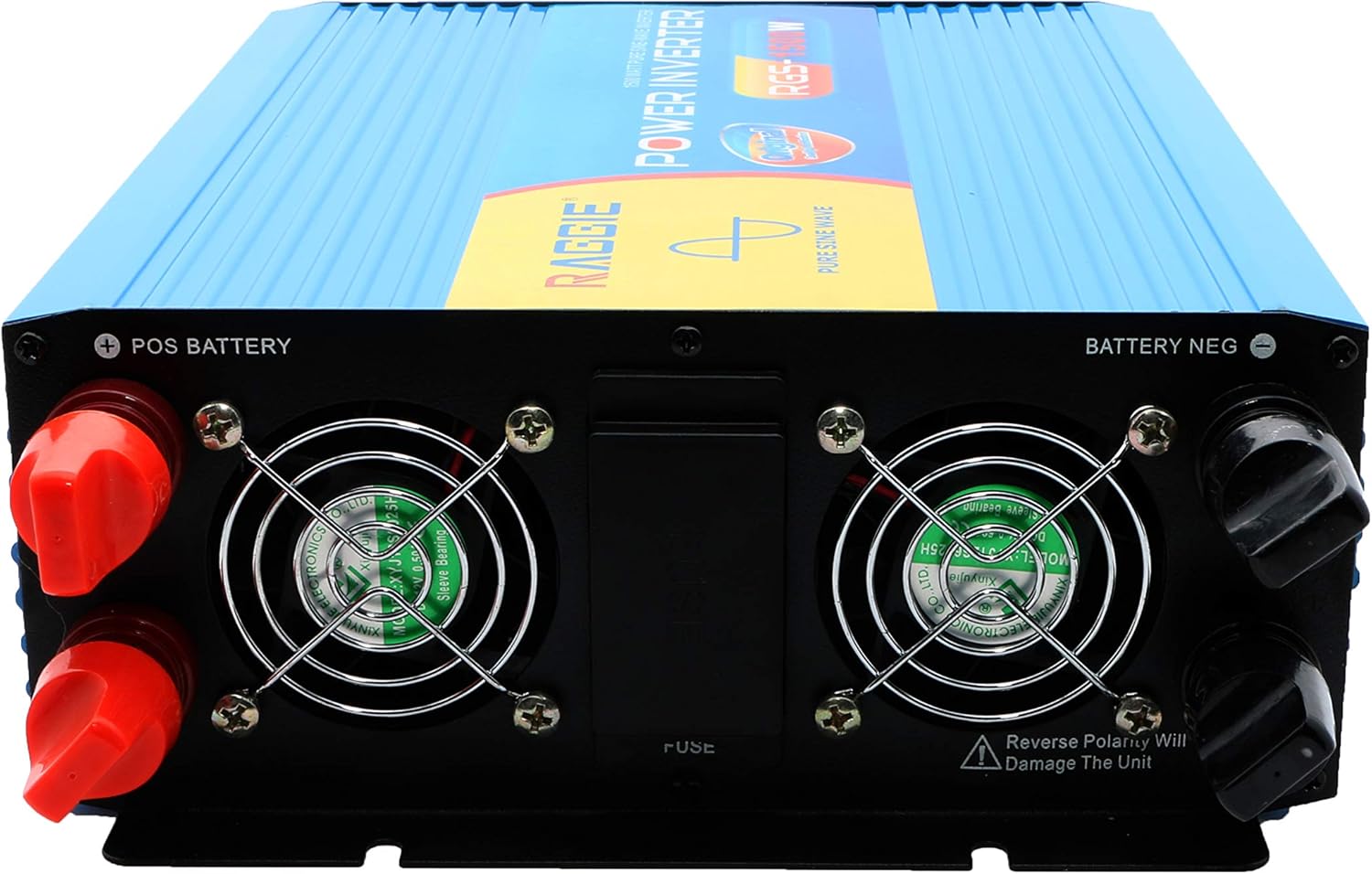
- Always connect the battery terminals with correct polarity: positive (+) to positive, and negative (-) to negative. Reverse polarity will damage the unit.
- Asigurați-vă că toate conexiunile sunt strânse și sigure pentru a preveni supraîncălzirea și formarea arcurilor electrice.
- Nu deschideți invertorul casing. În interior nu există piese care să poată fi reparate de utilizator. Apelați la personal calificat pentru orice service.
- Țineți copiii departe de invertor și de conexiunile acestuia.
- Always disconnect the DC power source before performing any maintenance or troubleshooting.
- Asigurați-vă că invertorul este împământat corespunzător.
3. Produs terminatview
The RAGGIE RGS 1500W inverter features robust construction and essential ports for reliable power conversion.
3.1 Componentele panoului din spate
The rear panel includes the DC input terminals for connecting to your 12V battery or solar array, along with cooling fans and a fuse compartment.
3.2 Componentele panoului frontal
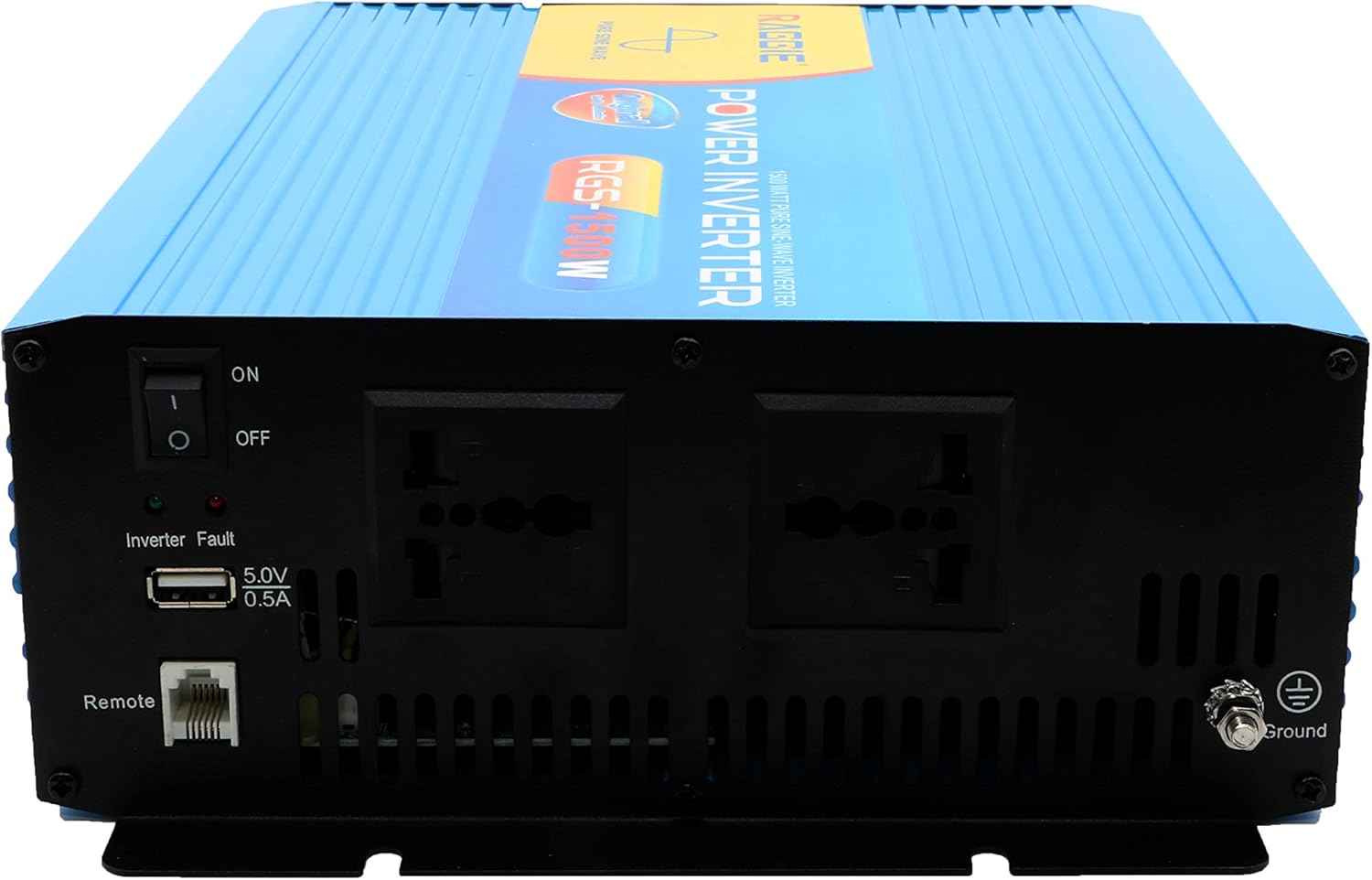
The front panel provides the AC output sockets for connecting your appliances, the main power switch, a USB charging port, and a remote control port.
4. Configurare și instalare
Follow these steps for proper installation of your inverter.
4.1 Despachetarea și inspecția
- Scoateți cu grijă invertorul din ambalaj.
- Inspect the unit for any signs of damage during transit. If damage is found, do not proceed with installation and contact your supplier.
- Asigurați-vă că toate accesoriile sunt prezente.
4.2 Plasarea
- Alegeți un loc uscat, răcoros și bine ventilat.
- Avoid areas with direct sunlight, high temperatures, or excessive dust.
- Mount the inverter securely on a stable surface.
- Ensure there is adequate clearance around the cooling fans for proper airflow.
4.3 DC Input Connection (Battery/Solar)
IMPORTANT: Ensure the inverter's power switch is in the OFF position before making any connections.
- Use appropriate gauge cables for your 12V DC input. Refer to the specifications for recommended cable sizes.
- Conectați ROȘU (+) cable to the positive terminal of your 12V battery/solar array.
- Conectați celălalt capăt al ROȘU (+) cable to the positive terminal (POS BATTERY) on the inverter's rear panel.
- Conectați NEGRU (-) cable to the negative terminal of your 12V battery/solar array.
- Conectați celălalt capăt al NEGRU (-) cable to the negative terminal (BATTERY NEG) on the inverter's rear panel.
- Asigurați-vă că toate conexiunile sunt strânse și sigure.
4.4 Împământare
For safety, the inverter must be properly grounded.
- Connect a grounding wire from the ground terminal on the inverter's front panel to a suitable earth ground point (e.g., vehicle chassis, ground rod).
4.5 AC Output Connection (Appliances)
- Plug your AC appliances directly into the AC output sockets on the inverter's front panel.
- Asigurați puterea totalătage of all connected appliances does not exceed the inverter's continuous output power (1500W).
5. Instrucțiuni de utilizare
5.1 Turning On the Inverter
- Ensure all DC and AC connections are correctly made and secure.
- Switch the main power switch on the inverter's front panel to the ON poziţie.
- The inverter will typically emit a short beep and an indicator light will illuminate, indicating it is operational.
5.2 Turning Off the Inverter
- Disconnect all AC appliances from the inverter.
- Switch the main power switch on the inverter's front panel to the OFF poziţie.
5.3 port de încărcare USB
- The inverter includes a 5.0V 0.5A USB port for charging small electronic devices.
- Plug your USB device into this port for charging.
6. Întreținere
Întreținerea regulată asigură performanța optimă și durata de viață a invertorului dumneavoastră.
- curatenie: Periodically clean the exterior of the inverter with a dry, soft cloth. Ensure cooling vents are free from dust and debris. Do not use liquid cleaners.
- Verificarea conexiunii: Regularly inspect all DC and AC connections to ensure they remain tight and free from corrosion. Loose connections can cause overheating and power loss.
- Înlocuirea siguranței: The inverter is equipped with internal fuses. If the inverter stops working and troubleshooting does not resolve the issue, the fuse may need replacement. This should only be performed by qualified personnel.
7. Depanare
Această secțiune abordează problemele frecvente pe care le puteți întâmpina cu invertorul dumneavoastră.
| Problemă | Cauza posibila | Soluţie |
|---|---|---|
| Fără ieșire de putere / Invertorul nu pornește | Loose DC connections Volumul bateriei scăzuttage Siguranță arsă Comutator invertor OPRIT | Check and tighten DC cables Reîncărcați sau înlocuiți bateria Check and replace fuse (by qualified personnel) Turn inverter switch ON |
| Overload warning / Inverter shuts down | Sarcina conectată depășește 1500 W Surge power too high | Reduceți wat-ul totaltage of connected appliances Ensure appliance starting current is within inverter's peak capacity |
| Overheating warning / Inverter shuts down | Ventilatie slaba Temperatura ambientală excesivă Ventilatoare de răcire blocate | Asigurați un flux de aer adecvat în jurul invertorului Move inverter to a cooler location Clean cooling fans and vents |
| Volumul bateriei scăzuttage avertisment | Încărcarea bateriei este scăzută | Reîncărcați bateria |
8. Specificații
| Caracteristică | Caietul de sarcini |
|---|---|
| Marca | RAGGIE |
| Numărul de model | RGS 1500W |
| Putere de ieșire continuă | 1500 wați |
| Vol. De intraretage | 12 volți DC |
| Ieșire Voltage | AC (Standard for region, typically 220V) |
| Sursa de alimentare | External (Battery/Solar) |
| Utilizări recomandate | Provide AC power from a DC source, operate AC devices using DC power. |
| Putere de ieșire de vârf | 18000 Watts (Momentary Surge) |
| Certificari | UL, ETL, CE |
| Data primului disponibil | 9 iulie 2019 |
9. Garanție și asistență
Pentru informații despre garanție sau asistență tehnică, vă rugăm să consultați documentația furnizată odată cu achiziția sau să contactați direct producătorul. Păstrați bonul fiscal ca dovadă a achiziției.