
1. Introducere
This manual provides detailed instructions for the safe and proper installation, operation, and maintenance of your Cabletech UCH0198-2 Full Motion TV Wall Mount. Please read this manual thoroughly before installation and retain it for future reference. This wall mount is designed to securely hold flat-panel or curved LED televisions ranging from 32 to 55 inches, with a maximum weight capacity of 35 kg (77 lbs).
2. Informații importante privind siguranța
- Capacitate de greutate: Do not exceed the maximum weight capacity of 35 kg (77 lbs). Exceeding this limit can result in serious injury or property damage.
- Dimensiunea ecranului: This mount is designed for TVs between 32 and 55 inches. While some larger TVs may fit VESA patterns, ensure they do not exceed the weight limit.
- Compatibilitate VESA: Verify your TV's VESA mounting pattern is compatible with the mount's supported patterns (75x75, 100x100, 100x150, 150x100, 150x150, 200x100, 100x200, 300x200, 300x300, 400x200, 400x300, 400x400).
- Structura peretelui: Ensure the mounting surface (wall) can safely support the combined weight of the mount and your television. For wood stud installation, ensure studs are solid. For concrete or brick walls, use appropriate anchors (not always included). Consult a professional installer if unsure about your wall's integrity.
- Instrumente: Folosiți unelte adecvate pentru instalare. Purtați întotdeauna ochelari de protecție.
- Asamblare: Do not attempt to install this product alone if the TV is heavy. Two or more people are recommended for safe installation.
- Copii: Nu lăsați copiii la îndemână în timpul instalării. Piesele mici pot prezenta pericol de sufocare.
- Deteriora: Do not install if any parts are missing or damaged. Contact customer support for replacement parts.
3. Conținutul pachetului
Please check to ensure all components are present and undamaged before beginning installation. If any parts are missing or damaged, do not proceed with installation and contact customer support.
- Ansamblu placă de perete
- TV Bracket Arms (2x)
- Kit accesorii de montare (diverse șuruburi, șaibe, distanțiere pentru TV și perete)
- Wall Anchors (for concrete/brick, if included)
- Nivel
- Manual de instructiuni

Figura 1: Față view of the wall mount components.
4. Specificațiile produsului
| Numărul de model | UCH0198-2 |
| Marca | Cabletech |
| Dimensiuni de ecran compatibile | 32" - 55" |
| Capacitate maximă de încărcare | 35 kg (77 lbs) |
| Compatibilitate VESA | 75x75, 100x100, 100x150, 150x100, 150x150, 200x100, 100x200, 300x200, 300x300, 400x200, 400x300, 400x400 |
| Unghi de înclinare | 0° până la -20° |
| Horizontal Level Adjustment | +3° până la -3° |
| Wall Distance (Extended) | 78 mm - 400 mm (3.07" - 15.75") |
| Material | Metal |
| Culoare | Negru |
5. Configurare și instalare
Before you begin, ensure you have all necessary tools and have read the safety information. Two people are recommended for installation.
5.1 Unelte necesare (nu sunt incluse)
- Creion
- Detector de grinzi (pentru pereți cu grinzi din lemn)
- Drill with appropriate drill bits (e.g., 10mm for concrete, 5.5mm for wood studs)
- Cheie tubulară sau cheie reglabilă
- Șurubelniță cu cap Phillips
- Bandă de măsurare
- Ochelari de siguranță
5.2 Atașarea suporturilor TV la televizor
- Așezați cu grijă televizorul cu fața în jos pe o suprafață moale și curată pentru a preveni deteriorarea ecranului.
- Identificați găurile de montare VESA de pe spatele televizorului.
- Select the correct diameter and length screws from the hardware kit that fit your TV's mounting holes. Use washers and spacers if necessary to ensure the screws do not penetrate too deeply or leave the bracket loose.
- Attach the two vertical TV bracket arms to the back of your TV using the selected screws. Ensure the hooks on the bracket arms are facing upwards (or towards the top of the TV) and are level with each other. Do not overtighten.
5.3 Montarea plăcii de perete pe perete
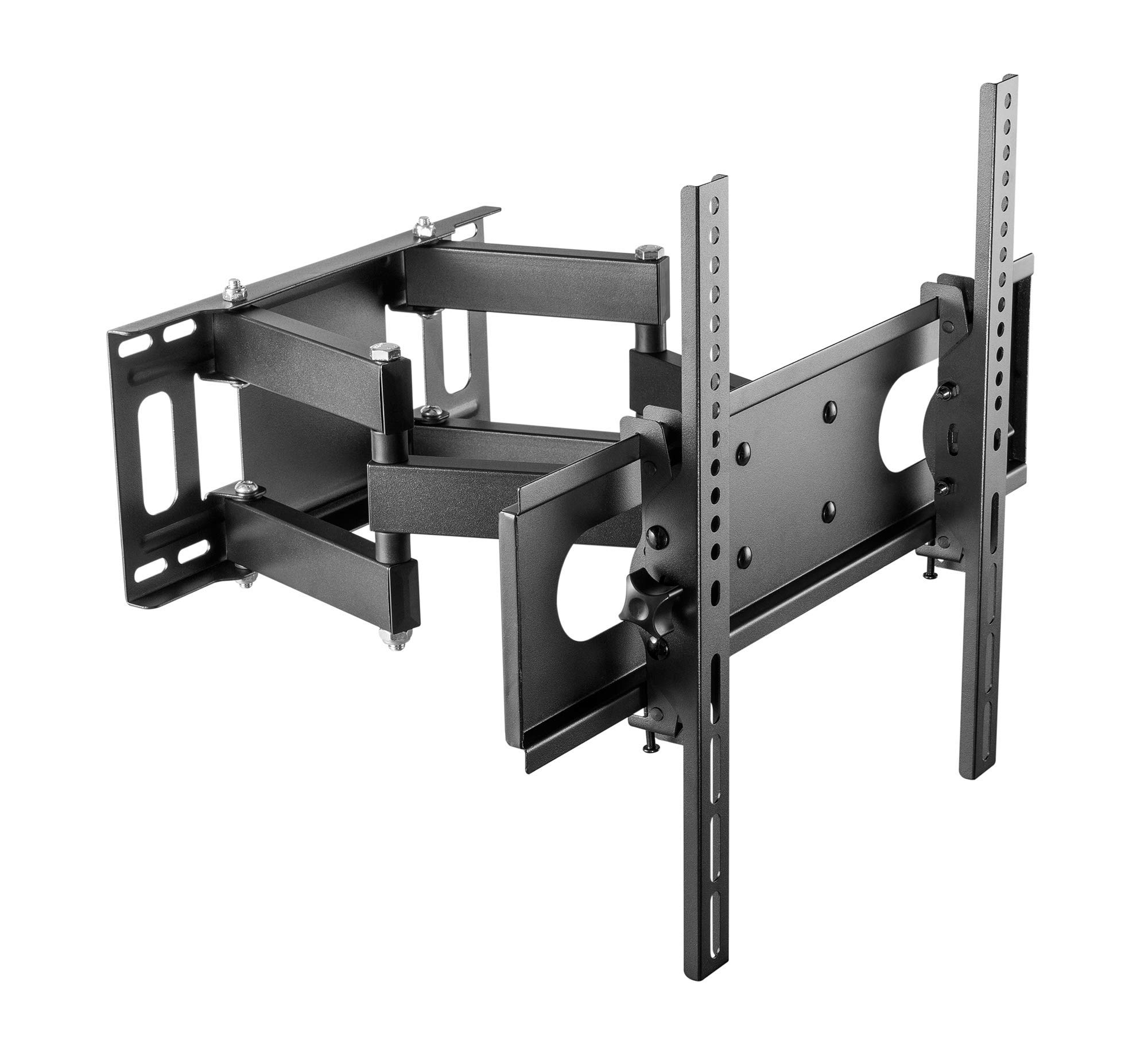
Figure 2: Cabletech UCH0198-2 wall mount in extended position.
- Determinați locația de montare: Decide on the desired height for your TV. Mark the center point on the wall.
- Localizarea montanților (pentru pereți cu montanți din lemn): Use a stud finder to locate the edges and center of two adjacent wood studs. The wall plate must be mounted to at least two studs for secure installation.
- Poziționare placă de perete: Hold the wall plate against the wall at your desired height and center. Use a level to ensure it is perfectly horizontal. Mark the drilling locations through the holes on the wall plate.
- Găuriți găuri pilot:
- Pentru Știfturi din lemn: Drill pilot holes using a 5.5mm drill bit to a depth of approximately 60mm.
- Pentru Solid Concrete/Brick Walls: Drill pilot holes using a 10mm drill bit to a depth of approximately 60mm. Insert the concrete anchors into the drilled holes until they are flush with the wall surface.
- Atașați placa de perete: Align the wall plate with the drilled holes. Secure it to the wall using the lag bolts and washers provided in the hardware kit. Tighten all bolts firmly, but do not overtighten.
5.4 Agățarea televizorului
- With assistance, carefully lift the TV (with brackets attached) and hook the TV bracket arms onto the wall plate.
- Ensure the TV is securely seated on the wall plate. The safety screws or locking mechanisms on the bottom of the TV bracket arms should be engaged to prevent accidental dislodging.
- Testați cu atenție stabilitatea televizorului montat înainte de a-l demonta.asinîl execută complet.
6. Instrucțiuni de utilizare (Reglări)
Your Cabletech UCH0198-2 mount offers various adjustments for optimal viewing.
6.1 Extending and Retracting the TV

Figure 3: Wall mount extended, showing adjustable distance from wall.
- Gently pull or push the TV to extend it away from the wall (up to 400mm) or retract it closer to the wall (minimum 78mm).
- Ensure cables are not pinched or strained during movement.
6.2 Tilting the TV
- The mount allows for a tilt range of 0° to -20° (downwards).
- Loosen the tilt adjustment knobs or bolts on the TV bracket arms.
- Adjust the TV to the desired tilt angle.
- Retighten the knobs/bolts to secure the TV in position.
6.3 Swiveling the TV (Horizontal Adjustment)
- The articulating arm allows you to swivel the TV horizontally to achieve various viewunghiuri de ing.
- Gently push or pull the side of the TV to rotate it left or right.
- The mount also features a small horizontal level adjustment of +3° to -3° to correct for minor leveling issues after installation. This is typically adjusted by loosening specific bolts on the TV plate, leveling, and retightening. Refer to the detailed diagrams for specific adjustment points.
6.4 Managementul cablurilor
- The mount includes a cable winder or clips to help organize and route cables along the articulating arm.
- Secure cables to prevent them from dangling or getting caught during TV movement. Ensure enough slack is provided for full range of motion.
7. Întreținere
- curatenie: Ștergeți suportul cu o cârpă moale și uscată. Nu utilizați substanțe de curățare abrazive sau solvenți.
- Verificări periodice: Verificați periodic toate șuruburile și bolțurile pentru a vă asigura că rămân strânse și fixate. Strângeți-le din nou dacă este necesar.
- Circulaţie: If the mount's movement becomes stiff, a small amount of silicone-based lubricant can be applied to the pivot points, avoiding contact with painted surfaces.
8. Depanare
| Problemă | Cauza posibila | Soluţie |
|---|---|---|
| Televizorul nu este la nivel după instalare. | Wall plate not perfectly level, or minor adjustment needed. | Use the horizontal level adjustment feature (+3° to -3°). Loosen the specific bolts on the TV plate, adjust with a level, and retighten. |
| Mount feels loose or unstable. | Mounting bolts not fully tightened, or wall structure is inadequate. | Check and retighten all wall mounting bolts. If the wall structure is compromised, consult a professional. Ensure TV safety screws are engaged. |
| TV cannot tilt or swivel smoothly. | Adjustment bolts are too tight, or pivot points need lubrication. | Loosen tilt adjustment knobs/bolts slightly. Apply a small amount of silicone-based lubricant to pivot points if necessary. |
| Cables are getting pinched. | Insufficient slack or improper cable routing. | Reroute cables using the integrated cable management. Ensure enough slack for full range of motion. |
9. Garanție și asistență pentru clienți
This Cabletech UCH0198-2 TV Wall Mount comes with a manufacturer's warranty of 2 ani de la data cumpărării.
For warranty claims, technical assistance, or if you have any questions regarding the installation or operation of your product, please contact Cabletech customer support through your retailer or the official Cabletech website. Please have your model number (UCH0198-2) and proof of purchase ready when contacting support.