
DALI Katch G2
DALI Katch G2 Portable Bluetooth Speaker User Manual
Model: Katch G2
Introducere
Thank you for choosing the DALI Katch G2 Portable Bluetooth Speaker. This manual provides essential information for setting up, operating, and maintaining your speaker. Please read it thoroughly before use to ensure optimal performance and longevity of your device.

Imagine: față view of the DALI Katch G2 Portable Bluetooth Speaker in Caramel White.
Informații de siguranță
- Nu expuneți difuzorul la apă sau umiditate excesivă. Acest produs nu este impermeabil.
- Avoid placing the speaker near heat sources or in direct sunlight for extended periods.
- Use only the charger supplied with the product.
- Nu încercați să dezasamblați sau să modificați difuzorul. Apelați la personal calificat pentru orice service.
- A nu se lăsa la îndemâna copiilor.
Conținutul pachetului
Verificați dacă toate articolele sunt prezente în ambalaj:
- DALI Katch G2 Portable Bluetooth Speaker
- Adaptor de alimentare/Încărcător
- Ghid de pornire rapidă (nu este inclus în acest manual)
- Travel Pouch (may vary by region)
Produs terminatview
The DALI Katch G2 features a sleek design with intuitive controls and various connectivity options.
Comenzi și indicatoare

Image: Top panel of the DALI Katch G2 showing power, Bluetooth, volume, and sound mode buttons.
- Buton de alimentare: Apăsați pentru a porni sau opri difuzorul.
- Buton Bluetooth: Apăsați pentru a intra în modul de asociere.
- Butoane de volum (+/-): Reglați volumul de redare.
- Buton Mod Sunet: Cycle through available sound profiles.
- Indicatoare luminoase pentru baterie: Display current battery level.
Porturi și conexiuni

Image: Side panel of the DALI Katch G2 showing the charging port and auxiliary input.
- Port de încărcare: Connect the power adapter to the charging port on the speaker.
- Intrare auxiliară de 3.5 mm: Connect external audio sources via a stereo mini-jack cable.
Componente interne

Imagine: Explodată view illustrating the internal components of the DALI Katch G2 speaker, including drivers and circuit board.
Înființat
1. Încărcarea bateriei
- Connect the supplied power adapter to the charging port on the speaker.
- Conectați adaptorul de alimentare la o priză de perete.
- The battery indicator lights will illuminate to show charging status. A full charge takes approximately 2 hours.
- A fully charged battery provides up to 30 hours of playback.
2. Pornire/Oprire
- Pentru a porni, apăsați și mențineți apăsat butonul Buton de alimentare până când se activează luminile indicatoare.
- Pentru a opri, țineți apăsat butonul Buton de alimentare din nou până când luminile indicatoare se sting.
3. Asociere Bluetooth
- Asigurați-vă că difuzorul este pornit.
- Apăsați tasta Buton Bluetooth. The Bluetooth indicator light will flash, indicating pairing mode.
- Pe dispozitivul dvs. (smartphone, tabletă etc.), activați Bluetooth și căutați dispozitivele disponibile.
- Select "DALI Katch G2" from the list.
- Once connected, the Bluetooth indicator light will glow solid.
4. Analog Connection
- Connect a 3.5mm stereo mini-jack cable from your audio source to the Auxiliary Input port on the speaker.
- Difuzorul va comuta automat în modul de intrare auxiliară.
5. Împerechere stereo True Wireless (TWS)
Two DALI Katch G2 speakers can be paired together for a stereo sound experience.
- Ensure both DALI Katch G2 speakers are powered on and not connected to any other Bluetooth device.
- Pe un difuzor (acesta va fi difuzorul principal), apăsați și mențineți apăsat butonul Buton Bluetooth până când intră în modul de asociere.
- Pe al doilea difuzor, apăsați butonul Buton Bluetooth dată.
- The speakers will automatically connect to each other. The primary speaker's Bluetooth indicator will glow solid, and the secondary speaker's indicator will also confirm connection.
- Now, connect your audio source to the primary speaker via Bluetooth as described in step 3.
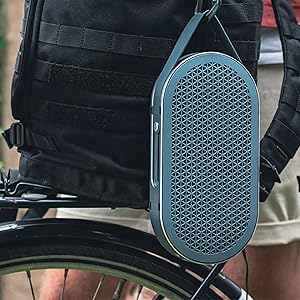
Image: Two DALI Katch G2 speakers set up for True Wireless Stereo pairing in a home environment.
Operarea difuzorului
1. Redarea audio
- Once connected via Bluetooth or auxiliary input, start playback from your audio source.
- Utilizați Butoane de volum (+/-) on the speaker or your connected device to adjust the volume.
2. Moduri de sunet
The DALI Katch G2 offers different sound profiles to suit your listening preference or environment.
- Apăsați tasta Butonul mod sunet to cycle through the available sound modes (e.g., "Clear" and "Warm").
- Each mode provides a distinct audio characteristic.
3. Verificarea nivelului bateriei
- Apăsați scurt pe Buton de alimentare when the speaker is on to illuminate the battery indicator lights, showing the current charge level.
Întreţinere
1. Curatenie
- Ștergeți difuzorul cu o cârpă moale și uscată.
- Nu utilizați agenți de curățare abrazivi, ceară sau solvenți.
2. Depozitare
- Când nu este utilizat pentru perioade lungi de timp, depozitați difuzorul într-un loc răcoros și uscat.
- Evitați temperaturile extreme.
3. Îngrijirea bateriei
- Pentru a prelungi durata de viață a bateriei, evitați descărcarea completă frecventă a acesteia.
- Încărcați difuzorul în mod regulat, chiar dacă nu îl utilizați frecvent.
Depanare
| Problemă | Cauza posibila | Soluţie |
|---|---|---|
| Difuzorul nu pornește. | Bateria este epuizată. | Conectați difuzorul la adaptorul de alimentare și încărcați-l. |
| Niciun sunet din difuzor. | Volumul este prea mic sau dezactivat. Sursă de intrare selectată greșit. Device not paired correctly. | Măriți volumul difuzorului și al dispozitivului conectat. Ensure correct input (Bluetooth/Aux) is active. Reconectați dispozitivul Bluetooth. |
| Asocierea Bluetooth nu reușește. | Difuzorul nu este în modul de asociere. Dispozitivul este prea departe de difuzor. Interferență. | Press the Bluetooth button to enter pairing mode. Mutați dispozitivul mai aproape de difuzor. Îndepărtați-vă de alte dispozitive wireless. |
| Împerecherea True Wireless Stereo (TWS) eșuează. | Difuzoarele nu sunt în modul de asociere TWS. One speaker already connected to a device. | Ensure both speakers are disconnected from other devices and follow TWS pairing steps. |
Specificații
| Numele modelului | DALI Katch G2 |
| Marca | DALI |
| Tip difuzor | Difuzor Bluetooth portabil |
| Tehnologia de conectivitate | Bluetooth 5.0 (apt-X, apt-X HD, AAC) |
| Mod ieșire audio | Stereo |
| Putere maximă de ieșire difuzor | 25 wați |
| Capacitatea bateriei | 3300 mAh |
| Durata de viață a bateriei | Până la 30 ore |
| Timp de încărcare | Aproximativ 2 ore |
| Diametrul wooferului | 3.5 inchi |
| Diametrul tweeterului | 21 milimetri |
| Dimensiuni produs (D x L x H) | 1.8 cm x 10.5 cm x 5.4 cm |
| Greutatea articolului | 2.42 lire sterline (1.1 kilograme) |
| Metoda de control | Atingere |
| Impermeabil | Nu |
Informații despre garanție
The DALI Katch G2 Portable Bluetooth Speaker comes with a Garanție limitată. Specific terms and conditions of the warranty may vary by region and retailer. Please retain your proof of purchase for warranty claims. For detailed warranty information, refer to the documentation provided with your purchase or visit the official DALI website-ul.
Asistență pentru clienți
If you encounter any issues not covered in this manual or require further assistance, please contact DALI customer support.
- Visit the official DALI website pentru resurse de asistență, întrebări frecvente și informații de contact.
- Refer to your product packaging or purchase documentation for specific regional support contacts.
Ask a question about this manual
Ask about setup, troubleshooting, compatibility, parts, safety, or missing instructions. Manuals+ will review the question and use this page’s manual context to help answer it.