
1. Introducere
The CEM iLDM-150 is a professional-grade laser distance meter designed for fast, accurate, and easy distance measurement. This device utilizes a precision narrow laser beam to ensure accuracy, avoiding common errors associated with extraneous objects. Beyond basic measurements, it offers advanced functionalities such as capturing images of measured distances, marking lengths, areas, or volumes, and storing data on a cloud service for convenient access and sharing.
This manual provides detailed instructions for the safe and effective use of your iLDM-150 Laser Distance Meter. Please read it thoroughly before operating the device.
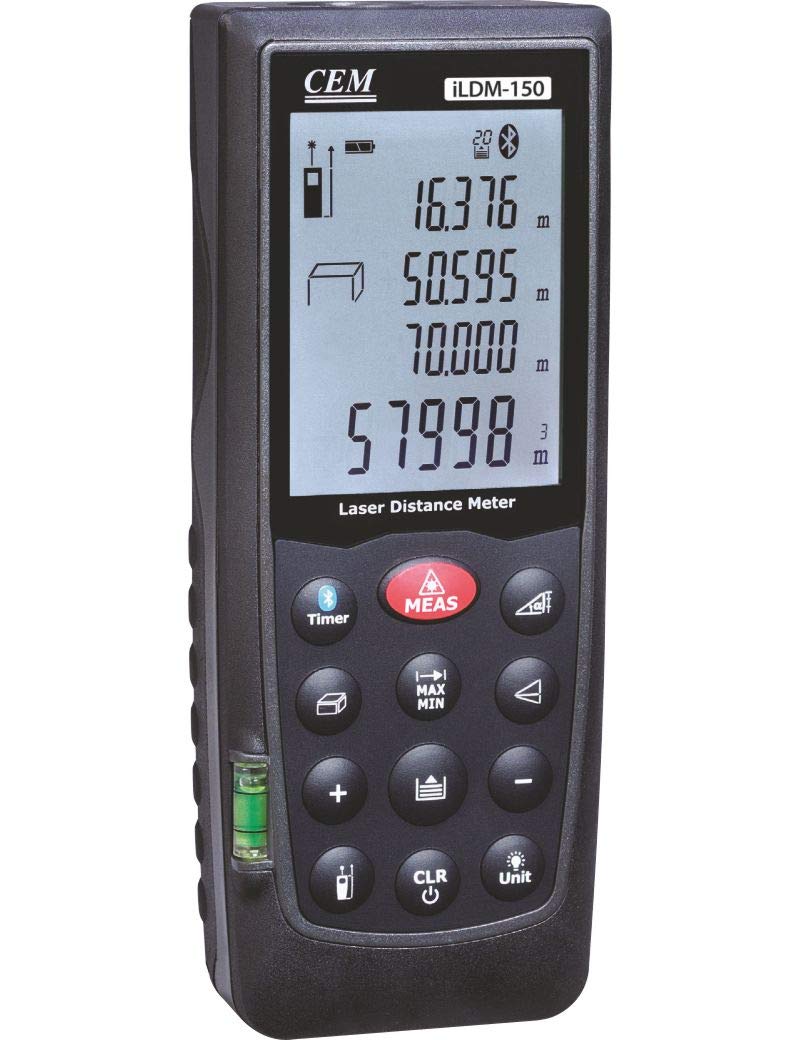
Figure 1: The CEM iLDM-150 Laser Distance Meter, displaying its compact design, digital interface, and control buttons for precise measurements.
2. Caracteristici cheie
The CEM iLDM-150 Laser Distance Meter includes the following key features:
- Calcule de suprafață și volum: Quickly determine areas and volumes from measured lengths.
- Indirect Measuring (Pythagoras): Calculate distances indirectly using the Pythagorean theorem.
- Măsurarea unghiului: Integrated tilt sensor allows for angle measurements.
- Măsurare continuă: Track real-time distance changes.
- Captură de imagine: Take pictures of measured distances.
- Integrare servicii cloud: Store and manage measurement data via the Meterbox iLDM software and cloud server.
- Measurement History: Stores the last 20 measurements for review.
3. Configurare
3.1 Instalarea bateriei
The iLDM-150 requires batteries for operation. Batteries are not included with the device.
- Locate the battery compartment cover on the back or side of the device.
- Deschideți capacul compartimentului bateriei.
- Insert the required batteries (typically AAA or AA, refer to the compartment label for exact type and polarity) ensuring correct polarity (+/-).
- Închideți bine capacul compartimentului bateriei.
3.2 Pornire/Oprire
- Pentru a porni dispozitivul, apăsați tasta [ON/MEAS] buton.
- Pentru a opri dispozitivul, țineți apăsat butonul [OFF] button for a few seconds, or the device will automatically power off after a period of inactivity to conserve battery life.
4. Instrucțiuni de utilizare
4.1 Măsurarea distanței de bază
- Porniți dispozitivul.
- Îndreptați fasciculul laser spre suprafața țintă.
- Apăsați tasta [ON/MEAS] Apăsați butonul o dată. Distanța măsurată va fi afișată pe ecran.
4.2 Măsurare continuă
This mode allows you to track real-time distance changes as you move the device.
- Apăsați tasta [ON/MEAS] button and hold it for a few seconds until 'Continuous' or a similar indicator appears on the display.
- Move the device; the distance displayed will update continuously.
- Presa [ON/MEAS] din nou pentru a opri măsurarea continuă.
4.3 Area and Volume Calculations
Use the dedicated shortcut keys for these functions.
- Zonă: Apăsați tasta [ZONĂ] button. Measure the length and width as prompted by the device. The area will be calculated and displayed.
- Volum: Apăsați tasta [VOLUM] button. Measure the length, width, and height as prompted. The volume will be calculated and displayed.
4.4 Indirect Measurement (Pythagoras)
This function is useful for measuring distances that cannot be directly accessed.
- Apăsați tasta [PYTHAGORAS] buton.
- Follow the on-screen instructions to take the required measurements (e.g., hypotenuse and one leg for a right triangle).
- The device will calculate and display the unknown distance.
4.5 Măsurarea unghiului
The integrated tilt sensor allows for angle measurements.
- Apăsați tasta [UNGHI] button (if available) or cycle through modes until the angle measurement mode is active.
- Position the device to measure the desired angle. The angle will be displayed on the screen.
4.6 Image Capture and Cloud Service
The iLDM-150 allows you to capture images with measurements and store them.
- After taking a measurement, use the designated button (refer to device interface) to capture an image.
- Install the Meterbox iLDM software on your smartphone.
- Connect your iLDM-150 to your smartphone via Bluetooth (if supported) or transfer data as per software instructions.
- Utilize the Meterbox iLDM software and cloud server to edit, store, and share your measurement data and images.
5. Întreținere
5.1 Curățare
- Curățați dispozitivul în mod regulat cu o lavetă moale,amp pânză. Nu utilizați agenți de curățare abrazivi sau solvenți.
- Ensure the laser lens and display are free from dust and debris for optimal performance. Use a lens cleaning cloth if necessary.
5.2 Depozitare
- Store the iLDM-150 in a dry, dust-free environment, away from direct sunlight and extreme temperatures.
- Dacă depozitați dispozitivul pentru o perioadă lungă de timp, scoateți bateriile pentru a preveni scurgerile și deteriorarea acestuia.
6. Depanare
| Problemă | Cauza posibila | Soluţie |
|---|---|---|
| Dispozitivul nu pornește. | Baterii descărcate sau descărcate; instalare incorectă a bateriilor. | Replace batteries with new ones; ensure correct polarity. |
| Măsurători inexacte. | Obstructed laser path; unstable measuring surface; dirty lens. | Ensure clear line of sight to target; measure on a stable surface; clean the laser lens. |
| Afișajul afișează un mesaj de eroare. | Măsurare în afara intervalului; eroare internă. | Ensure target is within specified range; power off and restart the device. If error persists, contact support. |
| Cannot connect to Meterbox iLDM app. | Bluetooth not enabled; app not installed or updated; device not in pairing mode. | Ensure Bluetooth is on for both devices; install/update Meterbox iLDM app; refer to app instructions for pairing. |
7. Specificații
| Caietul de sarcini | Detaliu |
|---|---|
| Marca | CEM |
| Numărul de model | iLDM-150 |
| Producător | CEM Instruments India Pvt Ltd |
| ASIN | B07SPL1NW2 |
| Baterii incluse | Nu |
| Culoare | Multicolor |
| Nivel de rezistență la apă | Impermeabil |
8. Garanție și asistență
Please note the following regarding warranty and support for your CEM iLDM-150 Laser Distance Meter:
- All sales are final. No returns are accepted.
- Replacements will be provided only in cases of a wrong item being shipped or a manufacturing defect reported.
- Any reported manufacturing defect must be replicable by the manufacturer upon receiving the product back for assessment.
For technical assistance or to report a manufacturing defect, please contact CEM Instruments India Pvt Ltd directly through their official support channels.