
Easytry123 Easytry7607
Easytry123 Replacement Remote Control User Manual
Model: Easytry7607 for Integra A/V Receivers
Introducere
This manual provides instructions for the Easytry123 Replacement Remote Control, Model Easytry7607. This remote is designed as a replacement for various Integra A/V Receiver models, including DTR-40.4, DTR-40.3, DTR-30.7, DTR-20.7, DTR-30.4, DHC-80.3, and DTR-50.3, and their corresponding original remote models like RC-833M, RC-899M, RC-838M, and RC-811M. Please read this manual carefully before use to ensure proper operation.
Înființat
1. Instalarea bateriei
Telecomanda necesită două baterii AAA (nu sunt incluse). Urmați acești pași pentru a le instala:
- Localizați compartimentul bateriei de pe spatele telecomenzii.
- Apăsați pe clapetă și glisați capacul bateriei în jos pentru a-l deschide.
- Introduceți două baterii AAA, asigurându-vă că bornele pozitive (+) și negative (-) se aliniază corect cu marcajele din interiorul compartimentului.
- Glisați capacul bateriei înapoi în poziție până când se fixează cu un clic.
Imaginea 1: Back of the remote control with the battery cover removed, illustrating the battery insertion process. Note the polarity markings inside the compartment.
Important: Ensure batteries are inserted with correct polarity. Incorrect installation can damage the remote control. Do not mix old and new batteries, or different types of batteries.
Operațiunea
Funcții de bază
This replacement remote control operates using infrared (IR) technology. Point the remote directly at your Integra A/V Receiver. Ensure there are no obstructions between the remote and the receiver's IR sensor.

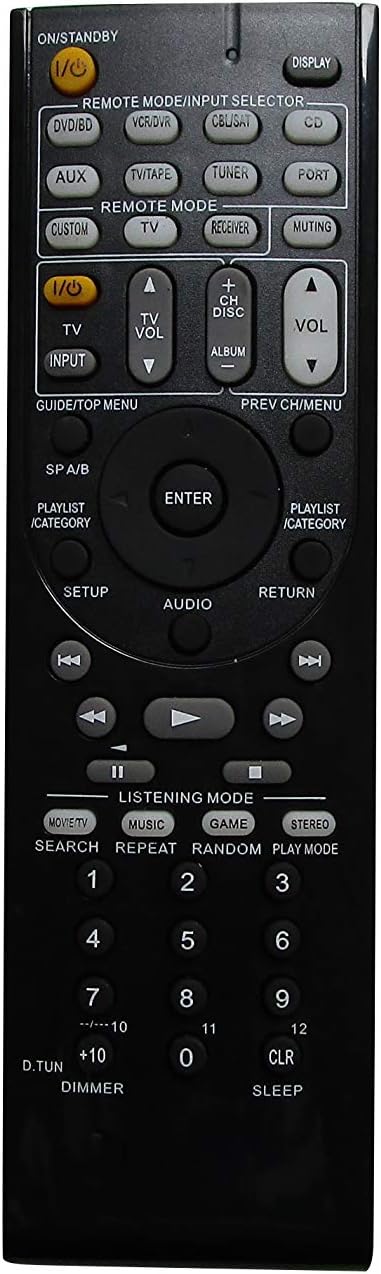
Imaginea 2: Faţă view of the remote control, showing the layout of all buttons for various functions.
The remote features standard buttons for power, volume control, input selection, and navigation. Refer to Imaginea 2 for the button layout. Press the corresponding button for the desired function.
Note de compatibilitate
- This remote is a replacement and may not offer all the exact same features or button functions as your original Integra remote.
- It does not support programming or learning functions. Remote codes cannot be entered or modified.
- Functionality is dependent on the specific Integra A/V Receiver model. While designed for compatibility, some advanced or model-specific functions may not be supported.
Întreţinere
Curatenie
Pentru a curăța telecomanda, ștergeți-o ușor cu o lavetă moale și uscată. Nu utilizați produse de curățare lichide, spray-uri sau materiale abrazive, deoarece acestea pot deteriora suprafața sau componentele interne ale telecomenzii.
Înlocuirea bateriei
Replace batteries when the remote's response becomes sluggish or stops working. Follow the battery installation steps outlined in the Înființat section. Always replace both batteries at the same time with new AAA alkaline batteries.
Depanare
- Telecomanda nu răspunde:
- Verificați dacă bateriile sunt introduse corect, respectând polaritatea.
- Înlocuiți bateriile vechi cu baterii alcaline AAA noi.
- Ensure there is a clear line of sight between the remote control and the A/V receiver's IR sensor. Remove any obstructions.
- Verificați dacă telecomanda este îndreptată direct spre receptor.
- Unele funcții nu funcționează:
- This is a replacement remote and may not support all functions of your original Integra remote. Refer to the Note de compatibilitate in the Operation section.
- The remote does not support programming or learning functions.
- Remote feels loose or rattles:
- Asigurați-vă că capacul bateriei este închis corect.
- If internal components feel loose, contact the seller for assistance.
Specificații
| Marca | Easytry123 |
| Numărul de model | Easytry7607 |
| Dispozitive compatibile | Integra A/V Receivers (DTR-40.4, DTR-40.3, DTR-30.7, DTR-20.7, DTR-30.4, DHC-80.3, DTR-50.3, etc.) |
| Tehnologia de conectivitate | infraroșu (IR) |
| Tip controler | Buton de control |
| Tip baterie | 2 baterii alcaline AAA (nu sunt incluse) |
| Culoare | Negru |
| Caracteristica specială | Design ergonomic |
Informații despre garanție
Specific warranty details for this product are provided by the seller, Easytry123. Please refer to your purchase documentation or contact the seller directly for information regarding warranty coverage and terms.
Asistență pentru clienți
For any questions, concerns, or technical assistance not covered in this manual, please contact the seller, Easytry123, through the platform where the purchase was made. Provide your order number and a detailed description of the issue for prompt support.
Ask a question about this manual
Ask about setup, troubleshooting, compatibility, parts, safety, or missing instructions. Manuals+ will review the question and use this page’s manual context to help answer it.