
Introducere
This manual provides essential instructions for the setup, operation, and maintenance of your Easytry123 replacement remote control. This remote is designed to function with various ONKYO AV A/V Receiver models, including RC-745M, TX-NR1007, TX-NR807, RC-717M, RC-738M, TX-SR607, TX-SR607S, RC-742M, and TX-SR707.
Notă importantă: As a replacement unit, this remote control may not support all advanced functions or features present on your original ONKYO remote. Its primary purpose is to provide core control over your AV receiver. Please ensure your receiver model is listed above for compatibility.
Înființat
1. Instalarea bateriei
Telecomanda necesită două baterii AAA (nu sunt incluse). Urmați acești pași pentru a le instala:
- Localizați capacul compartimentului bateriei de pe spatele telecomenzii.
- Apăsați pe clapetă și glisați capacul în jos pentru a deschide compartimentul.
- Insert two AAA batteries, ensuring the positive (+) and negative (-) terminals align correctly with the markings inside the compartment. Incorrect insertion can prevent the remote from functioning.
- Glisați capacul compartimentului bateriei la loc până când se aude un clic.
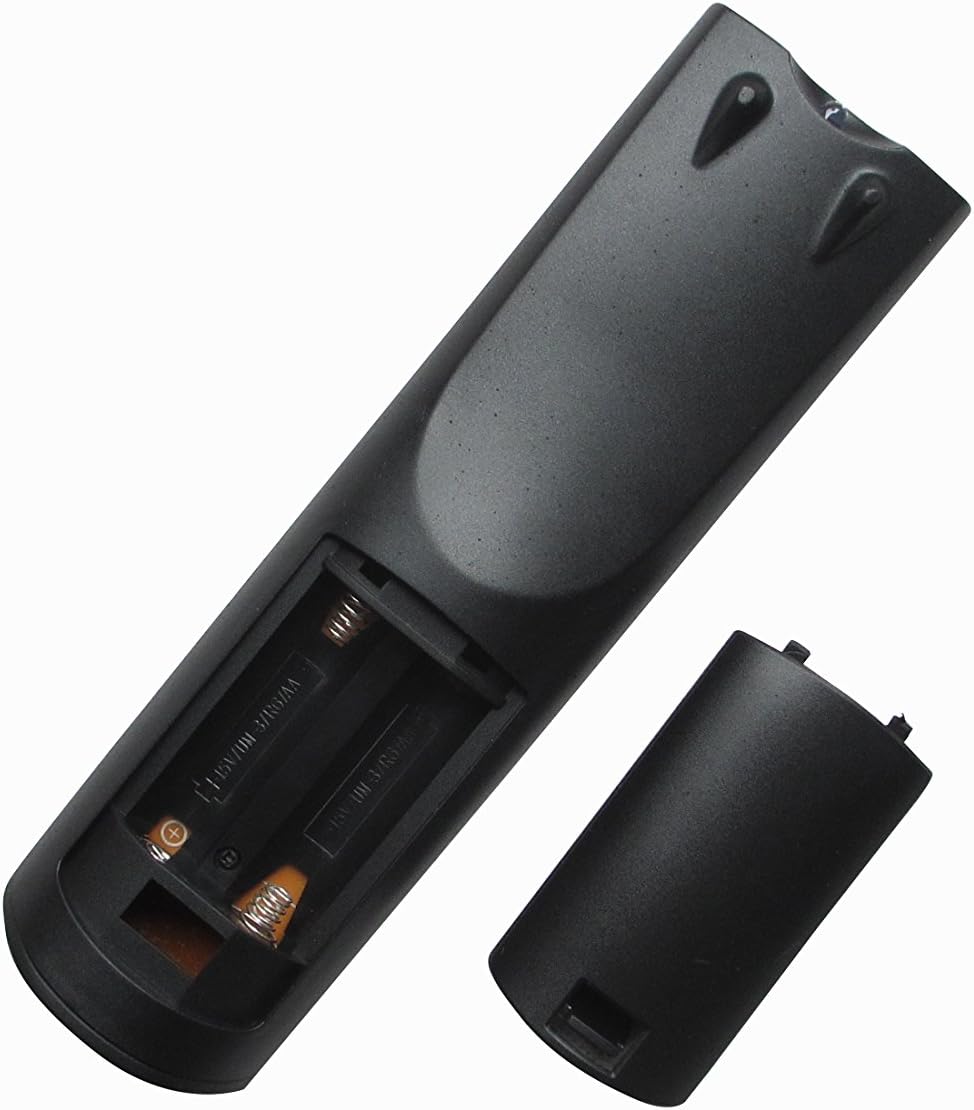
Imaginea 1: Spate view of the remote control with the battery compartment open, ready for battery insertion. Note the spring contacts for the negative terminals and raised contacts for the positive terminals.

Imaginea 2: O altă view of the remote's battery compartment, illustrating the correct orientation for AAA battery placement.
2. Utilizare inițială
This replacement remote control is pre-programmed for the listed ONKYO AV A/V Receiver models. No additional programming or pairing steps are typically required. Once batteries are installed, the remote should be ready for immediate use with your compatible receiver.
Point the remote control directly at your ONKYO AV A/V Receiver and press the desired function button.
Instrucțiuni de operare
The Easytry123 replacement remote control provides intuitive access to the primary functions of your ONKYO AV A/V Receiver. While the exact button layout may vary slightly from your original remote, the core functions are generally mapped to standard remote control buttons.
- Pornire/Oprire: Utilizați PUTERE button to turn your receiver on or off.
- Controlul volumului: Adjust the audio level using the VOLUM + şi VOLUM - butoane.
- Selectare intrare: Cycle through available audio/video inputs (e.g., HDMI 1, DVD, CD) using the INTRARE or dedicated input selection buttons.
- Mut: Temporarily silence the audio output with the MUTE buton.
- Navigare: Folosiți butoanele cu săgeți direcționale și ENTER or OK button for menu navigation on your receiver's display.
For specific advanced functions or detailed operation of your ONKYO receiver's features, please refer to your receiver's original instruction manual.
Întreţinere
Curățarea telecomenzii
Pentru a menține aspectul și funcționalitatea telecomenzii:
- Ștergeți suprafața cu o cârpă moale și uscată.
- Pentru murdăria încăpățânată, ușor dampClătiți laveta cu apă sau cu un detergent blând, neabraziv. Nu utilizați substanțe chimice dure sau solvenți.
- Avoid getting moisture into the battery compartment or any openings.
Înlocuirea bateriei
Replace the batteries when the remote's response becomes sluggish or it stops functioning. Always replace both batteries at the same time with new AAA batteries. Do not mix old and new batteries, or different types of batteries.
Depozitare
Dacă telecomanda nu va fi utilizată pentru o perioadă lungă de timp, scoateți bateriile pentru a preveni scurgerile și deteriorarea acesteia.
Depanare
Dacă întâmpinați probleme cu telecomanda, vă rugăm să consultați următoarele soluții comune:
- Telecomanda nu răspunde:
- Verificați dacă bateriile sunt introduse corect, respectând polaritatea (+/-).
- Înlocuiți bateriile cu baterii AAA noi.
- Ensure there are no obstructions between the remote control and the ONKYO receiver's infrared sensor.
- Make sure you are within the effective range of the receiver and pointing the remote directly at it.
- Unele funcții nu funcționează:
- As a replacement remote, it may not support all functions of your original ONKYO remote. Focus on core functions like power, volume, and input selection.
- Verify that your ONKYO receiver model is listed as compatible in the introduction section.
- Consult your ONKYO receiver's original manual for specific function details.
- Telecomanda funcționează intermitent:
- Acest lucru indică adesea un nivel scăzut al bateriei. Înlocuiți bateriile.
- Ensure a clear line of sight to the receiver.
If problems persist after trying these steps, please contact the seller for further assistance.
Specificații
| Număr de model: | RM-736M |
| Marca: | Easytry123 |
| Dispozitive compatibile: | ONKYO AV A/V Receivers (Models: RC-745M, TX-NR1007, TX-NR807, RC-717M, RC-738M, TX-SR607, TX-SR607S, RC-742M, TX-SR707) |
| Tehnologie de conectivitate: | infraroșu (IR) |
| Caracteristica speciala: | Design ergonomic |
| Numărul maxim de dispozitive acceptate: | 1 |
| Sursa de alimentare: | 2 x baterii AAA (nu sunt incluse) |
Garanție și suport
Specific warranty information for this replacement remote control is typically provided by the seller at the time of purchase. Please refer to your purchase documentation or contact the seller directly for details regarding warranty coverage and support.
For technical assistance or inquiries not covered in this manual, please reach out to the Easytry123 customer support or the retailer from whom you purchased the product.