
1. Introducere
Mulțumesc pentru achizițieasing the UHAPPY U18 Portable Mini HD LED Projector. This manual provides essential information for the safe and efficient operation of your device. Please read it thoroughly before use and retain it for future reference.
Măsuri de siguranță
- Nu priviți direct în lentila proiectorului atunci cândamp este pornit.
- Asigurați o ventilație adecvată în jurul proiectorului pentru a preveni supraîncălzirea.
- Nu expuneți proiectorul la ploaie sau umezeală.
- Folosiți doar adaptorul de alimentare furnizat împreună cu proiectorul.
- Nu încercați să deschideți sau să reparați singur proiectorul. Apelați la personal calificat pentru orice service.
2. Produs terminatview
Familiarize yourself with the components and ports of your UHAPPY U18 projector.
Conținutul pachetului
The following items are included in your projector package:

Image: Contents of the UHAPPY U18 projector package, including the projector, power adapter, AV cable, remote control, and user manual.
- UHAPPY U18 Mini LED Projector
- Adaptor de alimentare
- Cablu AV
- Telecomanda
- Manual de utilizare (acest document)
Componente și porturi ale proiectorului

Image: Angled top-down view of the UHAPPY U18 projector, highlighting the lens, focus adjustment, and control panel.

Imagine: Sus view of the UHAPPY U18 projector, showing the integrated control buttons.

Imagine: față view of the UHAPPY U18 projector, focusing on the projection lens.
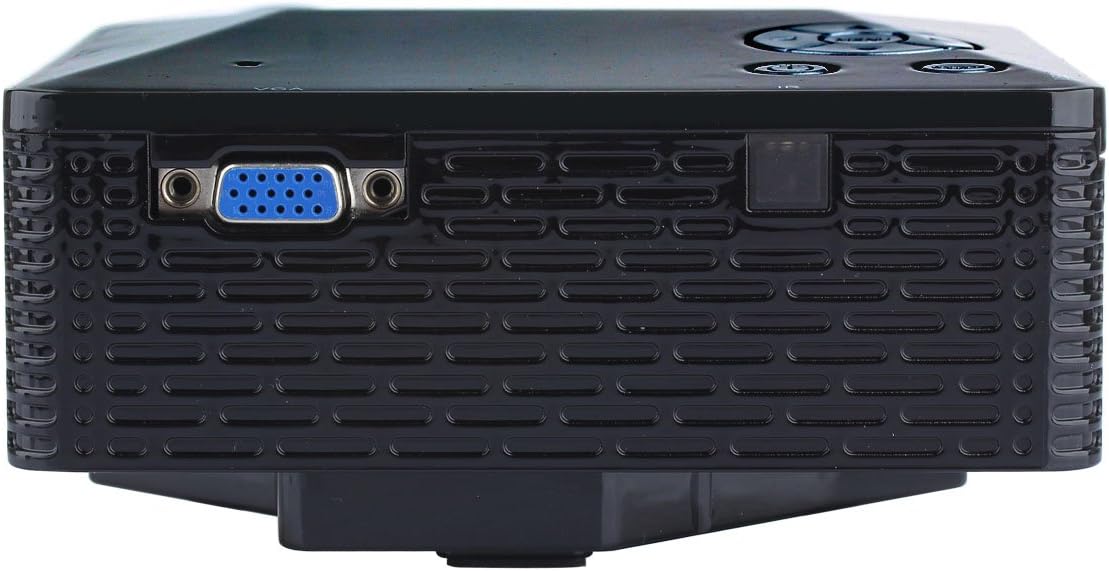
Imagine: Laterală view of the UHAPPY U18 projector, illustrating the VGA input port.
The projector features various input ports for connectivity:
- Intrare HDMI: For connecting devices like laptops, gaming consoles, or media players.
- Port USB: Pentru conectarea dispozitivelor de stocare USB pentru redarea directă a fișierelor media.
- Slot pentru card SD: For inserting SD memory cards to play media directly.
- Intrare AV: Pentru conectarea dispozitivelor mai vechi folosind cablul AV inclus.
- Intrare VGA: For connecting computers or laptops with a VGA output.
- DC-IN: Port de intrare pentru alimentare.
- Ieșire căști: For connecting external audio devices or headphones.
- Buton de focalizare: Located near the lens for adjusting image clarity.
3. Configurare
3.1 Plasarea
Place the projector on a stable, flat surface. Ensure there is adequate space around the projector for ventilation. The ideal projection distance is between 1 to 4 meters, yielding an image size of 20 to 80 inches.
3.2 Conexiune la alimentare
- Connect the power adapter to the DC-IN port on the projector.
- Conectați adaptorul de alimentare la o priză electrică adecvată.
3.3 Conectarea dispozitivelor de intrare
Choose the appropriate cable and port based on your source device:
- HDMI: Connect an HDMI cable from your device (e.g., laptop, DVD player) to the projector's HDMI port.
- VGA: Connect a VGA cable from your computer to the projector's VGA port.
- DE: Use the provided AV cable to connect devices with AV output (e.g., older DVD players, set-top boxes) to the projector's AV port.
- Card USB/SD: Introduceți o unitate USB în portul USB sau un card SD în slotul pentru card SD.
4. Instrucțiuni de utilizare
4.1 Pornire/Oprire
- Pentru a porni: Press the power button on the projector or the remote control. The LED indicator will light up.
- Pentru a opri: Press the power button again. It is recommended to allow the projector to cool down for a few minutes before unplugging it.
4.2 Selectarea sursei
After powering on, you may need to select the input source:
- Press the 'Source' button on the projector or the remote control.
- Use the navigation buttons to select the desired input (HDMI, VGA, AV, USB, SD) and press 'OK' or 'Enter'.
4.3 Ajustarea focalizării
If the projected image appears blurry:
- Rotate the focus knob located near the projector lens until the image becomes clear and sharp.
4.4 Navigare prin meniu
Use the 'Menu' button on the projector or remote to access settings. Use the navigation arrows to move through options and 'OK' or 'Enter' to confirm selections. The projector supports multiple languages including English, Czech, Slovak, Danish, German, Spanish, French, Croatian, Italian, Hungarian, Dutch, Norwegian, Polish, Portuguese, Romanian, Slovene, Serbian, Finnish, Swedish, Bulgarian, Greek, Russian, and Chinese.
4.5 Formate media acceptate
When playing media directly from USB or SD card, the projector supports the following formats:
- Imagine: BMP, JPEG, PNG
- Video: MPEG1, MPEG2, MPEG4, RM, RMVB, AVI, FLV, WMV
5. Întreținere
5.1 Curățarea lentilei
Folosiți o lavetă moale, fără scame, special concepută pentru lentile optice, pentru a șterge ușor lentila proiectorului. Evitați utilizarea materialelor abrazive sau a substanțelor chimice dure.
5.2 Curățare generală
Wipe the projector's exterior with a soft, dry cloth. Do not use liquid cleaners directly on the device. Ensure ventilation openings are free from dust and obstructions.
5.3 Depozitare
When not in use, store the projector in a cool, dry place, away from direct sunlight and extreme temperatures. It is advisable to cover the lens to protect it from dust.
6. Depanare
Dacă întâmpinați probleme cu proiectorul, consultați următoarele probleme și soluții frecvente:
| Problemă | Cauza posibila | Soluţie |
|---|---|---|
| Nicio imagine pe ecran | Sursă de intrare selectată greșit Conexiune cablu slăbită Dispozitivul sursă nu este pornit | Selectați sursa de intrare corectă. Verificați toate conexiunile prin cablu. Asigurați-vă că dispozitivul sursă este pornit și emite un semnal. |
| Imaginea este neclară | Focalizarea nu este ajustată | Rotate the focus knob until the image is clear. |
| Nici un sunet | Volumul prea mic External audio device not connected Setări audio ale dispozitivului sursă | Măriți volumul proiectorului. Connect external speakers/headphones to the audio output. Verificați setările audio de pe dispozitivul sursă. |
| Proiectorul se supraîncălzește și se oprește | Ventilație blocată Utilizare prelungită în mediu cald | Asigurați-vă că orificiile de ventilație sunt libere. Allow the projector to cool down. Operate in a well-ventilated area. |
7. Specificații
Technical specifications for the UHAPPY U18 Portable Mini HD LED Projector:
- Sistem de imagine: LCD
- Rezoluție nativă: 320x240
- Lamp: LED
- Durata de viață a LED-ului: 20,000 de ore
- Luminozitate: 60 LM
- Contrast: 300:1
- Obiectiv: F=125
- Dimensiunea imaginii: 20-80 inci
- Distanța de proiecție: 1-4 metri
- Mod de proiecție: Proiecție față
- Mod de operare: Comandă manuală/de la distanță
- Terminale de intrare: AV, VGA, USB, SD, HDMI
- Ieșire: Căști
- Putere: 24W
- Culoare: 16.77 milioane de culori
- Vorbitor: 1.0W*2
- Temperatura de lucru: 10-35°C
- Dimensiuni: 135 x 132 x 52 mm
- Greutate: 0.44 kg
8. Garanție și asistență
This product is manufactured by Generic. For warranty information and technical support, please refer to the documentation provided at the time of purchase or contact your retailer. Keep your purchase receipt as proof of purchase.