
1. Introducere
This manual provides comprehensive instructions for the setup, operation, maintenance, and troubleshooting of your Canyon CNS-SW71SS Smartwatch. Please read this manual carefully before using your device to ensure proper function and longevity.
The Canyon CNS-SW71SS Smartwatch is designed to help you monitor your fitness activities and stay connected. It features a 1.22-inch color screen, multi-sport modes, heart rate monitoring, sleep tracking, and notification alerts. Its IP68 water resistance makes it suitable for various environments.
2. Produs terminatview
2.1 Caracteristici cheie
- 1.22-inch color touch screen display.
- Multi-sport mode for tracking various activities.
- Daily activity monitoring: calories, steps, heart rate, and sleep.
- Notifications for incoming calls, SMS, emails, calendar events, and social media.
- Music control and remote camera function.
- Smart alarm and weather data display.
- Până la 7 zile de viață a bateriei.
- IP68 water resistance (submersible up to 1 meter for 30 minutes).
- Conectivitate Bluetooth 4.0.
- Compatible with iOS and Android operating systems.
- Comes with two interchangeable wristbands: metal and TPU.
2.2 Componente
The Canyon CNS-SW71SS Smartwatch consists of the main watch unit, interchangeable wristbands, and a charging cable.

Figura 1: Față view of the Canyon CNS-SW71SS Smartwatch, showing the display with steps, distance, calories, and heart rate data.

Figura 2: Înclinat view of the Canyon CNS-SW71SS Smartwatch, featuring a silver metal mesh strap and a round display.
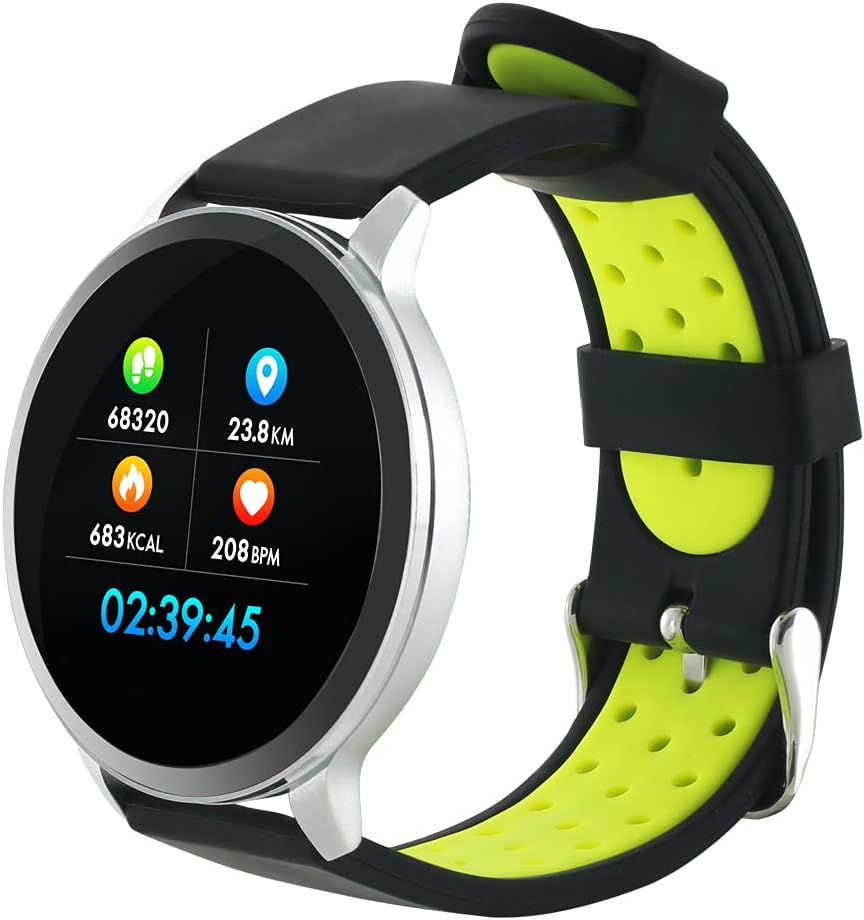
Figure 3: The Canyon CNS-SW71SS Smartwatch shown with an alternative black and lime green TPU strap, highlighting its interchangeable design.

Figura 4: Spate view of the Canyon CNS-SW71SS Smartwatch, displaying the optical heart rate sensor and magnetic charging contacts.

Figure 5: The retail packaging for the Canyon CNS-SW71SS Smartwatch, illustrating key features and the included two straps.
3. Configurare
3.1 Încărcarea ceasului inteligent
- Connect the charging cable to a USB power adapter (not included) or a computer's USB port.
- Align the magnetic charging pins of the cable with the charging contacts on the back of the smartwatch. The watch will vibrate and display a charging icon.
- Allow approximately 2-3 hours for a full charge. A full charge provides up to 7 days of usage.
3.2 Installing the Canyon Fit Application
- Scan the QR code provided in the packaging or search for "Canyon Fit" in your smartphone's app store (Google Play Store for Android, Apple App Store for iOS).
- Descărcați și instalați aplicația.
- Open the Canyon Fit app and follow the on-screen instructions to create an account and set up your profile.
3.3 Împerecherea cu smartphone-ul
- Asigură-te că ceasul tău inteligent este încărcat și pornit.
- Activați Bluetooth pe smartphone-ul dvs.
- Deschide aplicația Canyon Fit.
- Navigate to the device pairing section within the app (usually found under 'Device' or 'Profile').
- Select your smartwatch (e.g., "CNS-SW71SS") from the list of available devices.
- Confirmați solicitarea de asociere atât pe smartphone, cât și pe ceasul inteligent, dacă vi se solicită.
3.4 Attaching/Changing Wristbands
The smartwatch comes with two wristbands (metal and TPU) that can be interchanged. To attach or change a wristband, locate the quick-release pins on the underside of the strap. Slide the pin to detach the current strap and then align and slide the pin of the new strap into the corresponding holes on the watch body until it clicks into place.
4. Instrucțiuni de utilizare
4.1 Navigare de bază
- Touch screen: Swipe left/right to navigate through different functions and menus. Swipe up/down to view notificări sau setări rapide.
- Buton lateral: Press the side button to return to the main watch face or to wake up the screen. A long press may access power options or specific features depending on the context.
4.2 Monitorizarea fitnessului
- Modul multi-sport: Access the 'Workout' or 'Sport' menu on your watch. Select your desired activity (e.g., running, cycling, walking) to start tracking. The watch will record duration, distance, calories burned, and heart rate.
- Activitate zilnică: Ceasul urmărește automat pașii, distanța și caloriile arse pe parcursul zilei. View these statistics on the watch face or in the Canyon Fit app.
- Monitorizarea ratei cardiace: The watch continuously monitors your heart rate. You can also manually initiate a heart rate measurement from the heart rate interface.
- Urmărirea somnului: Wear the smartwatch to bed, and it will automatically track your sleep patterns, including deep sleep, light sleep, and wake times. View detailed sleep analysis in the Canyon Fit app.
4.3 Notificări
Once paired with your smartphone and with notification permissions granted in the Canyon Fit app, your smartwatch will display alerts for:
- Apeluri primite
- Mesaje SMS
- E-mailuri
- Evenimente din calendar
- Social Media Apps (e.g., WhatsApp, Facebook, InstagRAM)
Glisează în sus pe cadranul ceasului pentru a view recent notifications. You can dismiss notifications from the watch.
4.4 funcții suplimentare
- Controlul muzicii: While music is playing on your phone, you can use the watch to play/pause, skip tracks, and adjust volume.
- Cameră la distanță: Open the camera function in the Canyon Fit app. Use your smartwatch as a remote shutter button to take photos on your phone.
- Alarmă inteligentă: Set alarms through the Canyon Fit app. The watch will vibrate to wake you up gently.
- Date meteo: Once connected to your phone, the watch will display current weather conditions and forecasts for your location.
5. Întreținere
5.1 Curățare
- Ștergeți ecranul și carcasa ceasului cu o lavetă moale șiamp pânză.
- For the metal strap, use a soft brush to gently clean any debris. For the TPU strap, wash with mild soap and water.
- Asigurați-vă că contactele de încărcare sunt curate și uscate înainte de încărcare.
- Evitați utilizarea substanțelor chimice dure sau materiale abrazive pentru curățare.
5.2 Rezistență la apă (IP68)
The Canyon CNS-SW71SS Smartwatch is IP68 rated, meaning it is resistant to dust and can be immersed in water up to 1 meter deep for a maximum of 30 minutes. While it can withstand splashes, rain, and brief immersion, it is not recommended for hot showers, saunas, or diving, as steam and high water pressure can compromise the seals.
- Do not press any buttons while the watch is submerged.
- Uscați bine ceasul după expunerea la apă.
5.3 Îngrijirea bateriei
- Evitați descărcarea completă frecventă a bateriei.
- Încărcați dispozitivul în mod regulat, chiar dacă nu îl utilizați, pentru a menține bateria sănătoasă.
- Depozitați ceasul într-un loc răcoros și uscat atunci când nu îl utilizați pentru perioade lungi de timp.
6. Depanare
- Ceasul nu se pornește: Asigurați-vă că ceasul este complet încărcat. Conectați-l la încărcător timp de cel puțin 30 de minute.
- Nu se poate conecta la smartphone:
- Asigurați-vă că Bluetooth este activat pe telefon.
- Ensure the Canyon Fit app has necessary permissions.
- Repornește atât telefonul, cât și ceasul inteligent.
- Încearcă să anulezi asocierea și să o reconectezi prin aplicație.
- Notificările nu apar:
- Check notification settings in the Canyon Fit app and your phone's system settings.
- Asigurați-vă că ceasul este conectat prin Bluetooth.
- Inaccurate heart rate/activity data:
- Asigurați-vă că ceasul este purtat strâns pe încheietura mâinii, nici prea strâmt, nici prea lejer.
- Curățați senzorul de pe spatele ceasului.
- Environmental factors or certain movements can affect accuracy.
- Ecranul nu răspunde: Try restarting the smartwatch by holding down the side button. If unresponsive, allow the battery to fully drain and then recharge.
7. Specificații
| Numele modelului | CNS-SW71SS |
| Marca | CANION |
| Dimensiunea afișajului | 1.22 inci |
| Compatibilitatea sistemelor de operare | Android, iOS |
| Tehnologia de conectivitate | Bluetooth 4.0 |
| Evaluare de rezistență la apă | IP68 |
| Caracteristici speciale | Wireless Charging (implied by product data), Multi-Sport Mode, Heart Rate Monitor, Sleep Tracker, Notifications |
| Dispozitive compatibile | Smartphone |
| Baterie | Reîncărcabilă (1 inclus) |
| Opțiuni de culoare | Black, Lime Green, Silver |
8. Garanție și asistență
For warranty information and technical support, please refer to the documentation included with your purchase or visit the official Canyon website. You can also contact Canyon customer service for assistance with product issues or inquiries.
Suport online: https://canyon.eu/support/ (Examplinkul, vă rugăm să verificați pagina oficială de asistență)