
BSIDE BSIDE ZT-M1 Auto/Manual Digital
BSIDE ZT-M1 Digital Multimeter
Manual de instrucțiuni pentru utilizator
Introducere
This manual provides detailed instructions for the safe and effective operation of your BSIDE ZT-M1 Auto/Manual Digital Multimeter. This device is designed for precise electrical measurements, featuring an 8000-count triple display, V.F.C converter, and various measurement modes including voltage, current, resistance, capacitance, frequency, and temperature. Please read this manual thoroughly before use and keep it for future reference.
Informații de siguranță
Always observe safety precautions when using electrical testing equipment. Failure to do so may result in injury or damage to the device or equipment under test.
- Nu depășiți valorile maxime de intrare specificate pentru fiecare interval de măsurare.
- Asigurați-vă că sondele de testare sunt conectate corect și că comutatorul de funcții este setat pe intervalul corect înainte de a efectua orice măsurătoare.
- Acordați o atenție deosebită atunci când lucrați cu circuite electrice aflate sub tensiune. Evitați contactul cu firele sau terminalele neizolate.
- Do not use the multimeter if it appears damaged or if the test leads are frayed or broken.
- Înlocuiți bateriile imediat ce apare indicatorul de baterie descărcată pentru a asigura citiri precise.
- Keep the device dry and clean. Do not expose it to extreme temperatures or humidity.
Produs terminatview și Componente
The BSIDE ZT-M1 Multimeter comes with essential accessories for various testing needs.
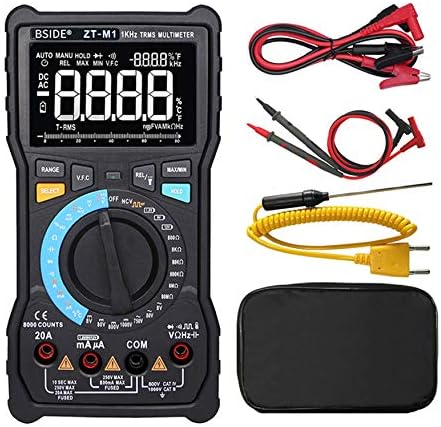
Figura 1: The BSIDE ZT-M1 Digital Multimeter shown with its complete set of accessories, including standard test leads (red and black), alligator clip adapters, a K-type thermocouple temperature probe, and a protective carrying pouch.
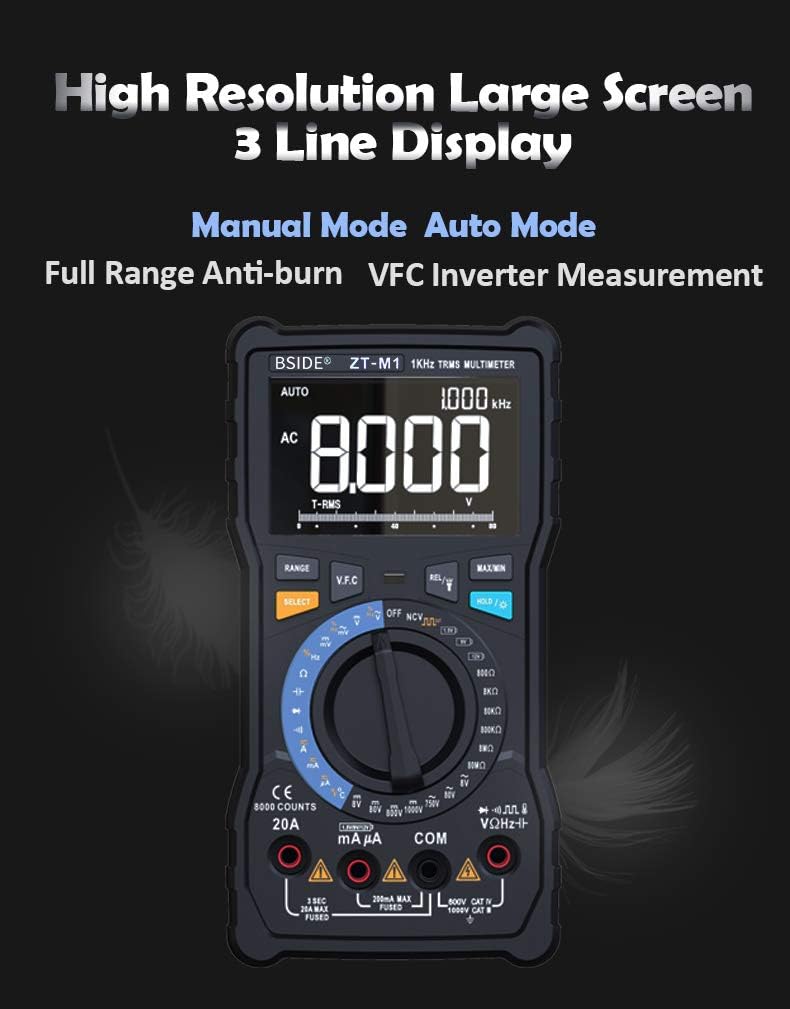
Figura 2: Un detaliat view of the multimeter's high-resolution, 3-line display. This display can show multiple readings simultaneously, such as AC voltage, frequency, and an analog bar graph, enhancing readability and data interpretation.
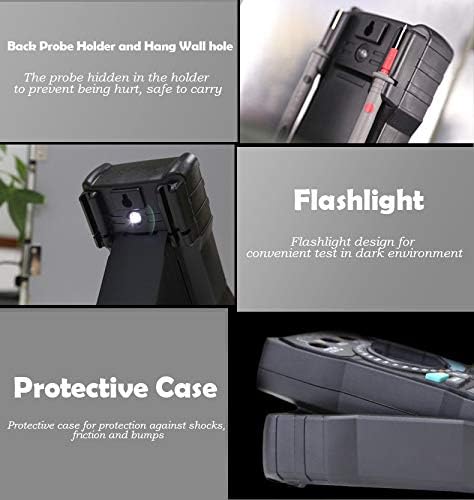
Figura 3: Key physical features of the multimeter. This includes a convenient back probe holder for secure storage, an integrated flashlight for illumination in dark environments, and a robust protective case designed to shield the device from impacts and abrasions.
Înființat
Instalarea bateriei
The BSIDE ZT-M1 is powered by standard batteries (not specified in input, assuming common type like AA/AAA or 9V). To install or replace batteries:
- Asigurați-vă că multimetrul este oprit și deconectați toate sondele de testare.
- Localizați capacul compartimentului bateriei pe spatele dispozitivului.
- Use a screwdriver (if required) to open the compartment.
- Introduceți baterii noi, respectând polaritatea corectă (+/-) așa cum este indicată în interiorul compartimentului.
- Închideți bine capacul compartimentului bateriei.
Conectarea cablurilor de testare
Always connect the black test lead to the "COM" (Common) jack. Connect the red test lead to the appropriate input jack based on the measurement type:
- Pentru Voltage, Resistance, Capacitance, Frequency, Diode, and Continuity measurements: Connect the red lead to the "VΩHz" jack.
- For Current measurements (mA/µA): Connect the red lead to the "mAµA" jack.
- For High Current measurements (A): Connect the red lead to the "20A" jack.
- For Temperature measurements: Connect the K-type thermocouple probe to the designated temperature input jacks (usually marked with temperature symbols).
Instrucțiuni de operare
Pornire/Oprire și selectare mod
Turn the rotary switch to the desired measurement function to power on the multimeter. To turn off the multimeter, rotate the switch to the "OFF" position. The device features both Auto and Manual ranging modes.

Figura 4: Illustration of the multimeter's rotary switch, highlighting the distinct Auto Mode and Manual Mode sections. Auto mode automatically selects the correct measurement range, while Manual mode allows the user to select a specific range for precise control.
Funcții de măsurare
- DC Voltage (V/mV): Rotate the switch to the DC Voltage position. Connect test leads in parallel with the circuit or component. Ranges: 800.0mV, 8.000V, 80.00V, 800.0V, 1000V.
- AC Voltage (V/mV): Rotate the switch to the AC Voltage position. Connect test leads in parallel. Ranges: 800.0mV, 8.000V, 80.00V, 800.0V, 750V. Features True RMS measurement.
- DC Current (A/mA/µA): Rotate the switch to the DC Current position. Connect test leads in series with the circuit. Ranges: 800.0µA, 8.000mA, 80.00mA, 800.0mA, 8.000A, 20.00A.
- AC Current (A/mA/µA): Rotate the switch to the AC Current position. Connect test leads in series. Ranges: 800.0µA, 8.000mA, 80.00mA, 800.0mA, 8.000A, 20.00A. Features True RMS measurement.
- Rezistență (Ω): Rotate the switch to the Resistance position. Ensure the circuit is de-energized. Connect test leads across the component. Ranges: 800.0Ω, 8.000kΩ, 80.00kΩ, 800.0kΩ, 8.000MΩ, 80.00MΩ.
- Capacitance (F/nF/mF): Rotate the switch to the Capacitance position. Ensure capacitors are discharged before testing. Ranges: 9.999nF, 99.99nF, 999.9nF, 9.999µF, 99.99µF, 999.9µF, 9.999mF, 99.99mF.
- Frecvența (Hz): Rotate the switch to the Frequency position. Ranges: 9.999Hz, 99.99Hz, 999.9Hz.
- Ciclu de funcționare: Available in conjunction with Frequency measurement. Range: 1%~99%.
- Temperatură (°C/°F): Rotate the switch to the Temperature position. Connect the K-type thermocouple. Ranges: -20°C to 1000°C (-4°F to 1832°F).
- Test de diodă: Rotate the switch to the Diode position. Used to check the forward voltagcăderea de tensiune a unei diode.
- Test de continuitate: Rotate the switch to the Continuity position. An audible beep indicates continuity (low resistance).
- Square Wave Output: The multimeter can generate a square wave signal. Frequencies: 50Hz~5000Hz.
Funcții speciale
- Păstrarea datelor: Apăsați butonul „HOLD” pentru a îngheța valoarea curentă de pe afișaj. Apăsați din nou pentru a o elibera.
- Iluminare de fundal: The display features a backlight for improved visibility in low-light conditions. (Activation method not specified, assuming a dedicated button or automatic).
- V.F.C (Variable Frequency Converter) Measurement: This function allows for accurate measurement of the output voltage of variable frequency drives (VFDs) or inverters.
- Test baterie: The multimeter includes a dedicated function for testing battery voltage.
- Oprire automată: To conserve battery life, the multimeter will automatically power off after a period of inactivity.
- Indicație baterie descărcată: An icon on the display will indicate when the battery level is low and requires replacement.
- Lanternă: An integrated flashlight assists in illuminating the test area, especially useful in dark environments.

Figura 5: The multimeter's capability to display temperature in both Celsius and Fahrenheit, along with an analog bar graph. Below, it demonstrates the V.F.C function, showing its ability to accurately measure the output voltage from an inverter, which is crucial for industrial applications.
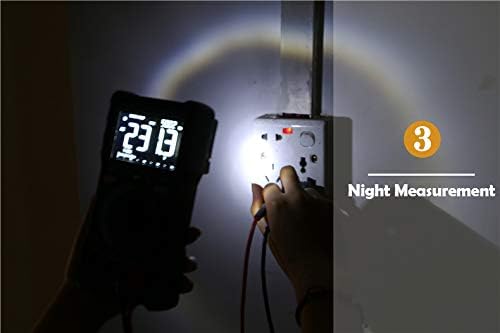
Figura 6: The multimeter's built-in flashlight in use, providing illumination for making measurements in dimly lit or dark conditions, such as inspecting a wall socket at night.
Întreţinere
Curatenie
Ștergeți carcasa cu reclamăamp o lavetă și un detergent blând. Nu utilizați substanțe abrazive sau solvenți. Asigurați-vă că dispozitivul este complet uscat înainte de utilizare.
Înlocuirea bateriei
When the low battery indicator appears, replace the batteries as described in the "Setup" section. Remove batteries if the device will not be used for an extended period to prevent leakage.
Depozitare
Store the multimeter in a cool, dry place, away from direct sunlight and extreme temperatures. Utilize the provided protective case for enhanced durability and protection.
Depanare
If you encounter issues with your BSIDE ZT-M1 Multimeter, refer to the following common problems and solutions:
- Fără afișaj/Pornire: Verificați instalarea bateriilor și asigurați-vă că bateriile nu sunt descărcate.
- Citiri inexacte: Verify test lead connections, ensure the correct function and range are selected. Check battery level.
- „OL” sau Indicație de suprasarcină: The measured value exceeds the selected range. Switch to a higher range or use auto-ranging mode.
- Fără bip de continuitate: Asigurați-vă că circuitul este deconectat de la curent. Verificați dacă sunt deteriorate cablurile de testare.
- Pâlpâirea afișajului: Low battery may cause display instability. Replace batteries.
Specificații
Detailed technical specifications for the BSIDE ZT-M1 Digital Multimeter:
| Parametru | Valoare/Interval |
|---|---|
| Afişa | 8000 Counts, 3-Line Triple Display |
| Variind | Auto/Manual |
| Material | ABS/PVC |
| Rata de actualizare | 3 ori / secundă |
| RMS adevărat | Da |
| DC Voltage (V) | 800.0mV / 8.000V / 80.00V / 800.0V / 1000V (±0.5%+3) |
| AC Voltage (V) | 800.0mV / 8.000V / 80.00V / 800.0V / 750V (±1.0%+3) |
| Curent DC (A) | 800.0µA / 8.000mA / 80.00mA / 800.0mA / 8.000A / 20.00A (±1.2%+3) |
| Curent alternativ (A) | 800.0µA / 8.000mA / 80.00mA / 800.0mA / 8.000A / 20.00A (±1.5%+3) |
| Rezistență (Ω) | 800.0Ω / 8.000kΩ / 80.00kΩ / 800.0kΩ / 8.000MΩ (±0.5%+3), 80.00MΩ (±1.5%+3) |
| Capacitate (F) | 9.999nF (±5.0%+5), 99.99nF / 999.9nF / 9.999µF / 99.99µF / 999.9µF (±2.0%+5), 9.999mF / 99.99mF (±5.0%+5) |
| Frecvență (Hz) | 9.999Hz / 99.99Hz / 999.9Hz (±0.1%+2) |
| Ciclul de funcționare | 1%~99% (±0.1%+2) |
| Temperatură | -20°C ~ 1000°C / -4°F ~ 1832°F (±2.5%+5) |
| Testul diodei | Da |
| Test de continuitate | Da |
| Ieșire cu undă pătrată | 50Hz~5000Hz |
| V.F.C Converter | Da |
| Reținere de date | Da |
| Iluminare de fundal | Da |
| Test baterie | Da |
| Indicație baterie descărcată | Da |
| Oprire automată | Da |
Informații despre garanție
Specific warranty details for the BSIDE ZT-M1 Multimeter are not provided in this manual. Please refer to the product packaging or the manufacturer's official website-ul pentru termenii și condițiile de garanție.
Asistență pentru clienți
For technical assistance, troubleshooting beyond this manual, or inquiries regarding your BSIDE ZT-M1 Multimeter, please contact the retailer or manufacturer directly. Contact information is typically available on the product packaging or the official BSIDE website-ul.
Documente aferenteBSIDE ZT-M1 Auto/Manual Digital


Ask a question about this manual
Ask about setup, troubleshooting, compatibility, parts, safety, or missing instructions. Manuals+ will review the question and use this page’s manual context to help answer it.