
1. Introducere
This manual provides detailed instructions for the safe and effective operation of the BSIDE ADMS7 Digital Multimeter. The ADMS7 is a high-precision, automatic induction smart multimeter designed for measuring DC/AC voltage, resistance, frequency, and other electrical parameters. It features an intelligent identification function and True RMS measurement capabilities, making it suitable for various electrical testing applications.
2. Informații de siguranță
AVERTISMENT: Pentru a evita electrocutarea sau vătămările corporale, citiți și înțelegeți toate informațiile de siguranță înainte de a utiliza acest produs.
- Asigurați-vă întotdeauna că multimetrul este în modul de măsurare corect înainte de a conecta sondele de testare la un circuit.
- Nu aplica voltage or current that exceeds the maximum specified limits for the multimeter. Maximum voltage allowed at the measuring end: 600V DC, 600V AC.
- Acordați o atenție deosebită atunci când lucrați cu circuite electrice aflate sub tensiune. Evitați contactul cu firele sau terminalele neizolate.
- Verificați cablurile de testare pentru a depista eventualele deteriorări înainte de fiecare utilizare. Nu utilizați dacă izolația este compromisă.
- Înlocuiți bateriile imediat ce apare indicatorul de baterie descărcată pentru a asigura citiri precise.
- Nu utilizați multimetrul dacă pare deteriorat sau nu funcționează corect.
- This device is designed for use at working heights up to 2000m.
3. Produs terminatview
The BSIDE ADMS7 Digital Multimeter is a compact and intelligent testing device. Familiarize yourself with its components:

Figure 3.1: BSIDE ADMS7 Multimeter, including the main unit, red and black test leads, a wrist strap, and the product packaging.
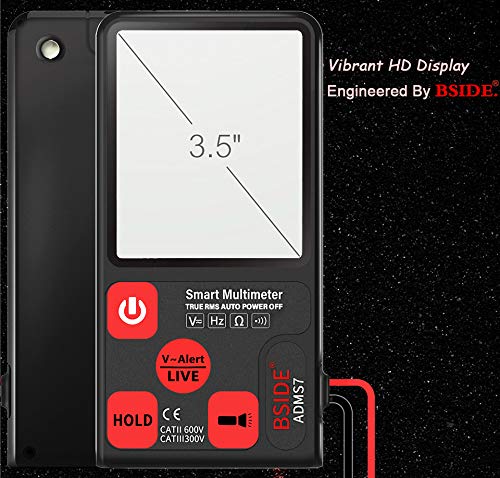
Figura 3.2: Față view of the ADMS7 Multimeter, highlighting its 3.5-inch vibrant HD display and button layout.
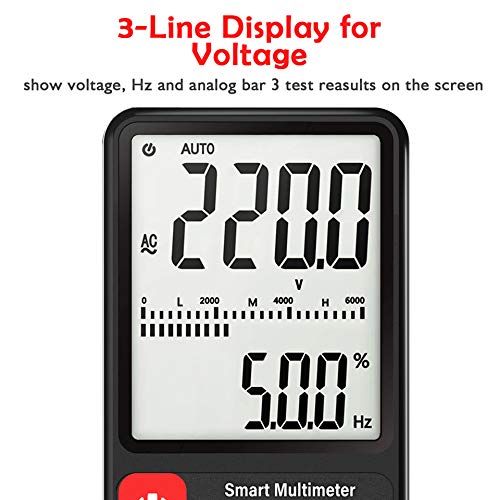
Figura 3.3: Detaliat view of the multimeter's LCD, illustrating the 3-line display for voltage, frequency (Hz), and analog bar graph results.
Componente cheie:
- Display LCD: Large screen for clear readings, including main value, secondary value, and analog bar graph. Maximum display value: 6000 digits.
- Buton de alimentare: Pentru a porni sau opri dispozitivul.
- V-Alert/LIVE Button: Activează volumul fără contacttage detection and live wire detection.
- Țineți butonul apasat: Îngheață citirea curentă de pe afișaj.
- Mufe de intrare: For connecting test leads (COM and VΩHz).
- Cablii de testare: Red (positive) and Black (common) leads for measurements.
4. Configurare
4.1 Instalarea bateriei
- Asigurați-vă că multimetrul este oprit.
- Localizați capacul compartimentului bateriei pe spatele dispozitivului.
- Folosiți o șurubelniță pentru a deschide compartimentul bateriei.
- Insert two AAA 1.5V batteries, observing the correct polarity (+/-). Batteries are not included.
- Puneți la loc capacul compartimentului bateriei și fixați-l cu șurubul.
4.2 Conectarea cablurilor de testare
- Introduceți sonda neagră de testare în mufa de intrare „COM” (Comun).
- Insert the red test lead into the "VΩHz" input jack for voltagmăsurători de e, rezistență și frecvență.
5. Instrucțiuni de utilizare
5.1 Pornire/Oprire
Apăsați tasta Buton de alimentare (red circle with line) to turn the multimeter on. The device will automatically enter intelligent identification mode. To turn off, press and hold the Power Button. The device also features an automatic shutdown time of 15 minutes to conserve battery life.
5.2 Mod de identificare automată
Upon power-on, the ADMS7 automatically detects the type of measurement (AC/DC voltage, resistance, continuity) and selects the appropriate range. This simplifies operation by eliminating manual range selection.
5.3 Vol. de măsuraretage (AC/DC)
- Ensure the multimeter is powered on and in automatic identification mode.
- Connect the black test lead to the common point of the circuit and the red test lead to the point where voltage este de măsurat.
- Afișajul va afișa volumultage reading (DC or AC) and frequency (Hz) if applicable.
5.4 V-Alert (Volum fără contact)tage Detection) and LIVE Function
Funcția V-Alert permite detectarea fără contact a tensiunii ACtage, indicating the presence of live electrical fields without direct contact. The LIVE function helps identify live wires.

Figure 5.1: The V-Alert function in use, showing the multimeter detecting voltage near various electrical outlets. The display indicates the presence of voltage, and an audible alarm sounds.
- Apăsați tasta V-Alert/LIVE Button. The display will show "V-Alert" or "LIVE".
- For V-Alert, bring the top of the multimeter near the conductor or outlet. The device will beep and the bar graph on the LCD will indicate the strength of the detected voltage câmpul.
- For LIVE, insert the red test lead into the suspected live wire and the black test lead into the neutral or ground. The display will indicate "LIVE" and provide a voltage reading if a live wire is detected.
5.5 Funcția HOLD
Apăsați tasta Țineți butonul apasat to freeze the current reading on the display. This is useful for recording measurements in difficult-to-read situations. Press the button again to release the hold function.
6. Întreținere
6.1 Curățare
Ștergeți multimetrul casing cu anunțamp o lavetă și un detergent blând. Nu utilizați substanțe abrazive sau solvenți. Asigurați-vă că dispozitivul este complet uscat înainte de utilizare.
6.2 Înlocuirea bateriei
Când bateria este sub volumtage indication (battery icon) appears on the LCD, replace the batteries as described in Section 4.1. Prompt battery replacement ensures continued accuracy and proper operation.
7. Depanare
- Fără afișare: Verificați instalarea bateriilor și asigurați-vă că bateriile nu sunt descărcate.
- Citiri inexacte: Ensure test leads are properly connected. Check battery level. Verify the multimeter is in the correct mode (though automatic, ensure it's not stuck in a specific function).
- „OL” sau Indicație de suprasarcină: The measured value exceeds the multimeter's range. Disconnect immediately to prevent damage.
- No V-Alert Detection: Ensure the V-Alert function is activated. The multimeter needs to be close enough to the AC voltage sursa.
8. Specificații
| Parametru | Valoare |
|---|---|
| Valoarea maximă de afișare | 6000 cifre |
| Indicarea polarității | Automatic indication |
| Afișare unitate | Function, power unit display |
| Timp de oprire automată | 15 minute |
| Sursa de alimentare de lucru | 2 x AAA 1.5V battery (not included) |
| Baterie sub voltage Indicație | Afișaj LCD |
| Coeficient de temperatură | Less than 0.1 x accuracy / °C |
| Temperatura de lucru | 0 - 40 °C |
| Temperatura și umiditatea de depozitare | 10 - 60 °C |
| Vol. Maximtage Allowed | 600V DC, 600V AC |
| Înălțimea de lucru | Până la 2000 m |
| Protecție la suprasarcină | Gamă completă |
| Vol. Periculostage Alarma | Two grades |
9. Garanție și asistență
For warranty information and technical support, please refer to the documentation provided with your purchase or contact the manufacturer directly. Keep your purchase receipt as proof of purchase.


