
1.view
The Apple iPad Mini (2019) is a compact and powerful tablet designed for portability and performance. It features a 7.9-inch Retina Display with True Tone technology, providing vibrant colors and comfortable viewing. Powered by the A12 Bionic chip, it offers fast and efficient performance for various tasks, from browsing to gaming.
Caracteristicile cheie includ:
- 7.9-inch Retina Display with True Tone and wide Color
- A12 Bionic chip with Neural Engine
- Touch ID fingerprint sensor for secure authentication
- 8MP back camera and 7MP FaceTime HD front camera
- Stereo speakers for immersive audio
- 802.11ac Wi-Fi connectivity
- Până la 10 ore de viață a bateriei
- Lightning connector for charging and accessories
- Support for Apple Pencil (1st Generation)
- iPadOS 14 for enhanced tablet experience

Image 1.1: The Apple iPad Mini (2019) in Space Gray, showcasindesignul și afișajul său compact.
2. Ce se află în cutie
Upon opening your iPad Mini package, ensure all the following items are present:
- iPad mini (2019)
- Cablu Lightning la USB
- Adaptor de alimentare USB
3. Configurare
3.1. Taxă inițială
Before first use, it is recommended to fully charge your iPad Mini. Connect the Lightning to USB Cable to the iPad's Lightning port and the USB Power Adapter, then plug the adapter into a power outlet.
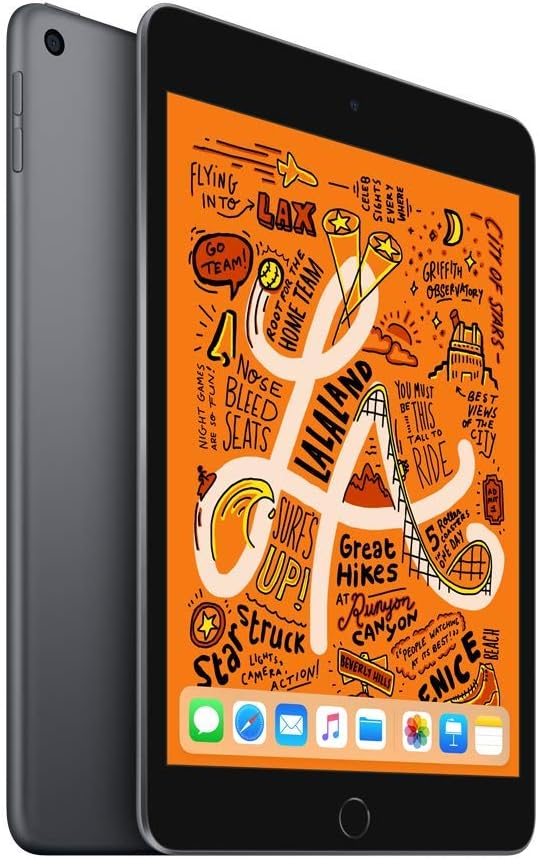
Imaginea 3.1: Față view of the iPad Mini, ready for initial setup.
3.2. Power On and Basic Configuration
- Țineți apăsat butonul Butonul de sus până când apare sigla Apple.
- Urmați instrucțiunile de pe ecran pentru a vă selecta limba și regiunea.
- Conectați-vă la o rețea Wi-Fi.
- Înființat Touch ID by following the prompts to register your fingerprint.
- Creați o parolă.
- Restore from an iCloud or computer backup, or set up as a new iPad.
- Conectează-te cu ID-ul tău Apple sau creează unul nou.
- Enable or disable location services, Siri, and other features as desired.
4. Utilizarea iPad-ului Mini
4.1. Navigare de bază
- Buton Acasă: Press once to return to the Home screen. Double-press to open the App Switcher. Press and hold to activate Siri.
- Gesturi: Swipe down from the top-right corner for Control Center. Swipe down from the middle of the screen for Search. Swipe up from the bottom to go home (if using gestures instead of Home button).

Image 4.1: The iPad Mini display showing a vibrant interface.
4.2. Conectarea la Wi-Fi
- Du-te la Setări > Wifi.
- Activați Wi-Fi.
- Selectați rețeaua dorită din listă.
- Introduceți parola dacă vi se solicită, apoi atingeți Alăturați-vă.
4.3. Utilizarea camerei
Deschideți Camera foto app from the Home screen. Tap the shutter button to take a photo. Swipe left or right to switch between photo, video, panorama, and other modes. Tap the camera icon to switch between the front and back cameras.
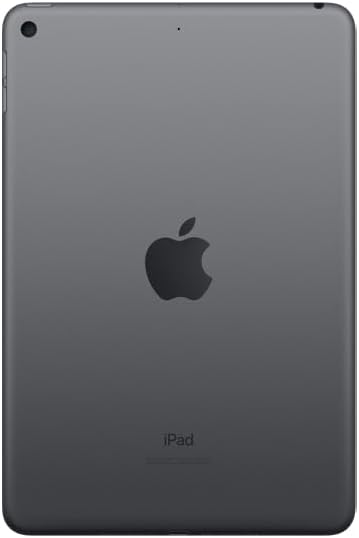
Imaginea 4.2: Spate view of the iPad Mini, highlighting the back camera.
4.4. Apple Pencil (1st Generation)
The iPad Mini (2019) supports the first-generation Apple Pencil. To pair, remove the cap from your Apple Pencil and plug it into the Lightning connector on your iPad. Tap Pereche when the Bluetooth Pairing Request appears. Once paired, you can use it for drawing, note-taking, and more.
5. Întreținere
5.1. Cleaning Your iPad Mini
To clean your iPad Mini, use a soft, lint-free cloth. Avoid abrasive cloths, towels, paper towels, or similar items that could scratch the screen. Do not use aerosol sprays, solvents, or abrasives. Unplug all cables and power off the device before cleaning.
5.2. Actualizări software
Keep your iPad Mini's software up to date to ensure optimal performance and security. Go to Setări > General > Actualizare softwareDacă este disponibilă o actualizare, urmați instrucțiunile de pe ecran pentru a o descărca și instala.
5.3. Îngrijirea bateriei
To maximize battery lifespan, avoid exposing your iPad to extreme temperatures. For long-term storage, charge the device to about 50% and power it off. Recharge it to 50% every six months.
5.4. Managementul stocării
To check and manage your storage, go to Setări > General > Spațiu de stocare pentru iPadPuteți descărca aplicațiile neutilizate, șterge fișierele mari files, or move photos and videos to iCloud to free up space.
6. Depanare
6.1. Dispozitivul nu răspunde
If your iPad Mini is unresponsive, try a force restart:
- Apăsați lung pe ambele Butonul de sus iar cel butonul Acasă simultan.
- Continue holding until you see the Apple logo.
- Release both buttons and allow the iPad to restart.
6.2. Probleme de conexiune Wi-Fi
If you are experiencing Wi-Fi connectivity problems:
- Asigurați-vă că Wi-Fi-ul este activat în Setări > Wifi.
- Reporniți routerul Wi-Fi.
- Uitați de rețea și reconectați-vă: Accesați Setări > Wifi, atingeți pictograma de informații next to your network, then tap Uită de această rețea. Rejoin the network.
- Reset Network Settings: Go to Setări > General > Transfer sau resetare iPad > Resetați > Resetați setările de rețea. This will reset all network settings, including Wi-Fi passwords.
6.3. Blocarea sau blocarea aplicației
If an app is not working correctly:
- Force quit the app: Double-press the Home button to open the App Switcher, then swipe up on the app's preview to close it. Reopen the app.
- Update the app: Check the App Store for updates to the problematic app.
- Reinstall the app: Delete the app from your iPad and then download it again from the App Store.
7. Specificații
| Numele modelului | iPad mini |
| Numărul de model al articolului | MUQW2LL/A |
| Afişa | 7.9-inch Retina display with True Tone |
| Rezoluția afișajului | 2048 x 1536 pixeli |
| Chip | A12 Bionic chip with Neural Engine |
| Capacitate de stocare | 64 GB |
| Camera din spate | 8MP with HDR and 1080p HD video |
| Cameră frontală | 7MP FaceTime HD with Auto HDR |
| Durata de viață a bateriei | Up to 10 hours (Wi-Fi browsing) |
| Conector | Fulger |
| Dimensiuni (Îl x l x A) | 8 x 5.3 x 0.24 inchi (203.2 x 134.8 x 6.1 mm) |
| Greutate | 0.66 pound (300.5 grams) Wi-Fi model |
| Data de lansare | 18 martie 2019 |
8. Garanție și asistență
8.1. Informații despre garanție
Your Apple iPad Mini (2019) is covered by Apple's standard limited warranty, which typically covers manufacturing defects for one year from the original purchase date. For detailed warranty terms and conditions, please refer to the official Apple warranty documentation included with your product or visit the Apple website-ul.
8.2. Asistență pentru clienți
For further assistance, technical support, or service, please visit the official Apple Support website:
You can find articles, troubleshooting guides, and contact options for Apple support specialists on their website-ul.