
1. Introducere
This manual provides instructions for the installation, operation, and maintenance of the Cisco CP-68KEM-3PCC Expansion Module. This module is designed to enhance the functionality of your Cisco IP Phone 6851 by providing additional programmable keys.
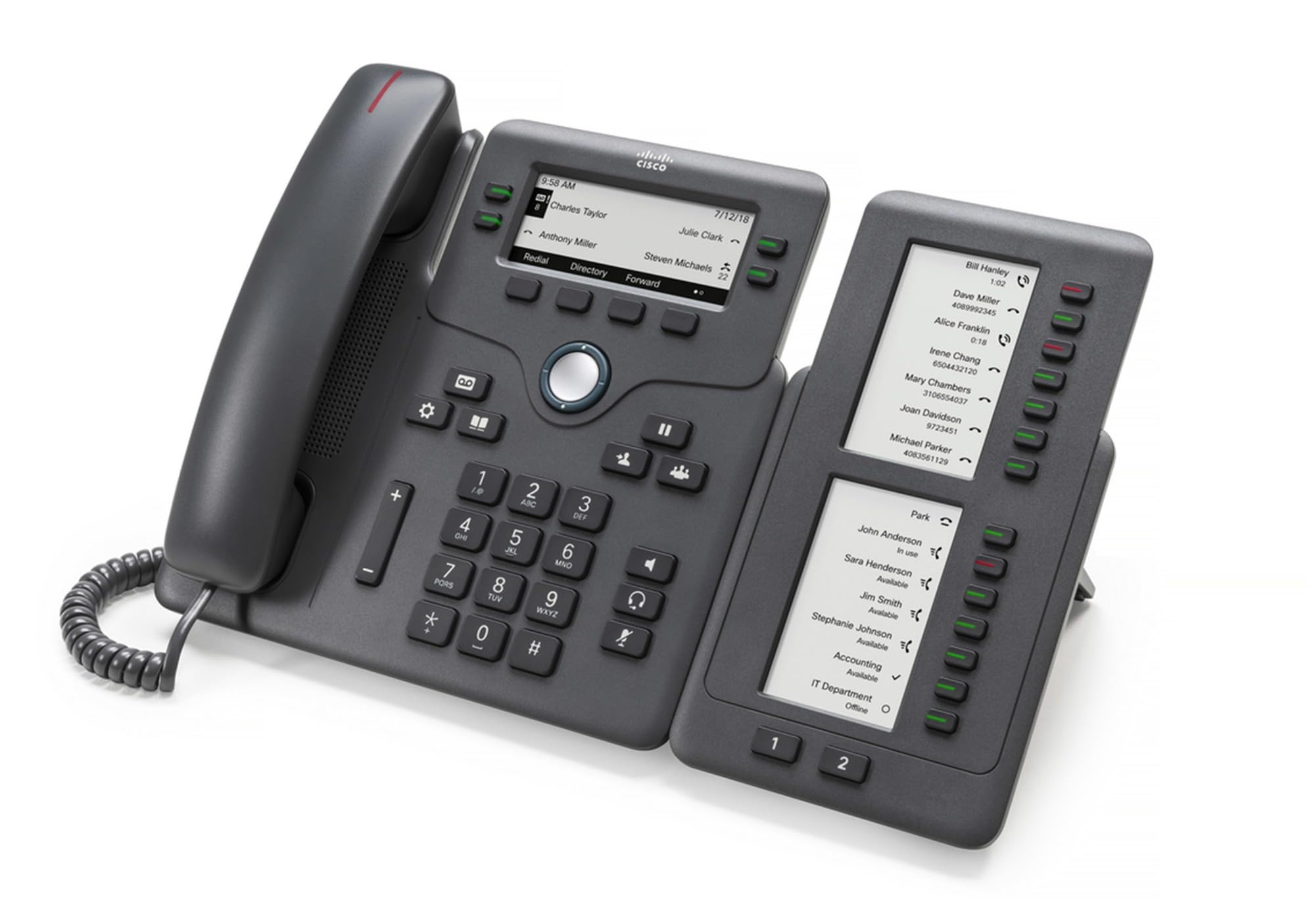
Figure 1: Cisco CP-68KEM-3PCC Expansion Module. This image shows the front view of the expansion module with its grayscale LCD screen and programmable keys.
The Cisco CP-68KEM-3PCC Expansion Module adds 14-line keys and 2-page keys, totaling 28 additional keys, with an easy-to-read grayscale LCD screen. It is ideal for monitoring and managing call status, directory numbers, and speed dial functions.
2. Ce se află în cutie
Despachetați cu grijă cutia și asigurați-vă că toate articolele sunt prezente:
- Cisco CP-68KEM-3PCC Phone Expansion Module
- Connecting Cable (typically included for linking to the phone)
- Documentation (this user manual, safety information)
If any items are missing or damaged, please contact your vendor or Cisco support immediately.
3. Instrucțiuni de configurare
Follow these steps to connect your Cisco CP-68KEM-3PCC Expansion Module to your Cisco IP Phone 6851.
- Prepare the IP Phone: Ensure your Cisco IP Phone 6851 is powered off and disconnected from the network.
- Connect the Expansion Module: Locate the expansion port on the back or side of your Cisco IP Phone 6851. Connect the provided connecting cable from the expansion module to this port.
- Securizarea conexiunii: Ensure the cable is securely fastened to prevent accidental disconnection.
- Pornire: Reconnect your Cisco IP Phone 6851 to the network and power it on. The expansion module should be detected automatically.
- Verificați funcționalitatea: Once the phone has booted, check the expansion module's display and keys to ensure they are responsive.
For detailed visual instructions, refer to the official Cisco documentation or support website-ul.
4. Operating the Expansion Module
The expansion module provides additional keys for various functions, enhancing your call management capabilities.
4.1 taste programabile
The 28 programmable keys (14 keys across 2 pages) can be configured for:
- Directory Numbers (DNs): Assign specific phone lines or extensions.
- Apelare rapida: Program frequently called numbers for quick access.
- Taste de funcții: Assign functions like call transfer, conference, or call park.
- Call Status Monitoring: Monitor the status of other lines (e.g., busy, ringing).
4.2 Page Navigation
Use the dedicated page keys (usually located near the display) to switch between the two pages of programmable keys. The grayscale LCD screen will update to show the labels for the currently active page.
4.3 Configurare
Configuration of the programmable keys is typically managed through your organization's phone system administrator or via the web interface of the Cisco IP Phone 6851. Consult your IT department for specific configuration instructions.
5. Întreținere
To ensure the longevity and optimal performance of your Cisco CP-68KEM-3PCC Expansion Module, follow these maintenance guidelines:
- curatenie: Folosiți o lavetă moale, uscată și fără scame pentru a curăța suprafețele exterioare. Pentru petele persistente, ștergeți ușor.ampClătiți cârpa cu apă. Evitați utilizarea substanțelor chimice dure, a produselor de curățare abrazive sau a solvenților, deoarece acestea pot deteriora finisajul și componentele electronice.
- Mediu: Keep the module in a clean, dry environment, away from direct sunlight, excessive heat, and moisture.
- Manipulare: Handle the module with care. Avoid dropping it or subjecting it to strong impacts.
- Organizare de cabluri: Ensure connecting cables are not kinked, pinched, or under strain.
There are no user-serviceable parts inside the expansion module. Do not attempt to open or repair the device yourself.
6. Depanare
If you encounter issues with your expansion module, try the following troubleshooting steps:
| Problemă | Cauza posibila | Soluţie |
|---|---|---|
| Module not recognized by phone | Loose cable connection, phone not restarted, incompatible phone model. |
|
| Cheile nu răspund | Software glitch, configuration issue. |
|
| Afișajul este gol sau pâlpâie | Problemă de alimentare, defecțiune internă. |
|
If these steps do not resolve the issue, please contact Cisco technical support or your authorized reseller.
7. Specificații
| Caracteristică | Detaliu |
|---|---|
| Numărul de model | CP-68KEM-3PCC |
| Marca | Cisco |
| Dispozitive compatibile | Telefon IP Cisco 6851 |
| Culoare | Negru |
| Material | Metal |
| Dimensiuni articol (Lxlxh) | 5.1 x 10.2 x 20.3 cm |
| Sursa de alimentare | Corded (powered via host IP Phone) |
| Numărul de chei | 28 (14 keys across 2 pages) |
| Afişa | Grayscale LCD |
| GTIN/UPC | 889728068383 |
8. Informații despre garanție
The Cisco CP-68KEM-3PCC Expansion Module comes with a 2 ani garanție pentru produs de la data achiziției. Această garanție acoperă defectele de materiale și de fabricație în condiții normale de utilizare. Nu acoperă daunele cauzate de utilizare necorespunzătoare, accidente, modificări neautorizate sau cauze externe.
For warranty claims or detailed terms and conditions, please refer to the official Cisco warranty policy available on their website-ul sau contactați punctul de vânzare.
9. Suport
For technical assistance, product information, or to report issues, please contact Cisco support:
- Asistență Cisco Website: Vizitați oficialul Asistență Cisco website-ul for documentation, downloads, and contact options.
- Revânzător autorizat: Contact the reseller from whom you purchased the product.
When contacting support, please have your product model (CP-68KEM-3PCC) and serial number ready.