
BSIDE ADMS6
BSIDE Smart Digital Multimeter ADMS6 User Manual
Model: ADMS6 | Brand: BSIDE
Introducere
The BSIDE Smart Digital Multimeter ADMS6 is designed for ease of use, especially for beginners, by automatically identifying tested parameters and selecting the appropriate range. This eliminates the need for manual function knob switching, streamlining the measurement process. Its compact design and integrated probe holders enhance portability and safety.

Image: The BSIDE Smart Digital Multimeter ADMS6, showcasing its main unit and included test probes. The device features a clear digital display and a central rotary switch.
Caracteristici cheie
- Automatic Identification Design: Identifică automat volumul AC/DCtage, AC/DC current, frequency (Hz), continuity, and resistance, eliminating manual range selection.
- Transparent "Hz" Button: This button illuminates green or red to indicate AC voltage strength, live wire detection, or continuity.
- Dual Side Probe Holder Design: Test probes can be securely fixed in integrated holders for convenient single-hand measurements or safely stored to prevent accidental contact with the tips.

Image: The multimeter demonstrating its dual-side probe holder design. One view shows probes extended and fixed for use, while another shows them retracted and hidden for safe storage.
- Recoverable Fuses Design: Features self-resetting fuses to protect the device and reduce repair time and costs.
- Carcasa de protectie: Durable case provides protection against shocks, friction, and bumps, and is easy to remove and replace.
- Backtop Stand: Integrated stand allows for convenient hands-free operation.

Image: The multimeter with its backtop stand partially extended, illustrating how it can be propped up for easier viewîn timpul utilizării.
- Compact și portabil: Designed to be pocket-sized for easy carrying.

Image: The compact BSIDE multimeter shown fitting into a standard jeans pocket, highlighting its portability.
Conținutul pachetului
La deschiderea coletului, vă rugăm să verificați dacă toate articolele enumerate mai jos sunt prezente și în stare bună:
- 1 x BSIDE Smart Digital Multimeter ADMS6
- 1 x Set of Test Probes
- 1 x Manual de utilizare

Image: A visual representation of the package contents, showing the multimeter, its test probes, and the included user manual.
Note: Batteries (2 x AAA) are not included in the package due to aviation security regulations. Please purchase them separately.
Înființat
Instalarea bateriei
- Localizați capacul compartimentului bateriei pe spatele multimetrului.
- Use a screwdriver (not included) to open the battery compartment.
- Introduceți două baterii AAA de 1.5 V, asigurându-vă că polaritatea este corectă (+ și -), așa cum este indicată în interiorul compartimentului.
- Puneți la loc capacul compartimentului bateriei și fixați-l cu șurubul.
Connecting Test Probes
- Insert the red test lead into the "VΩHz" input jack.
- Introduceți sonda neagră de testare în mufa de intrare „COM” (comună).
- For current measurements (mA), insert the red test lead into the "mA" input jack and the black test lead into the "COM" jack.
Instrucțiuni de operare
The ADMS6 features an intelligent automatic identification system, simplifying most measurements. Turn the rotary switch to the desired general measurement mode (e.g., Multimeter, V-Alert, Live Check).
Automatic Measurement Mode (Multimeter)
When the rotary switch is set to "Multimeter", the device will automatically detect and measure:
- AC / DC Voltage: Connect probes across the circuit or component.
- Curent AC/DC: Connect probes in series with the circuit.
- Rezistență (Ω): Connect probes across the component.
- Continuitate: If resistance is less than 30Ω, the beeper will sound.
- Frecvența (Hz): The device will automatically detect frequency.

Image: The multimeter's display showing its smart identification feature, where it automatically detects the measurement type. The "Hz" button is illuminated, indicating its function.
V-Alert (Non-Contact Voltage Detectie)
Set the rotary switch to "V-Alert". Bring the top of the multimeter close to an AC voltage source. The device will beep and the "Hz" button will light up, indicating the presence of voltage. The intensity of the light (green/red) indicates voltagputerea e.
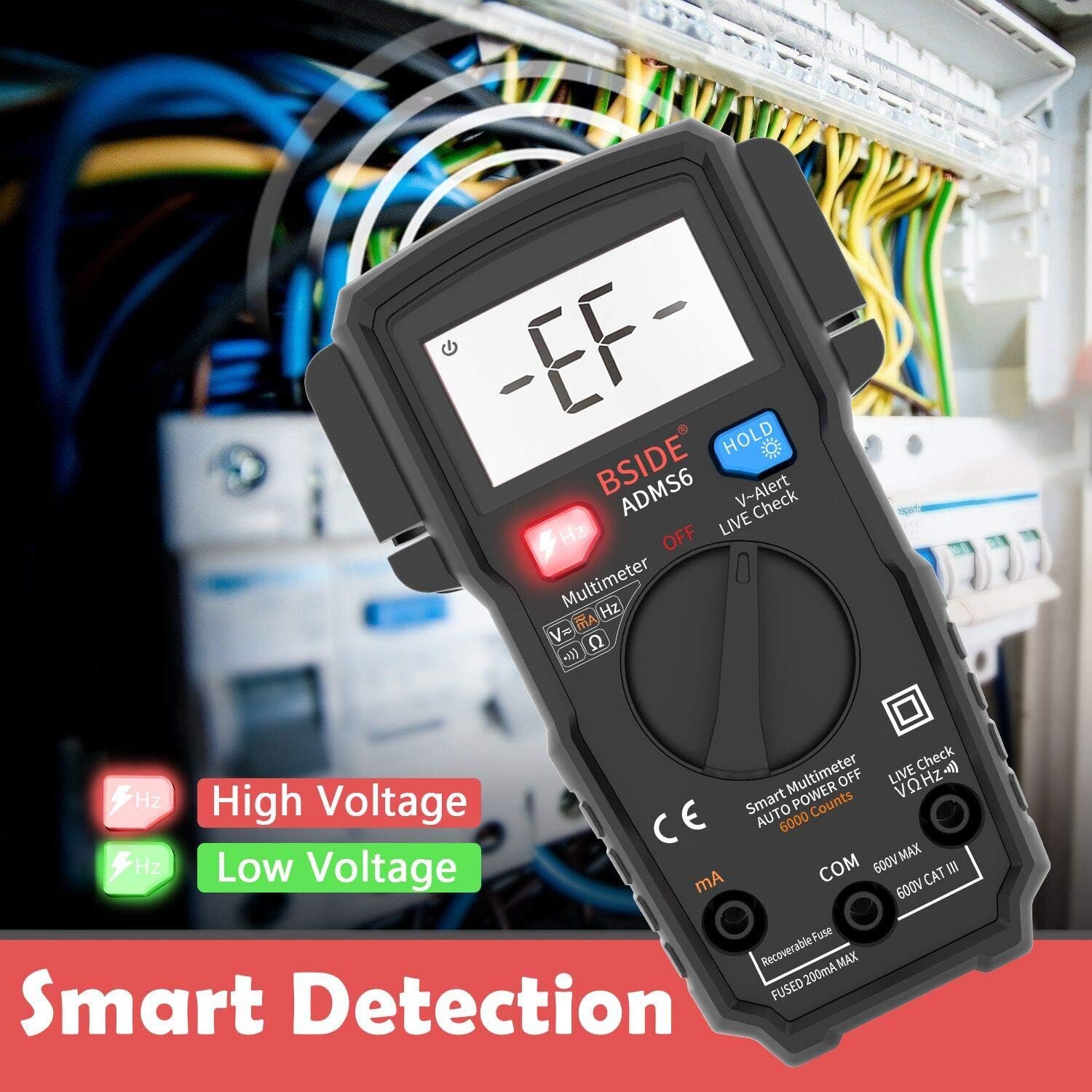
Image: The multimeter's display showing "-EF-" during V-Alert mode, with the "Hz" button illuminating red for high voltage and green for low voltage, indicating smart detection.
Verificarea cablurilor sub tensiune
Set the rotary switch to "Live Check". Use the red probe to touch the wire. If it's a live wire, an alarm beep will sound, the LCD screen will display "LIVE", and the "Hz" button will light up.
Funcția HOLD
Press the "HOLD" button to freeze the current reading on the display. Press it again to release the hold and resume live readings.
Iluminare de fundal
Press the "HOLD" button for a few seconds to turn the backlight on or off, improving visibility in low-light conditions.
Specificații
| Parametru | Valoare |
|---|---|
| Afişa | 6000 conturi |
| Curent DC | 600uA/6000uA/60mA/200mA ±(1.2%+3) |
| Curent alternativ | 600uA/6000uA/60mA/200mA ±(1.5%+5) |
| DC Voltage | 60mV/600mV/6V/60V/600V ±(0.8%+3) |
| AC Voltage | 60mV/600mV/6V/60V/600V ±(1.2%+5) |
| Rezistenţă | 6Ω/60Ω/600Ω/6kΩ ±(1.2%+3) |
| Frecvenţă | 10Hz/100Hz/1KHz ±(1.0%+5) |
| Beeper de continuitate | Sounds if resistance < 30Ω |
| Putere | 2 baterii AAA de 1.5 V |
| Dimensiuni (L x l x H) | 139 x 83 x 36 mm (5.35 x 3.23 x 1.14 inchi) |
| Greutate | 160 g (5.2 uncii) |
| Evaluare de siguranță | 600V CAT III |
Întreţinere
Curatenie
Pentru a curăța multimetrul, ștergeți carcasa cu un detergent de vată.amp cloth and a mild detergent. Do not use abrasives or solvents. Ensure the device is powered off and probes are disconnected before cleaning.
Înlocuirea bateriei
When the battery indicator appears on the display, replace the batteries promptly to ensure accurate readings. Refer to the "Battery Installation" section for instructions.
Protecție cu siguranțe
The ADMS6 features recoverable fuses. In case of an overload, the fuse will trip to protect the circuit. Allow a short period for the fuse to reset. If the issue persists, ensure correct measurement procedures are followed.

Image: A close-up of the multimeter's internal circuit board, highlighting the "Smart Anti-burn" feature, which includes a recoverable fuse for circuit protection.
Depozitare
Când nu îl utilizați pentru perioade lungi de timp, scoateți bateriile pentru a preveni scurgerile. Depozitați multimetrul într-un loc răcoros și uscat, ferit de lumina directă a soarelui și de temperaturi extreme.
Depanare
- Fără afișaj/Pornire:
- Verificați dacă bateriile sunt instalate corect și au o încărcare suficientă. Înlocuiți-le dacă este necesar.
- Asigurați-vă că comutatorul rotativ nu este în poziția „OFF”.
- Citiri inexacte:
- Verify that the test probes are securely connected to the correct input jacks.
- Ensure the probes are making good contact with the circuit or component being tested.
- Verificați nivelul bateriei; bateriile descărcate pot afecta precizia.
- "OL" (Overload) Displayed:
- The measured value exceeds the meter's maximum range for the selected function. Ensure you are within the specified limits.
- Fără bip de continuitate:
- Ensure the resistance is below 30Ω for the beeper to activate.
- Check for open circuits or poor connections.
Garanție și suport
BSIDE products are manufactured to high-quality standards. For specific warranty information, please refer to the warranty card included with your product or visit the official BSIDE website. If you encounter any issues or require technical assistance, please contact BSIDE customer support through their official channels. Keep your purchase receipt as proof of purchase for warranty claims.
Pentru asistență suplimentară, puteți vizita BSIDE Brand Store on Amazon.
Documente aferenteADMS6

Ask a question about this manual
Ask about setup, troubleshooting, compatibility, parts, safety, or missing instructions. Manuals+ will review the question and use this page’s manual context to help answer it.