
1. Introducere
This manual provides essential information for the installation, operation, and maintenance of your Itek Meshcore 36B Gaming Tower PC Case. Please read this manual thoroughly before beginning assembly to ensure proper setup and safe usage. Keep this manual for future reference.
Informații de siguranță
- Deconectați întotdeauna alimentarea de la toate componentele înainte de instalare sau întreținere.
- Manevrați panourile de sticlă securizată cu grijă pentru a preveni spargerea.
- Evitați expunerea carcasei la temperaturi sau umiditate extremă.
- Păstrați piesele mici departe de copii.
2. Conținutul pachetului
Verificați dacă toate componentele sunt prezente în pachet:
- Itek Meshcore 36B PC Case
- 4 x 14cm ARGB Fans (3 pre-installed in front, 1 pre-installed in rear)
- ARGB Fan Hub
- Accessory box (screws, cable ties, standoffs, etc.)
- Manual de utilizare (acest document)
3. Produs terminatview
The Itek Meshcore 36B is an ATX gaming tower designed for optimal airflow, ease of assembly, and modern aesthetics. It features a perforated mesh front panel, four pre-installed ARGB fans, and a tempered glass side panel.
Caracteristici cheie
- Excellent Airflow: Full mesh front panel and four pre-installed ARGB fans (3 front, 1 rear) for efficient cooling.
- Panou lateral din sticlă securizată: Oferă o claritate view a componentelor interne și a iluminării RGB.
- Conectivitate modernă: Includes 2x USB 3.0 ports and 1x USB-C port on the front/side I/O panel.
- Interior organizat: Separate compartment for the power supply unit (PSU) and storage drives (HDD/SSD) for clean cable management.
- Compatibilitate largă: Supports ATX motherboards, graphics cards up to 420mm, CPU coolers up to 174mm, and liquid cooling radiators up to 360mm.
Identificarea componentelor

Figura 3.1: Față view of the Itek Meshcore 36B PC case, showcasing the mesh front panel and three 14cm ARGB fans.

Figure 3.2: Angled front-side view, highlighting the tempered glass panel and front I/O ports (USB 3.0, Type-C).

Figura 3.3: Partea din spate view, illustrating the rear exhaust fan and expansion slots.

Figura 3.4: Interior view from the tempered glass side, detailing the motherboard tray and component layout.
4. Configurare și instalare
Follow these steps for assembling your PC components within the Itek Meshcore 36B case.
4.1 Pregătirea cazului
- Așezați carcasa pe o suprafață stabilă și plană.
- Carefully remove the tempered glass side panel by unscrewing the thumb screws at the rear and gently pulling the panel away. Set it aside on a soft, non-abrasive surface.
- Remove the solid metal side panel on the opposite side to access the cable management area.
4.2 Instalarea plăcii de bază
- Instalați scutul I/O (dacă nu este preatașat la placa de bază) în deschiderea din spate a carcasei.
- Align the motherboard with the standoffs in the case. Ensure the standoffs match your ATX motherboard's screw holes.
- Fixați placa de bază folosind șuruburile furnizate. Nu strângeți prea tare.
4.3 Instalarea unității de alimentare (PSU).
- Locate the PSU compartment at the bottom rear of the case.
- Slide the PSU into the compartment from the rear of the case, ensuring the fan faces downwards (if the case has a bottom vent) or upwards.
- Fixați sursa de alimentare cu șuruburi din spatele carcasei.
4.4 Instalarea unității de stocare (HDD/SSD)
The case features dedicated bays for 3.5" HDDs and 2.5" SSDs, typically located in the PSU shroud area or behind the motherboard tray.
- For 3.5" HDDs: Slide the drive into the designated drive cage and secure with screws.
- For 2.5" SSDs: Mount the SSD onto the designated brackets, usually found behind the motherboard tray, and secure with screws.
4.5 Instalarea plăcii grafice și a plăcii de extensie
- Scoateți capacele sloturilor de expansiune necesare din spatele carcasei.
- Insert the graphics card or other expansion card into the appropriate PCIe slot on the motherboard.
- Secure the card with the provided screw or latch mechanism.
4.6 Managementul cablurilor
The Meshcore 36B offers 21mm of cable management space behind the motherboard tray.
- Route all necessary cables (PSU, data, front panel) through the cutouts in the motherboard tray.
- Use the included cable ties to bundle and secure cables, ensuring they do not obstruct airflow or interfere with side panel closure.
- Connect the front panel connectors (USB 3.0, USB-C, audio, power/reset switches, LED indicators) to the corresponding headers on your motherboard.
- Connect the ARGB fan hub to your motherboard's ARGB header (if available) for software control, or use the integrated controller for basic lighting effects. Ensure all fans are connected to the hub.
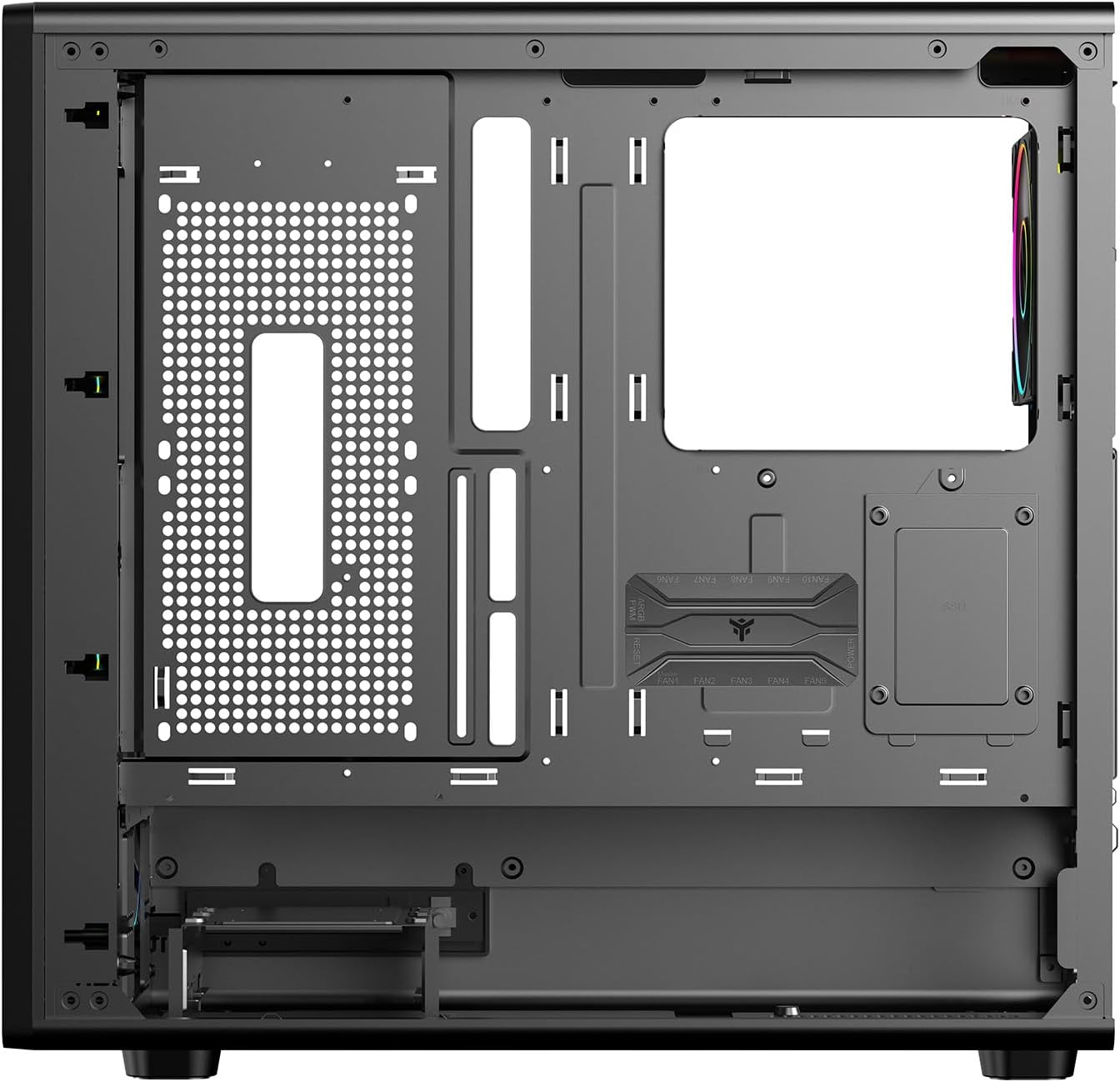
Figura 4.1: Interior view from the backplate side, illustrating cable management options.
5. Instrucțiuni de utilizare
5.1 Pornire
- Once all components are installed and cables are connected, replace both side panels.
- Connect your monitor, keyboard, mouse, and other peripherals.
- Conectați cablul de alimentare la sursa de alimentare și la o priză de perete.
- Rotiți comutatorul de alimentare de pe sursa de alimentare în poziția „ON”.
- Press the power button on the front panel of the case to start your computer.
5.2 Conectivitate panou frontal
The front/side I/O panel provides convenient access to:
- 2 porturi USB 3.0: Pentru transfer de date de mare viteză cu dispozitive compatibile.
- 1 x USB-C Port: For modern USB Type-C devices.
- Mufe audio: Pentru căști și microfoane.
- Buton de alimentare: Pentru a porni/opri sistemul.
- Buton de resetare: Pentru a reporni sistemul.
- Indicatoare LED: For power and HDD activity.
5.3 Controlul iluminării ARGB
The pre-installed ARGB fans are connected to an ARGB hub. Lighting can be controlled in two ways:
- Controlul software-ului plăcii de bază: If the ARGB hub is connected to a compatible 3-pin 5V ARGB header on your motherboard, you can use your motherboard's RGB software (e.g., ASUS Aura Sync, MSI Mystic Light, Gigabyte RGB Fusion) to synchronize and customize lighting effects.
- Controler integrat: If not connected to a motherboard ARGB header, the hub typically has a button (often labeled 'LED' or 'RGB') on the case's front I/O panel or directly on the hub itself to cycle through pre-set lighting modes and colors.
6. Întreținere
Întreținerea regulată ajută la asigurarea performanței optime și a longevității carcasei PC-ului.
6.1 Curățarea filtrului de praf
The Meshcore 36B includes dust filters to prevent dust buildup inside the case. These filters should be cleaned periodically.
- Locate and remove the dust filters (typically on the top, front, and/or bottom of the case).
- Curățați filtrele folosind aer comprimat, o perie moale sau clătind cu apă (asigurați-vă că sunt complet uscate înainte de reinstalare).
- Reinstalați filtrele de praf.
6.2 Curățare generală
- Folosiți un moale, damp cloth to wipe down exterior surfaces. Avoid abrasive cleaners.
- Pentru panoul din sticlă securizată, folosiți un produs de curățat geamuri și o lavetă din microfibră pentru a evita dungile.
- Periodically use compressed air to clear dust from internal components and fan blades.
7. Depanare
If you encounter issues with your PC case, refer to the following common problems and solutions.
7.1 Fans Not Spinning / ARGB Not Lighting Up
- Verificați conexiunile de alimentare: Ensure all fans are properly connected to the ARGB hub, and the hub itself is receiving power from the PSU (usually via a SATA power connector).
- Check ARGB Signal: If using motherboard software control, verify the ARGB hub is connected to a 3-pin 5V ARGB header on the motherboard and that the software is correctly configured.
- Try Integrated Controller: If motherboard control fails, try using the physical button on the case or hub to cycle through lighting modes.
7.2 Front Panel USB/Audio Ports Not Working
- Verify Motherboard Connections: Ensure the USB 3.0, USB-C, and audio headers from the front panel are securely connected to the correct pins on your motherboard. Refer to your motherboard manual for header locations.
- Verificați driverele: Ensure you have installed the latest chipset and audio drivers for your motherboard.
7.3 Supraîncălzirea sistemului
- Clean Dust Filters: Asigurați-vă că filtrele de praf sunt curate și nu obstrucționează fluxul de aer.
- Check Fan Orientation: Verify that fans are installed with correct airflow direction (front fans typically intake, rear/top fans exhaust).
- Improve Cable Management: Poor cable management can restrict airflow. Re-route cables for better air circulation.
8. Specificații
| Caracteristică | Caietul de sarcini |
|---|---|
| Marca | Itek |
| Numele modelului | Itek Case MESHCORE 36B |
| Numărul de model | ITGCAMC36B |
| Tipul cazului | Turn |
| Compatibilitate cu placa de baza | ATX |
| Material | Metal, Plastic, Sticlă securizată |
| Culoare | Negru |
| Metoda de răcire | Aer |
| Ventilatoare preinstalate | 4 x 14cm ARGB Fans (3 Front, 1 Rear) |
| Porturi I / O frontale | 2 x USB 3.0, 1 x USB-C |
| Lungimea maximă a GPU | 420mm |
| Înălțimea maximă a răcitorului CPU | 174mm |
| Suport pentru răcirea lichidelor | Până la 360 mm |
| Spațiu de gestionare a cablurilor | 21mm |
| Caracteristici suplimentare | Dust Filter, Perforated Front, ARGB Lighting, Integrated Fan |
9. Garanție și asistență
9.1 Garanția produsului
The Itek Meshcore 36B PC Case comes with a 24 luni garantie from the date of purchase. This warranty covers manufacturing defects and faulty components under normal use. It does not cover damage caused by misuse, accidents, unauthorized modifications, or improper installation.
9.2 Suport tehnic
For technical assistance, troubleshooting beyond this manual, or warranty claims, please contact Itek customer support through their official website or the retailer where the product was purchased. Please have your product model number (ITGCAMC36B) and proof of purchase ready when contacting support.