
1. Introducere
Thank you for choosing the LECLSTAR Motion Sensor Closet Light. This manual provides essential information for the safe and effective use of your new lighting product. Please read these instructions carefully before installation and operation, and retain them for future reference.
This wireless, battery-operated light features 51 LEDs, motion sensing capabilities, and is designed for various indoor applications such as closets, cabinets, kitchens, and stairs.
2. Informații de siguranță
- Nu expuneți dispozitivul la apă sau umiditate excesivă.
- Do not attempt to disassemble, repair, or modify the light. This will void the warranty and may cause damage or injury.
- Utilizați numai cablul USB furnizat pentru încărcare.
- Evitați expunerea directă a ochilor la lumina LED, deoarece aceasta poate fi foarte puternică.
- A nu se lăsa la îndemâna copiilor.
3. Conținutul pachetului
Vă rugăm să verificați coletul pentru a vă asigura că sunt prezente toate articolele:
- 1 x LECLSTAR Motion Sensor Closet Light
- 1 x Magnetic Plastic Bracket
- 2 x 3M Adhesive Pads
- 4 x șuruburi de montare
- 1 x cablu de încărcare USB
- 1 x Manual de utilizare
4. Produs terminatview
Familiarize yourself with the components of your LECLSTAR Motion Sensor Closet Light.

Figura 1: Product Components. This diagram illustrates the various parts of the light, including the USB charging port, magnetic strip for mounting, LED light board, durable aluminum alloy casing, ON/OFF switch, infrared motion sensor receiver, and protective ABS cover.
- Port USB: Pentru încărcarea bateriei interne.
- Bandă magnetică: Allows for easy attachment to magnetic surfaces or the included bracket.
- LED Light Board: Contains 51 bright LEDs for illumination.
- Material din aliaj de aluminiu: Provides a durable and lightweight housing.
- Buton ON/OFF: Controls the power and operating modes.
- Receptor infrarosu: Detects signals from the remote control (if applicable).
- ABS Cover: Protects the LEDs and diffuses light.
5. Configurare și instalare
The LECLSTAR Motion Sensor Closet Light offers flexible installation options.
5.1 Charging Before First Use
Before installation, fully charge the light. Refer to Section 6 for detailed charging instructions.
5.2 Opțiuni de montare
You can install the light using the magnetic plastic bracket with 3M adhesive or screws.
- Aderență magnetică: Peel off the protective film from the 3M adhesive pads and attach them to the magnetic plastic bracket. Press the bracket firmly onto a clean, dry surface where you wish to install the light. The light can then be magnetically attached to the bracket.
- Montare cu șuruburi: Use the provided screws to secure the magnetic plastic bracket to a desired surface. Once the bracket is securely mounted, attach the light magnetically.

Figura 2: Versatile Installation. This image illustrates the light's adaptability, showing it mounted under a bed, in a kitchen, on a bookshelf, along stairs, inside a wardrobe, and providing illumination for outdoor tasks, highlighting its ease of placement in diverse environments.
5.3 Considerații privind plasarea
- For optimal motion detection, position the sensor ball to face the direction of expected movement.
- When using multiple motion sensor lights, avoid placing them too close together in motion-sensing mode, as they may interfere with each other's sensitivity.
- Ensure the installation surface is clean and dry for secure adhesion.
6. Instrucțiuni de încărcare
The LECLSTAR Motion Sensor Closet Light is equipped with a built-in 2400mAh lithium battery.
- Connect the provided USB charging cable to the light's USB port.
- Conectați celălalt capăt al cablului USB la un adaptor de alimentare USB standard (nu este inclus) sau la portul USB al unui computer.
- During charging, the indicator light on the device will be albastru.
- După încărcarea completă, indicatorul luminos se va aprinde roşu.
- O încărcare completă durează de obicei aproximativ 4 ore.
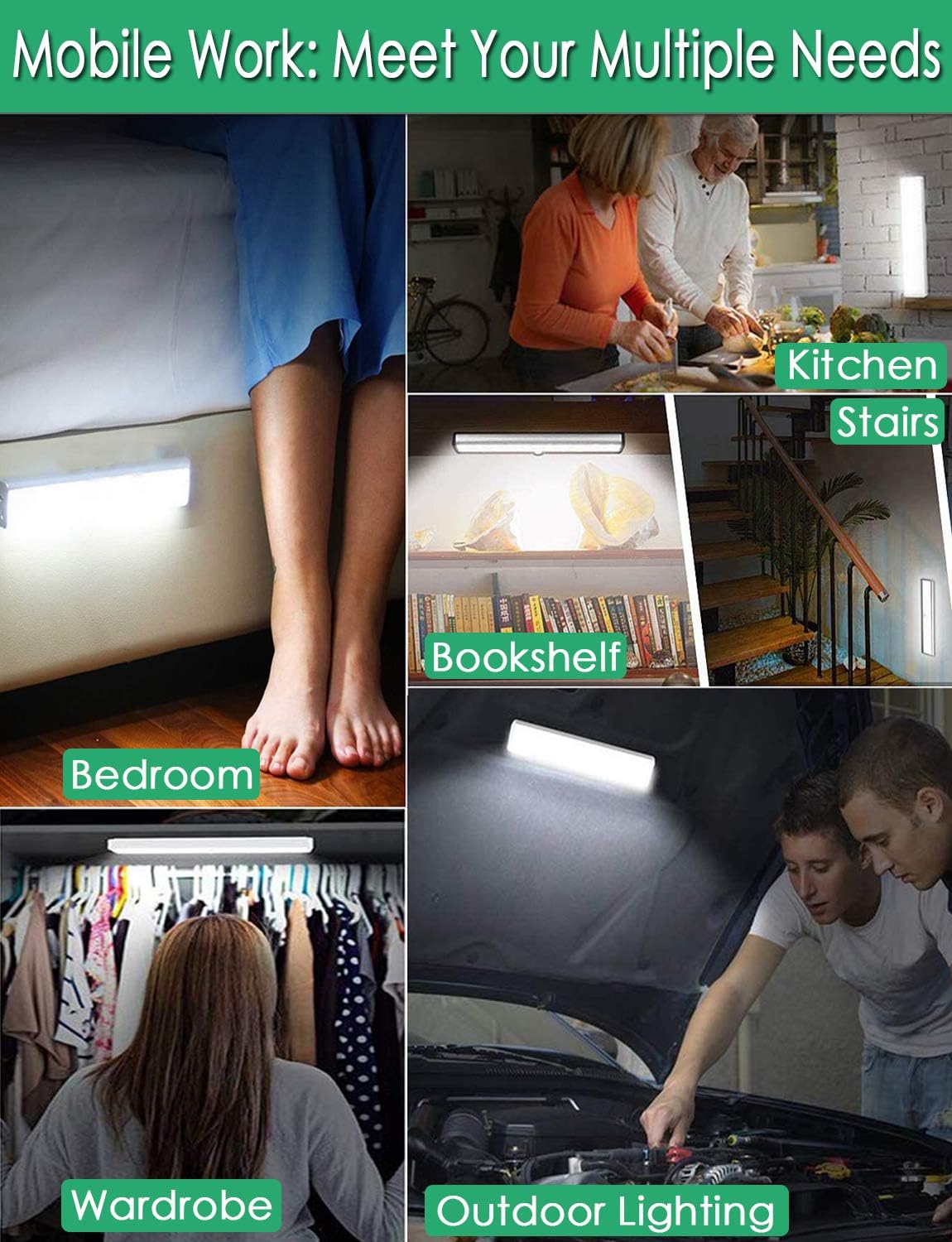
Figura 3: Charging Status. This image demonstrates the charging process, showing the light connected to a power source. The indicator light is red when charging and turns blue when the battery is fully charged, indicating its status clearly.
7. Instrucțiuni de utilizare
The light features multiple operating modes and can be controlled via its ON/OFF button or an optional remote control.
7.1 Mode Selection (ON/OFF Button)
Locate the ON/OFF button on the side of the light. Toggle the switch to select the desired mode:
- OPRIT: Lumina este complet stinsă.
- PE: Lumina rămâne aprinsă continuu.
- AUTO (Mod senzor de mișcare): The light will automatically turn on when motion is detected in a dark environment. It will turn off approximately 30 seconds after no motion is detected.

Figura 4: Motion Sensor Operation. This image demonstrates how the motion sensor works: the light remains off in bright environments, automatically turns on when movement is detected in the dark within a 3-meter, 120-degree range, and then automatically turns off after 30 seconds of inactivity.
7.2 Motion Sensor Details
- Unghi de detectare: 120 de grade.
- Distanța de detectare: Până la 3 de metri (aproximativ 10 de picioare).
- The sensor is designed to activate only in low-light conditions to conserve battery life.
7.3 Remote Control Functions (Optional)
If your model includes a remote control, you can access additional features:

Figura 5: Remote Control Functions. This image displays the remote control, highlighting its various buttons: ON/OFF for power, 'S' for sensor mode, '1', '2', '3' for different light modes or brightness levels, '+' and '-' for adjusting brightness, and '15', '30', '60', '120' for setting a timer.
- ON/OFF: Aprinde sau stinge lumina.
- S (Sensor Mode): Activează modul senzor de mișcare.
- 1, 2, 3 (Light Modes): Selects different light modes or brightness levels.
- 50%, 100%, +, - (Adjustable Brightness): Reglează intensitatea luminii.
- 15, 30, 60, 120 (Timer Function): Sets the light to turn off automatically after a specified duration.
8. Întreținere
- curatenie: Ștergeți lampa cu o cârpă moale și uscată. Nu folosiți substanțe de curățare abrazive sau solvenți.
- Îngrijirea bateriei: To prolong battery life, avoid fully discharging the battery frequently. Charge the light regularly, especially if it will not be used for an extended period.
9. Depanare
- Lumina nu se aprinde:
- Asigurați-vă că bateria este încărcată.
- Check that the light is switched to the 'ON' or 'AUTO' mode.
- Senzorul de mișcare nu funcționează:
- Ensure the light is in 'AUTO' mode.
- Verify that the ambient light is dark enough for the sensor to activate.
- Check that the sensor is not obstructed and is facing the area of expected movement.
- If multiple motion sensor lights are nearby, they might interfere with each other. Try repositioning them.
- Lumina pâlpâie sau se diminuează în mod neașteptat:
- The battery level may be low. Recharge the light.
10. Specificații
| Model | B07JRBSJDR |
| Culoare deschisă | Pure White (6000K) |
| Cantitate LED | 51 LED-uri |
| Ieșire lumen | 240lm |
| Motion Detecting Angle | 120 de grade |
| Motion Detecting Distance | Până la 3 metri (10 picioare) |
| Timp de viață LED | Mai mult de 80,000 de ore |
| Tip baterie | Baterie cu litiu de 2400 mAh |
| Timp de încărcare USB | Aproximativ 4 ore |
| Vol. De operaretage | 4.2V |
| Wattage | 3W |
| Dimensiuni | 15.3 x 0.8 x 0.8 inci |
| Material | Metal, plastic |
| Sursa de alimentare | Alimentat cu baterie |
| Caracteristici speciale | Pornire instantanee |
11. Garanție și asistență
LECLSTAR provides a lifetime warranty for this product. If you encounter any issues or have questions regarding your Motion Sensor Closet Light, please contact the LECLSTAR service team for assistance. Our dedicated support team is ready to help you.
For warranty claims or technical support, please refer to the contact information provided on the product packaging or the official LECLSTAR website-ul.