
1. Introducere
Thank you for choosing the Easytry123 Replacement Remote Control. This remote is designed to provide convenient control for various Goodman AC Air Conditioner models. It is an infrared, button-controlled device, engineered for ease of use.
Compatible Goodman AC Models include: WMC-24-1-KFAA, WMH241, WMH181A, HDP181A, HG31ES, WMH121, HG31AS, WMH241A.
Important Note: As a replacement unit, this remote control may not support all functions of your original air conditioner remote. Please verify compatibility with your specific AC model before use.
2. Configurare: Instalarea bateriei
Your Easytry123 Replacement Remote Control requires two (2) AAA batteries (not included) for operation. Follow these steps to install the batteries:
- Localizați compartimentul bateriei de pe spatele telecomenzii.
- Apăsați pe clapetă și glisați capacul compartimentului bateriei în jos pentru a-l deschide.
- Introduceți două baterii AAA, asigurându-vă că bornele pozitive (+) și negative (-) se aliniază corect cu marcajele din interiorul compartimentului.
- Glisați capacul compartimentului bateriei la loc până când se aude un clic.
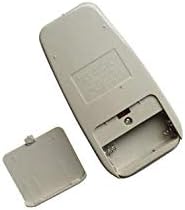
Figure 1: Back of the remote control with the battery cover removed, illustrating the battery compartment for AAA batteries.
After installing the batteries, the remote control is ready for use.
3. Instrucțiuni de utilizare
To operate your Goodman AC Air Conditioner using the Easytry123 Replacement Remote Control, follow these general guidelines:
- Point the Remote: Ensure the remote control is pointed directly at the infrared receiver on your Goodman AC unit. Obstructions between the remote and the AC unit can prevent proper communication.
- Pornire/Oprire: Apăsați tasta PUTERE buton pentru a porni sau opri aparatul de aer condiționat.
- Reglați temperatura: Utilizați TEMPERATURA UP (▲) și TEMPERATURA SCADĂ (▼) buttons to set your desired temperature.
- Selectați modul: Apăsați tasta MOD button to cycle through available operating modes such as Cool, Fan, Dry, or Heat (if supported by your AC unit).
- Viteza ventilatorului: Utilizați VITEZA VENTILATORULUI button to adjust the fan's intensity (e.g., Low, Medium, High, Auto).
- Funcții cronometru: If your AC unit and this replacement remote support timer functions, refer to your AC unit's original manual for specific timer settings.
Familiarize yourself with the buttons on the remote and their corresponding functions. Due to the nature of replacement remotes, some advanced features present on your original remote may not be available or function identically.
4. Întreținere
Proper care and maintenance will extend the life of your remote control:
- curatenie: Ștergeți telecomanda cu o cârpă moale și uscată. Nu utilizați agenți de curățare lichizi, bureți abrazivi sau solvenți chimici, deoarece aceștia pot deteriora suprafața sau componentele interne.
- Înlocuire baterie: Replace batteries promptly when the remote's range decreases or it stops responding. Always replace both batteries at the same time with new AAA batteries. Do not mix old and new batteries, or different types of batteries.
- Depozitare: Dacă telecomanda nu va fi utilizată pentru o perioadă lungă de timp, scoateți bateriile pentru a preveni scurgerile și eventualele deteriorări. Depozitați telecomanda într-un loc răcoros și uscat, ferit de lumina directă a soarelui și de temperaturi extreme.
- Evitați picăturile: Protect the remote from physical impact. Dropping the remote can damage its internal circuitry.
5. Depanare
If you encounter issues with your Easytry123 Replacement Remote Control, please refer to the following troubleshooting steps:
- Telecomanda nu răspunde:
- Verificați bateriile. Asigurați-vă că sunt introduse corect, respectând polaritatea (+/-).
- Înlocuiți bateriile cu baterii AAA noi.
- Ensure there are no obstructions between the remote control and the AC unit's infrared receiver.
- Confirm you are within the effective operating range of the AC unit (typically within 20 feet and direct line of sight).
- Certain Functions Not Working:
- As a replacement remote, some specific or advanced functions of your original AC remote may not be supported. This is normal for universal or replacement remotes.
- Verify that your AC unit model is listed as compatible in the introduction section of this manual.
- AC Unit Not Responding to Any Remote:
- Ensure the AC unit itself is powered on and receiving electricity.
- Consult your Goodman AC unit's original user manual for troubleshooting steps related to the AC unit's receiver.
6. Specificații
| Marca | Easytry123 |
| Numărul de model | Easytry3659 |
| Dispozitive compatibile | Goodman AC Air Conditioners (specific models listed in Introduction) |
| Tehnologia de conectivitate | Infraroşu |
| Tip controler | Buton de control |
| Tip baterie | 2 x baterii AAA (nu sunt incluse) |
| Caracteristica specială | Design ergonomic |
7. Garanție și asistență
For any questions, concerns, or support regarding your Easytry123 Replacement Remote Control, please contact the seller directly through the platform where you made your purchase.
Please note that the product typically comes with a return policy of 30 days from the date of purchase. Refer to your purchase details for specific return and warranty information.