
PowMr SL03-30A
PowMr SL03-30A Solar Charge Controller User Manual
Model: SL03-30A
1. Introducere
The PowMr SL03-30A Solar Charge Controller is designed to manage the power flow from your solar panels to your battery bank, ensuring efficient charging and protecting your batteries from overcharge and over-discharge. This controller is suitable for 12V/24V systems and supports various battery types including Lithium and Lead-Acid batteries. It features an LCD display for monitoring system parameters and offers multiple protection functions to enhance system safety and longevity.
2. Caracteristici cheie

Imagine: Pesteview of the PowMr SL03-30A Solar Charge Controller's main features, including 12V/24V auto-detection, energy recording, temperature compensation, aluminum heat sink, eight electronic protections, compatibility with Lithium/Lead-acid batteries, and light & timer control.
- 12V/24V Auto-detection: Automatically identifies system voltage.
- Energy Recording/Current Display: Provides real-time monitoring of energy and current.
- Compensarea temperaturii: Adjusts charging parameters based on ambient temperature.
- Radiator de căldură din aluminiu: Asigură o disipare eficientă a căldurii pentru o funcționare stabilă.
- Eight Electronic Protections: Comprehensive safety features including overcharge, over-discharge, short-circuit, and reverse current protection.
- Compatibilitate baterie: Supports Lithium and Lead-Acid battery types (Flooded, GEL, AGM, LiFePO4).
- Light & Timer Control: Programmable load control functions.
- Display LCD: Clear interface for parameter viewing and adjustment.

Imagine: Internă view of the controller highlighting key components such as the copper coil for stable charge/discharge, a fuse for double protection, and MOSFETs made from good raw materials for current sensing.
3. Instrucțiuni de siguranță
Please read all instructions carefully before installation and operation. Failure to follow these instructions may result in damage to the controller, battery, or solar panels, and may void the warranty.
- Ensure the battery is connected first to allow the controller to recognize the system voltage.
- Always connect the solar panels and load after the battery.
- Disconnect the solar panels and load before disconnecting the battery.
- Install the controller in a well-ventilated, dry, and cool environment, away from flammable materials.
- Avoid touching or short-circuiting wires or terminals.
- Folosiți cabluri cu calibru corespunzător pentru toate conexiunile pentru a preveni supraîncălzirea.
- This device is for indoor use only. Avoid exposure to water or excessive humidity.
- A nu se lăsa la îndemâna copiilor.
4. Instalare
4.1 Secvența de cablare
- Connect the battery to the charge controller. Ensure correct polarity (+ to + and - to -). The controller will display the battery voltage.
- Connect the solar panel to the charge controller. Ensure correct polarity. The controller will begin charging the battery.
- Connect the load to the charge controller. Ensure correct polarity.
Important: Always connect the battery first and disconnect it last. This sequence prevents damage to the controller from voltage creste.
4.2 Montare
Mount the controller vertically on a wall or flat surface in a well-ventilated area, away from direct sunlight, high temperatures, and water. Ensure there is sufficient air circulation around the heat sink.

Image: The PowMr SL03-30A Solar Charge Controller showing its mounting holes on the sides, indicating how it can be affixed to a surface.
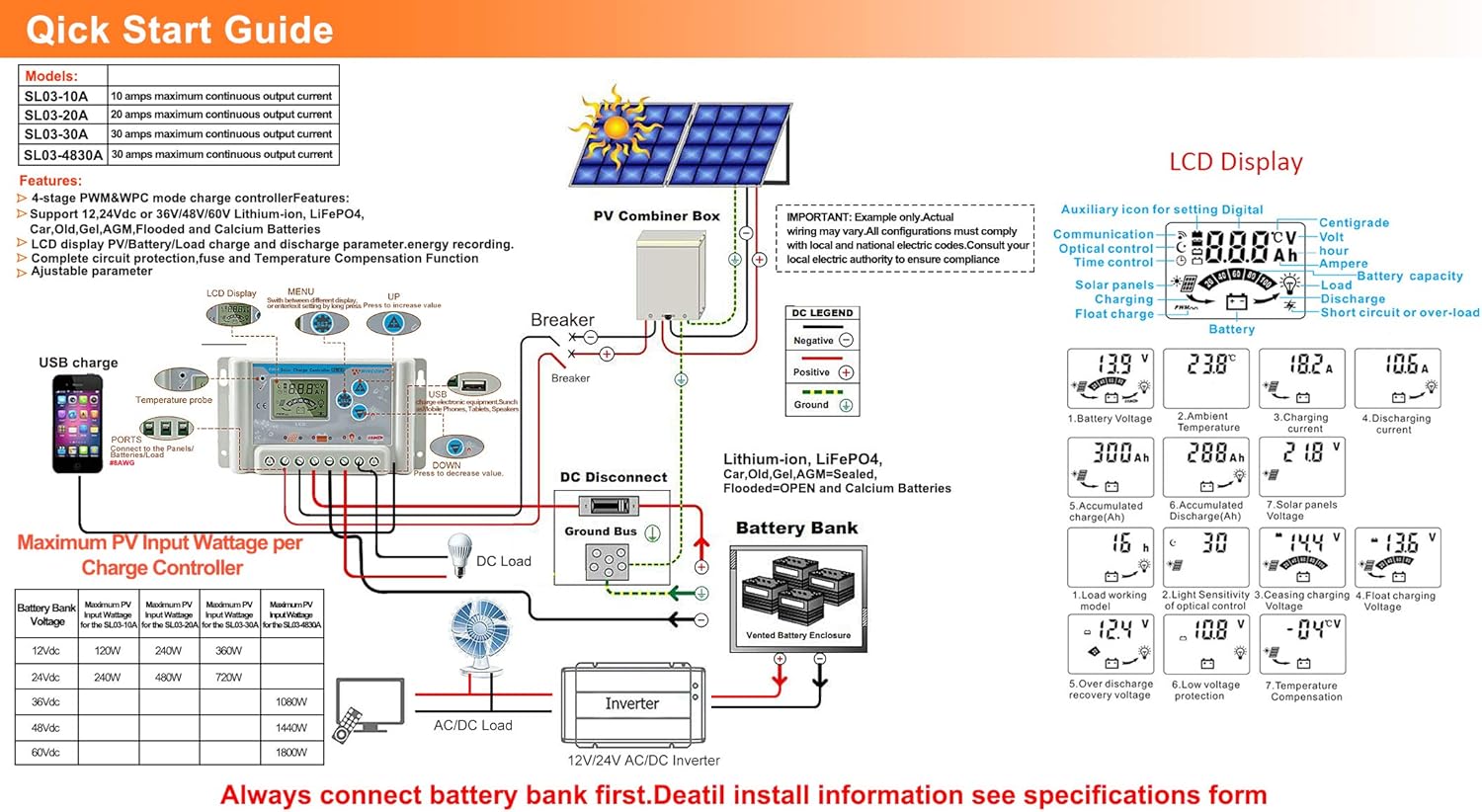
Image: A detailed wiring diagram for the solar charge controller, showing connections for PV combiner box, battery bank, DC load, and inverter. It also illustrates the LCD display and various parameters.
4.3 Video Guide: How to Connect the Controller
Video: This video demonstrates the correct wiring procedure for the PowMr SL03-30A Solar Charge Controller, showing how to connect the battery and solar panels. It also shows how to browse the interface and adjust settings.
5. Funcționare
5.1 Afișaj LCD și butoane
The controller features an LCD display and three buttons for operation: UP, DOWN, and SET.
- Buton SUS: Navigates through display interfaces, increases parameter values.
- Buton JOS: Navigates through display interfaces, decreases parameter values.
- Buton SET: Enters/exits setting mode, confirms parameter changes.
5.2 Browsing Display Interfaces
Press the UP or DOWN button to cycle through various display interfaces, including battery voltage, charging current, accumulated discharge, and load status.
5.3 Setări parametri
To enter the setting interface, long-press the SET button for 5 seconds. Use the UP and DOWN buttons to adjust values and the SET button to confirm and move to the next parameter. Long-press SET again to save changes and exit.
Parametrii reglabili includ:
- Tip baterie: Select the correct battery type (e.g., Lead-Acid, Lithium).
- Modul de control al încărcăturii: Set timer for load operation (e.g., 24H for continuous, 16H for dusk-to-dawn).
- Încărcare Voltage: Adjust maximum charge voltage.
- Volum de întrerupere a descărcăriitage: Setați volumul minimtage before load disconnection.
- Discharge Reconnect Voltage: Setați volumultage at which the load reconnects.
Refer to the "Specifications" section for default and adjustable ranges for each parameter.
6. Funcții de protecție

Image: A circular diagram illustrating the eight electronic protection features of the PowMr SL03-30A Solar Charge Controller, including power off memory, short-circuit, over-charging, open-circuit, over-load, under-voltage discharge, over-heat, and dual MOSFET reverse current protection.
The PowMr SL03-30A controller incorporates multiple protection mechanisms to ensure the safety and longevity of your solar system:
- Protecție la supraîncărcare: Previne deteriorarea bateriei din cauza încărcării excesive.
- Protecție la supradescărcare: Disconnects the load when battery voltage scade sub un nivel sigur.
- Protecție la scurtcircuit: Se oprește automat în caz de scurtcircuit.
- Open-circuit Protection: Protects the system if the solar panel circuit is open.
- Protecție polaritate inversă: Prevents damage from incorrect battery or solar panel connections.
- Protecție la suprasarcină: Disconnects the load if current exceeds the rated limit.
- Protecție împotriva căldurii: Reduce puterea sau se oprește dacă temperatura internă a controlerului este prea mare.
- Memorie de oprire: Păstrează setările chiar și după o pană de curent.
7. Specificații

Image: A comprehensive table detailing the specifications for PowMr SL03-10A, SL03-20A, SL03-30A, and SL03-40A models, including normal battery voltage, charge/discharge current, battery type, system recognize range, charging regulation, maximum PV open circuit voltage, and various protection parameters.
| Parametru | Value (SL03-30A) |
|---|---|
| Vol. baterie normalătage | 12V / 24V Auto |
| Curent de încărcare | 30A |
| Curent de descărcare | 30A |
| Tip baterie | Lead-Acid Battery (Flooded, AGM, Gel, Calcium), LiFePO4 (Lithium) |
| System Recognize Range | Lead-Acid Battery: 8V-15V(12V System), 18V-30V(24V System) LiFePO4: 8V-15V(12V), 18V-30V(24V) |
| Charging Regulation | Bulk, Absorption, Float, Equalization |
| Max. Circuit deschis PV Voltage (Voc) | <= 50V |
| Max. PV Input Wattage (12 V/24 V) | 360W/720W |
| Stop-charge Voltage | Default 14.4V (12V), 28.8V (24V) (adjustable) |
| Float-charge Voltage | Default 13.6V (12V), 27.2V (24V) (adjustable) |
| Vol. Scăzuttage Reconnected | Default 12.4V (12V), 24.8V (24V) (adjustable) |
| Vol. Scăzuttage Deconectare | Default 10.8V (12V), 21.6V (24V) (adjustable) |
| No Load Losses | <10mA |
| Compensarea temperaturii bateriei | Automatic with optional NTC thermal probe (adjustable) |
| Temperatura de operare | -20°C până la +60°C |
| Outline Size (L*W*H) | 143*77*40mm |
| Distanța orificiilor de montare | 134*55mm |
| Greutate | 260 g |
8. Depanare
This section provides solutions to common issues you might encounter with your PowMr SL03-30A Solar Charge Controller.
| Problemă | Cauza posibila | Soluţie |
|---|---|---|
| Afișajul controlerului este oprit. | Nicio baterie conectată sau volumul baterieitage prea jos. | Connect the battery correctly. Ensure battery voltage este peste 8V. |
| "LLL" or "HHH" displayed on screen. | No PV input or PV voltage prea mic/mare. | Ensure solar panels are connected and receiving sunlight. Check PV voltage. |
| Bateria nu se încarcă. | Solar panel not connected, insufficient sunlight, or incorrect wiring. | Check solar panel connections and ensure adequate sunlight. Verify wiring polarity. |
| Load not working. | Load disconnected, battery voltage too low (over-discharge protection), or load control settings. | Check load connections. Charge battery. Adjust load control timer (e.g., set to 24H for continuous). |
| Supraîncălzirea controlerului. | Poor ventilation or excessive load/charging current. | Ensure proper ventilation around the controller. Reduce load or charging current if consistently overheating. |
9. Întreținere
Întreținerea regulată asigură performanțe optime și prelungește durata de viață a regulatorului de încărcare solară.
- Curăţenie: Păstrați controlerul curat și fără praf și resturi. Folosiți o cârpă uscată pentru curățare.
- Conexiuni: Verificați periodic toate conexiunile cablurilor pentru strângere și coroziune. Conexiunile slăbite pot cauza supraîncălzirea și performanța slabă.
- Ventilare: Asigurați-vă că orificiile de ventilație nu sunt blocate pentru a permite disiparea corespunzătoare a căldurii.
- Sănătatea bateriei: Monitorizați volumul baterieitage and health regularly. Replace batteries as needed.
- Conditii de mediu: Ensure the controller is operating within its specified temperature and humidity ranges.
10. Garanție și asistență
For warranty information, technical support, or service inquiries, please contact PowMr customer service through the retailer where the product was purchased or visit the official PowMr website. Please have your model number (SL03-30A) and purchase date available when contacting support.
Pentru mai multe informații, vizitați Magazin PowMr.
Ask a question about this manual
Ask about setup, troubleshooting, compatibility, parts, safety, or missing instructions. Manuals+ will review the question and use this page’s manual context to help answer it.